1. Producte acabatview
The ELECOM DEFT PRO Trackball Mouse is a high-performance input device designed for superior accuracy and ergonomic comfort. It offers versatile connectivity options and customizable functions to enhance productivity.
- Tecnologia de seguiment òptic: Provides precise cursor movement with less hand movement.
- 8 botons funcionals: Assign favorite functions using the "ELECOM Mouse Assistant" software.
- DPI Cursor: Easily switch between 500, 1000, and 1500 DPI for customized cursor speed.
- Manteniment fàcil: Features three 2.5 mm artificial ruby ball bearings for smooth rolling and easy cleaning.
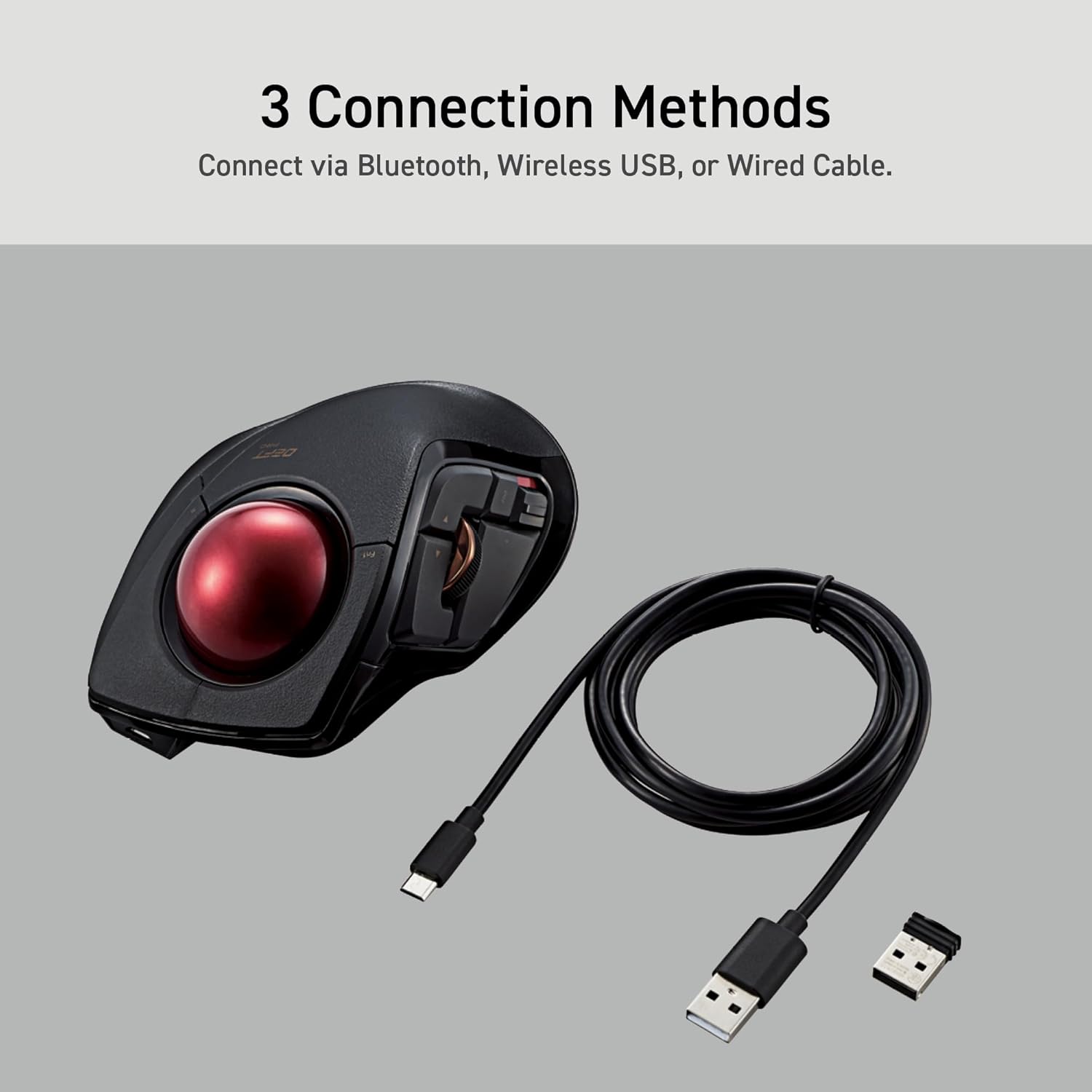
- Connectivitat múltiple: Supports wired, wireless (2.4GHz USB receiver), and Bluetooth connections.

2. Guia de configuració
2.1. Què hi ha a la caixa
Abans de començar, assegureu-vos que hi hagi tots els components:
- ELECOM DEFT PRO Trackball Mouse
- 1 x bateria AA
- Cable USB (per a connexió amb cable)
- USB Receiver (for wireless 2.4GHz connection)
- Manual d'usuari (aquest document)

2.2. Instal·lació de la bateria
- Localitzeu el compartiment de la bateria a la part inferior del ratolí.
- Obriu la tapa del compartiment de la bateria.
- Inseriu la pila AA inclosa, assegurant-vos de la polaritat correcta (+/-).
- Tanqueu bé la tapa del compartiment de la bateria.
2.3. Connectar el ratolí
The DEFT PRO offers three connection methods:
- Connexió per cable: Connecteu el ratolí directament a l'ordinador amb el cable USB proporcionat.
- Wireless (2.4GHz) Connection:
- Inseriu el receptor USB en un port USB disponible de l'ordinador.
- Slide the connection switch on the underside of the mouse to the "Wireless" (W) position.
- Connexió Bluetooth:
- Slide the connection switch on the underside of the mouse to the "Bluetooth" (B) position.
- Press the pairing button on the underside of the mouse until the indicator light flashes.
- On your computer, go to Bluetooth settings and select "ELECOM DEFT PRO" to pair.

3. Instruccions de funcionament
3.1. Ergonomic Design and Control
The DEFT PRO is designed to position your hand and wrist in a natural, comfortable position, reducing strain during extended use. Its index-finger control allows for precise cursor manipulation.


The extra-large 44mm trackball allows you to span the full screen with speed and accuracy.

3.2. Programmable Buttons and DPI Settings
The mouse features 8 programmable buttons, allowing you to assign various functions for a personalized workflow. The DPI button enables quick adjustments between 500, 1000, and 1500 DPI to suit your preference for cursor speed.
3.3. Mouse Assistant Software
To fully utilize the programmable features, download the "ELECOM Mouse Assistant" software from the ELECOM NET website. This software allows for enhanced customization, including presentation mode and gesture creation.

4. Manteniment
Regular maintenance ensures optimal performance and longevity of your trackball mouse.
4.1. Neteja del trackball
The trackball is designed for easy removal and cleaning. The ball rolls on three 2.5 mm large artificial ruby ball bearings, which are smooth and resistant to dust accumulation. However, occasional cleaning is recommended.
- Locate the hole on the underside of the mouse.
- Gently push the trackball through this hole to pop it out.
- Use a soft, lint-free cloth to wipe the trackball and the ball bearings clean.
- Reinsert the trackball into its slot, ensuring it clicks into place.

5. Solució De Problemes
If you encounter any issues with your ELECOM DEFT PRO Trackball Mouse, please refer to the following common solutions:
- Sense moviment del cursor:
- Ensure the mouse is powered on and the battery is correctly installed.
- Check the connection method switch (wired/wireless/Bluetooth) is in the correct position.
- For wireless/Bluetooth, ensure the USB receiver is properly inserted or the device is paired.
- Clean the trackball and its bearings as described in the Maintenance section.
- Botons que no responen:
- Verify that the Mouse Assistant software is correctly installed and configured.
- Reinicieu l'ordinador i el ratolí.
- Connexió intermitent:
- Move the mouse closer to the computer to reduce interference.
- Avoid using the mouse on metallic surfaces that may interfere with wireless signals.
For further assistance, please refer to the official user guides linked in the Support section.
6. Especificacions del producte
| Característica | Detall |
|---|---|
| Marca | ELECOM |
| Sèrie | Deft Pro |
| Número de model | M-DPT1MRXBK |
| Plataforma de maquinari | Portàtil, PC |
| Sistema operatiu | Windows 8, Windows 10, Windows 11 or later, macOS 10.13 or later |
| Pes de l'article | 5.7 oz (sense bateria) |
| Dimensions del producte | W3.6"(91.4mm) X L5.3"(133.4mm) X H2.3"(57.3mm) |
| Color | Black / Red ball |
| Font d'alimentació | Alimentat per piles (1 pila AA inclosa) |
| Configuració de DPI | 500/1000/1500 count (switchable) |
| Connectivitat | Wired, Wireless (2.4GHz), Bluetooth |
| Característica especial | Programmable Buttons, Ergonomic Design |
7. Vídeos oficials de productes
Producte acabatview
Aquest vídeo ofereix una visió generalview of the ELECOM DEFT PRO Trackball Mouse, highlighting its key features and design.
Boost Your Creative Mind
Discover how the ELECOM DEFT PRO Trackball Mouse can enhance your creative workflow and productivity.
8. Suport i garantia
For detailed information, troubleshooting, and warranty claims, please refer to the official documents:
Warranty information is typically provided within the official user manual or product packaging. Please retain your proof of purchase for warranty service.


