1. Introducció
Gràcies per la compraasing the Bytech Massive Bluetooth Long Bar Speaker-BK. This manual provides essential information for the proper setup, operation, and maintenance of your new speaker. Please read this manual thoroughly before using the product to ensure optimal performance and longevity.
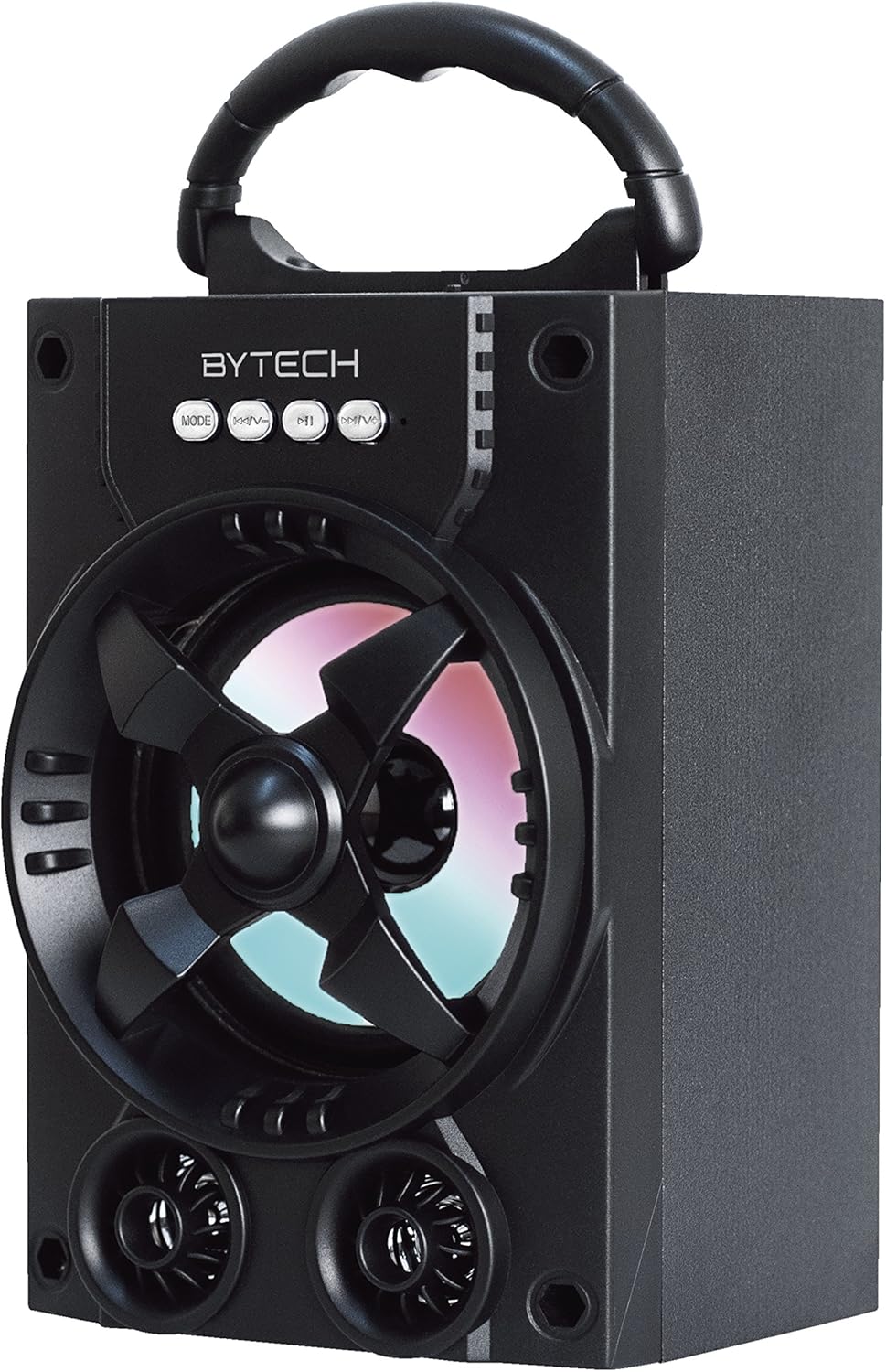
Figura 1.1: Frontal view of the Bytech Massive Bluetooth Long Bar Speaker-BK, showcasing its design, handle, and speaker grille with LED lights.
2. Contingut del paquet
Si us plau, comproveu el paquet per veure si hi ha els elements següents:
- Bytech Massive Bluetooth Long Bar Speaker-BK
- Cable de càrrega USB
- Manual d'usuari (aquest document)
Si falta algun element o està malmès, poseu-vos en contacte amb l'atenció al client.
3. Característiques del producte
- LED Performance Lights: Dynamic LED lights that synchronize with your music for an enhanced audio-visual experience.
- Convenient Carrying Handle: Integrated handle for easy portability, allowing you to take your music anywhere.
- Universal Bluetooth Connectivity: Seamlessly connect wirelessly to your smartphone, tablet, or other Bluetooth-enabled devices.
- So envoltant: Designed to deliver a high-quality surround sound experience.
- Disseny portàtil: Ideal for various settings, including parties, outdoor gatherings, and personal use.

Figure 1.2: The speaker shown with its retail packaging, illustrating its key features such as multi-color LED lights, Bluetooth connectivity, and surround sound capability.
4. Controls i indicadors
The speaker features intuitive controls and indicators for easy operation:
- Botó MODE: Press to switch between available input modes (e.g., Bluetooth).
- Botó V: Press to decrease volume. Long press to skip to the previous track.
- Botó V+: Press to increase volume. Long press to skip to the next track.
- Botó M: (Function not explicitly detailed, typically for mode or mute)
- Llums LED: Indicate power status, charging status, and provide dynamic light effects during audio playback.
5. Guia de configuració
5.1 Càrrega de l'altaveu
- Connecteu l'extrem petit del cable de càrrega USB al port de càrrega de l'altaveu.
- Connecteu l'extrem gran del cable de càrrega USB a un adaptador de corrent USB (no inclòs) o al port USB d'un ordinador.
- L'indicador LED mostrarà l'estat de càrrega (per exemple, vermell durant la càrrega, apagat quan estigui completament carregat).
- Espereu aproximadament 3-4 hores per a una càrrega completa abans del primer ús.
5.2 Engegada/apagada
- To power on, press and hold the Power button (location not specified, typically near charging port or on control panel) for a few seconds until you hear an audible prompt or see the LED lights activate.
- Per apagar-lo, premeu i manteniu premut el botó d'engegada de nou fins que l'altaveu s'apagui.
5.3 Vinculació Bluetooth
- Ensure the speaker is powered on and in Bluetooth pairing mode (indicated by a flashing LED light or audible prompt).
- Al teu telèfon intel·ligent o tauleta, navega fins a la configuració de Bluetooth.
- Cerca available devices. The speaker will appear as "BYTECH" or a similar name.
- Seleccioneu l'altaveu de la llista per iniciar l'emparellament.
- Once successfully paired, the LED indicator will typically become solid, and you may hear a confirmation tone.
6. Instruccions de funcionament
6.1 Reproducció d'àudio mitjançant Bluetooth
- After successful Bluetooth pairing, open your preferred music application on your connected device.
- Select and play your desired audio. The sound will be streamed wirelessly to the speaker.
- Use the V+ and V- buttons on the speaker or your connected device to adjust the volume.
- Long press V+ or V- to skip tracks.
6.2 LED Performance Lights
The speaker features integrated LED lights that enhance your listening experience. These lights typically activate automatically when the speaker is powered on and playing audio. Specific controls for light modes are not detailed, but they are designed to provide dynamic visual effects.
6.3 Canvi de mode
Premeu el botó MODE button to cycle through available input modes. While Bluetooth is the primary connectivity, other modes (if available, such as FM radio or AUX input) can be accessed via this button.
7. Manteniment i cura
- Neteja: Feu servir un drap suau i sec per netejar l'exterior de l'altaveu. No utilitzeu netejadors abrasius, ceres ni dissolvents.
- Emmagatzematge: Quan no l'utilitzeu durant períodes prolongats, guardeu l'altaveu en un lloc fresc i sec, allunyat de la llum solar directa i de temperatures extremes.
- Cura de la bateria: Per allargar la durada de la bateria, eviteu descarregar-la completament amb freqüència. Torneu a carregar l'altaveu regularment, fins i tot si no l'esteu fent servir, per mantenir la bateria en bon estat.
- Resistència a l'aigua: Aquest producte és NO waterproof. Avoid exposure to water, rain, or excessive moisture to prevent damage.
8. Solució De Problemes
Si teniu problemes amb l'altaveu, consulteu els problemes i solucions més comuns següents:
| Problema | Causa possible | Solució |
|---|---|---|
| L'altaveu no s'encén. | Bateria baixa. | Carregueu l'altaveu completament. |
| No hi ha so de l'altaveu. | Volume too low; Not paired; Incorrect mode. | Increase volume on speaker and device; Ensure successful Bluetooth pairing; Press MODE button to select correct input. |
| La connexió Bluetooth és inestable o falla. | Device too far; Interference; Pairing issue. | Move device closer to speaker (within 33 ft/10m); Avoid obstacles; Forget device on your phone and re-pair. |
| Els llums LED no funcionen. | Speaker not powered on or playing audio. | Ensure speaker is on and audio is playing. |
9. Especificacions
| Característica | Detall |
|---|---|
| Marca | Bytech |
| Nom del model | BYTECH |
| Número de model de l'article | BCAUBS134BK |
| Tipus d'altaveu | So envoltant |
| Tecnologia de connectivitat | Bluetooth |
| Tecnologia de comunicació sense fils | Bluetooth |
| Dispositius compatibles | Smartphone |
| Potència de sortida màxima dels altaveus | 20 watts |
| Resposta de freqüència | 20 kHz |
| Impedància | 1 ohms |
| Mida de l'altaveu | 5 polzades |
| Font d'alimentació | Cable elèctric (per carregar) |
| Tipus de bateria | Necessita 1 bateria de ions de liti |
| Color | Negre |
| Dimensions del producte | 4.75 x 5.5 x 8.5 polzades |
| Pes de l'article | 1.3 lliures |
| És impermeable | No |
| País d'origen | Xina |
| UPC | 805112038121 |
10. Informació de la garantia
Bytech products are manufactured to the highest quality standards. For specific warranty terms and conditions, please refer to the warranty card included with your purchase or visit the official Bytech weblloc web. Conserveu el comprovant de compra per a reclamacions de garantia.
11. Atenció al client
For technical assistance, troubleshooting, or general inquiries, please contact Bytech customer support. Contact information can typically be found on the product packaging, the official Bytech weblloc web o el vostre rebut de compra.
Nota: Segons les dades proporcionades, no hi havia vídeos oficials de productes del venedor disponibles per a la seva inserció.


