1. Introducció
The MikroTik CRS112-8P-4S-IN is a Cloud Router Switch designed for network environments requiring advanced management capabilities and Power over Ethernet (PoE) functionality. This device features eight Gigabit Ethernet ports with PoE-out capabilities and four SFP ports for fiber optic connectivity. It operates on MikroTik's RouterOS Level 5, providing extensive configuration options for routing, switching, and network management.
This manual provides essential information for the proper installation, operation, maintenance, and troubleshooting of your CRS112-8P-4S-IN switch.
2. Informació de seguretat
- Always disconnect power before cleaning or servicing the device.
- Assegureu-vos una ventilació adequada per evitar el sobreescalfament. No obstruïu les obertures de ventilació.
- Use only the power adapter supplied with the device or a compatible power supply that meets the specified voltage i requisits actuals.
- Eviteu exposar el dispositiu a aigua, humitat o temperatures extremes.
- Aquest dispositiu només està dissenyat per a ús interior.
- La instal·lació ha de ser realitzada per personal qualificat d'acord amb les normes elèctriques locals.
3. Contingut del paquet
Comproveu que el vostre paquet contingui els elements següents:
- MikroTik CRS112-8P-4S-IN Smart Switch unit
- Power Adapter (typically 24V, 2.5A)
- Cable d'alimentació
- Rackmount ears (optional, may be included or sold separately)
- Mounting screws (if rackmount ears are included)

Figura 3.1: Frontal view of the CRS112-8P-4S-IN Smart Switch.
4. Maquinari acabatview
The CRS112-8P-4S-IN features a compact design with various ports and indicators for network connectivity and status monitoring.
4.1 Tauler frontal
- 8 x Gigabit Ethernet Ports: RJ45 ports supporting 10/100/1000 Mbps speeds with PoE-out capabilities.
- 4 x SFP Ports: For 1 Gbps fiber optic uplinks.
- Indicadors LED: Power, User, and Ethernet port status LEDs.
4.2 Panell posterior
- DC Input Jacks: Two DC input jacks. One supports 18-28V DC, and the other supports 48-57V DC.
- Cargol de presa de terra: For connecting a grounding wire.
- Botó de restabliment: For resetting the device to factory defaults or entering RouterBOOT loader.
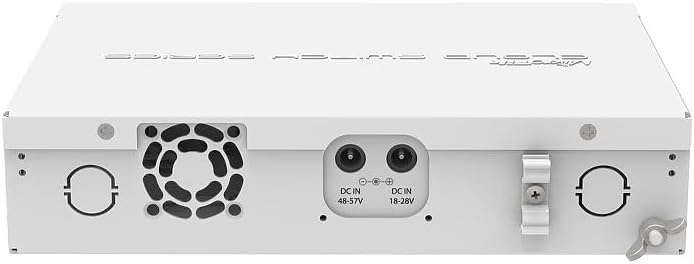
Figura 4.1: posterior view of the CRS112-8P-4S-IN Smart Switch showing DC input jacks.
5. Configuració
Follow these steps to set up your MikroTik CRS112-8P-4S-IN switch.
5.1 Connexió de potència
- Connect the provided power cord to the power adapter.
- Connect the power adapter's output plug to one of the DC input jacks on the rear panel of the switch. The switch supports 18-28V DC or 48-57V DC.
- Plug the power cord into a suitable electrical outlet. The device will power on automatically.

Figure 5.1: Included power adapter.

Figure 5.2: Power cord.
Note on PoE: For 802.3af/at PoE/PoE+ output, a 48-57V DC power supply is required. If using the standard 18-28V DC power supply, only Passive PoE is available, and the maximum current per port is 1A. With a 48-57V DC supply, the maximum current per port is 450mA.
5.2 Connexió de cables de xarxa
- Connect your network devices (computers, servers, access points) to the Gigabit Ethernet ports (RJ45) on the front panel.
- If using fiber optic connections, insert compatible SFP modules into the SFP ports and connect fiber optic cables.
5.3 Accés a la configuració inicial
The CRS112-8P-4S-IN runs RouterOS. Initial configuration can be performed via:
- Caixa de vins: A graphical utility for Windows. Download from the MikroTik weblloc.
- WebFiga: A web-based interface accessible via a web navegador.
- Serial Console: For advanced users, via a serial cable (not included).
By default, the device will attempt to obtain an IP address via DHCP. If no DHCP server is present, it will typically default to 192.168.88.1. Refer to the MikroTik documentation for detailed RouterOS configuration guides.
6. Funcionament
Once powered on and connected, the CRS112-8P-4S-IN functions as a managed switch and router. Its operation is primarily controlled through the RouterOS software.
6.1 Basic Switching and PoE
- The Ethernet ports will automatically detect connected devices and establish network links.
- PoE-out ports will automatically detect and provide power to compatible PoE devices (802.3af/at or Passive PoE) based on the connected power supply.
6.2 RouterOS Functionality
RouterOS allows for advanced network configurations, including:
- VLAN management
- Normes del tallafoc
- Routing protocols
- Qualitat de servei (QoS)
- Agregació d'enllaços
- Monitoring and diagnostics
Detailed instructions for these features are available in the MikroTik RouterOS documentation on their official weblloc.
7. Manteniment
Regular maintenance ensures optimal performance and longevity of your device.
7.1 Neteja
- Netegeu periòdicament l'exterior del dispositiu amb un drap suau i sec.
- Ensure ventilation openings are free from dust and debris. Do not use liquid cleaners or aerosols.
7.2 actualitzacions de microprogramari
It is recommended to keep RouterOS firmware updated to the latest stable version to benefit from new features, performance improvements, and security patches. Firmware updates can be performed via WinBox or WebFig. Always back up your configuration before performing a firmware update.
8. Solució De Problemes
Aquesta secció tracta problemes comuns que podeu trobar.
8.1 Sense poder
- Check if the power cord is securely connected to both the device and the electrical outlet.
- Verifiqueu que l'adaptador de corrent funciona correctament.
- Ensure the electrical outlet is live.
8.2 Sense connectivitat de xarxa
- Check the Ethernet cable connections. Ensure they are securely plugged into both the switch and the connected device.
- Verify the link/activity LEDs on the switch ports. If they are off, there might be a cable issue or the connected device is not powered on.
- Confirm IP address settings on your connected devices and the switch.
8.3 PoE Not Working as Expected
- Ensure you are using a 48-57V DC power supply for 802.3af/at PoE/PoE+ devices. The included 24V power supply only supports Passive PoE.
- Check the power requirements of the connected PoE device.
- Verify PoE settings within RouterOS for the specific ports.
8.4 SFP Port Issues
- Ensure compatible SFP modules are used.
- If experiencing connectivity issues, try manually setting the SFP port speed to 1Gbps within RouterOS, disabling auto-negotiation.
8.5 Restabliment dels valors predeterminats de fàbrica
To reset the device to its factory default configuration:
- With the device powered on, press and hold the reset button located on the rear panel.
- Continue holding the button until the user LED starts flashing.
- Release the button to reset the device.
9. Especificacions
| Característica | Especificació |
|---|---|
| Model | CRS112-8P-4S-IN |
| Ports Ethernet | 8 x 10/100/1000 Mbps RJ45 with PoE-out |
| Ports SFP | 4 x 1 Gbps SFP |
| Sortida PoE | Passive PoE (18-28V DC input), 802.3af/at (48-57V DC input) |
| Max Current per PoE Port | 1A (18-28V input), 450mA (48-57V input) |
| Velocitat de transferència de dades | 1000 megabits per segon |
| Sistema operatiu | RouterOS Level 5 |
| Dimensions | Refer to product datasheet |
| Pes | Aproximadament 2 lliures (0.9 kg) |
| Temperatura de funcionament | Refer to product datasheet (up to 60 Degrees Celsius) |
| Entrada de potència | 18-28V DC or 48-57V DC |
10. Garantia i Suport
MikroTik products typically come with a limited manufacturer's warranty. For specific warranty terms and conditions, please refer to the documentation provided with your purchase or visit the official MikroTik website. Technical support, additional documentation, and software downloads are available through the MikroTik support portal: mikrotik.com/support.
It is recommended to register your product on the MikroTik website for access to the latest resources and support.


