1. Introducció
This manual provides essential information for the installation, configuration, operation, and maintenance of the MOXA AWK-1137C-US-T 802.11n Wireless AP Client. This device is designed for industrial wireless applications, offering reliable 802.11n connectivity in challenging environments with a wide operating temperature range.
2. Informació de seguretat
- Always disconnect power before cleaning or servicing the device.
- Assegureu-vos una correcta connexió a terra per evitar riscos elèctrics.
- Feu funcionar el dispositiu dins dels rangs de temperatura i humitat especificats.
- No exposeu el dispositiu a la humitat ni a temperatures extremes.
- Només personal qualificat ha de fer la instal·lació i el manteniment.
3. Contingut del paquet
Comproveu que el vostre paquet contingui els elements següents:
- MOXA AWK-1137C-US-T Wireless AP Client unit
- Guia d'instal·lació ràpida
- Documentation CD (or link to online resources)
- Mounting kit (if applicable)
- Power adapter or terminal block (if applicable)
Si falta algun article o està malmès, poseu-vos en contacte amb el vostre proveïdor immediatament.
4. Maquinari acabatview
The AWK-1137C-US-T features robust industrial design. Key components typically include:
- Ports Ethernet: Per a connexions de xarxa per cable.
- Connectors d'antena: For external antennas to optimize wireless signal.
- Entrada d'alimentació: Terminal block for DC power input.
- Indicadors LED: Provide status information for power, WLAN, and Ethernet activity.
- Botó de restabliment: Per restaurar la configuració predeterminada de fàbrica.
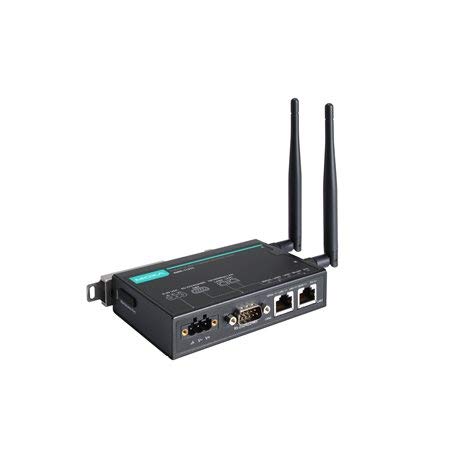
Figure 1: MOXA AWK-1137C-US-T Wireless AP Client. This image shows the compact industrial design of the device, typically featuring antenna ports, Ethernet connections, and power input.
5. Configuració
5.1 Muntatge
The AWK-1137C-US-T supports DIN-rail mounting. Attach the DIN-rail kit to the device and snap it onto a standard DIN-rail. Ensure the device is securely fastened to prevent vibration or accidental dislodgement.
5.2 Connexió d'alimentació
- Connect a suitable DC power source (e.g., 12-48 VDC) to the device's power input terminal block.
- Ensure correct polarity (+ and -) as indicated on the device.
- Tighten the screws on the terminal block to secure the power wires.
5.3 Connexió de xarxa
- Connect an Ethernet cable from your network switch or router to the Ethernet port on the AWK-1137C-US-T.
- Attach appropriate antennas to the antenna connectors. Ensure they are securely tightened.
5.4 Configuració inicial
To access the device's webInterfície de gestió basada en:
- Connect a computer directly to the device's Ethernet port or ensure it is on the same network segment.
- Configure your computer's IP address to be in the same subnet as the device's default IP address (refer to the Quick Installation Guide for the default IP).
- Obre a web browser and enter the device's default IP address.
- Inicieu la sessió amb el nom d'usuari i la contrasenya predeterminats (consulteu la Guia d'instal·lació ràpida).
- Change the default password immediately for security.
6. Funcionament
6.1 Modes de funcionament
The AWK-1137C-US-T can operate in various modes, including Access Point (AP) and Client mode. Select the appropriate mode based on your network requirements.
- Mode de punt d'accés (AP): The device acts as a central hub for wireless clients to connect.
- Mode client: The device connects to an existing Access Point, extending wired network connectivity wirelessly.
6.2 Configuració sense fil
Configure the following wireless parameters via the web interfície:
- SSID: The name of your wireless network.
- Canal: Select an appropriate wireless channel to avoid interference.
- Banda: Configure for 2.4 GHz or 5 GHz operation, depending on the model and environment.
- Potència de transmissió: Adjust the output power for optimal coverage and compliance.
6.3 Configuració de seguretat
Implement strong wireless security to protect your network:
- Xifratge: Use WPA2/WPA3-PSK or Enterprise for robust security.
- Password/Passphrase: Choose a strong, unique password.
- Filtratge d'adreces MAC: Optionally restrict access to specific devices.
7. Manteniment
7.1 actualitzacions de microprogramari
Regularly check the MOXA website for the latest firmware updates. Firmware updates can provide new features, performance improvements, and security patches. Follow the instructions provided with the firmware package for a safe update process.
7.2 Neteja
Clean the device periodically with a soft, dry cloth. Do not use liquid or aerosol cleaners. Ensure the device is powered off before cleaning.
7.3 Consideracions ambientals
Ensure the operating environment remains within the specified temperature and humidity limits (-40 to 75°C). Avoid placing the device near heat sources or in direct sunlight.
8. Solució De Problemes
8.1 Sense poder
- Comproveu la connexió del cable d'alimentació i assegureu-vos que la font d'alimentació estigui activa.
- Comproveu la font d'alimentació voltage is within the device's specified range.
- Inspect the power input terminal block for loose connections.
8.2 Sense connexió de xarxa
- Check Ethernet cable connections and ensure they are properly seated.
- Verify that the network switch or router is functioning correctly.
- For wireless connections, ensure the SSID, security settings, and channel match the connected AP/client.
- Check the LED indicators for network activity.
8.3 Velocitat sense fil lenta
- Ensure antennas are properly connected and positioned for optimal signal.
- Check for sources of interference (e.g., other wireless devices, microwave ovens).
- Adjust the wireless channel to a less congested one.
- Verify that the device is operating in 802.11n mode and not a slower standard.
8.4 Restabliment dels valors predeterminats de fàbrica
If configuration issues persist, you may need to reset the device to its factory default settings. Locate the reset button (often recessed) and press and hold it for approximately 5-10 seconds while the device is powered on. The device will reboot with default settings.
9. Especificacions
| Característica | Especificació |
|---|---|
| Número de model | AWK-1137C-US-T |
| Estàndard sense fils | 802.11n |
| Banda Operativa | Banda dels EUA |
| Temperatura de funcionament | -40 a 75 °C |
| Dimensions del paquet | 7.87 x 6.57 x 1.97 polzades |
| Pes de l'article | 1.15 lliures |
| Fabricant | MOXA |
| Data de primera disponibilitat | 30 d'abril de 2018 |
10. Garantia i Suport
10.1 Informació de la garantia
MOXA products typically come with a standard warranty. For detailed warranty terms and conditions, please refer to the official MOXA weblloc web o la targeta de garantia inclosa amb el producte. Conserveu el comprovant de compra per a reclamacions de garantia.
10.2 Suport tècnic
For technical assistance, product documentation, or driver downloads, please visit the official MOXA support website. You can also contact MOXA's customer support team directly through the contact information provided on their weblloc.


