1. Introducció
This user manual provides essential information for the safe and efficient operation of your VOLT Micro UPS 800VA 480W Uninterruptible Power Supply. Please read this manual thoroughly before installation and use, and retain it for future reference. The UPS is designed to provide backup power to connected electronic devices during power outages, protecting them from data loss and hardware damage.
2. Instruccions de seguretat
Always observe the following safety precautions to prevent injury and damage to the UPS or connected equipment:
- No obriu el SAI casing. No hi ha peces a l'interior que l'usuari pugui reparar. Demaneu totes les tasques de manteniment a personal de servei qualificat.
- Do not operate the UPS in environments with excessive dust, humidity, or extreme temperatures.
- Assegureu-vos que el SAI estigui connectat a una presa de corrent amb connexió a terra.
- Do not connect appliances that draw high current, such as laser printers, heaters, or vacuum cleaners, to the UPS output.
- Position the UPS in a well-ventilated area, away from direct sunlight or heat sources.
- In case of fire, use a dry chemical extinguisher. Water can cause electrical shock.
- La bateria interna no és reemplaçable per l'usuari. Poseu-vos en contacte amb personal de servei qualificat per a la substitució de la bateria.
3. Contingut del paquet
Verifiqueu que tots els elements siguin presents al paquet:
- VOLT Micro UPS 800VA 480W 9Ah Unit
- 1 x USB Type B to USB Type B Cable
- 1 x Power Cord for Peripheral/Computer Connection
- 1 x CD with UPSILON 2000 Software
- 1 x Manual d'usuari (aquest document)
4. Producte acabatview
The VOLT Micro UPS 800VA 480W features a compact design with an intuitive LCD display for monitoring operational status.
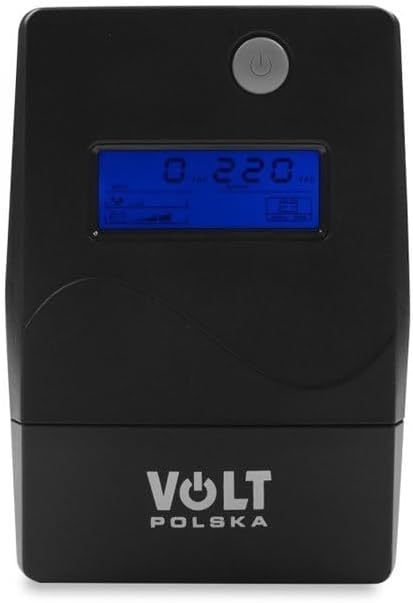
Figura 4.1: Davant view of the VOLT Micro UPS 800VA 480W, showing the power button and the LCD screen which displays real-time operational parameters.

Figura 4.2: lateral view of the UPS unit, illustrating its compact form factor and potential ventilation grilles.

Figura 4.3: posterior view of the UPS, highlighting the various input and output connection ports for devices and power.
4.1. Informació de la pantalla LCD
The LCD display provides real-time status updates:
- Entrada Voltage: Mostra el volum actualtage from the utility power.
- Vol. De sortidatage: Mostra el voltage supplied by the UPS to connected devices.
- Estat de la bateria: Indica el nivell de càrrega de la bateria interna.
- Nivell de càrrega: Mostra el percentatgetage de la capacitat del SAI que utilitzen els dispositius connectats.
- Mode de funcionament: Indicates whether the UPS is operating on utility power, battery power, or in bypass mode.
5. Configuració
5.1. Desembalatge i col·locació inicial
- Carefully remove the UPS from its packaging.
- Place the UPS on a flat, stable surface in a well-ventilated area, away from direct sunlight, heat, and moisture.
- Assegureu-vos que hi hagi prou espai al voltant de la unitat per a un flux d'aire adequat.
5.2. Càrrega inicial
Before initial use, connect the UPS to a standard wall outlet and allow it to charge for at least 6 hours without any load. This ensures the internal battery is fully charged and ready to provide optimal backup time.
5.3. Connexió d'equips
- Connect the UPS to a grounded wall outlet using the provided power cord.
- Plug your computer, monitor, and other critical electronic devices into the output sockets on the rear of the UPS. Ensure the total power consumption does not exceed the UPS's 480W capacity.
- For communication with your computer, connect the USB Type B to USB Type B cable from the UPS to an available USB port on your computer.
5.4. Software Installation (UPSILON 2000)
The included CD contains the UPSILON 2000 monitoring software. Install this software on your computer to enable advanced features such as:
- Real-time monitoring of UPS status.
- Scheduled shutdown of connected devices during extended power outages.
- Customizable alerts and notifications.
Follow the on-screen instructions provided by the software installer.
6. Instruccions de funcionament
6.1. Engegar/apagar el SAI
- Encendre: Press and hold the power button on the front panel for approximately 3 seconds until you hear a beep and the LCD display illuminates.
- Apagar: Press and hold the power button for approximately 3 seconds until the UPS powers down.
6.2. Funcionament normal
When connected to utility power, the UPS will charge its battery and provide conditioned power to your connected devices. The LCD will display input/output voltage, battery status, and load level.
6.3. Battery Mode Operation
En cas d'una potènciatage, the UPS will automatically switch to battery mode, providing uninterrupted power to your connected devices. An audible alarm will sound, and the LCD will indicate battery operation. The duration of battery backup depends on the load connected.
6.4. Avís de sobrecàrrega
If the connected load exceeds the UPS's capacity (480W), an overload warning will be displayed on the LCD, and an alarm will sound. Immediately disconnect non-essential equipment to prevent damage to the UPS.
7. Manteniment
7.1. Cura de la bateria
- To maximize battery life, ensure the UPS is always connected to a power source to keep the battery charged.
- Eviteu les descàrregues profundes freqüents.
- If the UPS is to be stored for an extended period, fully charge it, then disconnect it from the power source. Recharge every 3 months to prevent battery degradation.
7.2. Neteja
Periodically clean the exterior of the UPS with a soft, dry cloth. Do not use liquid or aerosol cleaners, as they may contain flammable substances or cause electrical shock.
8. Solució De Problemes
Consulteu la taula següent per veure els problemes habituals i les seves solucions:
| Problema | Causa possible | Solució |
|---|---|---|
| El SAI no s'encén | Battery discharged; Power cord not connected | Connect to utility power and charge for 6 hours; Ensure power cord is securely connected. |
| UPS beeps continuously in normal mode | Condició de sobrecàrrega | Disconnect non-essential equipment until the alarm stops. |
| Temps de còpia de seguretat curt | Battery not fully charged; Battery nearing end of life; Excessive load | Charge UPS for 6 hours; Reduce connected load; Consider battery replacement by qualified personnel. |
| UPS does not provide power during outage | UPS not turned on; Battery completely discharged | Ensure UPS is turned on; Allow UPS to charge fully. |
9. Especificacions
| Característica | Especificació |
|---|---|
| Marca | Volt Polska |
| Número de model | 5UP0800090 |
| Potència Nominal | 480 watts |
| Poder aparent | 800 VA |
| Vol d'entrada/sortidatage | 230 Volts |
| Bateria Ampedat | 9 A |
| Capacitat de la bateria | 9 Ah |
| Bateria recarregable | Sí |
| Forma d'ona (mode de bateria) | Approximation of sine wave |
| Charge Time (to 90%) | 6 hores |
| Dimensions (LxWxH) | 298 x 101 x 142 mm |
| Pes de l'article | 4.9 quilos |
| Color | Negre |
10. Garantia i Suport
For warranty information, please refer to the documentation provided at the time of purchase or contact your retailer. For technical support or service inquiries, please contact Volt Polska customer service through their official weblloc web o les dades de contacte proporcionades amb el vostre producte.


