1. Producte acabatview
The PDP Afterglow Prismatic LED Wired Controller is officially licensed by Microsoft for Xbox One, designed to enhance your gaming experience. It features dimmable Prismatic LED lighting with a full color range, allowing users to customize the controller's appearance. The transparent polycarbonate housing showcases the internal circuitry, adding to its unique design. This controller includes a 3.5mm headset jack with onboard audio controls for convenient access to game and chat audio levels. It also provides enhanced gameplay through vibration feedback.

Image: The PDP Afterglow Prismatic LED Wired Controller illuminated with blue lighting, showcasing el seu disseny transparent.
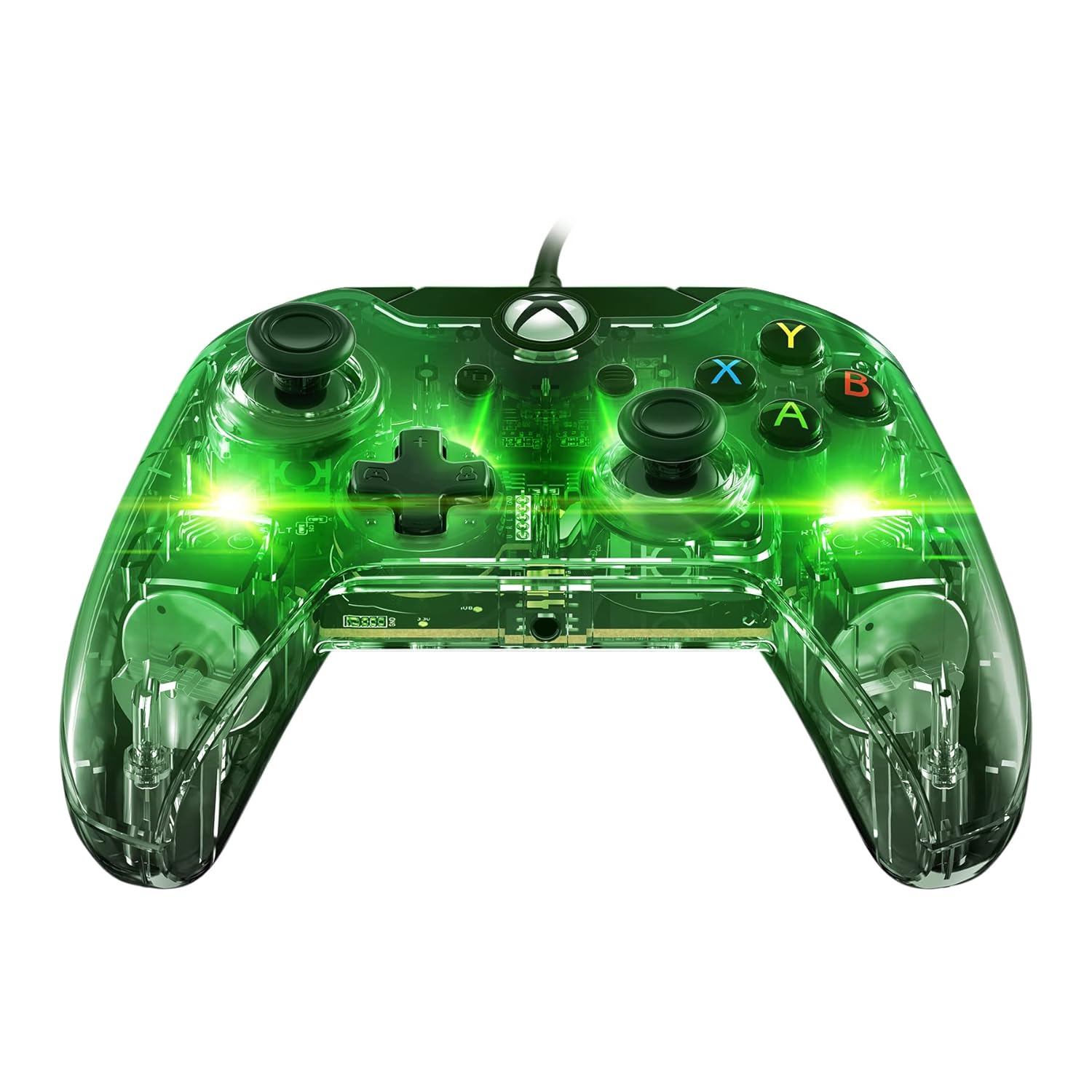
Image: The PDP Afterglow Prismatic LED Wired Controller illuminated with green lighting.

Image: The PDP Afterglow Prismatic LED Wired Controller illuminated with purple lighting.

Image: The PDP Afterglow Prismatic LED Wired Controller illuminated with red lighting.
Característiques principals:
- Officially licensed by Microsoft for Xbox One.
- Dimmable Prismatic LED lighting with full color range.
- Clear polycarbonate housing revealing internal circuitry.
- Integrated 3.5mm headset jack for game and chat audio.
- Onboard audio controls for volume adjustment.
- Enhanced gameplay with vibration feedback.
- Detachable 10-foot micro USB cable for easy connection.
- Compatible with Xbox One, Xbox One S, Xbox One X, and Windows.
2. Guia de configuració
Connecting Your Controller:
- Locate the detachable 10-foot micro USB cable included with your controller.
- Connect the micro USB end of the cable to the port on the top of the controller.
- Plug the standard USB end of the cable into an available USB port on your Xbox One console (Xbox One, Xbox One S, Xbox One X) or your Windows PC.
- The controller will automatically be recognized by your system. The LED lighting will illuminate upon successful connection.
For advanced customization, including button remapping, sensitivity settings, and LED lighting adjustments, download the Centre de control PDP app from the Microsoft Store on your Xbox One or Windows 10 PC. Settings saved within the controller via the app will persist even when connected to other compatible devices.
3. Instruccions de funcionament
Controls bàsics:
The Afterglow controller features standard Xbox One button layouts, including dual analog sticks, a D-pad, A/B/X/Y buttons, shoulder buttons (LB, RB), and triggers (LT, RT). All buttons are designed for responsive and smooth operation.
Il·luminació LED prismàtica:
The controller's signature Prismatic LED lighting can be customized to your preference. You can select a specific color, set it to cycle through a rainbow of colors, or turn the lighting off completely. These adjustments are typically made through the PDP Control Hub app.
Vídeo: Un funcionari ha acabatview of the Afterglow Wired Controller for Xbox, demonstrating its key features and LED lighting capabilities.
Video: A brief official demonstration of the PDP Afterglow Wired Controller for Xbox One (048-121-NA), highlighting its design and functionality.
Controls d'àudio:
Plug your compatible headset into the 3.5mm audio jack located at the bottom of the controller. The onboard audio controls allow you to adjust game volume and chat balance directly without pausing your game or navigating through console menus.
4. Manteniment
To ensure the longevity and optimal performance of your PDP Afterglow controller, follow these simple maintenance guidelines:
- Neteja: Use a soft, dry, lint-free cloth to wipe down the controller's surface. For stubborn smudges, slightly dampen the cloth with water. Avoid using harsh chemicals, abrasive cleaners, or solvents, as these can damage the transparent housing and internal components.
- Cura del cable: The detachable micro USB cable should be handled with care. Avoid sharp bends, kinks, or excessive pulling, which can damage the cable or the controller's port. When storing, coil the cable loosely.
- Emmagatzematge: Store the controller in a cool, dry place away from direct sunlight, extreme temperatures, and excessive dust.
5. Solució De Problemes
If you encounter issues with your PDP Afterglow controller, try the following troubleshooting steps:
- El controlador no respon:
- Assegureu-vos que el cable USB estigui connectat correctament tant al controlador com a la consola/PC.
- Try plugging the controller into a different USB port on your console/PC.
- Reinicia la consola Xbox One o l'ordinador.
- Problemes d'il·luminació LED:
- Check the settings in the PDP Control Hub app to ensure the lighting is enabled and configured as desired.
- Ensure the controller is receiving sufficient power from the USB port.
- Audio Problems (Headset Jack):
- Verifiqueu que els auriculars estiguin completament connectats al connector de 3.5 mm del controlador.
- Check the audio settings on your Xbox One or PC, and use the onboard audio controls on the controller to adjust volume and chat mix.
- Prova els auriculars amb un altre dispositiu per confirmar que funcionen correctament.
- Actualització del firmware:
Periodically check for and install firmware updates for your controller via the PDP Control Hub app. Updates can resolve bugs and improve performance.
6. Especificacions
| Característica | Detall |
|---|---|
| Marca | PDP |
| Número de model | 048-121-NA |
| Connectivitat | Wired (Detachable 10-foot Micro USB Cable) |
| Compatibilitat | Xbox One, Xbox One S, Xbox One X, Windows |
| Il·luminació | Dimmable Prismatic LED (Full Color Range) |
| Funcions d'àudio | 3.5mm Headset Jack, Onboard Audio Controls |
| Feedback de vibracions | Sí |
| Dimensions del producte | 0.31 x 0.43 x 0.83 polzades |
| Pes de l'article | 7.1 unces |
| Data de llançament | 15 de juny de 2018 |
7. Garantia i Suport
Per obtenir informació detallada sobre la garantia i l'assistència al client, consulteu el PDP oficial. weblloc web o contacteu directament amb el servei d'atenció al client. Conserveu el comprovant de compra per a reclamacions de garantia.
Podeu descarregar una guia d'usuari oficial (PDF): Descarrega la Guia d'usuari


