1. Introducció
Thank you for choosing the TechniSat HD-C 232 Digital Cable Receiver. This compact DVB-C receiver is designed for receiving unencrypted digital television and radio programs via cable. It offers high-definition (HDTV) picture quality and features an integrated USB media player and an Electronic Program Guide (EPG). This manual provides essential information for setting up, operating, and maintaining your device.
Característiques principals:
- Compact DVB-C receiver for unencrypted digital TV and radio.
- High-Definition Television (HDTV) support.
- Integrated USB media player for video, music, and image files.
- Electronic Program Guide (EPG) with up to 7 days of program preview.
- Remote control with 4 programmable learning keys.
- HDMI and Scart connectivity for versatile TV connections.
2. Informació de seguretat
Si us plau, llegiu atentament totes les instruccions de seguretat abans d'utilitzar el dispositiu. Conserveu aquest manual per a futures consultes.
- Font d'alimentació: Use only the provided external power supply. Ensure the voltage matches your local power grid.
- Ventilació: No bloquegeu les obertures de ventilació. Assegureu-vos que hi hagi un flux d'aire adequat al voltant del dispositiu per evitar el sobreescalfament.
- Humitat: Do not expose the device to rain, moisture, or liquids.
- Neteja: Desconnecteu l'alimentació abans de netejar. Feu servir un drap sec i suau. No utilitzeu netejadors líquids ni en aerosol.
- Manteniment: No intenteu atendre aquest producte vosaltres mateixos. Consulteu tots els serveis a personal de servei qualificat.
- Col·locació: Place the device on a stable, flat surface. Avoid placing it near heat sources or in direct sunlight.
3. Contingut del paquet
Verifiqueu que tots els elements siguin presents al paquet:
- TechniSat HD-C 232 Digital Cable Receiver
- Remote Control with 4 learning keys
- Font d'alimentació externa
- Piles per al comandament a distància
- Manual d'usuari
4. Producte acabatview
4.1 Tauler frontal
The front panel of the HD-C 232 features essential controls and indicators.

Imatge 4.1: Davant view of the TechniSat HD-C 232 receiver. It shows the HDMI logo, a USB port, a green indicator light, a 4-digit display, and channel/power buttons.
- Port USB (frontal): For connecting USB storage devices for media playback.
- Visualització: A 4-digit segment display shows the current channel number or time in standby mode.
- Llum indicadora: Indica l'estat d'alimentació.
- Botons de control: Channel up/down and power on/off buttons.
4.2 Panell posterior
The rear panel provides all necessary connection ports for your television and cable network.

Imatge 4.2: posterior view of the TechniSat HD-C 232 receiver, showing various connection ports. From left to right: RF In, RF Out, S/PDIF (digital electrical audio out), HDMI Out, Scart (TV/Scart), and Power Input.
- Entrada de RF: Connects to your cable wall outlet.
- RF Out (LoopThrough): Allows passing the cable signal to another receiver or TV.
- S/PDIF (Digital Electrical Audio Out): For connecting to an audio ampsistema de lifier o home cinema.
- Sortida HDMI: Es connecta al televisor per a vídeo i àudio d'alta definició.
- Scart (TV/Scart): For connecting to older televisions or VCRs.
- Entrada d'alimentació: Connects to the external power supply.
4.3 Control remot
The included remote control provides full functionality for your receiver, including 4 programmable learning keys.
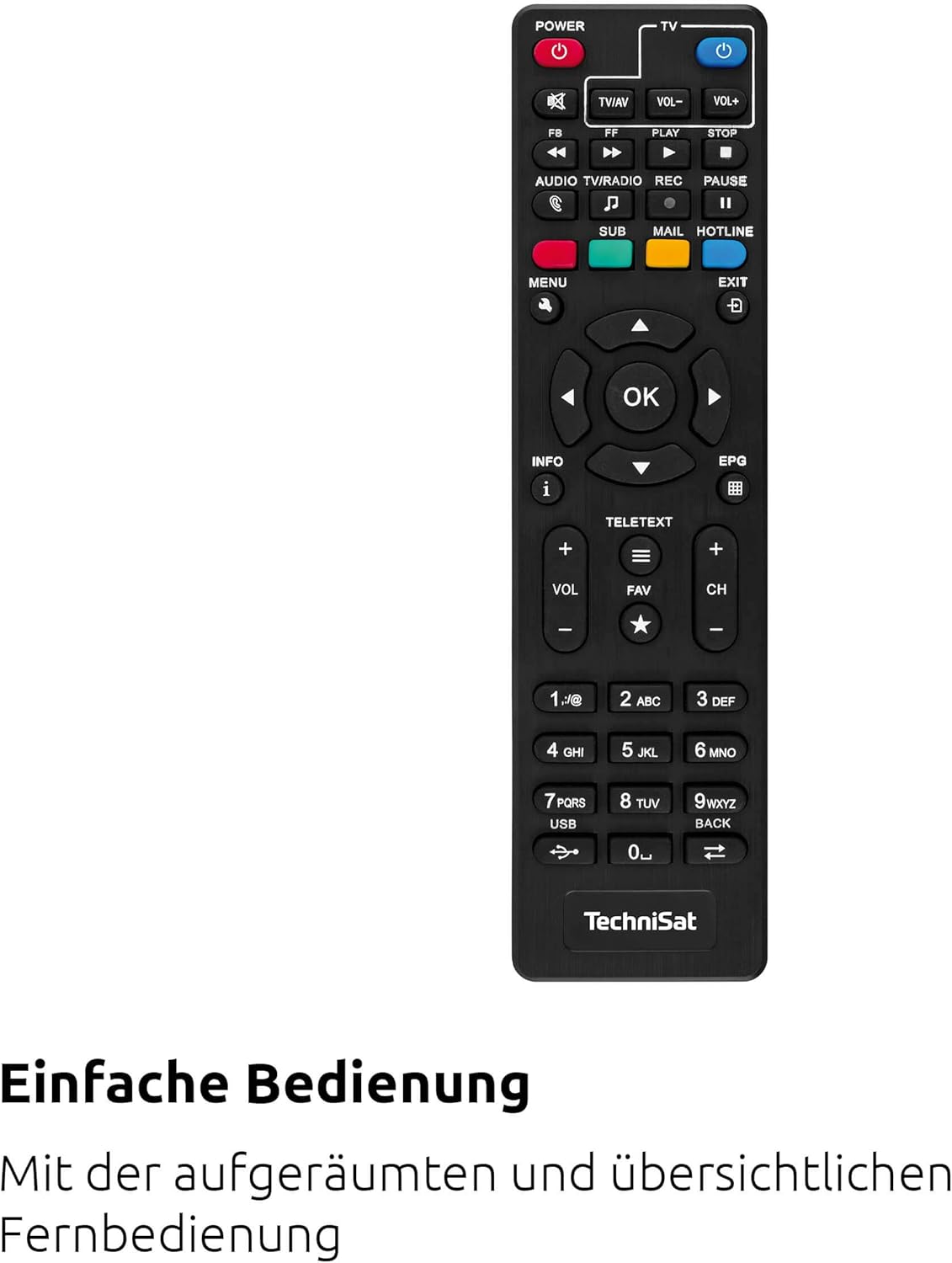
Imatge 4.3: The remote control for the TechniSat HD-C 232 receiver, featuring various buttons for power, volume, channel, menu navigation, EPG, and media playback.
Refer to the remote control section in Operating Instructions for details on its functions and how to use the learning keys.
5. Configuració
Follow these steps to connect your TechniSat HD-C 232 receiver and perform the initial setup.
5.1 Connexió del receptor
- Connexió per cable: Connect your cable network's antenna cable to the Entrada RF port a la part posterior del receptor.
Imatge 5.1: Illustration showing a cable connected to a receiver, representing the cable network connection.
- TV Connection (HDMI): Connect an HDMI cable (not included) from the Sortida HDMI port on the receiver to an HDMI input on your television.
- TV Connection (Scart - Optional): If your TV does not have an HDMI input, connect a Scart cable from the Scart port on the receiver to the Scart input on your television.
- Connexió del sistema d'àudio (opcional): For enhanced audio, connect an S/PDIF cable from the S/PDIF port on the receiver to your audio ampsistema de lifier o home cinema.
- Connexió d'alimentació: Connect the external power supply to the Entrada de potència on the receiver, then plug the power supply into a wall outlet.
5.2 Configuració inicial i escaneig de canals
- Turn on your television and select the correct HDMI or Scart input source.
- Turn on the TechniSat HD-C 232 receiver using the power button on the front panel or the remote control.
- The receiver will likely guide you through an initial setup wizard. Follow the on-screen instructions.
- During the setup, you will be prompted to perform a channel scan. Select "Automatic Channel Scan" to find all available unencrypted digital cable channels. This process may take several minutes.
- Once the scan is complete, save the channels. Your receiver is now ready for use.
6. Instruccions de funcionament
6.1 Basic TV Viewing
- Selecció de canals: Utilitza el CH+ i CH- buttons on the remote control or front panel to change channels. You can also enter channel numbers directly using the numeric keypad on the remote.
- Control de volum: Utilitza el VOL+ i VOL- botons del comandament a distància per ajustar el volum.
- Silenciar: Premeu el botó MUT botó per silenciar temporalment l'àudio.
6.2 Using the Electronic Program Guide (EPG)
The EPG provides a detailed overview of current and upcoming programs for up to seven days.

Imatge 6.1: Icon representing the Electronic Program Guide (EPG) feature.
- Premeu el botó EPG button on your remote control to access the Electronic Program Guide.
- Navigate through channels and program times using the arrow keys.
- Select a program to view detailed information (if available).
- Premeu Sortida to leave the EPG.
6.3 USB Media Player
The integrated USB media player allows you to play video, music, and image files from a connected USB storage device.

Imatge 6.2: Icons representing the USB media player's capabilities for playing video, music, and image files.
- Insert a USB storage device (e.g., USB stick, external hard drive) into the USB port on the front panel of the receiver.
- Access the media player function via the main menu or a dedicated button on the remote control (if available).
- Navega pel teu files and folders using the remote control.
- Seleccioneu a file to play. The receiver supports common video (MPEG-2, H.264), audio, and image formats.
6.4 Remote Control Learning Function
The remote control has 4 programmable learning keys that can be assigned functions from another remote control (e.g., your TV remote's power, volume, or input selection).
To program a learning key:
- Place the TechniSat remote control and the remote control to be learned from head-to-head (infrared emitters facing each other) at a distance of about 1-3 cm.
- Enter the learning mode on the TechniSat remote (refer to your remote's specific instructions, usually by holding a specific button for a few seconds).
- Press the learning key on the TechniSat remote that you wish to program.
- Press the corresponding button on the other remote control whose function you want to copy.
- The TechniSat remote will indicate successful learning (e.g., an LED flashes). Repeat for other keys.
- Exit the learning mode.
7. Manteniment
Proper care ensures the longevity of your TechniSat HD-C 232 receiver.
- Neteja: Disconnect the receiver from the power outlet before cleaning. Use a soft, dry, lint-free cloth to wipe the exterior. Do not use abrasive cleaners, waxes, or solvents.
- Ventilació: Comproveu regularment que les ranures de ventilació no estiguin obstruïdes per pols o deixalles.
- Emmagatzematge: Si guardeu el dispositiu durant un període prolongat, desconnecteu-lo de l'alimentació i guardeu-lo en un lloc fresc i sec.
8. Solució De Problemes
If you encounter issues with your receiver, refer to the following common problems and solutions.
| Problema | Causa possible | Solució |
|---|---|---|
| Sense poder | Power cable not connected; power outlet faulty; power supply unit faulty. | Check power cable connection. Try a different power outlet. Ensure the external power supply is correctly connected. |
| Sense imatge ni so | Incorrect TV input selected; HDMI/Scart cable loose or faulty; no signal from cable network. | Select the correct HDMI/Scart input on your TV. Check all cable connections. Ensure the cable network is active and connected to the receiver's RF In. Perform a channel scan. |
| El comandament a distància no funciona | Batteries depleted or incorrectly inserted; infrared sensor blocked; remote control faulty. | Replace batteries. Ensure batteries are inserted with correct polarity. Remove any obstructions between the remote and receiver. |
| El suport USB no es reprodueix | USB device not recognized; file format not supported; USB device faulty. | Ensure the USB device is properly inserted. Check if the file format is supported (MPEG-2, H.264 for video). Try a different USB device. |
| Poca qualitat d'imatge | Weak cable signal; faulty cable connection; TV settings. | Check cable connections. Contact your cable provider if signal strength is consistently low. Adjust TV picture settings. |
9. Especificacions
| Característica | Detall |
|---|---|
| Marca | TechniSat |
| Model | HD-C 232 |
| Número de model | 0000/4830 |
| Color | Negre |
| Tipus de sintonitzador | DVB-C (Digital Cable) |
| Codificació de vídeo | MPEG-2 MP@HL/ML, H.264/MPEG-4 AVC |
| Connexions | 1x HDMI Out, 1x Scart, 1x USB 2.0 (front), 1x RF In, 1x RF Out (LoopThrough), 1x S/PDIF (Digital Electrical Audio Out) |
| Ports USB totals | 1 |
| Ports HDMI totals | 1 |
| Característiques especials | Electronic Program Guide (EPG), USB Media Player, Remote Control with Learning Function |
| Dispositius compatibles | Televisió |
| Mode de sortida d'àudio | Surround (5.1, 7.1 channel configuration) |
| Dimensions (A x A x P) | 16.9 cm x 4 cm x 10.3 cm |

Imatge 9.1: Diagram showing the dimensions of the TechniSat HD-C 232 receiver: 16.9 cm width, 4 cm height, and 10.3 cm depth.
10. Garantia i Suport
For warranty information and customer support, please refer to the warranty card included with your product or visit the official TechniSat weblloc web. Conserveu el comprovant de compra per a qualsevol reclamació de garantia.
Fabricant: TechniSat Digital GmbH
País d'origen: França


