1. Introducció
The Kaito Voyager Pro KA600 is a versatile digital emergency radio designed for both daily use and emergency preparedness. It features multiple power options, comprehensive radio band coverage, and additional functions like a smartphone charger, reading lamp, and flashlight. This manual provides detailed instructions for its setup, operation, and maintenance.
2. Informació de seguretat
- Do not expose the radio to extreme temperatures, direct sunlight for prolonged periods, or high humidity.
- Eviteu deixar caure la ràdio o sotmetre-la a impactes forts.
- Mantingueu la ràdio allunyada de camps magnètics forts.
- Do not attempt to disassemble or modify the radio. This will void the warranty.
- Use only recommended batteries and power adapters.
- When charging external devices, ensure they are compatible with 5V USB output.
3. Contingut del paquet
Verifiqueu que tots els elements siguin presents al vostre paquet:
- Kaito Voyager Pro KA600 Digital Emergency Radio
- Auriculars
- Manual d'usuari (aquest document)
- Targeta de garantia
4. Producte acabatview
Familiarize yourself with the main components of your Kaito Voyager Pro KA600 radio.

Figura 1: Disseny del panell frontal
This image displays the front of the Kaito Voyager Pro KA600 radio, highlighting the digital display, numeric keypad, speaker grille, and various control buttons and knobs for tuning and volume.
Components clau:
- Pantalla digital: Shows frequency, time, temperature, humidity, and other operational information.
- Ponent: Sortida d'àudio.
- Teclat: Numeric buttons for direct frequency entry and function selection.
- Pom d'afinació: For manual frequency adjustment.
- Pom de volum: Ajusta el nivell de sortida d'àudio.
- Power Select Switch: Choose between battery, solar/crank, or adapter power.
- Antena telescòpica: Per a una millor recepció de ràdio.
- Manovella: For manual power generation.
- Panell solar: Per a la càrrega solar.
- Port de sortida USB: Per carregar dispositius externs.
- Lectura LED Lamp & Flashlight: Integrated lighting features.
Video 1: Kaito Voyager Pro KA600 Radio Overview
This video provides a visual demonstration of the Kaito Voyager Pro KA600 radio, showcasing its various features and components in action, including tuning and power options.
5. Configuració
5.1 Engegar la ràdio
The KA600 offers multiple power options:
- Internal Rechargeable Ni-MH Battery: The radio includes a built-in rechargeable battery pack (3 Ni-MH batteries, 600mAh). This battery can be charged via hand crank, solar panel, USB input, or an optional AC/DC adapter.
- AA Batteries (Not Included): For extended use, insert three (3) AA batteries into the battery compartment.
- Dinamo de biela: Rotate the hand crank on the side of the radio to generate power and charge the internal battery.
- Panell solar: Expose the integrated solar panel to direct sunlight to charge the internal battery.
- USB Input (5V): Connect the radio to a computer or a standard USB wall adapter using a USB cable (not included) to charge the internal battery.
- AC/DC Adapter (Optional): A 6V DC wall power adapter (sold separately) can be used to power the radio and charge the internal battery.

Figura 2: Compartiment de la bateria
This image shows the rear of the radio with the battery cover removed, revealing the internal rechargeable Ni-MH battery and the slots for optional AA batteries.
5.2 Extensió d'antena
For optimal reception, extend the telescopic antenna fully when listening to FM, LW, SW, or NOAA Weather bands. For AM reception, the radio uses an internal ferrite bar antenna, so the telescopic antenna is not required.
6. Instruccions de funcionament
6.1 Activació/desactivació i selecció de banda
Premeu el botó PODER button to turn the radio on or off. Use the FM/WB button to cycle through FM and NOAA Weather bands. Use the AM button to select the AM band. For Longwave (LW) and Shortwave (SW), use the appropriate band selection buttons or direct frequency entry.
6.2 Mètodes d'afinació
The KA600 offers several ways to tune into stations:
- Sintonització manual: Gira el TUNING knob on the side of the radio to manually scan frequencies.
- Direct Keypad Entry: Enter the desired frequency directly using the numeric keypad and press ENTRAR (or similar confirmation button, refer to display).
- Sistema d'afinació automàtica (ATS): This function automatically scans and stores strong stations. Refer to the on-screen prompts or specific button for ATS activation.
- Memory Tuning: Store your favorite stations into memory for quick access. Use the M+ i M- botons per navegar per les emissores emmagatzemades.
6.3 NOAA Weather Alert Function
The NOAA Weather Alert feature automatically activates the radio to broadcast emergency weather alerts. To enable this:
- Ensure the radio is set to a NOAA Weather channel (1-7).
- Activate the "Alert" mode (refer to the specific button or menu option on the radio, typically labeled ALERTA).
- The radio will remain in standby and automatically turn on with an audible alert and broadcast the weather warning when activated by the NOAA network.
6.4 RDS (Radio Data System)
When tuned to an FM station broadcasting RDS, the radio's display may show additional information such as station name, program type, or song title. This feature is automatic when available.
6.5 Emergency Mobile Charger
The KA600 can charge external devices via its built-in standard DC 5V USB output port.
- Connect your smartphone, GPS unit, MP3 player, or digital camera to the USB output port using a compatible USB cable.
- Ensure the radio has sufficient power (internal battery charged, or actively cranking/solar charging).
- La càrrega començarà automàticament.
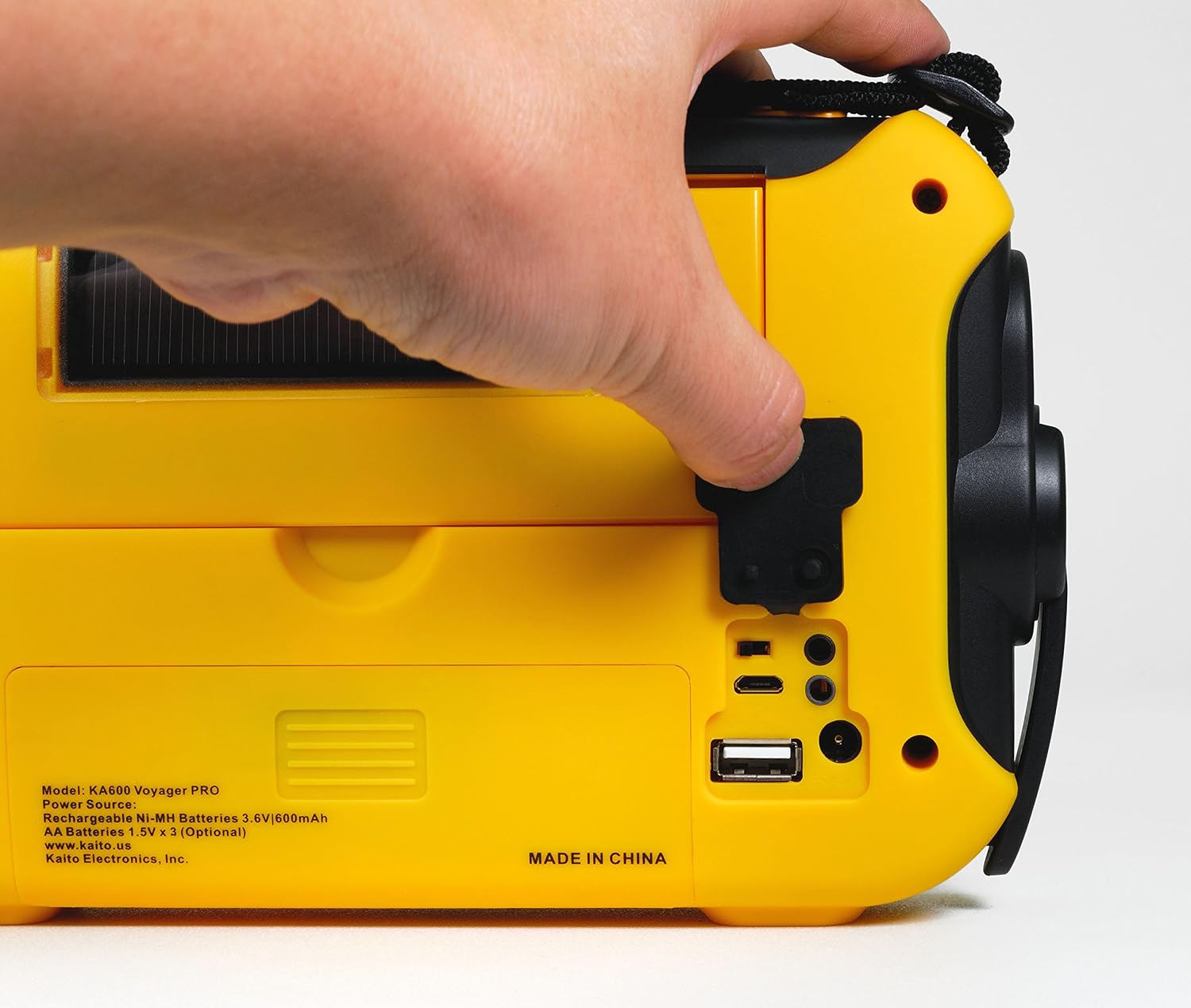
Figure 3: USB Output Port
This image highlights the USB output port on the side of the radio, used for charging external mobile devices.
6.6 Característiques d'il·luminació
- 5-LED de lectura Lamp: Flip up the solar panel to reveal the integrated reading lamp. Activate it using the designated button.
- Llanterna LED: A powerful LED flashlight is integrated into the radio. Activate it using its dedicated button.
- Red LED S.O.S. Beacon Light: In emergencies, activate the S.O.S. beacon for signaling.

Figure 4: Reading Lamp and Solar Panel
This image shows the rear of the radio with the solar panel raised, exposing the 5-LED reading lamp per il·luminació.
7. Manteniment
- Neteja: Netegeu la ràdio amb un suau, damp tela. No utilitzeu netejadors abrasius ni dissolvents.
- Cura de la bateria: If storing the radio for an extended period, remove any non-rechargeable AA batteries to prevent leakage. Ensure the internal Ni-MH battery is charged periodically to maintain its lifespan.
- Emmagatzematge: Guardeu la ràdio en un lloc fresc i sec, allunyat de la llum solar directa i de temperatures extremes.
8. Solució De Problemes
| Problema | Causa possible | Solució |
|---|---|---|
| La ràdio no s'encén. | Bateria baixa o esgotada; font d'alimentació incorrecta seleccionada. | Charge the internal battery via hand crank, solar, or USB. Insert fresh AA batteries. Ensure the power select switch is in the correct position. |
| Mala recepció de ràdio. | Antena no estesa; senyal feble; interferències. | Fully extend the telescopic antenna. Reposition the radio for better signal. Avoid sources of electronic interference. |
| No es pot carregar el dispositiu extern. | Radio battery too low; incompatible device; faulty cable. | Ensure the radio's internal battery is sufficiently charged. Verify device compatibility. Try a different USB cable. |
| NOAA Alert not activating. | Not on a NOAA channel; Alert mode not enabled; no active alerts. | Tune to a NOAA Weather channel. Ensure Alert mode is activated. Confirm there are active alerts in your area. |
9. Especificacions
- FM: 88 - 108 MHz
- AM (MW): 520 - 1710 kHz
- LW (Longwave): 150 - 521 kHz
- SO (ona curta): 2,300 - 23,000 kHz
- El temps de la NOAA: Channels 1 - 7
- Ponent intern: Diàmetre 66 mm
- Conector d'auriculars: 3.5 mm
- Bateries recarregables: 3 Ni-MH batteries, 600mAh
- Dimensions: 9.5 x 5.5 x 2.5 polzades (24.13 x 13.97 x 6.35 cm)
- Pes: 1 lliures (0.45 kg)
- Connectivitat: USB (for charging external devices)
- Fonts d'alimentació: Hand crank, solar panel, 3x AA batteries (not included), 5V USB input, 6V DC adapter (optional), internal Ni-MH battery.
10. Garantia i Suport
Your Kaito Voyager Pro KA600 radio comes with a warranty. Please refer to the included Warranty Card for details on coverage, terms, and how to register your product. For technical support or service inquiries, please visit the official Kaito weblloc o poseu-vos en contacte amb el seu departament d'atenció al client.
Kaito Official Weblloc: www.kaito.us


