Introducció
This instruction manual provides detailed guidance for the safe and efficient use of your Lenco Xemio-768 Digital Media Player. Please read this manual thoroughly before operating the device and retain it for future reference.
The Lenco Xemio-768 is a versatile digital media player capable of playing MP3/MP4 files, displaying photos, reading e-books, and recording voice memos. It features Bluetooth connectivity for wireless audio and an expandable memory via Micro SD card.
Contingut del paquet
- Lenco Xemio-768 Digital Media Player
- Cable USB
- Auriculars In-Ear
- 8GB Micro SD Card (pre-installed or included separately)
- Manual d'instruccions (aquest document)
Dispositiu acabatview
Familiarize yourself with the various parts and controls of your Xemio-768 player.
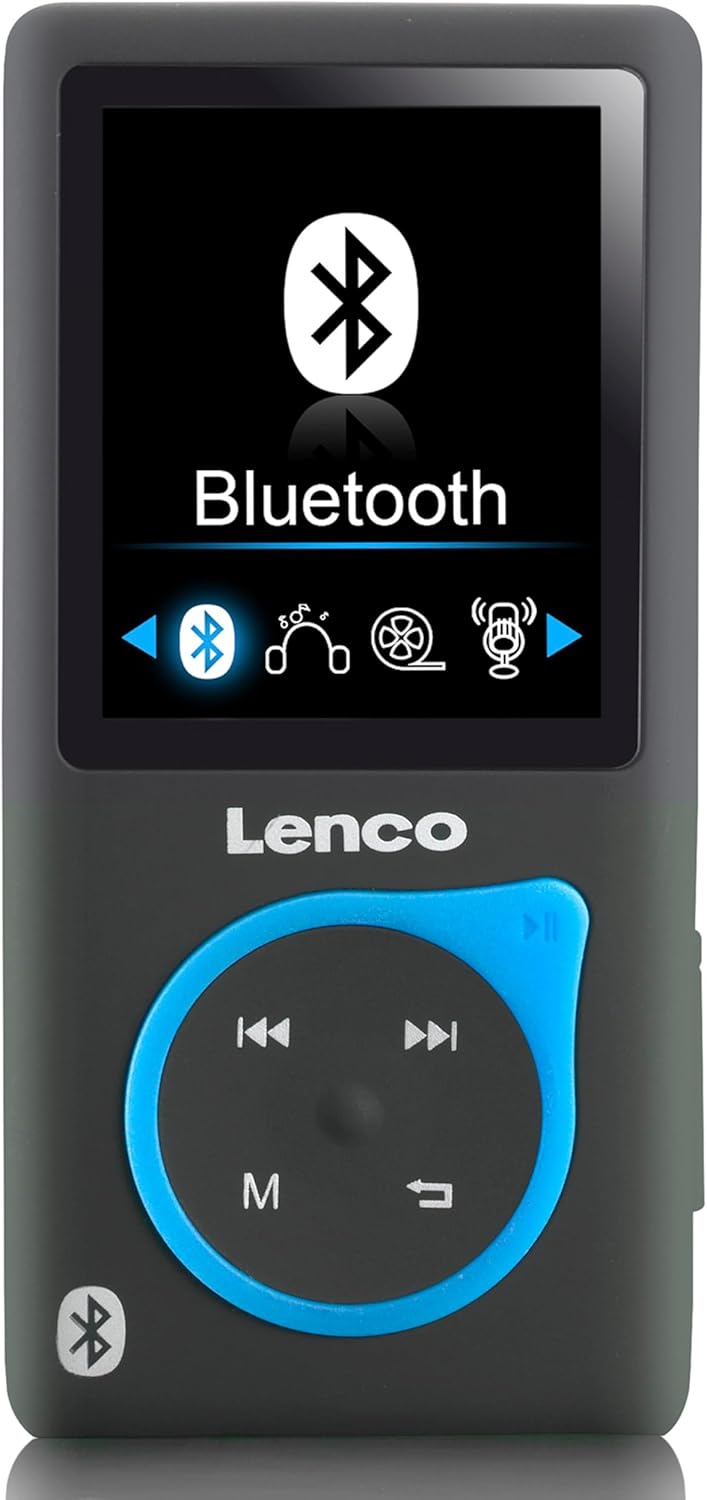
Imatge 1: Davant view of the Lenco Xemio-768 Digital Media Player. The screen displays the Bluetooth menu option. Below the screen are the Lenco logo and a circular control pad with playback buttons (previous, next, play/pause) and a menu button (M). A Bluetooth symbol is also visible on the bottom left of the device.
Key Controls and Ports:
- Pantalla LCD TFT de 1.8 polzades: Mostra menús, contingut multimèdia i configuració.
- Coixinet de control: Navigation and playback controls (Play/Pause, Next/Fast Forward, Previous/Rewind, Menu).
- Port micro USB: Per a càrrega i transferència de dades.
- Ranura per a targetes Micro SD: For memory expansion (supports up to 32GB).
- 3.5 mm Headphone Jack: Per a la connexió d'auriculars amb cable.
- Micròfon integrat: Per a l'enregistrament de veu.
Configuració
1. Càrrega del dispositiu
- Connect the small end of the included USB cable to the Micro USB port on the player.
- Connecteu l'extrem més gran del cable USB a un port USB amb alimentació d'un ordinador o a un adaptador de paret USB (no inclòs).
- The battery indicator on the screen will show charging status. A full charge typically takes approximately 3 hours.
- Disconnect the USB cable once fully charged.
2. Inserció d'una targeta Micro SD (opcional)
The player comes with an 8GB Micro SD card. If you wish to expand the storage, you can replace it with a card up to 32GB.
- Localitza la ranura per a targetes Micro SD al lateral del reproductor.
- Introduïu suaument la targeta Micro SD amb els contactes daurats cap avall fins que encaixi al seu lloc.
- Per treure-la, premeu suaument la targeta fins que faci clic i, a continuació, deixeu-la anar i sortirà.
3. Connexió d'auriculars
- Auriculars amb cable: Plug the 3.5 mm jack of the included in-ear headphones (or your own compatible headphones) into the headphone port on the player.
- Bluetooth Headphones/Speakers: Refer to the "Bluetooth Connectivity" section under Operating for wireless connection instructions.
4. Transferència Files
- Connecteu el reproductor a l'ordinador mitjançant el cable USB.
- El reproductor apareixerà com una unitat de disc extraïble a l'ordinador.
- Drag and drop your desired music (MP3, WMA), videos (AMV, AVI), photos (JPG, BMP, GIF), or e-books (TXT) into the appropriate folders on the player's internal memory or Micro SD card.
- Una vegada fileUn cop es transfereixin, expulseu el disc extraïble de l'ordinador amb seguretat abans de desconnectar el cable USB.
Instruccions de funcionament
Encès/Apagat
- To power on, press and hold the Power button (usually on the side) until the screen lights up.
- Per apagar, manteniu premut el botó d'engegada fins que el dispositiu s'apaga.
Navegació pel menú
- Use the directional buttons on the control pad to navigate through menu options.
- Press the central button (often Play/Pause) to select an option.
- Press the 'M' (Menu) button to go back to the previous menu or to access context-sensitive options during playback.
Reproducció de música
- Al menú principal, seleccioneu "Música".
- Browse through your folders and files to find the desired track.
- Press the central button to play the selected track.
- Utilitza el Anterior i A continuació botons per saltar pistes.
- Press the central button again to pause/resume playback.
Reproducció de vídeo
- Al menú principal, seleccioneu "Vídeo".
- Navega fins al teu vídeo files (AMV, AVI format).
- Seleccioneu un vídeo per començar la reproducció.
Foto Viewer
- Al menú principal, seleccioneu "Fotos".
- Navega per la teva imatge files (JPG, BMP, GIF format).
- Seleccioneu una imatge per view això.
Lector de llibres electrònics
- Al menú principal, seleccioneu "Llibre electrònic".
- Navigate to your text files (format TXT).
- Seleccioneu a file per obrir i llegir.
Enregistrament de veu
- From the main menu, select "Recorder" or "Voice Memo".
- Select "Start Recording" to begin.
- Press the central button to stop recording.
- Recordings are saved and can be accessed from the "Recordings" menu.
Connectivitat Bluetooth
- Ensure your Bluetooth headphones or speaker are in pairing mode. Refer to their respective manuals for instructions.
- On the Xemio-768, navigate to the "Bluetooth" menu.
- Selecciona "Cerca Devices" or "Pair New Device".
- Once your device appears in the list, select it to initiate pairing.
- Confirma l'emparellament en tots dos dispositius si se't demana.
- Once connected, audio will be routed wirelessly to your Bluetooth device.
Manteniment
Neteja
- Feu servir un drap suau, sec i sense borrissol per netejar l'exterior del dispositiu.
- Do not use abrasive cleaners, alcohol, or solvents, as these may damage the surface.
- Eviteu que entri humitat a cap obertura.
Cura de la bateria
- Per allargar la durada de la bateria, eviteu descarregar-la completament amb freqüència.
- Carregueu el dispositiu regularment, fins i tot si no l'utilitzeu durant períodes prolongats.
- Guardeu el dispositiu en un lloc fresc i sec, allunyat de la llum solar directa i de temperatures extremes.
Resolució de problemes
| Problema | Causa possible | Solució |
|---|---|---|
| El dispositiu no s’encén. | La bateria està esgotada. | Carregueu el dispositiu amb el cable USB proporcionat. |
| No es pot connectar per Bluetooth. | Bluetooth device not in pairing mode; interference; device out of range. | Ensure your Bluetooth headphones/speaker are in pairing mode. Move closer to the player. Try restarting both devices. |
| Files are not recognized or played. | Incorrecte file format; corromput file; Micro SD card issue. | Assegureu-vos files are in supported formats (MP3, WMA, AMV, AVI, JPG, BMP, GIF, TXT). Check if the Micro SD card is properly inserted or try another card. |
| No se sent so dels auriculars. | Headphones not properly connected; volume too low; corrupted audio file. | Check headphone connection. Increase volume. Test with different headphones or audio files. |
Especificacions
- Model: Xemio-768
- Visualització: LCD TFT de 1.8 polzades
- Memòria interna: 8 GB (via Micro SD card)
- Memòria ampliable: Fins a 32 GB (targeta Micro SD)
- Formats d'àudio compatibles: MP3, WMA
- Formats de vídeo compatibles: AMV, AVI
- Formats d'imatge compatibles: JPG, BMP, GIF
- Supported E-book Format: TXT
- Connectivitat: Bluetooth, Micro USB
- Auriculars Jack: 3.5 mm
- Tipus de bateria: Polímer de liti
- Durada de la bateria: Approximately 3 hours (playback)
- Dimensions: 0.09 x 4.15 x 8.5 cm
- Pes: 28.5 g
Garantia i Suport
For warranty information and technical support, please refer to the warranty card included with your product or visit the official Lenco weblloc web. Conserveu el comprovant de compra per a qualsevol reclamació de garantia.


