Introducció
The DigiTech Multi-Function LCD Wall Clock (Model XC0225) is a versatile device designed to provide convenient time display along with additional environmental information. This clock features a large LCD screen displaying time, date, day of the week, indoor temperature, and humidity. It also includes alarm and snooze functions, making it suitable for various settings, whether mounted on a wall or placed on a desktop.
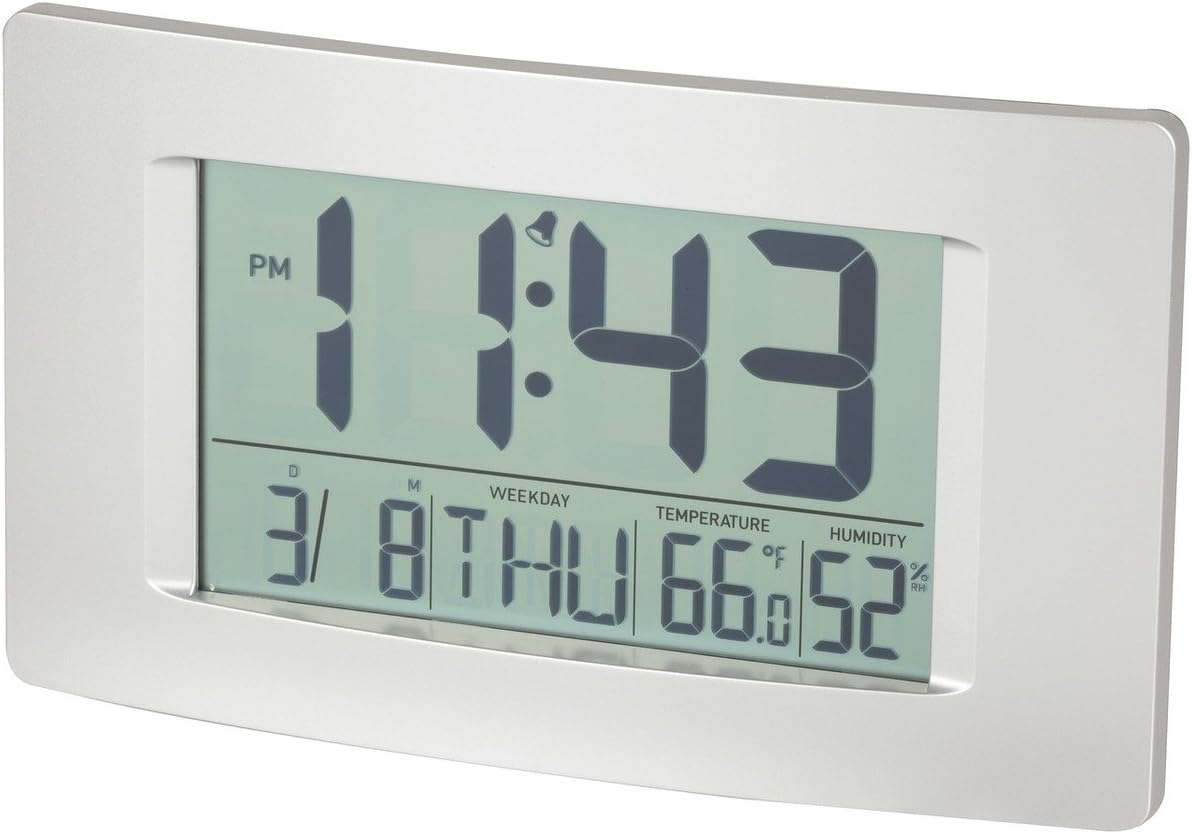
Figura 1: Frontal view of the Multi-Function LCD Wall Clock.
Contingut del paquet
- DigiTech Multi-Function LCD Wall Clock (Model XC0225)
- Manual d'usuari (aquest document)
Nota: 3 x AA batteries are required for operation and are not included in the package.

Figure 2: Product packaging illustrating the clock and its features.
Configuració
1. Instal·lació de la bateria
- Localitzeu el compartiment de la bateria a la part posterior del rellotge.
- Obriu la tapa del compartiment de la bateria.
- Insert 3 x AA batteries, ensuring correct polarity (+ and -) as indicated inside the compartment.
- Tanqueu bé la tapa del compartiment de la bateria.
2. Engegada inicial
Upon battery installation, the clock will power on automatically and display default settings. You may need to adjust the time, date, and other settings as described in the "Operating Instructions" section.
3. Opcions de muntatge
- Ubicació d'escriptori: Utilize the integrated stand on the back of the clock to place it on any flat surface.
- Muntatge a la paret: Use the integrated hang-hole on the back of the clock to mount it securely on a wall using a suitable screw or hook (not included).
Instruccions de funcionament
The clock features several buttons on the back for setting and adjusting functions. Refer to the labels next to each button for their specific functions (e.g., MODE, UP, DOWN, ALARM, SNOOZE/LIGHT).
1. Configuració de l'hora i la data
- Premeu el botó MODE button repeatedly until the time display starts flashing.
- Utilitza el UP or ABAIX botons per ajustar l'hora.
- Premeu MODE again to move to minutes, then use UP or ABAIX per ajustar-se.
- Continueu prement MODE per anar ciclant pels paràmetres d'any, mes i dia, ajustant cadascun amb UP or ABAIX.
- Premeu MODE una última vegada per sortir del mode de configuració.
2. Configuració de l'alarma
- Premeu el botó ALARMA botó una vegada per mostrar l'hora d'alarma actual.
- Manteniu premut el botó ALARMA fins que l'hora de l'alarma comenci a parpellejar.
- Utilitza el UP or ABAIX botons per ajustar l'hora de l'alarma.
- Premeu ALARMA again to move to alarm minutes, then use UP or ABAIX per ajustar-se.
- Premeu ALARMA una última vegada per confirmar i sortir del mode de configuració de l'alarma.
- Per activar/desactivar l'alarma, premeu el botó ALARMA button briefly when not in setting mode. An alarm icon will appear/disappear on the display.
3. Funció de posposició
Quan soni l'alarma, premeu el botó SNOOZE / LIGHT button to activate the snooze function. The alarm will temporarily stop and sound again after the set snooze interval (1-60 minutes, adjustable in settings).
4. Selecció de la unitat de temperatura (°C/°F)
Premeu breument UP button (or a dedicated °C/°F button if present) to toggle between Celsius (°C) and Fahrenheit (°F) temperature display.
5. Format 12/24 hores
Premeu breument ABAIX button (or a dedicated 12/24H button if present) to switch between 12-hour and 24-hour time formats.
Manteniment
1. Neteja
- Netegeu la superfície del rellotge amb un drap suau i sec.
- No utilitzeu netejadors abrasius, dissolvents ni esprais químics, ja que poden danyar la pantalla o laasing.
2. Substitució de la bateria
When the display becomes dim or functions become erratic, it is time to replace the batteries. Follow the "Battery Installation" steps in the Setup section to replace the 3 x AA batteries. Always replace all batteries at the same time with new ones.
Resolució de problemes
| Problema | Causa possible | Solució |
|---|---|---|
| La pantalla està en blanc o tènue. | Les bateries estan esgotades o instal·lades incorrectament. | Replace batteries with new 3 x AA batteries, ensuring correct polarity. |
| L'hora/data és incorrecta. | Not set correctly after battery installation or power interruption. | Seguiu les instruccions de "Configuració de la data i l'hora" per reiniciar-lo. |
| L'alarma no sona. | Alarm is not activated or alarm time is incorrect. | Ensure the alarm icon is displayed. Verify the alarm time setting. |
| Les lectures de temperatura/humitat semblen inexactes. | Clock placed near heat sources, vents, or in direct sunlight. | Relocate the clock to an area with stable ambient temperature and humidity. Allow time for readings to stabilize. |
Especificacions
| Característica | Detall |
|---|---|
| Model | XC0225 |
| Tipus de visualització | LCD digital |
| Mida LCD | 194 mm (ample) x 110 mm (altura) |
| Funcions | Time, Date, Day of Week, Alarm, Snooze, Indoor Temperature, Indoor Humidity |
| Format horari | 12 Hour / 24 Hour selectable |
| Interval de temperatura | -9.9 °C a +50 °C (14.1 °F a 122.0 °F) |
| Gamma d’humitat | 20% a 95% d'humitat relativa (HR) |
| Durada de la posposar | 1 - 60 minutes (adjustable) |
| Font d'alimentació | 3 piles AA (no incloses) |
| Dimensions (Overall, W x H x D) | 306 mm x 176 mm x 36 mm (aprox.) |
| Pes | 540g (without batteries) / 660g (shipping weight) |
| Opcions de muntatge | Integrated Stand, Wall Hang-hole |

Figure 3: Main display area dimensions of the clock for reference.
Garantia i Suport
This DigiTech product comes with a 1 anys de garantia des de la data de compra. Aquesta garantia cobreix els defectes de materials i de mà d'obra en ús normal.
For technical support, warranty claims, or further assistance, please contact your retailer or the DigiTech customer service department. Please have your model number (XC0225) and proof of purchase ready when contacting support.


