Introducció
The eKids Trolls Sing Along Boombox is designed to provide hours of musical fun for children. Featuring a built-in microphone and the ability to connect to an external MP3 player, this boombox allows users to sing along to their favorite tunes or the pre-loaded song. Its portable design with a convenient handle and an MP3 storage compartment makes it ideal for on-the-go entertainment.
Informació important de seguretat
Please read all safety instructions carefully before using this product. Failure to follow these instructions may result in injury or damage to the device.
- Perill d'asfixia: Aquest producte conté peces petites i no és adequat per a nens menors de 3 anys.
- Seguretat de la bateria:
- No barregeu piles velles i noves.
- No barregeu piles alcalines, estàndard (carboni-zinc) o recarregables (níquel-cadmi).
- Introduïu les piles amb la polaritat correcta (+ i -).
- Traieu les bateries esgotades ràpidament.
- No llenceu les piles al foc.
- Only use the specified battery type (3 x AA).
- Control de volum: To prevent hearing damage, do not listen at high volume levels for extended periods.
- Aigua i humitat: Keep the device away from water and moisture. Do not use near bathtubs, sinks, or other wet areas.
- Neteja: Unplug the device before cleaning. Use a soft, dry cloth. Do not use liquid cleaners or aerosol cleaners.
Contingut del paquet
Assegureu-vos que tots els elements siguin presents al paquet:
- eKids Trolls Sing Along Boombox
- Micròfon incorporat
- 3 x AA Batteries (pre-installed or included)
Producte acabatview
Familiarize yourself with the different parts of your Trolls Sing Along Boombox.

Imatge 1: Davant view of the Trolls Sing Along Boombox. It is purple with Trolls graphics, a central "GIMME A BEAT" display featuring Poppy, and a detachable microphone on the left side. A white handle is at the top.
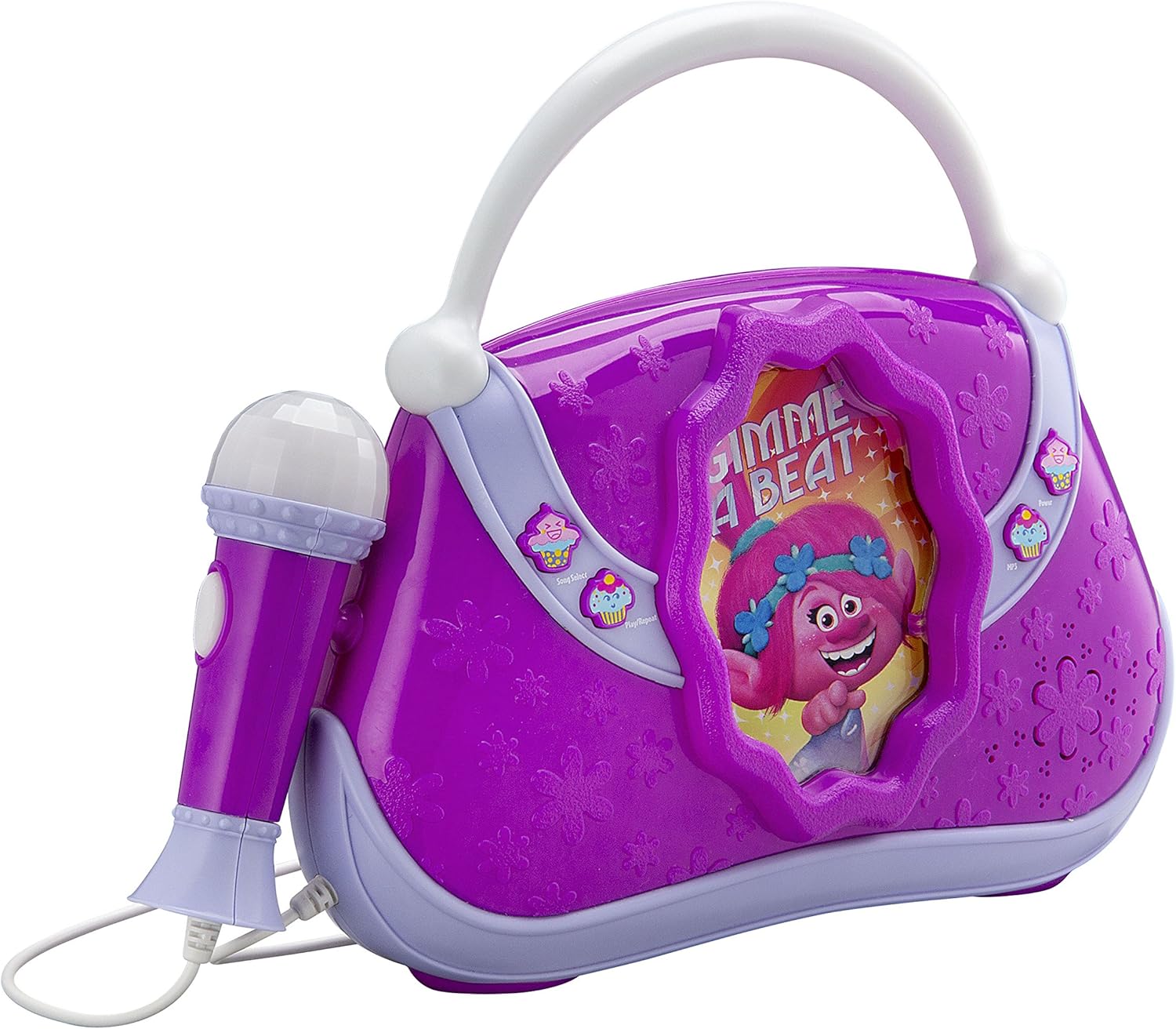
Imatge 2: lateral view of the Trolls Sing Along Boombox, showing its curved design and the attached microphone.

Imatge 3: Davant view of the Trolls Sing Along Boombox with the microphone detached, highlighting the microphone input port.
- Micròfon: A real working microphone for singing along.
- Mànec: Nansa integrada per facilitar el transport.
- MP3 Compartment: A storage compartment located at the back for your MP3 player.
- Controls: Buttons for built-in music, microphone volume, and MP3 playback (specific controls may vary, refer to product for exact button functions).
Configuració
1. Instal·lació de la bateria
The boombox requires 3 AA batteries. These are typically included with the product.
- Locate the battery compartment on the back or bottom of the boombox.
- Amb un tornavís Phillips (no inclòs), desenrosqueu la tapa del compartiment de la bateria.
- Insert 3 new AA (Zinc-carbon recommended) batteries, ensuring the correct polarity (+/-) as indicated inside the compartment.
- Substituïu la tapa del compartiment de la bateria i fixeu-la amb el cargol.
2. Connexió d'un reproductor MP3 (opcional)
You can connect an external MP3 player or other audio device to the boombox using a standard 3.5mm audio cable (not included).
- Locate the MP3 input jack on the boombox (usually near the microphone input or on the side).
- Plug one end of the 3.5mm audio cable into the MP3 input jack on the boombox.
- Plug the other end of the audio cable into the headphone jack of your MP3 player or audio device.
- For convenience, you can store your MP3 player in the dedicated compartment at the back of the boombox.
Instruccions de funcionament
1. Encès / apagat
Locate the Power ON/OFF switch, usually on the side or back of the unit. Slide it to the "ON" position to power on the boombox and to "OFF" to power it down.
2. Using the Built-in Music
The boombox comes with a pre-loaded song, "Get Back Up Again" from the Trolls movie.
- Press the "Music" or "Built-in Song" button (often indicated by a musical note icon or a cupcake icon as seen on the product images) to start playing the built-in music.
- Press the button again to pause or stop the music.
3. Ús del micròfon
The boombox features a real working microphone for karaoke fun.
- Ensure the microphone is securely plugged into its port on the boombox.
- Hold the microphone close to your mouth and speak or sing into it.
- Adjust the microphone volume using the dedicated "Mic Volume" control (if available, often indicated by a microphone icon or a cupcake icon).
- The microphone can be used independently or while playing built-in music or music from an MP3 player.
4. Playing Music from an MP3 Player
Once your MP3 player is connected (as described in the Setup section):
- Assegureu-vos que el boombox estigui encès.
- Start playing music on your connected MP3 player.
- The audio from your MP3 player should now play through the boombox speakers.
- Adjust the volume directly on your MP3 player and/or using the boombox's master volume control (if available).
Manteniment i cura
Proper care will ensure the longevity of your Trolls Sing Along Boombox.
- Neteja: Wipe the surface of the boombox with a soft, dry cloth. Do not use abrasive cleaners or solvents.
- Emmagatzematge: When not in use, store the boombox in a cool, dry place away from direct sunlight and extreme temperatures.
- Extracció de la bateria: If the boombox will not be used for an extended period, remove the batteries to prevent leakage.
- Cura del micròfon: Handle the microphone gently. Avoid dropping it or exposing it to excessive force.
Resolució de problemes
If you encounter any issues with your boombox, refer to the following common problems and solutions:
| Problema | Causa possible | Solució |
|---|---|---|
| No power / Boombox does not turn on. | Les piles estan gastades o incorrectament inserides. | Substituïu les piles per unes de noves, assegurant la polaritat correcta. |
| No hi ha so dels altaveus. | Volume is too low; MP3 player not connected properly or volume too low. | Increase boombox volume. Ensure MP3 player is connected securely and its volume is up. |
| El micròfon no funciona. | Microphone not plugged in securely; Microphone volume too low. | Ensure microphone cable is fully inserted. Increase microphone volume. |
| So distorsionat. | Volume too high; Low batteries. | Lower the volume. Replace batteries. |
Si el problema persisteix després de provar aquestes solucions, poseu-vos en contacte amb l'atenció al client.
Especificacions
| Marca | eKids |
| Número de model | 7545870605 |
| ASIN | B07D3Z9N6C |
| Font d'alimentació | Funciona amb bateria |
| Tipus de bateria | 3 x AA (Zinc-carbon) |
| Voltage | 4.5 Volts |
| Nombre de ponents | 2 |
| Pes de l'article | 1.9 lliures (aprox. 0.86 kg) |
| Fabricant | KIDdesigns |
| UPC | 092298938592 |
Garantia i Suport
Information regarding specific warranty terms for this product is not available in the provided data. For warranty claims or technical support, please contact the manufacturer, KIDdesigns, or the retailer where the product was purchased.
Please note that spare parts availability information is also not available.


