Producte acabatview
The Puro Icon Silicone Case is designed to provide protection and style for your iPhone 6, 6s, 7, or 8. Crafted from soft-touch silicone, this case offers a comfortable grip and helps safeguard your device from everyday bumps and scratches. Its precise design ensures full access to all phone controls and features, including compatibility with wireless charging.
Configuració i instal·lació
Installing the Puro Icon Silicone Case is a simple process:
- Clean your iPhone: Before installing the case, ensure your iPhone's back and sides are clean and free of dust or debris. Use a soft, dry cloth if necessary.
- Align the case: Hold the case with the camera cutout aligned with your iPhone's camera.
- Insert the phone: Gently push your iPhone into the case, starting from the top (camera end). Ensure all corners of the phone are securely seated within the case.
- Comprova l'ajust: Verify that the case fits snugly around your iPhone and that all buttons and ports are accessible and aligned with the case's cutouts.

Figura 1: Frontal view of the Puro Icon Silicone Case, highlighting its sleek design and precise fit for the iPhone.
Funcionament de la caixa
The Puro Icon Silicone Case is designed for seamless integration with your iPhone, enhancing its usability and protection:
- Protecció: The silicone material provides a protective layer against minor impacts, scratches, and daily wear and tear.
- Accés amb botons: The case features precisely molded buttons that maintain the tactile feel and responsiveness of your iPhone's original buttons.
- Accés al port: Accurate cutouts ensure unobstructed access to the charging port, speaker, and microphone.
- Càrrega sense fils: The thin design of the case allows for full compatibility with wireless charging pads, eliminating the need to remove the case for charging.
- Adherència millorada: The soft-touch silicone exterior provides a comfortable and secure grip, reducing the likelihood of accidental drops.
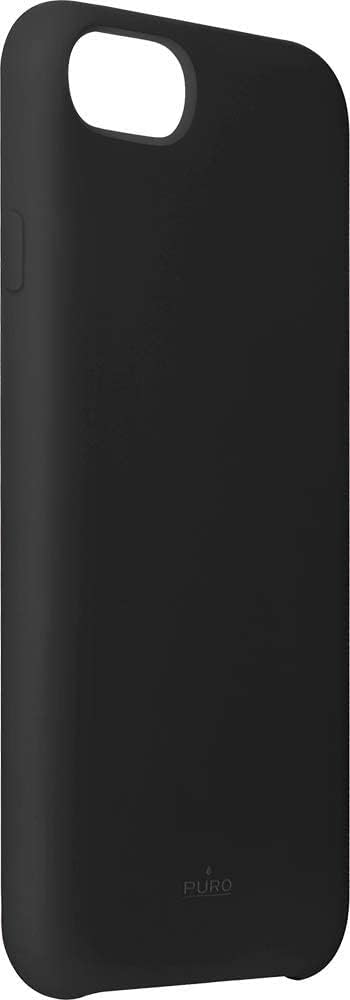
Figura 2: lateral view of the case, illustrating the precise button covers and cutouts for easy access.
Manteniment i cura
To ensure the longevity and appearance of your Puro Icon Silicone Case, follow these simple care instructions:
- Neteja: Netegeu la carcassa regularment amb un drap suauamp drap. Per a marques difícils, es pot utilitzar una solució de sabó suau i, a continuació, netejar amb un drap net i sec.amp cloth and then drying thoroughly.
- Eviteu productes químics durs: Do not use abrasive cleaners, solvents, or harsh chemicals, as these can damage the silicone material and its finish.
- Emmagatzematge: Quan no l'utilitzeu, guardeu la funda en un lloc net i sec, allunyat de la llum solar directa i de temperatures extremes.
- Resistència UV: The case features enhanced UV resistance to help prevent yellowing over time, but prolonged exposure to direct sunlight should still be minimized.
Resolució de problemes
Most issues with a phone case are minor. Here are some common concerns and their solutions:
- La caixa sembla fluixa: Ensure your iPhone model is compatible with the case (iPhone 6/6s/7/8). Re-install the case, making sure all corners are fully seated.
- Els botons són rígids: Check for any debris caught between the phone and the case buttons. Remove the phone, clean both surfaces, and re-install. The case buttons are designed to be responsive.
- Decoloració/Taques: Refer to the "Maintenance and Care" section for cleaning instructions. Some stubborn dyes from clothing or other materials may be difficult to remove from silicone.
Especificacions
| Marca | Puro |
| Fabricant | KOMQI |
| Model | IPC747CICONBLK |
| Número de part | IPC747CICONBLK |
| Dispositius compatibles | iPhone 6, iPhone 6s, iPhone 7, iPhone 8 |
| Característiques especials | Shock-absorbing, shockproof, UV resistant, wireless charging compatible |
| Components inclosos | Cas |
| Tipus de material | Silicona |
| Factor de forma | Funda per a iPhone |
| Dimensions del producte (L x A x A) | 6.7 x 0.2 x 13.8 cm |
| Pes de l'article | 54 g |
| Color | Negre |
Garantia i Suport
For information regarding product warranty, returns, or technical support, please refer to the official Puro website or the retailer from whom the product was purchased. Keep your proof of purchase for any warranty claims.
Puro Official Weblloc: www.puro.it (Note: This is a general link, specific support pages may vary.)


