Introducció
The Wicked Audio HUM 1000 headphones are designed to provide an immersive audio experience with advanced active noise cancelling technology. Featuring comfortable Soft-Tech cushions and a robust design, these headphones are suitable for extended listening sessions. This manual will guide you through the setup, operation, and maintenance of your new headphones to ensure optimal performance.
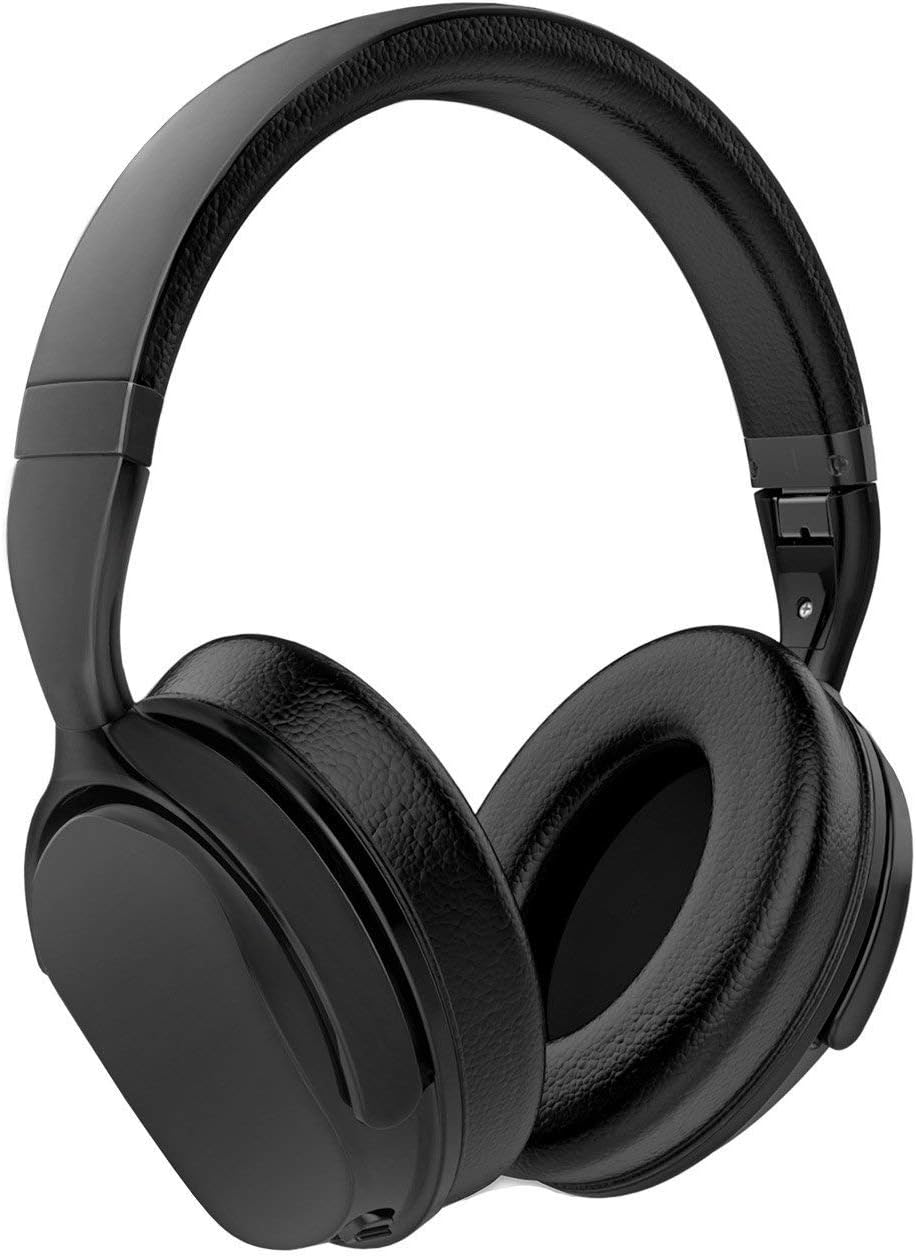
Image: The Wicked Audio HUM 1000 headphones in black, showcasing el seu disseny supraaural i el seu acabat elegant.
Contingut del paquet
Marqueu la casella per als elements següents:
- Wicked Audio HUM 1000 Full-Size, Wireless, Noise Cancelling Headphone
- EVA Travel Case
- USB to Micro USB Charging Cord
- Llibret d'instruccions (aquest manual)
- Aux Cord (3.5mm audio cable)

Image: A visual representation of all items included in the Wicked Audio HUM 1000 headphone package, including the headphones, travel case, charging cable, and auxiliary cable.
Producte acabatview i Controls
Familiarize yourself with the physical features and control buttons on your HUM 1000 headphones.

Imatge: Una imatge detallada view of the control buttons located on the earcup of the Wicked Audio HUM 1000 headphones, showing power, volume, and track control buttons.
Funcions de control:
- Botó d'encesa: Manteniu premut per encendre o apagar els auriculars.
- Augment de volum / pista següent: Premeu curt per pujar el volum, premeu llargament per passar a la següent pista.
- Baixada de volum / pista anterior: Premeu curt per baixar el volum, premeu llargament per anar a la pista anterior.
- Multi-function Button (Play/Pause/Answer/Hangup): Premeu una vegada per reproduir/pausar música o respondre/finalitzar trucades.
- Interruptor ANC (cancel·lació activa de soroll): Toggle to activate or deactivate noise cancelling.
Configuració i ús inicial
1. Càrrega dels auriculars
Before first use, fully charge your headphones. A full charge takes approximately 2 hours and provides up to 13.5 hours of playback.
- Connect the small end of the included USB to Micro USB charging cord to the charging port on the headphone.
- Connecteu l'extrem més gran del cable USB a un adaptador de corrent USB (no inclòs) o al port USB d'un ordinador.
- The LED indicator will show charging status (refer to the LED indicator section in the full manual for details).

Image: An informational graphic detailing Wicked Audio's Triple Battery Protection, which includes battery management on the main circuit board, integrated circuit protection against over-voltage, baix voltage, overcharge, undercharge, and dead short, and a final testing phase for charge/discharge cycles.
2. Emparellament Bluetooth
Pair your headphones with your Bluetooth-enabled device for wireless audio.
- Assegureu-vos que els auriculars estiguin carregats i apagats.
- Premeu i manteniu premut el botó d'engegada fins que l'indicador LED parpellegi en blau i vermell, cosa que indica el mode d'emparellament.
- Al dispositiu, activa el Bluetooth i cerca dispositius nous.
- Select "Wicked Audio HUM 1000" from the list of available devices.
- Un cop connectat, l'indicador LED es tornarà blau continu.
Funcionament dels auriculars
Cancel·lació activa de soroll (ANC)
The HUM 1000 features 97.5% active ambient noise reduction to minimize distractions from your surroundings.
- To activate ANC, slide the ANC switch to the 'ON' position.
- Per desactivar l'ANC, feu lliscar l'interruptor ANC a la posició "OFF".
Wired Connection (Aux Mode)
You can use the headphones with the included 3.5mm aux cord, even if the battery is depleted.
- Plug one end of the 3.5mm aux cord into the audio input jack on the headphone.
- Connecteu l'altre extrem al connector de sortida d'àudio de 3.5 mm del dispositiu.
- Note: Controls on the headphone may be limited or inactive in wired mode, depending on your device.
Cura i Manteniment
- Netegeu els auriculars amb un drap suau i sec. No utilitzeu productes de neteja abrasius ni dissolvents.
- Eviteu exposar els auriculars a temperatures extremes, humitat o llum solar directa.
- Store the headphones in the provided EVA travel case when not in use to protect them from dust and damage.
- No intenteu desmuntar ni modificar els auriculars, ja que això anul·larà la garantia.
Resolució de problemes
| Problema | Causa possible | Solució |
|---|---|---|
| Els auriculars no s'encenen | Bateria baixa | Carregueu els auriculars completament. |
| No es pot emparellar amb el dispositiu | Auriculars no en mode d'emparellament; Bluetooth del dispositiu desactivat; Massa lluny del dispositiu | Ensure headphones are in pairing mode (flashing blue/red). Turn device Bluetooth on. Move headphones closer to device (within 32ft/10m). |
| Sense so ni volum baix | Volume too low; Incorrect audio source; Headphones not connected | Increase volume on headphones and device. Ensure correct audio output is selected on device. Re-pair or reconnect headphones. |
| L'ANC no funciona eficaçment | ANC switch off; Improper fit | Ensure ANC switch is in the 'ON' position. Adjust headphones for a snug fit over your ears. |
Especificacions tècniques
| Característica | Detall |
|---|---|
| Nom del model | Wicked Audio HUM 1000 |
| Control de soroll | Active Noise Cancellation (97.5% ambient noise reduction) |
| Tecnologia de connectivitat | Bluetooth 5.0 |
| Durada de la bateria | Fins a 13.5 hores |
| Temps de càrrega | Aprox. 2 hores |
| Resposta de freqüència | 20 Hz - 20 kHz |
| Impedància | 35 ohms |
| Col·locació de l'orella | Sobre l'orella |
| Tipus de control | Control multimèdia, tàctil |
| Pes de l'article | 12 unces (0.75 lliures) |
| Dimensions del producte | 3 x 8 x 10.5 polzades |
| Color | Negre |
| UPC | 712949011558 |

Image: A detailed graphic outlining the technical specifications and key features of the Wicked Audio HUM 1000 headphones, including battery life, Bluetooth version, and control types.
Garantia i Suport
Wicked Audio products are designed for durability and performance. For warranty information or technical support, please refer to the official Wicked Audio weblloc web o contacteu directament amb el seu servei d'atenció al client. Conserveu el comprovant de compra per a qualsevol reclamació de garantia.
Per obtenir més ajuda, visiteu el Wicked Audio Store on Amazon.


