1. Introducció
The Autel MaxiLink ML629 is an advanced automotive diagnostic scanner designed to assist in identifying and resolving issues within your vehicle's key systems. This tool provides comprehensive diagnostic capabilities for Anti-lock Braking System (ABS), Supplemental Restraint System (SRS), Engine, and Transmission systems, in addition to full OBDII functionality. This manual will guide you through the setup, operation, maintenance, and troubleshooting of your ML629 device.

Image 1.1: The Autel MaxiLink ML629 diagnostic scanner with its packaging, highlighting its ABS, Engine, SRS, and Transmission diagnostic capabilities, along with lifetime free updates.
2. Informació de seguretat
Please read and understand all safety instructions before operating the device. Improper use can lead to damage to the device, vehicle, or personal injury.
- Feu sempre les proves d'automòbils en una zona ben ventilada.
- Utilitzeu protecció ocular i roba protectora adequada.
- Keep the device away from moisture, oil, and grease.
- No feu funcionar el dispositiu mentre conduïu.
- Ensure the vehicle is in Park (P) or Neutral (N) with the parking brake engaged before performing any diagnostic tests.
3. Producte acabatview
The Autel MaxiLink ML629 is designed for efficient and accurate vehicle diagnostics. Key features include:
- ABS, SRS, Engine, Transmission Diagnostics: Reads and clears codes for these four critical systems.
- Funcions OBDII completes: Supports all 10 modes of OBDII tests.
- DTC Definitions Lookup: Built-in library with over 7000 DTC definitions.
- Flux de dades en directe: Displays real-time data in text or graph format.
- Estat de preparació I/M: Comprova la preparació del sistema d'emissions.
- Congela les dades del fotograma: Captura les condicions del vehicle en el moment en què s'estableix un codi d'error.
- Dades Review and Printing: Permet review of recorded data and printing of diagnostic reports.
- Actualitzacions gratuïtes de per vida: Ensures the device remains current with new vehicle models and software enhancements.

Image 3.1: The Autel MaxiLink ML629 screen showing a list of its diagnostic capabilities, including DTC Lookup, reading/erasing DTCs, and diagnosing various vehicle systems.
4. Configuració
4.1 Connexió inicial
- Localitza el connector d'enllaç de dades (DLC) de 16 pins del vehicle. Normalment es troba sota el tauler de control, al costat del conductor.
- Assegureu-vos que el contacte del vehicle estigui apagat.
- Connect the ML629's OBDII cable to the vehicle's DLC.
- Turn the vehicle's ignition to the ON position (engine can be off). The ML629 will power on automatically.
4.2 Device Registration and Updates
To ensure full functionality and access to the latest vehicle coverage, it is recommended to register your device and perform software updates.
- Register an Autel ID: Visita l'Autel oficial website (www.autel.com) and create an Autel ID if you do not already have one.
- Bind ML629: Log in to your Autel ID. Bind your ML629 scanner using the device's Serial Number (SN), which is a 12-digit code located on the back of the device. During the binding process, you will be prompted for a registration password, which can be found in the device's menu under "Setting > About" (a 6-digit code).
- Actualitzacions de programari: After binding, you can update the scanner's software. This typically involves removing the 8GB SD card from the device, inserting it into a card reader connected to a computer, and using the Autel update software to download and install updates. Refer to the Autel weblloc web per obtenir instruccions detallades d'actualització.
5. Funcionament
5.1 System Diagnostics (ABS, SRS, Engine, Transmission)
The ML629 can diagnose four primary vehicle systems:
- ABS (Sistema de frens antibloqueig): Reads and clears codes related to the ABS system, which prevents wheels from locking up during braking.
- SRS (Supplemental Restraint System): Reads and clears codes for the airbag system, ensuring proper function of safety features.
- Motor: Reads and clears codes for the engine management system, helping to diagnose issues indicated by the Check Engine Light (MIL).
- Transmissió: Reads and clears codes for the automatic transmission system, assisting in diagnosing shifting or performance problems.
To access these functions, navigate to the "Scan" menu on the device, select the desired system, and follow the on-screen prompts to read or clear diagnostic trouble codes (DTCs).

Image 5.1: The Autel MaxiLink ML629 interface illustrating the four main systems it can diagnose: SRS, Transmission, Engine, and ABS.
5.2 Funcions OBDII
The ML629 supports all 10 modes of OBDII tests, providing comprehensive engine diagnostics:
- Llegir codis: Retrieves generic (P0, P2, P3, and U0) and manufacturer-specific (P1, P3, and U1) codes.
- Esborra codis: Clears Diagnostic Trouble Codes (DTCs) and turns off the Malfunction Indicator Light (MIL).
- Preparació I/M: Comprova la disponibilitat dels sistemes de monitorització d'emissions.
- Flux de dades en directe: Displays real-time operating parameters of the vehicle.
- View Congelar fotograma: Shows a snapshot of operating conditions when an emission-related fault occurred.
- Prova del monitor d'O2: Recupera els resultats de la prova del monitor del sensor d'O2.
- Prova del monitor integrat: Recupera resultats per a components i sistemes de transmissió relacionats amb les emissions.
- Prova de components: Permet iniciar una prova de fuites per al sistema EVAP del vehicle.
- Informació del vehicle: Recupera el número d'identificació del vehicle (VIN), l'ID de calibratge (CALID) i el número de verificació de calibratge (CVN).
- Mòduls presents: Identifies communication protocols and modules present in the vehicle.
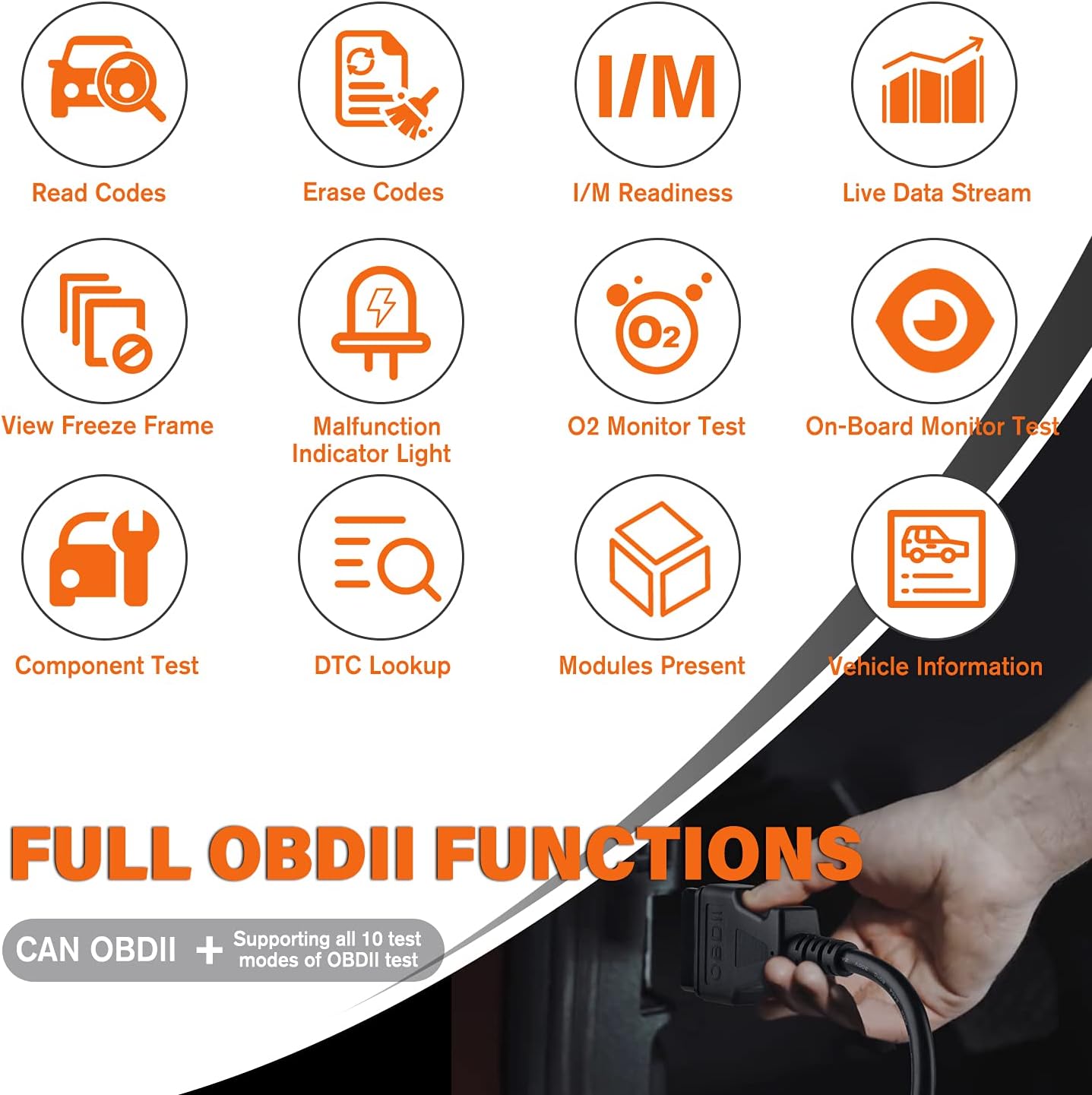
Image 5.2: A visual representation of the full OBDII functions supported by the ML629, including reading/erasing codes, I/M readiness, live data, and DTC lookup.
5.3 Cerca de DTC
The ML629 features a built-in DTC library to help you understand the meaning of diagnostic trouble codes. From the main menu, select "DTC Lookup" and enter the code to view la seva definició.
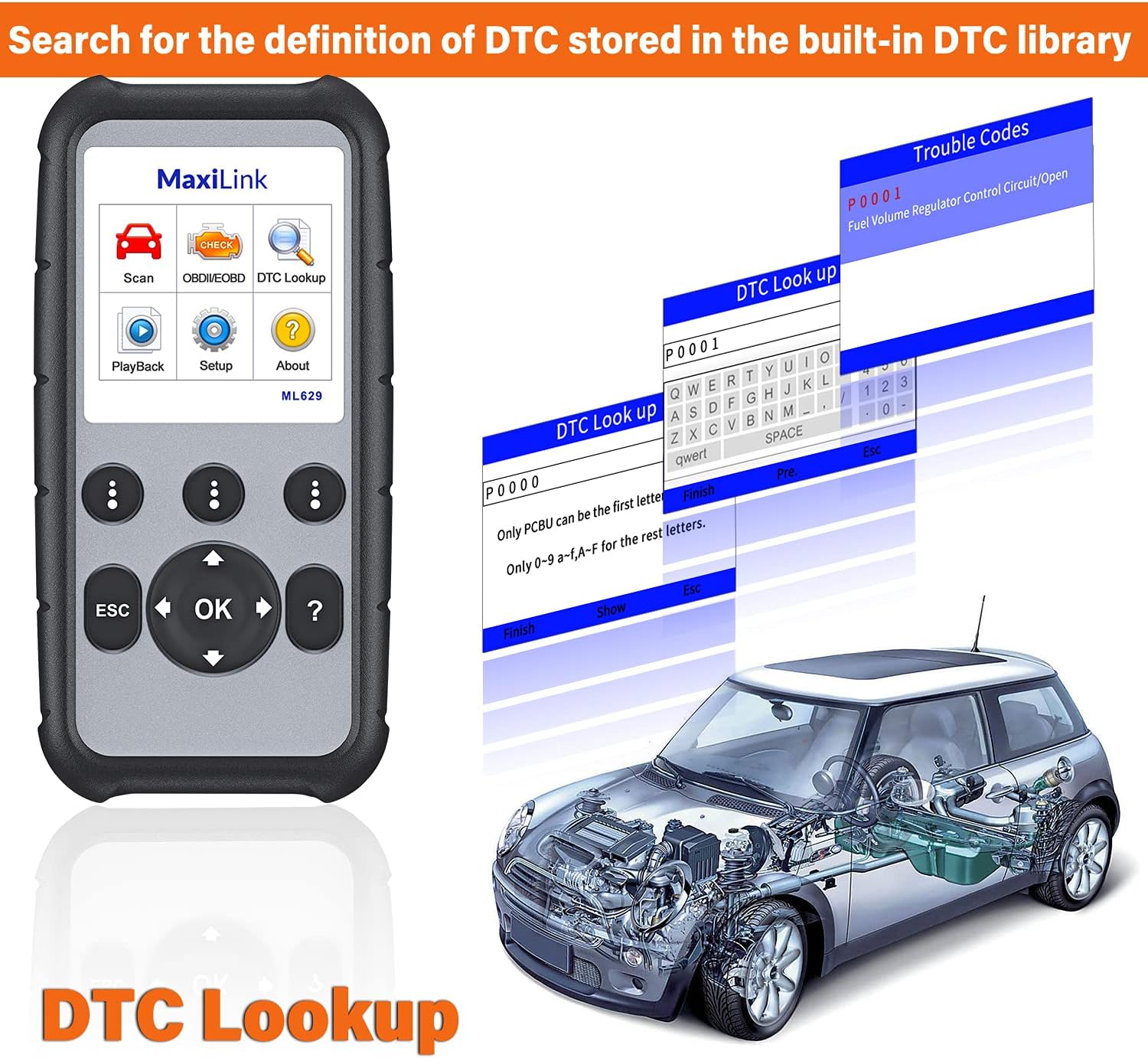
Image 5.3: The ML629 screen showing the DTC Lookup function, where users can input a code (e.g., P0001) to retrieve its definition from the device's internal library.
5.4 Flux de dades en directe
The Live Data Stream function allows you to view real-time sensor data from the vehicle. This data can be displayed in numerical text or graphical format, which is useful for monitoring vehicle performance and diagnosing intermittent issues.

Image 5.4: The ML629 screen showing live data stream in both numerical and graphical formats, allowing users to monitor various vehicle parameters.
6. Manteniment
6.1 Actualitzacions de programari
The Autel MaxiLink ML629 comes with lifetime free software updates. Regular updates ensure your scanner has the latest vehicle coverage and diagnostic capabilities. To update the device:
- Ensure your device is registered as described in Section 4.2.
- Remove the SD card from the ML629.
- Insert the SD card into a card reader connected to a computer with internet access.
- Download and install the Autel PC Suite software from the official Autel weblloc.
- Follow the on-screen instructions in the Autel PC Suite to download and install the latest software updates to your SD card.
- Safely eject the SD card from your computer and reinsert it into the ML629. The device will then apply the updates.
6.2 Neteja i emmagatzematge
- Netegeu el dispositiu amb un suau, damp tela. No utilitzeu netejadors abrasius ni dissolvents.
- Guardeu el dispositiu en un lloc sec i fresc, allunyat de la llum solar directa i de temperatures extremes.
- Keep the OBDII cable free from kinks or damage.
7. Resolució de problemes i compatibilitat
7.1 Compatibility Limitations
It is important to note the following compatibility considerations for the ML629:
- ABS/SRS/Engine/Transmission Functions: These functions are primarily supported for 30+ US/EU/Asian car makes, mainly for model years 2004-2013/2014, with some support extending to 2015-2017. The device generally does not support 2018+ newer vehicles for these specific system diagnostics.
- OBDII Functions: Supports standard OBDII vehicles manufactured from 1996 onward in the US market. However, due to the Secure Gateway (SGW) / FCA AutoAuth security system, this tool may be unable to clear OBDII module codes for all vehicles equipped with an SGW.
- Function Universality: Diagnostic functions are vehicle-specific. Always verify compatibility for your specific car make, model, year, and VIN before attempting advanced diagnostics.
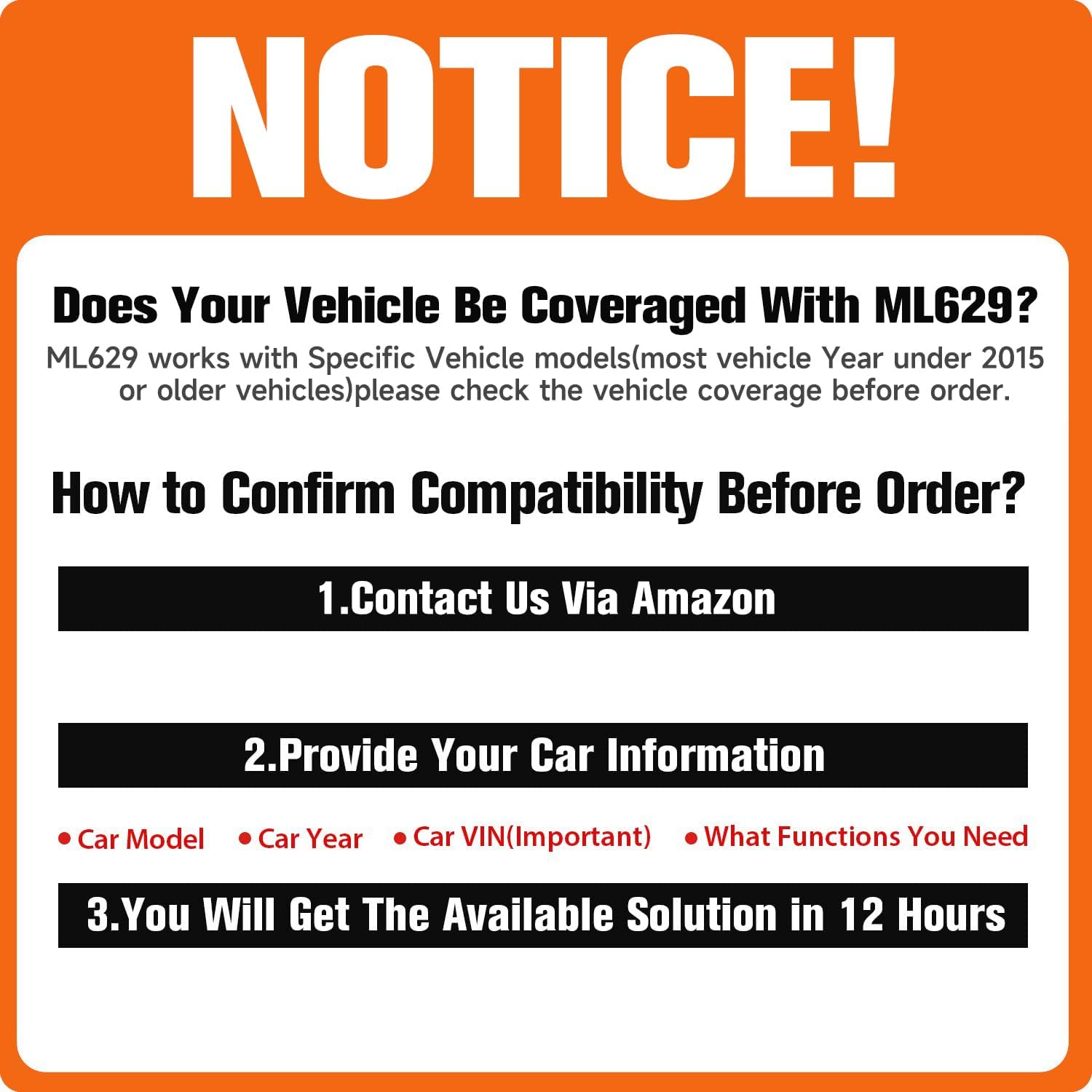
Image 7.1: A notice detailing the importance of checking vehicle compatibility for the ML629, especially concerning model years and specific functions.
7.2 Problemes comuns
- El dispositiu no s'encén: Ensure the OBDII cable is securely connected to the vehicle's DLC and the ignition is in the ON position. Check the vehicle's fuse for the OBDII port.
- Error de comunicació: Verify the vehicle's ignition is ON. Check for a secure connection. Ensure the vehicle is OBDII compliant. If issues persist, try on another compatible vehicle.
- Unable to clear codes: Some codes may be 'hard codes' that require a repair before they can be cleared. Ensure the underlying issue is resolved. Also, be aware of SGW limitations mentioned above.
8. Especificacions
| Característica | Especificació |
|---|---|
| Marca | Autel |
| Model | Autel ML629 |
| Pes de l'article | 0.01 unces |
| Dimensions del producte | 7.87 x 3.94 x 3.94 polzades |
| Sistema operatiu | Android 6.0 |
| UPC | 758232648216 |
| Data de primera disponibilitat | 10 de febrer de 2019 |
9. Garantia i Suport
9.1 Informació de la garantia
The Autel MaxiLink ML629 ABS/SRS scanner is backed by a 30-Day New Replacement & Full Refund Policy i ve amb a 1 anys de garantia des de la data de compra. Si us plau, conserveu el comprovant de compra per a reclamacions de garantia.
9.2 Suport tècnic
Autel provides 24/7 technical and sales support. If you encounter any issues or have questions regarding the operation of your ML629, please contact Autel customer support. For language change requests, please send your 12-digit Serial Number to Autelchoice@outlook.com to receive authorization.


