1. Introducció
This manual provides detailed instructions for the installation, operation, and maintenance of your Anlapus 8CH Full HD 720P HD-TVI Security Camera System. Please read this manual thoroughly before using the product to ensure proper setup and functionality. Keep this manual for future reference.
2. Contingut del paquet
Verifiqueu que tots els elements que s'enumeren a continuació s'inclouen al vostre paquet. Si falta algun element o hi ha algun malmès, poseu-vos en contacte amb l'atenció al client.

Image showing the contents included in the Anlapus 8CH Security Camera System package.
- 1 x 8CH DVR (Digital Video Recorder)
- 2 x HD-TVI Bullet Cameras
- 1 x ratolí USB
- 2 x 60ft BNC Cables (for camera connection)
- 1 x 1 to 4 Power Splitter Cable
- 2 x 12V Power Supplies (for DVR and cameras)
- 2 x Mounting Screw Bags
- 1 x Quick Start Guide (Instruction Manual)
- 2 adhesius d'advertència
3. Configuració
3.1 DVR Connections
Before powering on the DVR, connect all necessary peripherals as described below.

Diagram illustrating the rear panel connections of the Anlapus 8CH DVR, including video input, monitor/TV, audio input, network, USB, and power supply ports.
- Video Input (BNC): Connect the BNC cables from your cameras to these ports. The DVR supports up to 8 cameras.
- Monitor/TV (VGA/HDMI): Connect a monitor or TV using either the VGA or HDMI port for local viewing.
- Audio Input/Output (RCA): Connect external audio devices if required.
- Xarxa (RJ45): Connect an Ethernet cable from your router to this port for remote access and network features.
- USB (USB 2.0): Connect the included USB mouse for system navigation. Additional USB ports can be used for USB backup devices.
- Power Supply (DC 12V): Connect the DVR power adapter to this port and then to a power outlet.
3.2 Instal·lació de la càmera
The bullet cameras are designed for both indoor and outdoor use. Choose strategic locations that provide optimal coverage and are within reach of the provided BNC cables.

Image demonstrating various indoor and outdoor installation possibilities for the Anlapus bullet cameras, highlighting their suitability for different environments and conditions.
- Seleccioneu la ubicació: Identify areas requiring surveillance, considering factors like viewing angle, lighting, and proximity to power outlets.
- Muntatge: Use the provided mounting screws and anchors to securely attach the camera base to a wall or ceiling.
- Ajust d'angle: Afluixeu els cargols d'ajust del suport de la càmera per posicionar la càmera a la posició desitjada viewing angle, then tighten to secure.
- Encaminament de cables: Route the BNC cable from the camera to the DVR, ensuring cables are protected from damage and weather.
3.3 Cablejat del sistema
Follow these steps to connect your entire security system:
- Connect each camera's BNC connector to a Video Input port on the DVR.
- Connect the camera power cables to the 1-to-4 power splitter, then connect the splitter to one of the 12V power supplies.
- Connect the second 12V power supply to the DVR's DC 12V input.
- Connect your monitor/TV to the DVR via HDMI or VGA.
- Connect the USB mouse to a USB port on the DVR.
- For remote access, connect an Ethernet cable from your router to the DVR's Network port.
- Plug both 12V power supplies into electrical outlets. The system will power on.
4. Funcionament del sistema
4.1 Initial Setup and First-Time Wizard
Upon first power-on, the DVR will guide you through an initial setup wizard. This typically includes setting the language, date/time, creating an administrator password, and configuring network settings. Follow the on-screen prompts using the USB mouse.
4.2 Remote Access (Mobile App)
Access your security system remotely using the 365SECU mobile application.
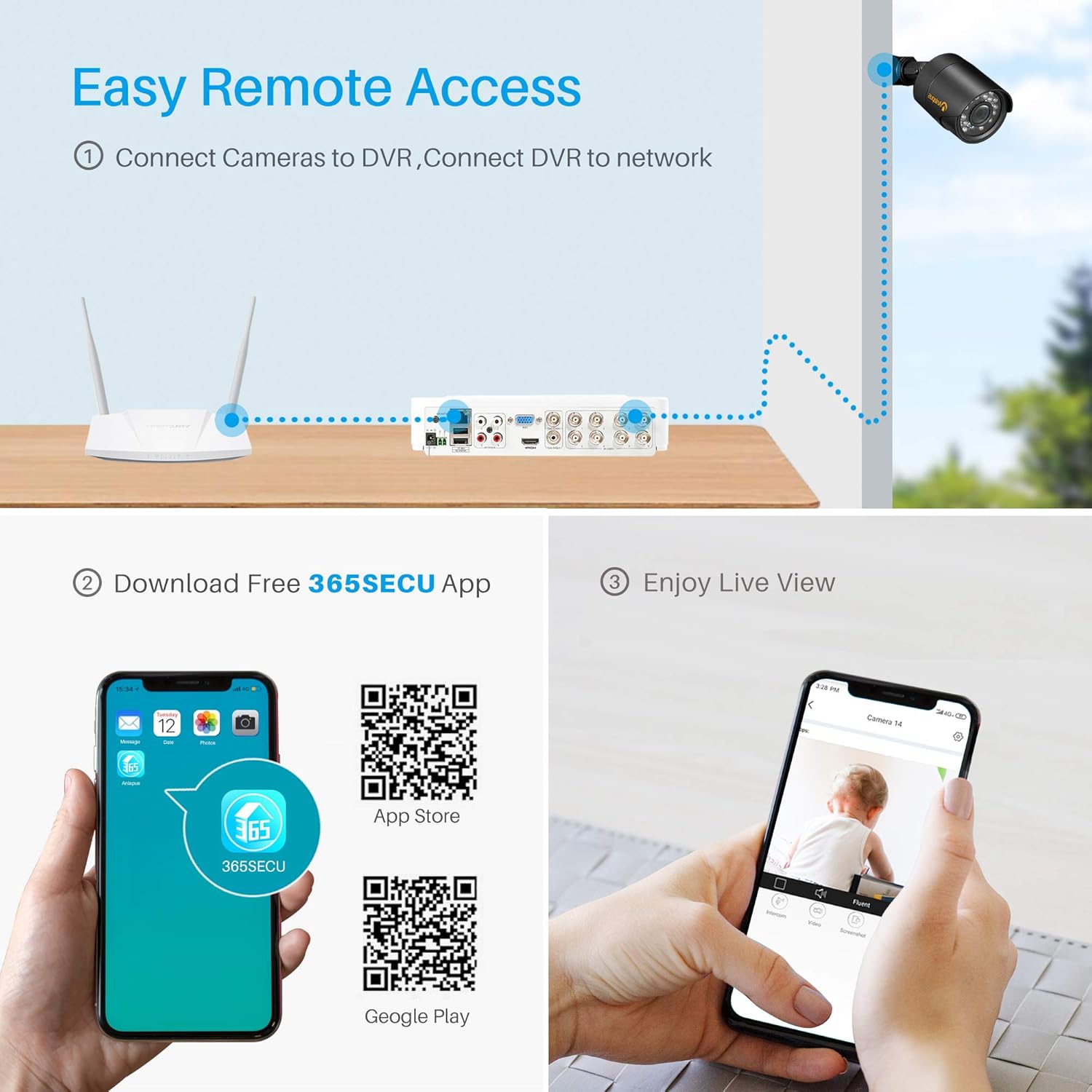
Diagram showing the process for remote access, including connecting cameras to DVR, DVR to network, downloading the 365SECU app, and viewen viu footage on a smartphone.
- Descarrega l'aplicació: Cerca "365SECU" in your smartphone's app store or scan the QR codes below.

Image displaying QR codes for downloading the 365SECU app from the App Store and Google Play, along with a smartphone screen showing the app interface.
- Per a Android: Google Play Store
- Per a iOS: Apple App Store
- Registra't/Inici de sessió: Create an account or log in to the 365SECU app.
- Afegeix un dispositiu: Follow the in-app instructions to add your DVR. This usually involves scanning a QR code displayed on the DVR's monitor or manually entering the device ID.
- Viu View: Un cop afegit, podeu view transmissions de càmera en directe, accés a menjar gravattage, and configure settings directly from your smartphone.
4.3 Motion Detection & Email Alert
Configure your system to detect motion and send alerts.

Image illustrating the motion detection and email alert feature, showing a camera detecting an intruder and the alert being displayed on a smartphone.
- Configuració d'accés: Navigate to the DVR's main menu, then to 'Alarm' or 'Motion Detection' settings.
- Activa la detecció de moviment: Activate motion detection for desired cameras.
- Define Area: Customize the detection area to reduce false triggers.
- Configure Email Alert: Enter your email server details and recipient email addresses to receive instant alerts when motion is detected.
4.4 Smart Playback Function
Review foo gravattage efficiently with the smart playback feature.

Image demonstrating the smart playback function, showing a monitor displaying recorded video timeline and individual snapshots for quick review.
- Access Playback: From the DVR's main menu, select 'Playback'.
- Seleccioneu data/hora: Choose the date and time range for the footage you wish to review.
- Cerca: The system will display a timeline with recorded events. You can quickly navigate through the timeline or use event markers to find specific moments.
4.5 Visió nocturna
The cameras are equipped with infrared (IR) LEDs for clear night vision, automatically activating in low-light conditions.

Comparison image showing the same outdoor scene during daytime (color) and nighttime (black and white with night vision active), illustrating the camera's night vision capability.
- Activació automàtica: The cameras automatically switch to black and white night vision mode when ambient light levels are insufficient.
- Interval IR: Ensure no obstructions block the IR LEDs for optimal night vision performance.
4.6 3D Digital Noise Reduction (3D DNR)
The cameras feature 3D Digital Noise Reduction technology to enhance image clarity in challenging lighting conditions.

Comparison image showing video quality without and with 3D Digital Noise Reduction, highlighting the reduction of noise interference in weak signal images.
- Improved Image Quality: 3D DNR reduces visual noise, especially in low-light environments, resulting in a cleaner and more detailed image.
- Emmagatzematge eficient: By reducing noise, the system can compress video more efficiently, saving storage space.
5. Manteniment
- Objectius de càmera: Regularly clean camera lenses with a soft, dry cloth to remove dust and smudges. Avoid abrasive cleaners.
- Connexions de cable: Periodically check all BNC and power connections for tightness and signs of wear or corrosion.
- Ventilació del DVR: Ensure the DVR is placed in a well-ventilated area to prevent overheating. Keep vents clear of dust.
- Actualitzacions de firmware: Comproveu el del fabricant weblloc web per obtenir actualitzacions de firmware disponibles per al vostre DVR per garantir un rendiment i una seguretat òptims.
- Estat del disc dur: If a hard drive is installed, monitor its health through the DVR's system settings to prevent data loss.
6. Solució De Problemes
| Problema | Causa possible | Solució |
|---|---|---|
| No es mostra vídeo al monitor | Loose video cable; Incorrect input selected on monitor; DVR not powered on. | Check HDMI/VGA cable connections; Select correct input source on monitor; Ensure DVR power adapter is connected and power light is on. |
| Sense imatge de càmera | Loose BNC cable; Camera not powered; Damaged cable/camera. | Check BNC cable connection at both camera and DVR; Verify camera power supply connection; Test with a known working cable/camera if possible. |
| L'accés remot no funciona | No network connection; Incorrect network settings; App not configured correctly. | Ensure Ethernet cable is connected to DVR and router; Check DVR network settings (DHCP enabled or static IP configured); Verify app device ID and network permissions. |
| Motion detection not triggering | Motion detection disabled; Sensitivity too low; Detection area not set. | Enable motion detection for the specific camera; Increase sensitivity; Define the detection area in DVR settings. |
| Sense enregistrament | No hard drive installed; Hard drive full; Recording schedule not set. | Install a compatible hard drive (not included); Format or replace hard drive; Configure recording schedule in DVR settings. |
7. Especificacions
| Característica | Detall |
|---|---|
| Marca | Anlapus |
| Número de model | 8KS-124W4-00-US |
| Tecnologia de connectivitat | Amb cable |
| Resolució de captura de vídeo | 1080p, 720p |
| Característiques especials | Motion Sensor, Night Vision, Waterproof |
| Nombre de canals | 8 |
| Capacitat d'emmagatzematge de memòria | 2 TB (Hard Drive Not Included) |
| Font d'alimentació | Elèctric amb cable |
| Operating System (DVR) | Android (for mobile app compatibility) |
| Dispositius compatibles | Cameras, Personal Computers, Smartphones, Tablets |
| Tecnologia de poca llum | Night color (refers to general night vision capability) |
| Mode d'enregistrament | Motion detection, Continuous, Schedule |
| Pes de l'article | 7.19 lliures |
| Dimensions del paquet | 11.4 x 11.4 x 8.2 polzades |
| UPC | 615068923699 |
8. Garantia i Suport
Anlapus products typically come with a limited warranty. For specific warranty terms, technical support, or service inquiries, please refer to the warranty card included in your package or visit the official Anlapus weblloc web. Conserveu el rebut de compra com a comprovant de compra per a reclamacions de garantia.


