1. Introducció
Thank you for choosing the TechniSat VIOLA 2 Portable DAB/FM Radio. This compact and versatile radio allows you to enjoy high-quality digital DAB+ and traditional FM radio broadcasts wherever you are. This manual provides essential information for setting up, operating, and maintaining your device to ensure optimal performance and longevity.

Image 1.1: The TechniSat VIOLA 2 radio positioned on a wooden table in an outdoor setting, highlighting its portability.
2. Informació de seguretat
Please read these safety instructions carefully before using the device and keep them for future reference.
- Font d'alimentació: Feu servir només l'adaptador de corrent proporcionat. Assegureu-vos que el volumtage coincideix amb els requisits de la vostra regió.
- Bateries: Use 4 x AA-LR6 batteries. Do not mix old and new batteries, or different types of batteries. Remove batteries if the device will not be used for an extended period.
- Aigua i humitat: No exposeu el dispositiu a la pluja, la humitat ni a líquids que gotegen o esquitxen. No col·loqueu objectes plens de líquids, com ara gerros, a sobre del dispositiu.
- Calor: Mantingueu el dispositiu allunyat de fonts de calor com ara radiadors, registres de calor, estufes o altres aparells (inclosos amplificadors) que produeixen calor.
- Ventilació: Assegureu-vos que hi hagi una ventilació adequada. No bloquegeu cap obertura de ventilació.
- Neteja: Desconnecteu l'alimentació abans de netejar. Feu servir un drap suau i sec. No utilitzeu netejadors líquids ni netejadors en aerosol.
- Manteniment: No intenteu atendre aquest producte vosaltres mateixos. Consulteu tots els serveis a personal de servei qualificat.
3. Contingut del paquet
Carefully unpack the box and ensure all items are present and in good condition:
- TechniSat VIOLA 2 Portable DAB/FM Radio
- Adaptador d'alimentació (6 V CC)
- Manual d'usuari (aquest document)
Note: 4 x AA-LR6 batteries are required for portable use and are not included in the package.
4. Producte acabatview
Familiarize yourself with the various parts and controls of your VIOLA 2 radio.

Imatge 4.1: Frontal view of the TechniSat VIOLA 2, displaying the speaker grille, LCD screen, and control buttons.
4.1 Controls del panell frontal
- Ponent: Altaveu integrat per a la sortida d'àudio.
- Pantalla LCD: Two-line display showing station information, time, and menu options.
- Botó On/Off: Encén o apaga el dispositiu.
- Volume/Enter Knob: Rotate to adjust volume, press to confirm selections.
- Tune +/- Buttons: Used for manual tuning or navigating menus.
- Botó DAB/FM: Switches between DAB+ and FM radio modes.
- Botó d'informació/menú: Displays additional information or accesses the menu settings.

Imatge 4.2: Una imatge detallada view of the control buttons and rotary knob on the TechniSat VIOLA 2, illustrating its simple operation.
4.2 Connexions del panell posterior

Image 4.3: The rear panel of the radio, showing the headphone output and the DC 6V power input.
- Presa d'auriculars (3.5 mm): Per a una escolta privada.
- Entrada DC 6V: Connecteu aquí l'adaptador de corrent proporcionat.
- Compartiment de la bateria: Located on the rear, for 4 x AA batteries.
- Antena telescòpica: Esteneu-lo per a una recepció de ràdio òptima.
5. Configuració
5.1 Alimentació del dispositiu
The VIOLA 2 can be powered by the included mains adapter or by batteries for portable use.
5.1.1 Alimentació de la xarxa
- Insert the small plug of the power adapter into the DC 6V input on the rear of the radio.
- Connecteu l'adaptador d'alimentació a una presa de corrent estàndard.
5.1.2 Potència de la bateria
- Obriu la tapa del compartiment de la bateria a la part posterior de la ràdio.
- Insert 4 x AA-LR6 batteries, ensuring correct polarity (+/-).
- Tanqueu bé la tapa del compartiment de la bateria.
5.2 Ajust de l'antena
For optimal reception, fully extend the telescopic antenna. Adjust its position and angle to achieve the best signal quality, especially in FM mode or areas with weaker DAB+ signals.
6. Instruccions de funcionament
6.1 Encesa/apagada
Premeu el botó On/Off botó per encendre o apagar la ràdio.
6.2 Mode Selection (DAB/FM)
Premeu el botó DAB/FM button to switch between DAB+ digital radio mode and FM analog radio mode.
6.3 Escaneig d'estacions
6.3.1 DAB+ Auto Scan
When you first turn on the radio in DAB+ mode, it will automatically perform a full scan for available stations. If you move to a new location or wish to refresh the station list:
- Assegureu-vos que la ràdio estigui en mode DAB+.
- Manteniu premut el botó Informació/Menú botó per entrar al menú.
- Gira el Volume/Enter knob to select "Full Scan" and press the knob to confirm.
- The radio will scan and update the station list.
6.3.2 FM Auto Scan
En mode FM:
- Assegureu-vos que la ràdio estigui en mode FM.
- Manteniu premut el botó Sintonitza +/- buttons. The radio will scan for the next available station.
6.4 Control de volum
Gira el Volume/Enter knob to adjust the listening volume.
6.5 Ús d'auriculars
Connecteu uns auriculars estàndard de 3.5 mm a la presa d'auriculars de la part posterior de la ràdio per escoltar-la en privat. L'altaveu intern es silenciarà automàticament quan hi hagi auriculars connectats.
6.6 Mostra informació

Image 6.1: A close-up of the radio's two-line LCD display, showing current station and program information.
The two-line LCD display provides various information depending on the mode:
- Mode DAB+: Station name, program type, scrolling text (DLS), signal strength, time, date.
- Mode FM: Frequency, station name (if RDS available), program type (if RDS available), time, date.
Premeu el botó Informació/Menú button repeatedly to cycle through available display information.
7. Manteniment
7.1 Neteja
Wipe the radio with a soft, dry, lint-free cloth. Do not use abrasive cleaners, waxes, or solvents as they may damage the finish.
7.2 Substitució de la bateria
When the battery indicator on the display shows low power, replace all four AA batteries with new ones. Ensure the radio is turned off or connected to mains power before replacing batteries.
8. Solució De Problemes
| Problema | Causa possible | Solució |
|---|---|---|
| Sense poder | Adaptador de corrent no connectat; piles esgotades o inserides incorrectament. | Check power adapter connection; Replace batteries or ensure correct polarity. |
| Sense so | Volume too low; Headphones connected; Mute activated. | Increase volume; Disconnect headphones; Check for mute function (if applicable). |
| Poor reception (DAB+/FM) | Antenna not extended or poorly positioned; Weak signal area. | Fully extend and adjust the telescopic antenna; Try moving the radio to a different location. Perform a full scan in DAB+ mode. |
| DAB+ stations missing | Not all stations scanned; Moved to a new area. | Perform a full scan (see Section 6.3.1). |
| La pantalla no funciona | Device off; Faulty unit. | Ensure device is on; If problem persists, contact customer support. |
9. Especificacions
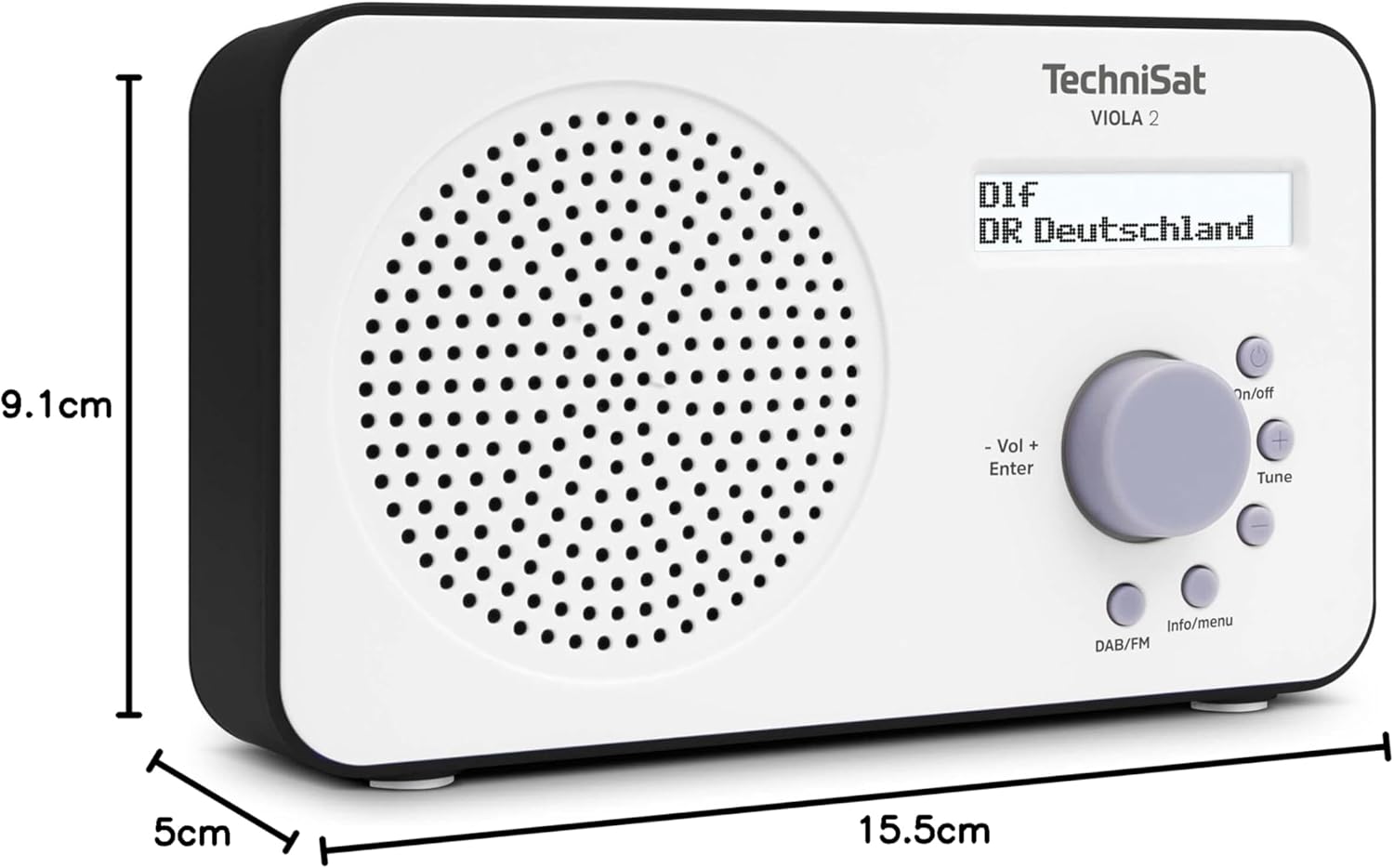
Image 9.1: The TechniSat VIOLA 2 radio with its physical dimensions indicated.
- Model: VIOLA 2
- Fabricant: TechniSat
- Número de model: 0000/3906
- Dimensions del producte (L x P x A): 15.5 x 5 x 9.1 cm
- Pes: 338 g
- Bandes de ràdio compatibles: DAB+, FM (with RDS and PLL)
- Tecnologia del sintonitzador: DAB/FM
- Sortida de l'altaveu: 1 watts RMS
- Visualització: Two-line LCD with backlight
- Connectivitat: 3.5mm Headphone Jack (AUX)
- Font d'alimentació: Corded Electric (6V DC adapter) and Battery Powered
- Bateries: 4 x AA-LR6 (not included)
- Característiques especials: Automatic station search, electronic volume control
- País d'origen: Xina
10. Garantia i Suport
TechniSat products are designed for reliability and performance. For warranty information, please refer to the warranty card included with your purchase or visit the official TechniSat website. If you encounter any issues not covered in this manual, please contact TechniSat customer support for assistance.
You can find contact details and further support resources on the official TechniSat weblloc: www.technisat.com


