Producte acabatview
The Flexson TV Mount Attachment for Sonos Beam is designed to seamlessly integrate your Sonos Beam soundbar with your television, especially when using an existing TV wall mount. This attachment ensures that the Sonos Beam moves in conjunction with your TV, providing optimal sound alignment regardless of your TV's position.

Image: The Flexson TV Mount Attachment shown installed, connecting a Sonos Beam soundbar directly below a television mounted on a wall.
- Allows a Sonos Beam to be added to an existing TV wall mount.
- Bespoke design securely holds the Sonos Beam.
- Enables the Sonos Beam to move with your TV when using a full-motion mount.
- Offers vertical and horizontal adjustment for perfect alignment with the screen.
Configuració i instal·lació
Follow these steps to properly install your Flexson TV Mount Attachment for Sonos Beam. Ensure all components are present before beginning installation.
Comprovació de components:
- 1 x TV Mount Attachment (main bracket and arms)
- All necessary screws and fixings (refer to included hardware pack)
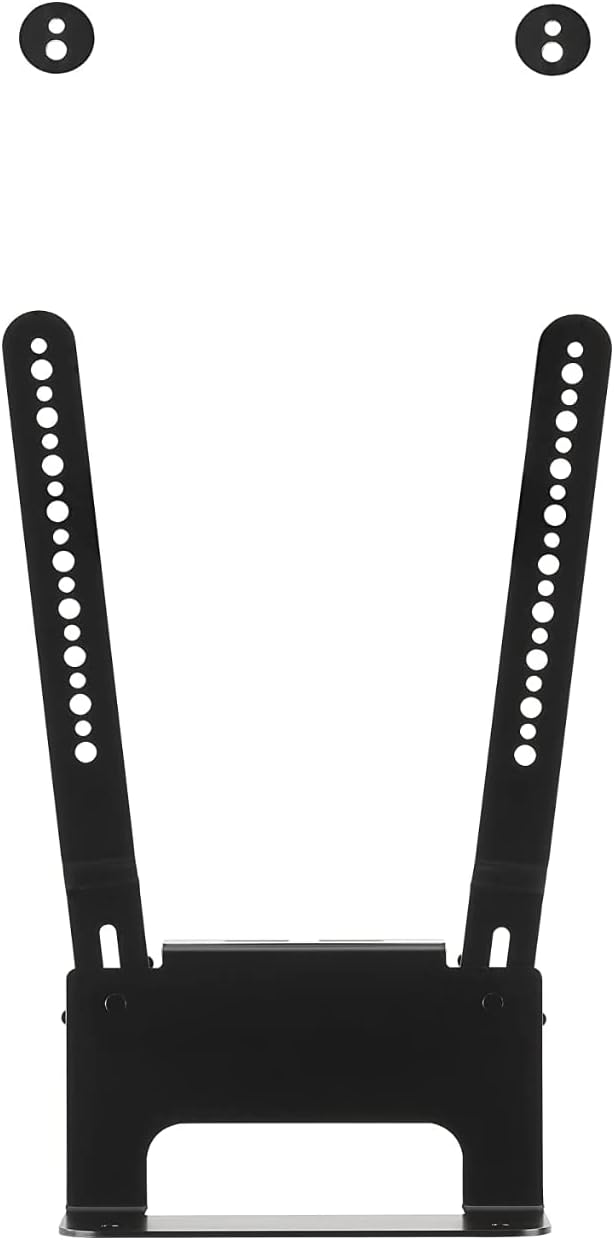
Image: The Flexson TV Mount Attachment bracket, showing its design and mounting holes.
Passos d'instal·lació:
- Prepare your TV and existing mount: Ensure your TV is securely mounted and accessible. If you are installing a new TV mount, complete that installation first according to its instructions.
- Attach the Flexson Mount to the TV mount: The Flexson TV Mount Attachment is designed to connect to the VESA mounting points on the back of your television, typically alongside or below your existing TV wall mount's arms. Align the attachment's arms with the appropriate VESA holes on your TV.
- Secure the Sonos Beam: Carefully place your Sonos Beam into the cradle of the Flexson attachment. Ensure it sits snugly and is aligned correctly.
- Fasten the Sonos Beam: Use the provided screws and hardware to secure the Sonos Beam to the attachment. Refer to the specific instructions in your product's packaging for precise screw locations and tightening specifications.
- Adjust for optimal alignment: The attachment allows for vertical and horizontal adjustments. Once the Sonos Beam is secured, make fine adjustments to ensure it is perfectly aligned with the bottom edge of your television screen. This optimizes both aesthetics and sound projection.

Imatge: Part posterior view of a television with the Flexson TV Mount Attachment and Sonos Beam installed, demonstrating how the soundbar integrates with the TV mount.
Funcionament
The Flexson TV Mount Attachment is designed for passive operation, meaning it functions by holding your Sonos Beam in a fixed position relative to your television. Its primary operational benefit is allowing the Sonos Beam to move in sync with your TV if your TV is on an articulating or full-motion wall mount.
- Synchronized Movement: When your TV mount is adjusted (e.g., tilted, swiveled, or extended), the Sonos Beam will move along with the TV, maintaining its position directly below the screen. This ensures that the sound is always directed towards the viewzona d'ing.
- Alignment Adjustment: After initial installation, you can make minor vertical and horizontal adjustments to the attachment to achieve perfect alignment of the Sonos Beam with your TV screen. This is typically a one-time setup process.
Cura i Manteniment
To ensure the longevity and appearance of your Flexson TV Mount Attachment, follow these simple care and maintenance guidelines:
- Neteja: Use a soft, dry cloth to wipe down the mount. For stubborn marks, a slightly damp cloth can be used, followed by immediate drying. Avoid abrasive cleaners, solvents, or harsh chemicals, as these can damage the finish.
- Inspecció: Periodically check all screws and connections to ensure they remain tight and secure. Over time, vibrations or adjustments may cause fasteners to loosen.
- Límit de pes: Do not attempt to attach any devices other than the Sonos Beam to this mount. Exceeding the intended load can compromise the mount's integrity and safety.
Resolució de problemes
If you encounter any issues with your Flexson TV Mount Attachment, consider the following common solutions:
- Sonos Beam not level: Check the vertical and horizontal adjustment points on the mount. Ensure all screws securing the Beam to the mount are tightened evenly.
- La muntura se sent fluixa: Verify that all screws connecting the Flexson attachment to your TV's VESA points and the Sonos Beam are securely fastened. If the TV mount itself feels loose, refer to your TV mount's instruction manual.
- Difficulty aligning: Ensure your TV is positioned correctly on its mount. Then, use the fine adjustment features of the Flexson attachment to achieve the desired alignment.
- Peces que falten: If any parts were missing upon unboxing, contact Flexson customer support immediately.
For issues not covered here, please refer to the Warranty and Support section for contact information.
Especificacions del producte
| Especificació | Detall |
|---|---|
| Dimensions del producte | 12.99 x 4.72 x 5.12 polzades |
| Pes de l'article | 2.68 lliures |
| Número de model | FLXBTV1021 |
| Factor de forma | Adjunt de muntatge de TV |
| Color | Negre |
| Material | Metall |
| Tipus de muntatge | Muntatge de paret |
| Tipus de moviment | Articulating (when paired with an articulating TV mount) |
| Dispositius compatibles | Sonos Beam, Television |
| Què hi ha a la caixa | 1 x TV Mount Attachment |
| Fabricant | Flexson |
| Data de primera disponibilitat | 16 de juliol de 2018 |
| UPC | 706352961111 |
Garantia i Suport
For information regarding product warranty, returns, or technical support, please contact Flexson directly. Details are typically provided with your product packaging or can be found on the official Flexson weblloc.
You can visit the official Flexson store for more information: Flexson Store on Amazon


