1. Introducció
This manual provides detailed instructions for the installation, operation, and maintenance of your Utilitech 240-Degree 2-Head Halogen Motion-Activated Flood Light with Timer. Please read this manual thoroughly before installation and retain it for future reference.
This flood light is designed for outdoor security lighting, featuring a 240-degree motion detection range and adjustable timer settings. Its durable white-powder coated aluminum construction ensures longevity.
2. Informació de seguretat
AVÍS: Risc de descàrrega elèctrica. Desconnecteu l'alimentació al fusible o al disjuntor abans de la instal·lació o el manteniment.
- Assegureu-vos que totes les connexions del cablejat estiguin segures i aïllades correctament.
- Aquest producte s'ha d'instal·lar d'acord amb el codi d'instal·lació aplicable per una persona familiaritzada amb la construcció i el funcionament del producte i els perills que comporta.
- No instal·leu a prop de materials combustibles.
- Use only bulbs specified in this manual.
- Avoid touching bulbs with bare hands during installation or replacement, as oils can reduce bulb life.
- Fixture may become hot during operation. Allow to cool before handling.
- Apte per a ús en llocs humits.
3. Contingut del paquet
Carefully unpack your flood light and ensure all items are present:
- 1 x Utilitech 2-Head Motion-Activated Flood Light Unit
- 1 x Mounting Hardware Kit (screws, wire nuts, gasket)
- 1 x manual d'instruccions
Note: Two 150-watt medium base halogen bulbs are required and not included.
4. Producte acabatview
Familiarize yourself with the components of your flood light:
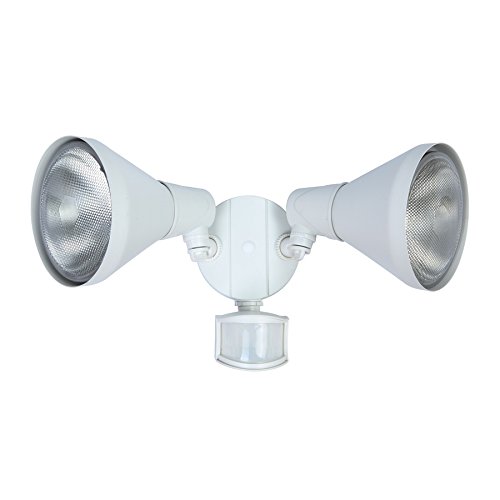
Figura 1: Davant view of the Utilitech 2-Head Motion-Activated Flood Light. It features two adjustable lamp heads and a motion sensor located below the central mounting plate.
- Lamp Caps: Two adjustable heads for directing light.
- Sensor de moviment: Detects movement within its 240-degree, 70-foot range.
- Control del temporitzador: Located on the sensor, allows adjustment of light duration (1, 3, or 10 minutes).
- Light Shields: Provide additional bulb protection.
- Placa de muntatge: For wall or eave installation.
5. Configuració i instal·lació
5.1. Eines necessàries (no incloses)
- Tornavís
- Pelafils
- Alicates
- Caulking Gun and Weatherproof Sealant
5.2. Ubicació de muntatge
- Choose a wall or eave location that provides the desired coverage area for motion detection.
- Ensure the mounting surface is sturdy and can support the fixture's weight.
- Avoid mounting near reflective surfaces or heat sources that could trigger the motion sensor falsely.
5.3. Instruccions de cablejat
- Apagueu l'alimentació: Locate the circuit breaker or fuse box and turn off the power to the area where you will be installing the flood light.
- Preparació del cablejat: If replacing an existing fixture, disconnect it. Strip approximately 3/4 inch of insulation from the ends of the house supply wires.
- Connecteu els cables:
- Connecteu el negre cable (calent) des del dispositiu fins al negre (hot) wire from the supply using a wire nut.
- Connecteu el blanc cable (neutre) des de l'aparell fins a la blanc (neutral) wire from the supply using a wire nut.
- Connecteu el verd o cable de coure nu (terra) des del dispositiu fins al verd or bare copper (ground) wire from the supply using a wire nut.
- Secure fixture: Carefully tuck all wires into the junction box. Mount the flood light fixture to the junction box using the provided mounting hardware. Ensure the gasket is properly seated to prevent moisture entry.
- Segell: Apply weatherproof sealant around the edges of the mounting plate where it meets the wall/eave to prevent water intrusion.
5.4. Instal·lació de bombetes
- Ensure power is still off.
- Unscrew the protective covers from the lamp caps.
- Insert two 150-watt medium base (E-26) PAR38 bulbs into the sockets. Compatible bulb types include PAR38 LED, PAR38 incandescent, PAR38 halogen, and PAR38 dimmable CFL.
- Screw the protective covers back onto the lamp caps.
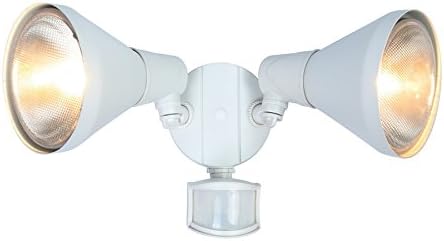
Figura 2: Primer pla view of one lamp head, showing the bulb housing and light shield. This image highlights the design of the individual light units.
6. Instruccions de funcionament
6.1. Encès
Once installation is complete, restore power at the circuit breaker. The flood light will enter a warm-up period, typically lighting up for a short duration before settling into motion-sensing mode.
6.2. Adjusting Lamp Caps
Les dues lamp heads are adjustable. Loosen the adjustment screws on each head, position the light to cover your desired area, and then tighten the screws securely.
6.3. Ajust del sensor de moviment
The motion sensor detects movement within a 240-degree field up to 70 feet. The sensitivity of the sensor may be adjustable (refer to the sensor unit for specific dials if present). Test the detection range by walking through the desired coverage area.
6.4. Configuració del temporitzador
The integrated timer allows you to set how long the light remains on after motion is detected. The available settings are 1, 3, or 10 minutes. Locate the timer dial on the motion sensor and rotate it to your preferred duration.
6.5. Anul·lació manual
This flood light features a manual override option, allowing it to operate constantly for a selected period. To activate manual override, quickly turn the wall switch OFF and then ON. The light will stay on continuously. To return to motion-sensing mode, turn the wall switch OFF for approximately 10 seconds, then turn it back ON. The light will then revert to automatic motion-activated operation.
7. Manteniment
7.1. Neteja
- Assegureu-vos que l'alimentació estigui apagada abans de netejar.
- Netegeu l'aparell amb un drap suauamp tela. No utilitzeu netejadors abrasius ni dissolvents.
- Keep the motion sensor lens clean to ensure optimal performance.
7.2. Substitució de bombetes
- Always turn off power at the circuit breaker before replacing bulbs.
- Deixeu que les bombetes es refredin completament abans de tocar-les.
- Unscrew the protective covers and carefully remove the old bulbs.
- Install new 150-watt medium base (E-26) PAR38 bulbs. Avoid touching new bulbs with bare hands.
- Replace protective covers and restore power.
8. Solució De Problemes
| Problema | Causa possible | Solució |
|---|---|---|
| La llum no s’encén. |
|
|
| La llum es manté encesa contínuament. |
|
|
| La llum s’encén sense cap motiu aparent. |
|
|
9. Especificacions
| Número de model | 6211W-PIR26B |
| Marca | Utilitech |
| Font d'alimentació | Cablejat (elèctric amb cable) |
| Wattage | 300 watts (total, 2 x 150W bulbs) |
| Tipus de bombeta | Halogen (compatible with PAR38 LED, incandescent, halogen, dimmable CFL) |
| Base del bulb | Medium base (E-26) |
| Angle de detecció de moviment | 240-Grau |
| Interval de detecció | 70 peus |
| Configuració del temporitzador | 1, 3, 10 minuts |
| Material | Aluminum (white-powder coated) |
| Acabat de l'aparell | Mat |
| Dimensions (A x A x P) | 7.48 x 16.34 x 6.61 polzades |
| Pes | 1.21 lliures (0.55 kg) |
| Llistat de seguretat | Llistat de seguretat ETL |
| Característiques especials | Dimmable (with compatible bulbs), Motion Sensor, Manual Override |
10. Garantia
This Utilitech flood light is covered by a Garantia limitada d'5 any from the date of purchase. This warranty covers defects in materials and workmanship under normal use. It does not cover damage resulting from improper installation, accident, misuse, abuse, or unauthorized modifications.
Conserveu el vostre comprovant de compra per a reclamacions de garantia.
11. Atenció al client
If you have any questions, require assistance with installation, or encounter issues not covered in this manual, please contact Utilitech customer support. Refer to your product packaging or the Utilitech weblloc web per obtenir informació de contacte actualitzada.
For efficient service, please have your product model number (6211W-PIR26B) and date of purchase available.


