Introducció
Thank you for choosing the Bozily Golf & Hunting Laser Rangefinder. This device is engineered for precision, offering 6X magnification and accurate distance measurements up to 1000 yards. It features advanced slope compensation technology and fast flag-lock capabilities, making it an essential tool for golf, hunting, and various outdoor activities. This manual provides detailed instructions for setup, operation, maintenance, and troubleshooting to ensure optimal performance and longevity of your rangefinder.

Imatge: The Bozily Golf and Hunting Laser Rangefinder, showcasing its compact design with white, red, and black accents. The device features two optical lenses on the front and a textured grip for comfortable handling.
Components inclosos
- 1x Bozily Golf Rangefinder
- 1x estoig de transport
- 2x CR2 Battery (one for use, one spare)
- 1x cordó
- 1x drap de neteja
- 1x Manual d'usuari (aquest document)
- 1x Caixa de colors
Configuració
Instal·lació de la bateria
The Bozily Rangefinder uses one CR2 battery. A spare battery is included.
- Localitza la tapa del compartiment de la bateria, que normalment es troba al lateral o a la part inferior del dispositiu.
- Gireu o feu lliscar la tapa per obrir el compartiment.
- Insert one CR2 battery, ensuring the positive (+) and negative (-) terminals align correctly with the indicators inside the compartment.
- Tanqueu bé la tapa del compartiment de la bateria.
Nota: Ensure the battery is seated firmly to prevent intermittent power issues.
Instruccions de funcionament
Encès/Apagat
- To power on the device, press the Power/Measurement button (usually located on top).
- El dispositiu s'apagarà automàticament després d'un període d'inactivitat per estalviar bateria.
Ajust d'enfocament
Rotate the eyepiece (diopter adjustment) to achieve a clear view of the display and target.
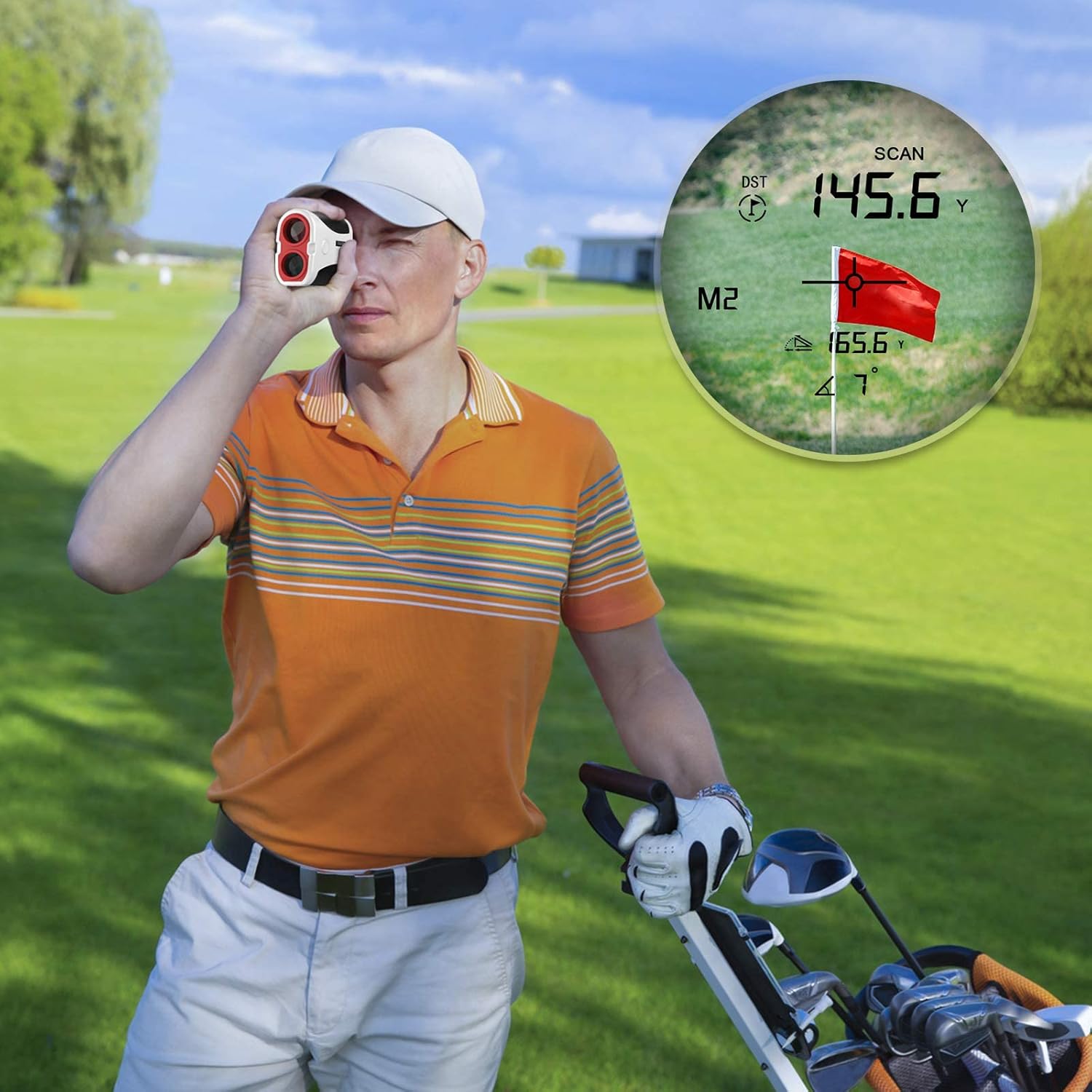
Imatge: A person using the Bozily rangefinder, with an overlay showing the internal display. The display indicates distance (DST), scan mode (SCAN), and a flag target, demonstrating how measurements are presented to the user.
Canvi d'unitats de mesura (iardes/metres)
To switch between yards (Y) and meters (M), press and hold the "MODE" button for approximately 3 seconds. The unit displayed on the LCD will change.
Modes d’escaneig
The rangefinder offers two primary scan modes:
- General Mode (Mode 1): Fast Continuous Scan
This mode is designed for quick and continuous measurement of distances to various objects. Press and hold the Power/Measurement button, and slowly pan the rangefinder across different targets. The distance readings will update continuously in real-time. This mode provides the actual linear distance to the target.

Imatge: An illustration of the Bozily rangefinder's Mode 1, demonstrating continuous scan. Three separate views through the eyepiece show different distance readings (55.6 Y, 125.6 Y, 95.6 Y) as the user scans across a golf course, highlighting the real-time measurement capability.
- Slope Mode (Mode 2): Slope Compensation & Flag-Lock with Vibration
This mode is ideal for golf, providing both the actual distance and a slope-adjusted distance, along with the angle of elevation or depression. When targeting a flag, the Flag-Lock feature will identify the closest object (the flagstick) and vibrate to confirm the lock, ensuring you get the precise distance to the pin. This mode is suitable for practice rounds and general play where slope compensation is desired.

Imatge: A golfer using the Bozily rangefinder in Mode 2, which supports slope and flag vibration. The image shows two views through the eyepiece: one displaying the direct distance (DST) and another showing the slope-adjusted distance (M2) along with the angle, illustrating the device's advanced measurement capabilities for golf.
Precisió: The rangefinder provides an accuracy of ±1 yard for distances up to 1000 yards.

Imatge: A person holding the Bozily rangefinder to their eye, with text overlay emphasizing "High-Speed Reading, Laser Rangefinder With Accuracy Of ±1 Yard." This image highlights the user experience and the precision of the device.
Manteniment
Neteja
- Use the provided cleaning cloth to gently wipe the lenses and the body of the rangefinder.
- Do not use abrasive materials, alcohol, or organic solvents, as these can damage the optical coatings and surface finish.
- For stubborn dirt, a small amount of lens cleaning fluid designed for optics can be applied to the cloth, not directly to the lens.
Emmagatzematge
- When not in use, store the rangefinder in its carrying case to protect it from dust, moisture, and physical impact.
- Emmagatzemar en un lloc fresc i sec, allunyat de la llum solar directa i de temperatures extremes.
- If storing for extended periods, it is recommended to remove the battery to prevent leakage.
Resolució de problemes
| Problema | Causa possible | Solució |
|---|---|---|
| El dispositiu no s'encén. | La bateria està morta o mal instal·lada. | Replace the CR2 battery or ensure it is inserted with correct polarity. Check for firm contact. |
| Lectures inexactes o inconsistents. | Unstable aiming; environmental factors (fog, heavy rain); target too small or reflective; battery low. | Ensure stable aiming. Avoid using in severe weather. Target a larger object if possible. Replace battery. |
| Display is blurry or unclear. | Eyepiece not adjusted; lenses are dirty. | Rotate the eyepiece to adjust diopter. Clean the lenses with the provided cloth. |
| Flag-Lock not working effectively. | Multiple objects in line of sight; flag too far. | Ensure the flag is the primary target and there are no closer objects. Try scanning slowly around the flag. |
Especificacions
| Característica | Detall |
|---|---|
| Ampliació | 6X |
| Interval de distància | 5-1000 iardes |
| Precisió | ± 1 iardes |
| Tipus làser | Class 1, 905nm |
| Angle de camp | 7 graus |
| Tipus de visualització | Pantalla digital LCD |
| Modes d’escaneig | General (Continuous Scan), Slope (Slope Compensation & Flag-Lock) |
| Unitat de mesura | Yards / Meters (switchable) |
| Dimensions (L x A x A) | 103 mm x 39 mm x 72 mm (4.06 x 1.54 x 2.83 polzades) |
| Pes | 185 g (6.53 oz) |
| Material | PC+ABS |
| Tipus de bateria | 1x CR2 (inclòs) |
| Resistència a l'aigua | Resistent a l'aigua (IP65) |
Garantia i Suport
Informació de la garantia
Your Bozily Golf & Hunting Laser Rangefinder comes with a 12-month warranty covering any product defects and customer dissatisfaction.
Política de devolució
A 30-day return policy is available via Amazon for eligible purchases. Please refer to Amazon's return policy for specific details.
Atenció al client
For any questions, technical support, or warranty claims, please contact Bozily customer service. When contacting support, please provide your order number and a detailed description of your inquiry.
Bozily aims to provide a 24-hour reply to all customer inquiries.


