Introducció
The DIGOO DG-TH8380 is a multifunctional wireless weather station designed to monitor indoor and outdoor temperature and humidity. It features a large LCD touchscreen display with a soft eye-care white backlight, a weather forecast function, and supports up to three outdoor sensors. This manual provides detailed instructions for setup, operation, maintenance, and troubleshooting.

Image: The DIGOO DG-TH8380 main display unit and its accompanying wireless outdoor sensor. The main unit shows time, indoor temperature and humidity, outdoor temperature and humidity, and a weather forecast icon. The outdoor sensor displays its current temperature and channel.
Contingut del paquet
Verifiqueu que tots els elements que s'enumeren a continuació s'inclouen al vostre paquet:
- 1 x DIGOO DG-TH8380 Wireless Touch Screen Weather Station Clock (Main Unit)
- 1 x DIGOO DG-TH8380 Wireless Outdoor Sensor
- 1 x DIGOO DG-TH8380 Full English User Manual
- 1 x USB Power Cable (Note: Charger and batteries are not included)
Especificacions
| Característica | Descripció |
|---|---|
| Dimensions de la unitat principal | 14.1 cm x 9.4 cm x 2.2 cm (5.6" x 3.7" x 0.9") |
| Mostra | LCD Touch Screen with Soft Eye-Care White Backlight |
| Rang de temperatura interior | 0 °C ~ 50 °C (32 °F ~ 122 °F) |
| Interval de temperatura exterior | -40 °C ~ +60 °C (-40 °F ~ 140 °F) |
| Rang d'humitat (interior i exterior) | 20% HR ~ 90% HR |
| Distància de transmissió sense fils | Fins a 100 metres (328 peus) en zona oberta |
| Font d'alimentació (unitat principal) | 3 x AAA batteries or USB cable (batteries not included) |
| Font d'alimentació (sensor remot) | 2 x AAA batteries (batteries not included) |
| Opcions de muntatge | Desktop stand or Wall-mount |
| Característiques especials | Touchscreen, Weather Forecast, 12/24 Hour Time, Calendar, Max/Min Temperature/Humidity Record, Low Battery Indicator, Supports up to 3 outdoor sensors |

Imatge: Un cop mésview showing the dimensions of the main unit (141mm x 95mm x 24mm) and various features including wall-mount capability, a table stand, battery power option, and the remote sensor.
Configuració
1. Alimentació de la unitat principal
- Obriu el compartiment de la bateria a la part posterior de la unitat principal.
- Introduïu 3 piles AAA, assegurant-vos de la polaritat correcta (+/-).
- Alternatively, connect the provided USB cable to the main unit and a USB power adapter (not included) for continuous power. Note: When powered by USB, the backlight will remain on. When battery-powered, the backlight activates for 20 seconds by pressing the top button.
- Tanqueu el compartiment de la bateria.
2. Alimentació del sensor exterior
- Obriu el compartiment de la bateria a la part posterior del sensor exterior.
- Introduïu 2 piles AAA, assegurant-vos de la polaritat correcta (+/-).
- Tanqueu el compartiment de la bateria.
3. Pairing the Sensor(s)
The main unit will automatically search for the outdoor sensor upon initial power-up. Ensure the sensor is within range. If pairing does not occur automatically or if adding additional sensors:
- Place the outdoor sensor near the main unit during the pairing process.
- On the outdoor sensor, select a channel (1, 2, or 3) using the channel switch inside the battery compartment.
- On the main unit, press the "CH" touch button to cycle through channels until the desired sensor channel is displayed. The main unit supports up to 3 outdoor sensors.
- Allow a few minutes for the sensor to transmit data to the main unit.
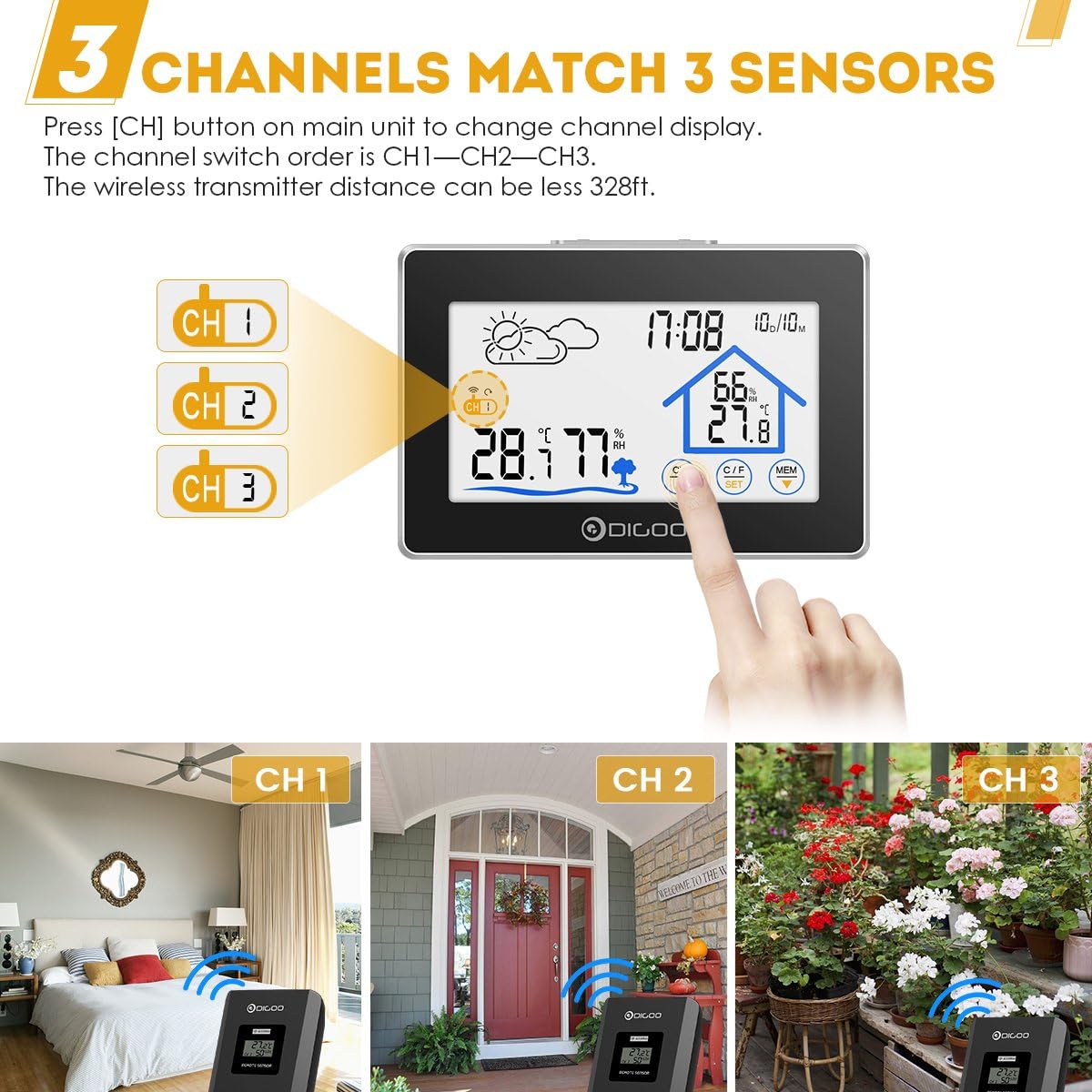
Image: The main unit display showing three channel indicators (CH 1, CH 2, CH 3) and a finger pressing the "CH" button to switch between them. This illustrates the multi-sensor capability.
4. Col·locació
- Unitat principal: Place the main unit on a flat surface using its integrated stand or mount it on a wall using the hanging hole on the back. Choose a location away from direct sunlight or heat sources for accurate indoor readings.
- Sensor exterior: Place the outdoor sensor in a shaded, dry location, protected from direct rain and sunlight, to ensure accurate outdoor temperature and humidity readings. Ensure it is within the 100-meter wireless transmission range of the main unit.
Instruccions de funcionament
Visualització finalitzadaview

Imatge: Una imatge detallada view of the main unit's LCD screen with labels pointing to key display elements: Weather Icon, Channel Display, Outdoor Temperature & Humidity, Backlight Button, Time & Date, Indoor Temperature & Humidity, and Touch Switch Buttons.
- Weather Icon: Displays current weather forecast (Sunny, Partly Cloudy, Cloudy, Rainy).
- Hora i data: Shows current time (12/24 hour format) and calendar.
- Temperatura i humitat interiors: Displays readings from the main unit's internal sensor.
- Temperatura i humitat exteriors: Displays readings from the currently selected outdoor sensor.
- Visualització del canal: Indicates which outdoor sensor channel (CH1, CH2, or CH3) is currently being displayed.
Funcions del botó tàctil
The DIGOO DG-TH8380 features sensitive touch buttons for easy operation:
- CH (Channel) Button: Touch to switch between outdoor sensor channels (CH1, CH2, CH3).
- °C/°F (Unit) Button: Touch to toggle temperature display between Celsius (°C) and Fahrenheit (°F).
- Botó MEM (Memòria): Touch to display the maximum and minimum temperature and humidity records for both indoor and outdoor readings. Press again to cycle through current, maximum, and minimum values.
- Botó SET: Used for setting time and date. Press and hold to enter setting mode. Use UP/DOWN buttons to adjust values.
- Botons UP/DOWN: Used to adjust values during setting mode.
- LIGHT Button (Top of Unit): Press to activate the backlight for 20 seconds (when battery-powered). When powered by USB, the backlight remains continuously on.
Configuració de l'hora i la data
- Manteniu premut el botó SET touch button until the time display starts flashing.
- Utilitza el UP i ABAIX touch buttons to adjust the hour.
- Premeu SET de nou per confirmar l'hora i passar a la configuració dels minuts.
- Repetiu el procés per a minuts, any, mes i dia.
- Premeu SET una última vegada per sortir del mode de configuració.

Image: The DIGOO DG-TH8380 main unit displaying its soft white backlight in a dimly lit room, illustrating its visibility at night.
Manteniment
- Neteja: Netegeu la unitat principal i el sensor amb un drap suau i sec. No utilitzeu productes de neteja abrasius ni dissolvents.
- Substitució de la bateria: Canvieu les piles tant de la unitat principal com del sensor exterior quan aparegui l'indicador de bateria baixa a la pantalla. Assegureu-vos de la polaritat correcta.
- Emmagatzematge: Si guardeu el dispositiu durant un període prolongat, traieu totes les piles per evitar fuites.
- Protecció del medi ambient: Do not expose the outdoor sensor to direct water immersion or extreme weather conditions beyond its specified operating range.
Resolució de problemes
| Problema | Causa possible | Solució |
|---|---|---|
| No hi ha cap pantalla a la unitat principal. | Les piles estan gastades o mal inserides; el cable USB no està connectat o està defectuós. | Comproveu la polaritat de la bateria i substituïu-la si cal. Assegureu-vos que el cable USB estigui connectat correctament a una font d'alimentació que funcioni. |
| La temperatura/humitat exterior no es mostra o és inexacta. | Sensor out of range; sensor batteries dead; incorrect channel selected; interference. | Move sensor closer to the main unit. Replace sensor batteries. Press "CH" button to select the correct channel. Avoid placing near large metal objects or strong electromagnetic sources. |
| Backlight not staying on (when battery powered). | Normal operation for battery mode. | The backlight is designed to turn off after 20 seconds to conserve battery. For continuous backlight, use USB power. |
| Weather forecast inaccurate. | Weather forecast is based on internal barometric pressure changes, not external data. | The weather station predicts weather for the next 12-24 hours based on atmospheric pressure trends. It may not always match local weather reports. Allow time for the unit to calibrate. |
Garantia i Suport
DIGOO products are designed for reliability and performance. For any issues encountered during use, please refer to the troubleshooting section first.
If further assistance is required, please contact the seller or manufacturer's customer service. Information regarding warranty coverage and support channels is typically provided at the point of purchase or on the official DIGOO weblloc.
Note: The product description mentions "Wolifui US Based Customer Service, 5 Days a Week (Business Days)" for warranty/refund inquiries. Please refer to your purchase documentation for specific contact details.


