Introducció
This manual provides essential instructions for the setup, operation, and maintenance of your LG 43UK6500MLA.AEE 43-inch 4K UHD LED TV. Please read this manual thoroughly before operating your television to ensure safe and correct use. Keep this manual for future reference.
The LG 43UK6500MLA.AEE features a 43-inch 4K Ultra HD LED display, Active HDR for enhanced picture quality, and the intuitive WebOS 4.0 smart TV platform. It includes a QuadCore Processor, TruMotion 100Hz, Wide Color Gamut, and Bluetooth connectivity.
Què hi ha a la caixa
Carefully unpack the box and ensure all items are present. If any items are missing or damaged, contact your dealer.
- LG 43UK6500MLA.AEE 43-inch 4K UHD LED TV
- Comandament a distància (piles no incloses)
- Cable d'alimentació
- Components del suport (si escau)
- Documentació (Manual d'usuari, Targeta de garantia)
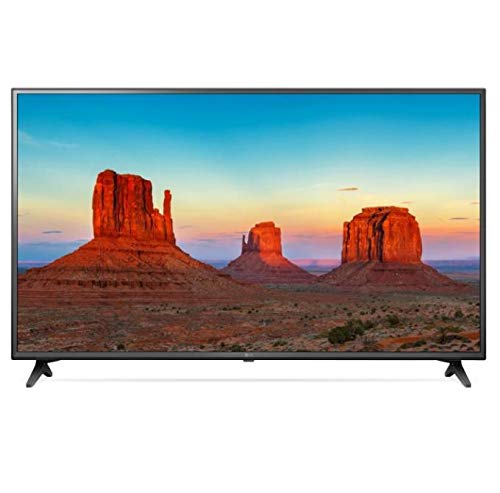
Image: LG 43UK6500MLA.AEE 43-inch 4K UHD LED TV. This image shows the television unit, typically including the screen, bezel, and a stand. A remote control may also be depicted alongside the TV.
Configuració
1. Desembalatge
Remove the TV and all accessories from the packaging. It is recommended to keep the packaging materials for future transport of the TV.
2. Stand Assembly (Table-top Mounting)
If you are placing the TV on a table, you will need to attach the stand. Follow these steps:
- Col·loqueu la pantalla del televisor amb la pantalla cap avall sobre una superfície suau i plana per evitar ratllades.
- Alineeu la base del suport amb els forats de muntatge de la part inferior del televisor.
- Fixeu el suport amb els cargols proporcionats. Assegureu-vos que tots els cargols estiguin ben ajustats.
Note: The TV supports table mounting. For wall mounting, a separate VESA-compatible wall mount kit (not included) is required. Refer to the wall mount kit's instructions for installation.
3. Connexió de perifèrics
- Potència: Connecteu el cable d'alimentació a l'entrada d'alimentació del televisor i després a una presa de corrent.
- Dispositius HDMI: Connect external devices like Blu-ray players, game consoles, or set-top boxes to the HDMI ports on the back of the TV using HDMI cables.
- Antena/cable: Connect an antenna or cable TV feed to the ANTENNA/CABLE input.
- Xarxa: Per accedir a Internet, connecteu un cable Ethernet al port LAN o connecteu-vos sense fil mitjançant Wi-Fi durant la configuració inicial.
- Dispositius USB: Connect USB storage devices to the USB port for media playback.
4. Assistent de configuració inicial
After connecting the power and turning on the TV for the first time, an on-screen setup wizard will guide you through essential settings:
- Selecció d'idioma: Trieu el vostre idioma preferit.
- Country Selection: Select your country for correct channel tuning.
- Connexió de xarxa: Configure your Wi-Fi connection or confirm the wired connection.
- Sintonització de canals: Scan for available broadcast channels.
- Hora i data: Estableix la data i l'hora correctes.
- Termes i condicions: Review and accept the user agreements.
Instruccions de funcionament
1. Control remot sobreview
The remote control allows you to access all functions of your TV. Insert two AAA batteries (not included) into the remote control, ensuring correct polarity.
- Botó d'encesa: Encén o apaga el televisor.
- Botons numèrics: Selecciona els canals directament.
- Pujar/baixar el volum: Ajusteu el nivell de so.
- Canal amunt/avall: Canvia de canal seqüencialment.
- Botó d'inici: Accedeix al WebOS Smart TV launcher.
- Botó d'entrada: Seleccioneu les fonts d'entrada (HDMI, USB, TV).
- Botons de navegació (amunt/avall/esquerra/dreta) i D'acord: Navegar pels menús i confirmar les seleccions.
- Botó enrere: Torna a la pantalla anterior.
- Botó de configuració: Access picture, sound, and general settings.
2. WebOS 4.0 Smart TV Navigation
Premeu el botó Casa button on your remote to open the WebOS launcher bar at the bottom of the screen. Use the navigation buttons to scroll through apps, input sources, and other features. Select an item by pressing OK.
3. Configuració d'imatge i so
To adjust picture or sound settings:
- Premeu el botó Configuració botó del comandament a distància.
- Navega a Imatge or So.
- Select desired options such as Picture Mode (Vivid, Standard, Cinema), Brightness, Contrast, or Sound Mode (Standard, Cinema, Music).
4. Connectivitat Bluetooth
Your TV supports Bluetooth for connecting compatible audio devices like headphones or soundbars.
- Vés a Configuració > So > Sortida de so.
- Seleccioneu LG Sound Sync (sense fils) or Bluetooth.
- Posa el teu dispositiu Bluetooth en mode de vinculació.
- Select your device from the list on the TV screen to connect.
Manteniment
1. Neteja del televisor
- Desendolla sempre el televisor abans de netejar-lo.
- Feu servir un drap suau i sec per netejar la pantalla i la carcassa.
- Per a marques difícils, esbandiu lleugeramentampNetegeu el drap amb aigua o un netejador de pantalles suau i no abrasiu. No ruixeu mai el netejador directament sobre la pantalla.
- Eviteu fer servir alcohol, benzè, diluents o altres substàncies volàtils, ja que poden fer malbé el televisor.
2. Actualitzacions de programari
To ensure optimal performance and access to the latest features, regularly check for software updates:
- Assegureu-vos que el vostre televisor estigui connectat a Internet.
- Vés a Configuració > General > Sobre aquest televisor > Comproveu si hi ha actualitzacions.
- Seguiu les instruccions que apareixen a la pantalla per descarregar i instal·lar les actualitzacions disponibles.
Resolució de problemes
Abans de contactar amb el servei tècnic, proveu les solucions següents per a problemes comuns:
| Problema | Possible causa/solució |
|---|---|
| No hi ha alimentació / el televisor no s'encén. |
|
| No picture or sound from an external device. |
|
| No channels found during tuning. |
|
| El comandament a distància no funciona. |
|
| Problemes de connexió Wi-Fi. |
|
Especificacions
| Característica | Detall |
|---|---|
| Marca | LG Electronics |
| Número de model | 43UK6500MLA.AEE |
| Nom del model | 43UK6500MLA |
| Any model | 2018 |
| Tecnologia de visualització | LED |
| Mida de la pantalla | 43 polzada (109 cm) |
| Resolució | 4K UHD (3840 x 2160) |
| Relació d'aspecte | 16:9 |
| Freqüència d'actualització | TruMotion 100Hz |
| Processador | QuadCore Processor |
| Suport HDR | HDR actiu |
| Gamma de colors | Àmplia gamma de colors |
| Sistema operatiu | WebOS 4.0 |
| Connectivitat | Wi-Fi, Bluetooth |
| Interfície del maquinari | Bluetooth |
| Ports USB | 1 |
| Mode de sortida d'àudio | estèreo |
| Configuració dels altaveus | 2 canals |
| Característiques especials | Guia electrònica de programes (EPG) |
| Tipus de muntatge | Muntatge de taula |
| Dimensions del producte (WxHxD) | 105.2 x 66 x 15.2 cm (amb suport) |
| Pes | 10.92 kg |
Garantia i Suport
Per obtenir informació sobre la garantia, consulteu la targeta de garantia inclosa amb el producte o visiteu el lloc web oficial de LG. website. For technical support, product registration, or service inquiries, please contact LG Customer Service through their official channels.
You can typically find contact information and support resources on the LG official weblloc: www.lg.com/support