KLIM Chroma Wireless Gaming Keyboard
Manual d'usuari
Brand: KLIM | Model: KLIM Chroma
1. Introducció
Thank you for choosing the KLIM Chroma Wireless Gaming Keyboard. This manual provides essential information for setting up, operating, and maintaining your new keyboard. Designed for gamers and everyday users, the KLIM Chroma offers instant wireless connectivity, vibrant RGB backlighting, and a durable, spill-resistant design for a superior typing and gaming experience.

Image: The KLIM Chroma Wireless Gaming Keyboard, showcasing its full layout and the compact USB receiver.
2. Contingut del paquet
Si us plau, assegureu-vos que tots els articles estiguin presents al vostre paquet:
- 1 x KLIM Chroma Wireless Gaming Keyboard
- 1 x Receptor sense fil USB
- 1 x cable de càrrega USB
- 1 x Manual d'usuari (aquest document)
3. Guia de configuració
3.1. Connexió del teclat
The KLIM Chroma keyboard offers instant plug-and-play connectivity without the need for additional drivers.
- Locate the USB wireless receiver, typically stored in a compartment on the underside of the keyboard.
- Plug the USB wireless receiver into an available USB port on your computer, gaming console, or compatible device.
- Turn on the keyboard using the power switch, usually located on the top edge or underside.
- The keyboard should automatically connect to the receiver within a few seconds. You are now ready to use your KLIM Chroma keyboard.

Image: Illustrates the keyboard's plug-and-play functionality, emphasizing instant connection without drivers.
3.2. Càrrega del teclat
The KLIM Chroma features a built-in rechargeable battery. To charge the keyboard:
- Connect the smaller end of the provided USB charging cable to the charging port on the keyboard.
- Connecteu l'extrem més gran del cable de càrrega USB a una font d'alimentació USB (per exemple, un port USB de l'ordinador, un adaptador de paret USB).
- An indicator light on the keyboard will typically show the charging status. The battery takes approximately 4-6 hours for a full charge.
- A full charge provides up to 17 hours of continuous use with backlighting, or significantly longer without backlighting.

Image: Highlights the keyboard's long-lasting rechargeable battery, capable of up to 17 hours of use.
4. Instruccions de funcionament
4.1. Encendre/apagar
To conserve battery life, always turn off the keyboard when not in use. The power switch is located on the top right edge of the keyboard.
- Slide the switch to the "ON" position to power on the keyboard.
- Slide the switch to the "OFF" position to power off the keyboard.
4.2. Control de retroil·luminació RGB
The KLIM Chroma keyboard features vibrant RGB backlighting to enhance your experience. Please note that the colors are not customizable, but you can cycle through various modes and adjust brightness.
- FN + RGB: Press these keys simultaneously to cycle through different lighting modes (e.g., static, breathing).
- FN + Page Up/Page Down: Adjust the brightness of the backlighting.
- FN + +/-: Ajusta la velocitat dels efectes d'il·luminació dinàmica.
- FN + On/Off (light icon): Turn the backlighting on or off.

Image: Shows the keyboard illuminated with its impressive RGB lighting effects, adding visual appeal to any setup.
4.3. Function Key Combinations (FN Key)
The FN key allows access to multimedia controls and other functions:
| Combinació | Funció |
|---|---|
| FN + F1 | Reproductor multimèdia |
| FN + F2 | Baixa el volum |
| FN + F3 | Puja el volum |
| FN + F4 | Silenciar |
| FN + F5 | Atureu-vos |
| FN + F6 | Pista anterior |
| FN + F7 | Reproduir/Pausa |
| FN + F8 | Pista següent |
| FN + F9 | Correu electrònic |
| FN + F10 | Web Navegador |
| FN + F11 | El meu ordinador |
| FN + F12 | Calculadora |
4.4. Compatibilitat
The KLIM Chroma Wireless Gaming Keyboard is widely compatible with various operating systems and devices, including:
- PC (Windows XP/Vista/7/8/10/11)
- Mac OS
- PlayStation 4 (PS4)
- PlayStation 5 (PS5)
- Xbox One
- Xbox Sèrie X/S
- Laptops, Smart TVs, Tablets (with USB port)

Image: Visual representation of the keyboard's broad compatibility across various gaming platforms and operating systems.
5. Manteniment i cura
To ensure the longevity and optimal performance of your KLIM Chroma keyboard, follow these care guidelines:
- Neteja: Use a soft, dry cloth to wipe down the keyboard. For deeper cleaning, a slightly damp Es pot utilitzar un drap amb sabó suau, assegurant-se que no entri líquid als interruptors clau ni als components interns.
- Resistència a vessaments: The keyboard is designed to be spill-resistant. In case of accidental spills, immediately power off the keyboard, disconnect it, and allow it to dry completely before re-using. Do not submerge the keyboard in water.
- Cura de la bateria: Avoid fully discharging the battery frequently. For best battery life, charge the keyboard when the low battery indicator appears. Store the keyboard in a cool, dry place if not used for extended periods.
- Emmagatzematge: Store the USB receiver in its designated compartment on the keyboard's underside when not in use to prevent loss.

Image: Depicts the keyboard's ultra-durable and spill-resistant design, highlighting its resilience against accidental liquid exposure.
6. Solució De Problemes
If you encounter issues with your KLIM Chroma keyboard, try the following solutions:
- El teclat no respon:
- Assegureu-vos que el teclat estigui encès.
- Comproveu si el receptor USB està connectat correctament a un port USB que funcioni.
- Ensure the keyboard is charged. Connect the USB cable to charge it.
- Proveu de connectar el receptor USB a un port USB diferent.
- Reinicieu l'ordinador o el dispositiu.
- La retroiluminació no funciona:
- Assegureu-vos que el teclat estigui encès i carregat.
- Press FN + On/Off (light icon) to toggle the backlighting.
- Adjust brightness using FN + Page Up/Page Down.
- Keys not registering or delayed input:
- Ensure the keyboard is within the wireless range (up to 30 feet) of the receiver.
- Comproveu si hi ha possibles interferències d'altres dispositius sense fil.
- Ensure the battery is not critically low.
7. Especificacions tècniques
Detailed specifications for the KLIM Chroma Wireless Gaming Keyboard:
| Característica | Especificació |
|---|---|
| Freqüència sense fil | 2.4 GHz |
| abast sense fils | Fins a 10 metres (30 peus) |
| Connectivitat | USB Receiver (Plug & Play) |
| Tipus de bateria | Recarregable (inclòs) |
| Capacitat de la bateria | 2000 mAh |
| Temps de càrrega | Aprox. 4-6 hores |
| Battery Life (with lights) | 17 hores (ús continu) |
| Battery Life (without lights) | Fins a 42 hores |
| Voltage | 3.7 V |
| Vida útil de la clau | 10 milions de pulsacions de tecles |
| Tipus de teclat | Teclat de membrana per a jocs |
| Nombre de claus | 104 |
| Il·luminació de fons | RGB (non-customizable colors) |
| Mode de repòs | Activates after 60 seconds of inactivity |
| Dimensions (L x A x A) | 17.32 x 5.67 x 1.14 polzades (440 x 144 x 29 mm) |
| Pes | 1.32 lliures (599 g) |
| Sistema operatiu compatible | Windows XP/7/8/10/11, macOS, Linux |
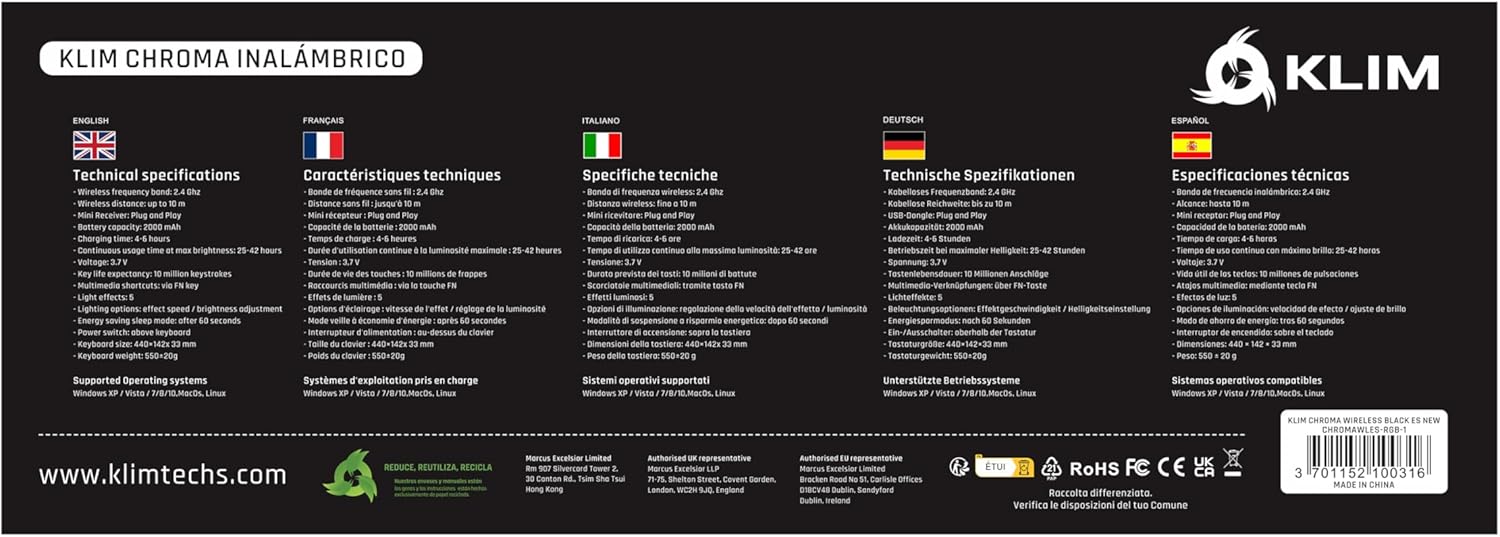
Image: The product packaging displaying technical specifications and features in various languages.
8. Garantia i Suport
KLIM stands behind the quality of its products. The KLIM Chroma Wireless Gaming Keyboard comes with a 5 any de garantia contra defectes de fabricació.
For technical support, warranty claims, or any questions regarding your product, please visit the official KLIM weblloc web o contacteu amb el seu servei d'atenció al client:
- Weblloc: www.klimtechs.com
- Correu electrònic: Refer to the support section on the KLIM weblloc web per obtenir la informació de contacte més actualitzada.
Please have your product model (KLIM Chroma) and ASIN (B07FLJ9DWJ) ready when contacting support.


