Introducció
Gràcies per la compraasing the iTOMA White Noise Machine and Alarm Clock Model 301. This device combines a sound machine with 20 soothing sounds and a digital alarm clock with vibration and buzzer options, designed to enhance your sleep and waking experience. Please read this manual thoroughly before use to ensure proper operation and to maximize the product's features.

Figura 1: iTOMA White Noise Machine and Alarm Clock Model 301. This image shows the front view of the device with its digital display showing "12:38" and control buttons on top.
Contingut del paquet
Verifiqueu que tots els elements siguin presents al paquet:
- 1 x iTOMA White Noise Machine and Alarm Clock
- 1 x Manual d'usuari
- 1 x cable de càrrega tipus C
- 1 x adaptador USB a USB C

Figura 2: Package Contents. This image displays the white noise machine, user manual, Type-C charging cable, and a USB to USB-C adapter, laid out on a surface.
Configuració
Alimentació del dispositiu
The iTOMA White Noise Machine and Alarm Clock is powered via a USB Type-C connection. An AC adapter is not included, but you can use any standard USB power adapter (e.g., from a smartphone) or a USB port on a computer or power bank.
- Connect the provided Type-C charging cable to the Type-C port on the back of the device.
- Connecteu l'altre extrem del cable a una font d'alimentació USB (per exemple, un adaptador de paret, un port USB de l'ordinador).
- The device will power on, and the display will illuminate.
Battery Installation (for backup)
The device requires 1 CR2032 battery (not included) for time and alarm settings backup during power outages. This battery does not power the main functions of the device.
- Locate the battery compartment on the bottom of the device.
- Obriu la coberta del compartiment.
- Insert one CR2032 battery, ensuring the correct polarity (+/-).
- Tanqueu bé la tapa del compartiment de la bateria.
Instruccions de funcionament
Establiment de l'hora
- Manteniu premut el botó HORA CONFIGURADA button located on the top of the device. The hour display will begin to flash.
- Utilitza el UP (▲) o ABAIX (▼) buttons to adjust the hour.
- Premeu el botó HORA CONFIGURADA button again. The minute display will flash.
- Utilitza el UP (▲) o ABAIX (▼) buttons to adjust the minutes.
- Premeu HORA CONFIGURADA una vegada més per confirmar i sortir del mode de configuració de l'hora.
Sound Machine Operation
The device offers 20 natural soothing sounds to aid relaxation and sleep.

Figura 3: Soothing Sounds Selection. This image highlights the "WHITE NOISE", "FANS SOUNDS", and "NATURE SOUNDS" buttons on the device, indicating the variety of available sounds.
- White Noise Sounds (5 types): Premeu el botó SOROLL BLANC button to cycle through 5 different white noise options.
- Fan Sounds (5 types): Premeu el botó FANS SOUNDS button to cycle through 5 different fan sound options.
- Nature Sounds (10 types): Premeu el botó ELS SONS DE LA NATURA button to cycle through 10 different nature sounds (e.g., bird, clock, forest, ocean, rain, thunder).
- Control de volum: Utilitza el UP (▲) o ABAIX (▼) buttons to adjust the sound volume (16 levels).
- Sound Timer: Premeu el botó TEMPORIZADOR button to set an automatic shut-off timer for the sounds. Options include 30, 60, 90, or 120 minutes, or continuous play. The device will remember your last sound and volume settings.

Figura 4: Timer Options. This image illustrates the available timer settings: Continuous, 30 minutes, 60 minutes, 90 minutes, and 120 minutes, shown above the device on a bedside table.
Funció de despertador
The device features a digital alarm clock with multiple wake-up options.

Figura 5: Digital Alarm Clock Features. This image highlights the wake-up options (buzzer or vibration), 16-level volume control, and snooze function, with the device shown on a wooden surface.
- Configuració de l'alarma:
- Manteniu premut el botó CONJUNT D'ALARMES button. The alarm hour will flash.
- Utilitza el UP (▲) o ABAIX (▼) buttons to set the desired alarm hour.
- Premeu CONJUNT D'ALARMES again. The alarm minute will flash.
- Utilitza el UP (▲) o ABAIX (▼) buttons to set the desired alarm minutes.
- Premeu CONJUNT D'ALARMES una tercera vegada per seleccionar el mode d'alarma:
- Diari: Alarm sounds every day.
- Dies laborables: L'alarma sona de dilluns a divendres.
- Caps de setmana: L'alarma sona dissabte i diumenge.
- Premeu CONJUNT D'ALARMES a fourth time to select the wake-up method:
- Zumbador: Standard audible alarm.
- Vibració: Silent vibration alarm (requires device to be placed on a surface where vibration can be felt, e.g., under a pillow).
- Premeu CONJUNT D'ALARMES una última vegada per confirmar i sortir del mode de configuració de l'alarma.
- Activació/desactivació de l'alarma: Premeu breument CONJUNT D'ALARMES button to toggle the alarm on or off. An alarm icon will appear on the display when active.
- Funció de posposar: Quan soni l'alarma, premeu el botó SNOOZE / DIMMER button to activate snooze. The alarm will pause for 9 minutes and then sound again. This can be repeated up to 6 times.
- Aturar l'alarma: To stop the alarm completely, press any button other than SNOOZE / DIMMER. The alarm will reset for the next scheduled time.
Control de regulació de la pantalla
The display brightness can be adjusted to suit your preference, especially for nighttime use.
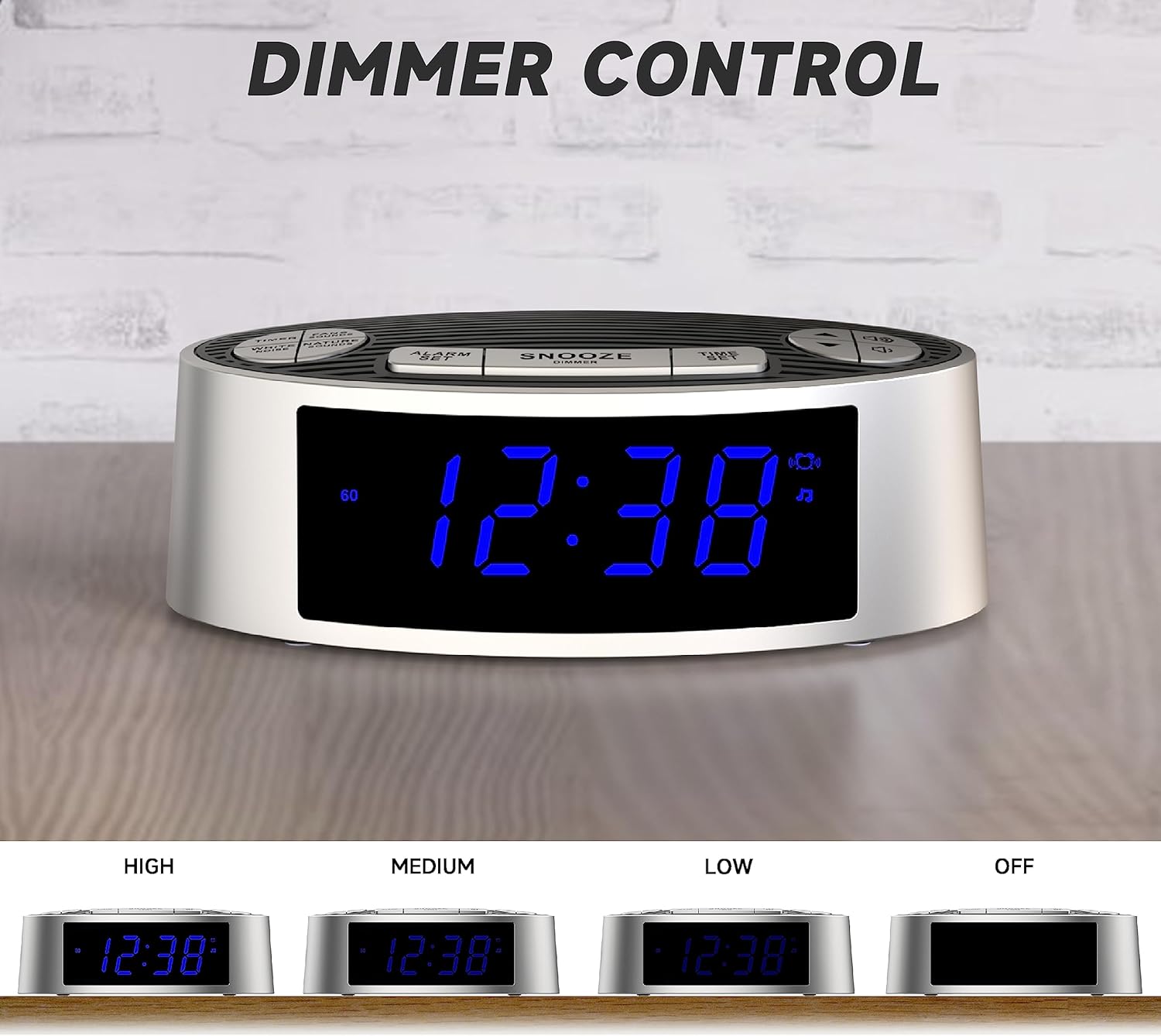
Figura 6: Dimmer Control. This image shows the device's display at four different brightness levels: High, Medium, Low, and Off, demonstrating the adjustable dimmer function.
- Premeu breument SNOOZE / DIMMER button (when the alarm is not sounding) to cycle through the 4 brightness levels: High, Medium, Low, and Off.
Manteniment
Neteja
- Desconnecteu el dispositiu de la font d'alimentació abans de netejar-lo.
- Utilitzeu un drap suau i sec per netejar l'exterior del dispositiu.
- Do not use liquid cleaners, abrasive cleaners, or sprays, as these may damage the finish or internal components.
Canvi de bateria
If the time and alarm settings are lost after a power outage, the CR2032 backup battery may need to be replaced. Follow the battery installation steps in the "Setup" section.
Resolució de problemes
| Problema | Causa possible | Solució |
|---|---|---|
| El dispositiu no s'encén. | No hi ha connexió d'alimentació o cable/adaptador defectuós. | Ensure the USB-C cable is securely connected to both the device and a working USB power source. Try a different USB cable or power adapter. |
| L'alarma no sona/vibra. | Alarm not activated, incorrect time, or volume too low. | Verify the alarm is set and activated (alarm icon visible). Check alarm time. Increase alarm volume. Ensure vibration mode is selected if desired. |
| Time/settings reset after power loss. | CR2032 backup battery is dead or missing. | Substituïu la pila de reserva CR2032. |
| La pantalla és massa brillant/tenua. | Cal ajustar la configuració del regulador d'intensitat. | Premeu el botó SNOOZE / DIMMER botó per anar canviant els nivells de brillantor. |
Especificacions
| Característica | Detall |
|---|---|
| Número de model | 301 (CKS703) |
| Marca | iTOMA |
| Dimensions (L x A x A) | 15 x 9 x 5.2 cm (5.9 x 3.5 x 2.0 polzades) |
| Pes | 240 grams (0.53 lliures) |
| Font d'alimentació | USB Type-C (AC adapter not included) |
| Bateria de seguretat | 1 CR2032 (no inclosa) |
| Sound Types | 20 (5 White Noise, 5 Fan, 10 Nature) |
| Nivells de volum | 16 |
| Sound Timers | Continuous, 30, 60, 90, 120 minutes |
| Alarm Wake-up Options | Buzzer, Vibration |
| Durada de la posposar | 9 minutes (up to 6 times) |
| Dimmer de la pantalla | 4 levels (High, Medium, Low, Off) |
| Material | Acrilonitril butadiè estirè (ABS) |
Garantia i Suport
For warranty information or technical support, please refer to the contact details provided on the product packaging or the official iTOMA weblloc web. Conserveu el rebut de compra com a comprovant de compra.
Per a més ajuda, podeu visitar: www.itoma.com


