1. Introducció
Gràcies per la compraasing the BLOW BT910 Portable Bluetooth Speaker. This manual provides essential information for the safe and efficient operation of your device. Please read it thoroughly before use and keep it for future reference.
2. Informació de seguretat
- No exposeu el dispositiu a temperatures extremes, llum solar directa ni humitat elevada.
- Mantingueu l'altaveu lluny de l'aigua i altres líquids.
- No intenteu desmuntar ni reparar el dispositiu vosaltres mateixos. Encarregueu tot el manteniment a personal qualificat.
- Feu servir només el cable de càrrega i l'adaptador proporcionats.
- Mantenir fora de l'abast dels nens.
- Eviteu escoltar música durant molt de temps a volums alts per evitar danys auditius.
3. Contingut del paquet
Assegureu-vos que tots els elements siguin presents al paquet:
- BLOW Bazooka 30-331 Speaker (Black)
- Cable de càrrega
- Cable d'àudio
- Manual d'usuari
4. Producte acabatview
Familiarize yourself with the components of your BLOW BT910 speaker.
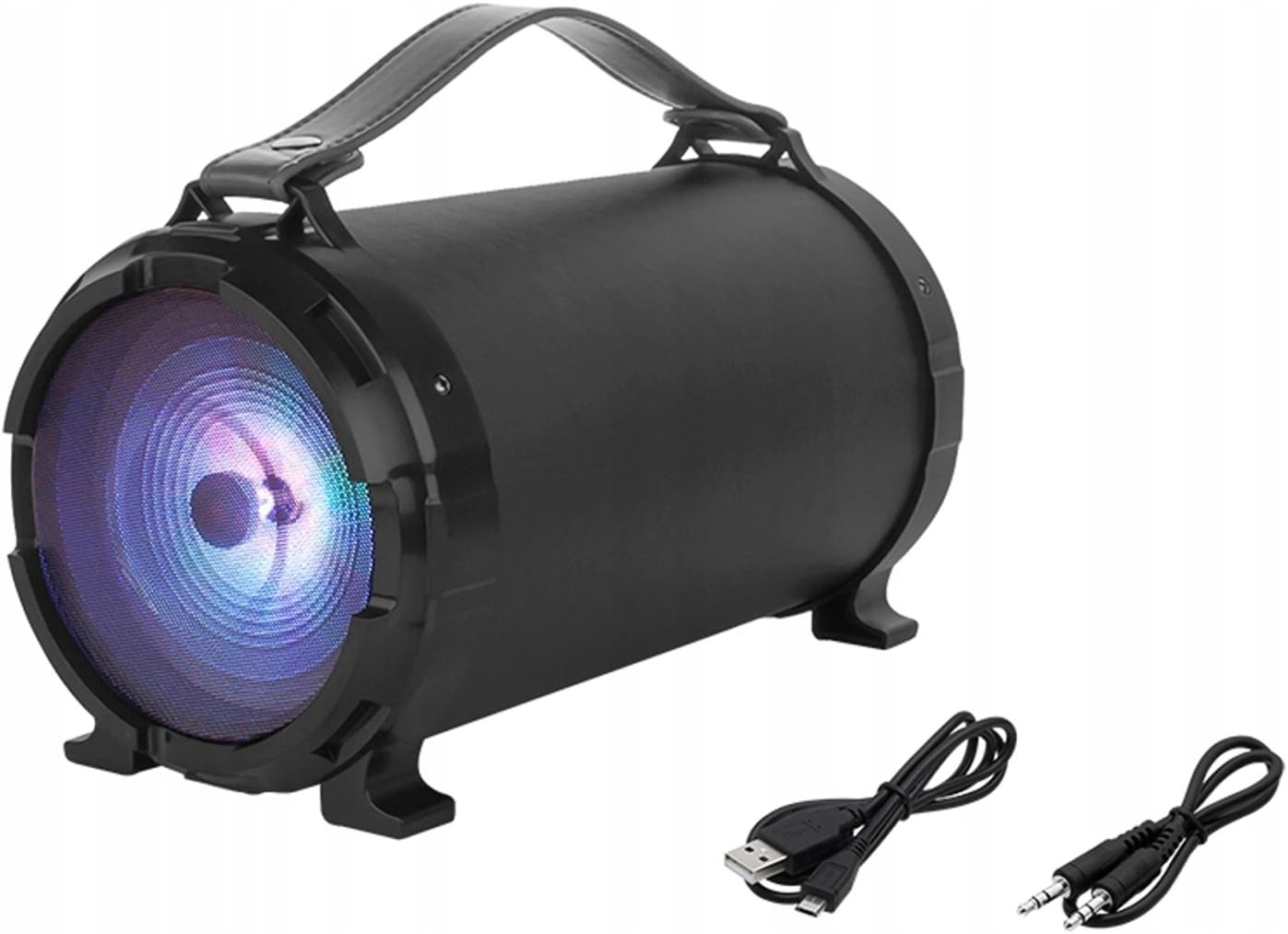
Imatge 1: Davant view of the BLOW BT910 Portable Bluetooth Speaker, showing the main speaker grille and included charging and audio cables.

Imatge 2: posterior view of the BLOW BT910 Portable Bluetooth Speaker, highlighting the BLOW brand logo.

Imatge 3: The BLOW BT910 Portable Bluetooth Speaker shown within its retail packaging, displaying key features.

Imatge 4: Diagram illustrating the dimensions of the BLOW BT910 Portable Bluetooth Speaker: 34cm length, 17cm width, and 18cm height.
Controls i ports:
- Botó d'encesa: Activa/desactiva l'altaveu.
- Botó de mode (M): Switches between Bluetooth, FM Radio, USB, SD, and AUX modes.
- Botó Reproduir/Pausa: Plays or pauses audio. Also answers/ends calls in Bluetooth mode.
- Pujar volum (+)/Pista següent: Premeu curt per pujar el volum, premeu llargament per passar a la següent pista.
- Baixar volum (-)/Pista anterior: Premeu curt per baixar el volum, premeu llargament per anar a la pista anterior.
- Botó de llum LED: Controls LED lighting modes.
- Port USB: Per a la reproducció des d'una unitat flaix USB.
- Ranura per a targeta SD: Per a la reproducció amb targeta SD.
- Entrada AUX: Per connectar dispositius d'àudio externs mitjançant un cable d'àudio de 3.5 mm.
- Entrada de micròfon: For karaoke function.
- Port de càrrega: Per carregar la bateria interna de l'altaveu.
5. Configuració
5.1 Càrrega de l'altaveu
- Connecteu el cable de càrrega al port de càrrega de l'altaveu.
- Connecteu l'altre extrem del cable de càrrega a un adaptador de corrent USB compatible (no inclòs) o a un port USB.
- The LED indicator will show charging status. It will typically turn off or change color once fully charged.
5.2 Encès/Apagat
- Per encendre: Press and hold the Power button for a few seconds until you hear an audible prompt or see the LED indicators light up.
- Per apagar: Press and hold the Power button again for a few seconds until you hear an audible prompt or the LED indicators turn off.
6. Instruccions de funcionament
6.1 Vinculació Bluetooth
- Ensure the speaker is powered on and in Bluetooth mode (indicated by a flashing blue LED). If not, press the Mode button to switch to Bluetooth mode.
- Activeu el Bluetooth al vostre telèfon intel·ligent, tauleta o altre dispositiu compatible amb Bluetooth.
- Cerca available Bluetooth devices and select "BT910" from the list.
- Once paired, the speaker will emit an audible confirmation, and the blue LED will stop flashing and remain solid.
- Ara pots reproduir àudio des del teu dispositiu a través de l'altaveu.
6.2 Mode de ràdio FM
- Premeu el botó Mode per canviar al mode de ràdio FM.
- Press the Play/Pause button once to automatically scan and save available FM stations.
- Use the Next Track/Previous Track buttons to navigate between saved stations.
6.3 Reproducció des de targeta USB/SD
- Inseriu una unitat flash USB o una targeta SD (amb MP3 files) al port/ranura respectiu.
- The speaker will automatically switch to USB or SD mode and begin playing music. If not, press the Mode button to select the correct mode.
- Feu servir els botons Reprodueix/Pausa, Pista següent i Pista anterior per controlar la reproducció.
6.4 Mode d'entrada AUX
- Connect one end of a 3.5mm audio cable (AUX cable) to the speaker's AUX input port.
- Connect the other end of the audio cable to the audio output jack of your external device.
- Premeu el botó Mode per canviar al mode AUX.
- Controla la reproducció d'àudio des del teu dispositiu extern.
6.5 Funció de karaoke
- Connect a microphone (not included) to the microphone input port.
- Adjust the microphone volume and echo effects using the dedicated controls on the speaker (if available).
- Play music through any of the available modes and sing along.
Control d'il·luminació LED 6.6
- Press the LED Light button to cycle through different lighting modes or to turn the lights off.
6.7 Control de volum i pista
- Pujar el volum: Premeu breument el botó '+'.
- Baixar el volum: Premeu breument el botó '-'.
- Pista següent: Premeu llargament el botó '+'.
- Pista anterior: Premeu llargament el botó '-'.
6.8 Demostracions en vídeo
No relevant product videos from the seller were found for the BLOW BT910 speaker (ASIN: B07FPH955W).
7. Manteniment
- Netegeu l'altaveu amb un drap suau i sec. No utilitzeu productes de neteja abrasius ni dissolvents.
- Guardeu l'altaveu en un lloc fresc i sec quan no l'utilitzeu.
- Eviteu deixar caure l'altaveu o sotmetre'l a impactes forts.
8. Solució De Problemes
| Problema | Possible solució |
|---|---|
| L'altaveu no s'encén. | Assegureu-vos que la bateria estigui carregada. Connecteu l'altaveu a una font d'alimentació i torneu-ho a provar. |
| No es pot emparellar per Bluetooth. | Make sure the speaker is in Bluetooth pairing mode. Ensure your device's Bluetooth is on and within range. Forget previous pairings on your device and try again. |
| No hi ha so de l'altaveu. | Comproveu el nivell de volum tant a l'altaveu com al dispositiu connectat. Assegureu-vos que esteu seleccionat el mode d'entrada correcte. |
| La recepció de ràdio FM és deficient. | Extend the antenna (if available) or reposition the speaker for better signal. |
9. Especificacions
| Característica | Detall |
|---|---|
| Marca | Cop |
| Número de model | IN-ACT-AKGBLOGLO0016 |
| Tipus d'altaveu | Portàtil |
| Tecnologia de connectivitat | Auxiliar, Bluetooth, USB |
| Potència màxima de sortida de l'altaveu | 50 watts |
| Mode de sortida d'àudio | estèreo |
| Dispositius compatibles | Telèfon mòbil |
| Configuració del canal de so envoltant | 2.0 |
| Color | Multicolor |
| Dimensions del producte | 10f. x 48an. x 50al. centimeters (2.79 x 24.64 x 16.51 cm; 2 kg) |
| Pes de l'article | 2 quilos |
| Impedància | 4 ohms |
| Impermeable | Fals |
| Interval màxim | 10 metres |
| Mètode de control | Premeu el botó, toqueu |
| Tecnologia de comunicació sense fils | Wi-Fi (Note: Bluetooth is the primary wireless audio connection) |
| Mida de l'altaveu | 5 polzades |
| Font d'alimentació | Battery (1 Lithium Ion battery required) |
| Característica especial | Bass Boost, Bluetooth |
| Usos recomanats | Per a telèfons intel·ligents o tauletes |
10. Garantia i Suport
This product comes with a standard return policy of 30 days for refund/replacement. For specific warranty details and support, please refer to the documentation included in your product packaging or contact the seller directly. The manufacturer is BLOW.


