1. Introducció
This manual provides comprehensive instructions for the installation, operation, and maintenance of the DIGI WR11-M400-DE1-XB Cellular Router. This device is designed to provide reliable 4G LTE cellular connectivity and Ethernet networking for various applications. Please read this manual thoroughly before using the product to ensure proper setup and functionality.
2. Informació de seguretat
Observeu les següents precaucions de seguretat per evitar danys al dispositiu o lesions al personal:
- Assegureu-vos que la font d'alimentació voltage coincideix amb els requisits del dispositiu.
- No exposeu el dispositiu a l'aigua ni a una humitat excessiva.
- Eviteu col·locar el dispositiu a prop de fonts de calor o sota la llum solar directa.
- No obriu el dispositiu casing; demaneu totes les tasques de manteniment a personal qualificat.
- Use only approved accessories and antennas with the router.
3. Contingut del paquet
Verifiqueu que tots els elements siguin presents al paquet:
- DIGI WR11-M400-DE1-XB Cellular Router
- Adaptador de corrent (pot variar segons la regió)
- Guia d'inici ràpid
- Maquinari de muntatge (si escau)
Note: Antennas are not included with this model and must be purchased separately.
4. Producte acabatview
The DIGI WR11-M400-DE1-XB is a compact and robust cellular router designed for reliable connectivity. Below is an image of the device with key features highlighted.
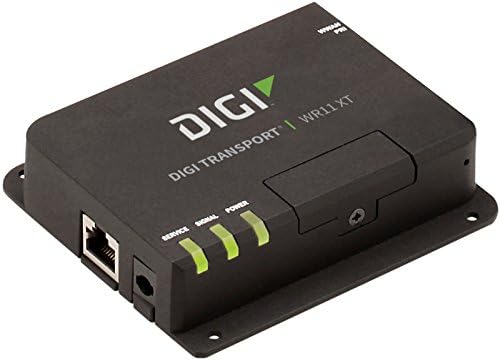
Imatge: Frontal view of the DIGI WR11-M400-DE1-XB Cellular Router, showing the Ethernet port, power input, and three LED indicators for Service, Signal, and Power. The device is black with the "DIGI TRANSPORT WR11 XT" logo.
Indicadors del panell frontal
- LED de servei: Indicates cellular service status. (e.g., Solid Green: Connected, Blinking: Attempting connection, Off: No service)
- LED de senyal: Indicates cellular signal strength. (e.g., Green: Strong, Amber: Medium, Red: Weak)
- LED d'alimentació: Indicates power status. (e.g., Solid Green: Power on, Off: Power off)
Ports i connectors
- Ethernet Port (LAN): One RJ45 port for wired network connection.
- Entrada d'alimentació: Connector for the DC power adapter.
- Connectors d'antena: (Not visible in image, but typically present on cellular routers for external antennas, though this model states "NO Antenna" in description, implying internal or separate purchase). Note: This model does not include antennas. External antennas must be connected to the appropriate ports (if available) for cellular connectivity.
5. Configuració
Configuració inicial
- Posicionament: Place the router in a central location, away from obstructions and other electronic devices that may cause interference. Ensure good cellular signal reception.
- Instal·lació de la targeta SIM: If applicable, insert your activated 4G LTE SIM card into the designated SIM card slot. Ensure it is inserted correctly according to the diagram on the device or in the Quick Start Guide.
- Connexió d'antena: If using external antennas (recommended for optimal performance, and necessary for this model as it ships without antennas), connect them securely to the antenna ports.
- Connexió d'alimentació: Connect the power adapter to the router's power input port, then plug the adapter into a power outlet. The Power LED should illuminate.
Connexió de xarxa
- Connexió per cable: Connect an Ethernet cable from the router's LAN port to your computer or network switch.
- Verifica la connectivitat: Once powered on, the router will attempt to establish a cellular connection. Monitor the Service and Signal LEDs. The Service LED should turn solid green, and the Signal LED should indicate good signal strength.
6. Instruccions de funcionament
Funcionament bàsic
Once the router is powered on and has established a cellular connection (indicated by the Service and Signal LEDs), devices connected to its Ethernet port will be able to access the internet via the 4G LTE network.
Accedint al Web Interfície
For advanced configuration and monitoring, you can access the router's webInterfície de gestió basada en:
- Ensure your computer is connected to the router via Ethernet.
- Obre a web navegador (per exemple, Chrome, Firefox, Edge).
- A la barra d'adreces, escriviu l'adreça IP predeterminada del router (normalment
192.168.1.1or192.168.0.1, refer to the Quick Start Guide or device label for the exact address) and press Enter. - Enter the default username and password when prompted (typically
adminfor both, or as specified in the Quick Start Guide). - You can now configure network settings, security, and monitor device status.
7. Manteniment
Un manteniment regular ajuda a garantir la longevitat i el rendiment òptim del vostre encaminador:
- Neteja: Feu servir un drap suau i sec per netejar l'exterior del router. No utilitzeu netejadors líquids ni aerosols.
- Actualitzacions de firmware: Reviseu periòdicament el fabricant weblloc web per a actualitzacions de firmware. Mantenir el firmware actualitzat pot millorar el rendiment, afegir funcions i augmentar la seguretat.
- Ventilació: Ensure the router is placed in a well-ventilated area to prevent overheating. Do not block ventilation openings.
- Cicle d'alimentació: If the router experiences issues, try power cycling it by disconnecting the power adapter for 10 seconds and then reconnecting it.
8. Solució De Problemes
This section addresses common issues you might encounter with the DIGI WR11-M400-DE1-XB Cellular Router.
| Problema | Causa possible | Solució |
|---|---|---|
| Sense alimentació (LED d'engegada apagat) | L'adaptador de corrent no està connectat o la presa de corrent està defectuosa. | Check power connections. Try a different power outlet. Ensure the power adapter is functioning. |
| No Cellular Service (Service LED Off/Blinking) | No SIM card, inactive SIM, poor signal, or network issue. | Ensure SIM card is correctly inserted and activated. Relocate the router for better signal. Contact your cellular provider. |
| Poor Signal Strength (Signal LED Red/Amber) | Router location, external interference, or antenna issue. | Move the router to an area with better cellular reception. Ensure external antennas (if used) are properly connected and positioned. |
| No Internet Access via Ethernet | No cellular connection, incorrect network settings, or faulty Ethernet cable. | Verify cellular connection status (Service LED). Check Ethernet cable connection. Access web interface to verify network settings. |
| No es pot accedir Web Interfície | Incorrect IP address, network configuration issue, or router not responding. | Verify the router's IP address. Ensure your computer is set to obtain an IP address automatically (DHCP). Try power cycling the router. |
9. Especificacions
Key technical specifications for the DIGI WR11-M400-DE1-XB Cellular Router:
| Característica | Detall |
|---|---|
| Model | WR11-M400-DE1-XB |
| Marca | Digi |
| Tecnologia de connectivitat | Cellular (4G LTE Sprint), Ethernet |
| Nombre de Ports | 1 (Ethernet) |
| Dispositius compatibles | Ordinador personal |
| Mètode de control | Remot |
| Tipus de controlador | Canvia |
| Característica especial | WPS |
| UPC | 665752885062 |
| Primera data disponible | 23 de juliol de 2018 |
10. Garantia i Suport
For information regarding product warranty, technical support, or service, please refer to the warranty card included with your product or visit the official Digi International website. Support resources, including FAQs, documentation, and contact information, are typically available online.
Conserveu el vostre comprovant de compra per a reclamacions de garantia.


