Introducció
This manual provides detailed instructions for the installation, operation, and maintenance of your LSLYA Dual 2 Din 7-inch Bluetooth Car Stereo with GPS Navigation. Please read this manual thoroughly before using the product to ensure proper function and to prevent damage.
Informació de seguretat
- Instal·lació professional recomanada: Installation of this car stereo requires professional guidance. Incorrect installation can lead to a short circuit or damage to the unit and vehicle. If you are unsure, seek professional assistance.
- Font d'alimentació: This car stereo operates on a 12V DC power supply. Verify your vehicle's voltage before installation. Connecting to an incompatible voltage will cause a short circuit.
- Connexions de cablejat: Always confirm the positive and negative terminals of your car's power supply. Connect wires according to the provided wiring diagram to ensure correct operation and prevent damage.
- No CD/DVD Player: This unit is not equipped with a CD/DVD player.
- Non-Removable Faceplate: The faceplate of this car stereo is not removable.
Configuració i instal·lació
Esquema de cablejat
Refer to the following diagram for proper wiring connections. Ensure all connections are secure and insulated.

This comprehensive wiring diagram provides instructions for connecting the LSLYA car stereo to the vehicle's electrical system. It details connections for all four speakers (front/rear, left/right), the rear camera, steering wheel control, constant power (+12V B+), ignition switch (+12V ACC), ground (B-), auto antenna, and headlight detection line. Proper installation according to this diagram is crucial for correct operation.
Physical Installation and Connections
The unit is designed for a standard Dual 2 Din opening. Ensure adequate space and secure mounting. Connect all necessary cables to the rear of the unit as shown in the diagram below.
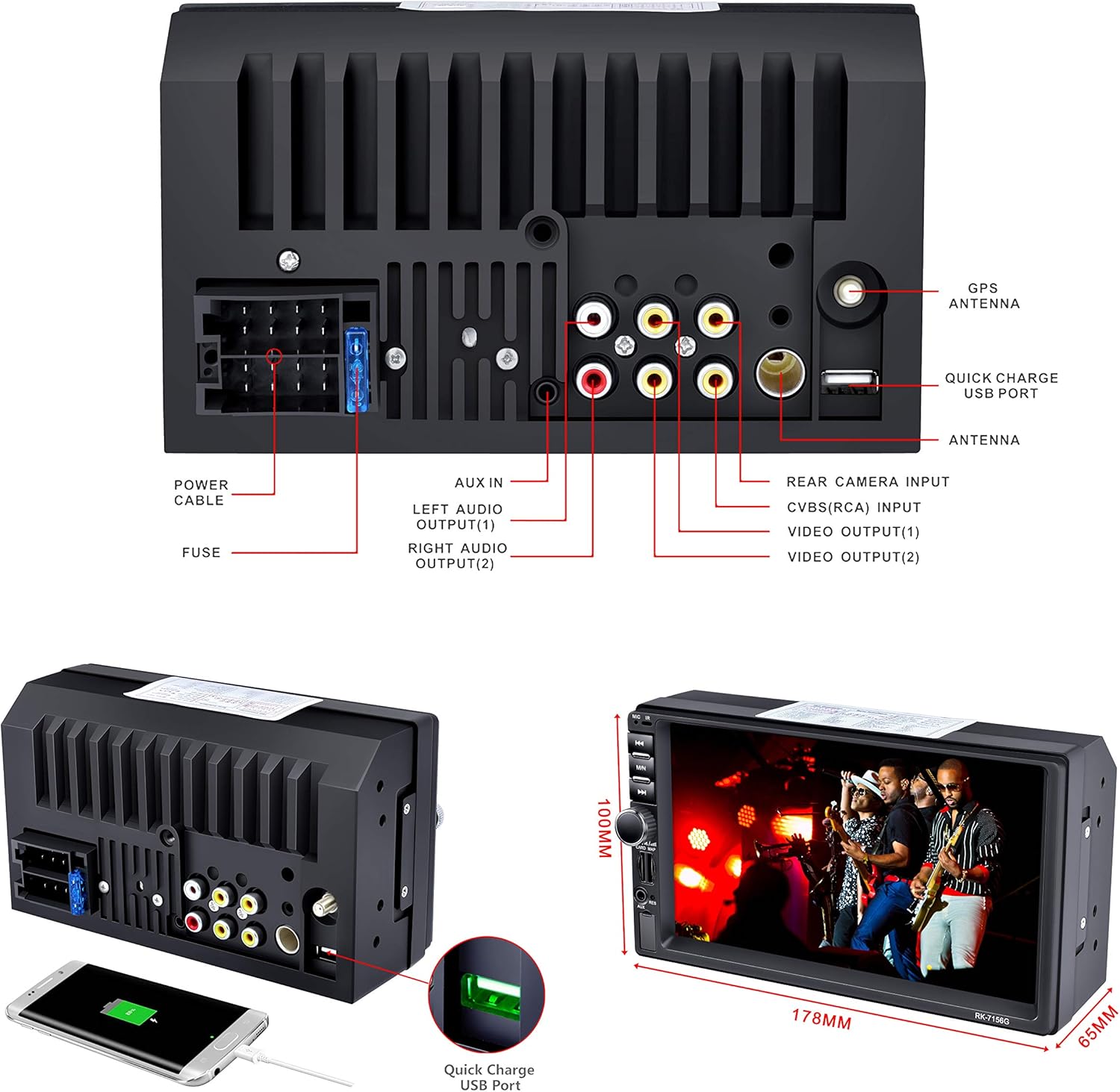
This image provides a detailed rear view of the LSLYA car stereo, illustrating all available input and output ports. These include connections for the GPS antenna, quick charge USB, radio antenna, rear camera, video outputs, left and right audio outputs, AUX input, power cable, and fuse. The physical dimensions of the unit are also indicated.
- Antena GPS: Connect the GPS antenna to the designated port for navigation functionality.
- Antena de ràdio: Connecteu l'antena de ràdio del vostre vehicle.
- Entrada de càmera posterior: Connect a compatible rear view camera for parking assistance.
- Ports USB: Utilize the USB ports for media playback and device charging.
- Audio/Video Outputs: Connecta externa amplifiers or monitors as needed.
Instruccions de funcionament
Controls bàsics i interfície
The unit features a 7-inch touchscreen for primary control, supplemented by physical buttons on the left side for quick access to essential functions.
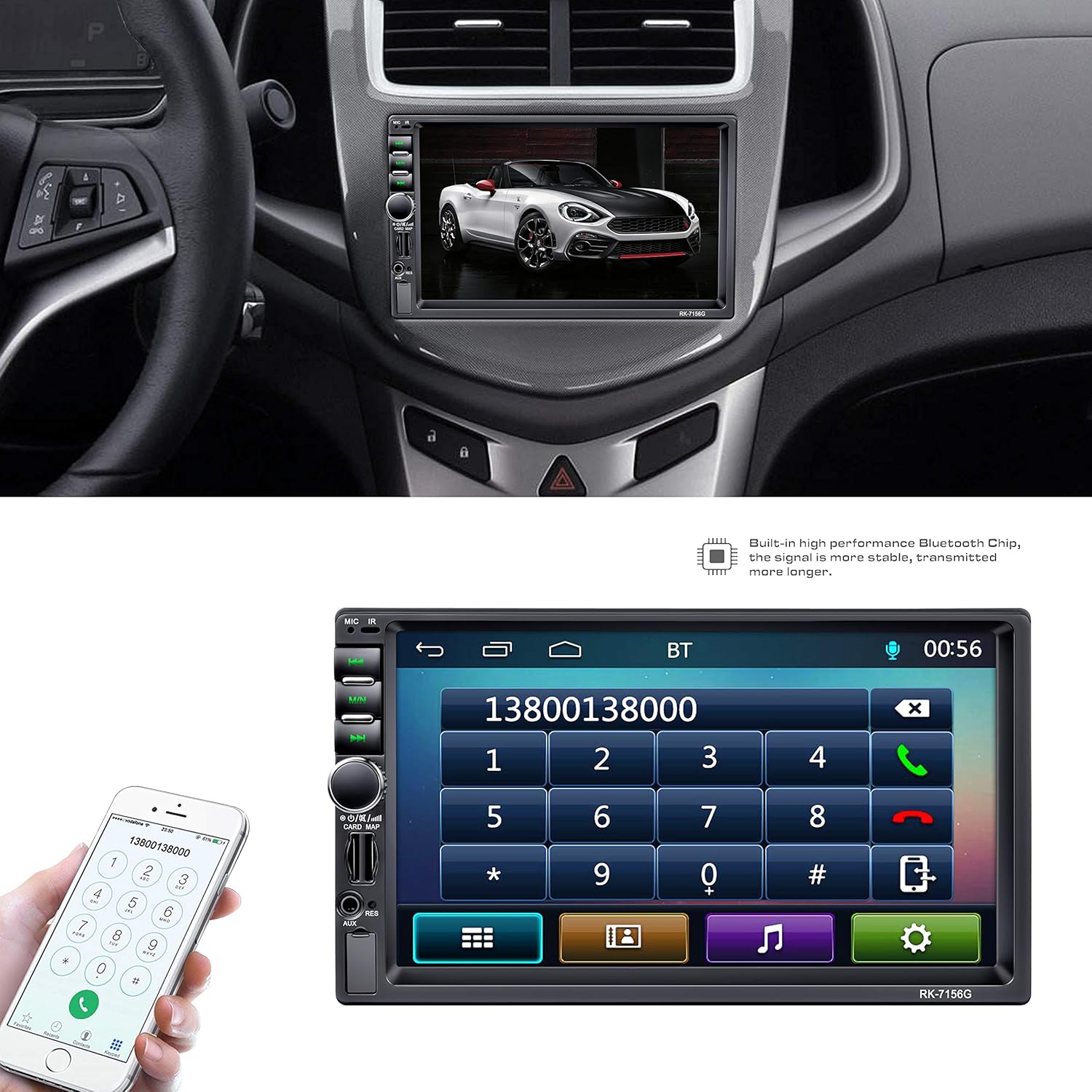
This image illustrates the LSLYA Dual 2 Din Car Stereo integrated into a vehicle's dashboard. The 7-inch touchscreen displays the Bluetooth phone call interface, allowing users to dial numbers directly from the unit. A smartphone is also shown, indicating the Bluetooth connectivity feature for hands-free communication.
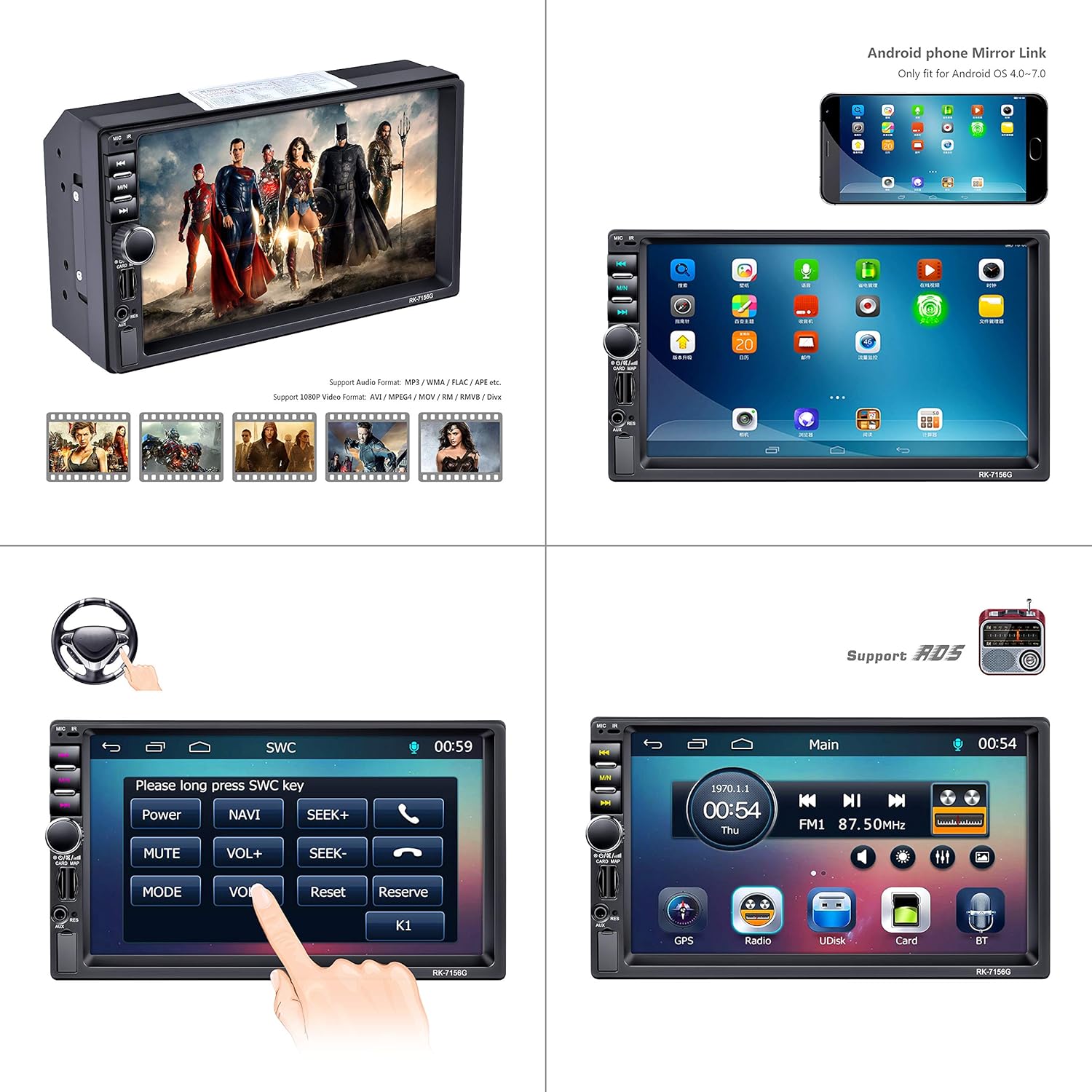
This composite image demonstrates several key functions of the LSLYA car stereo. It shows the unit's ability to play various video formats, an example of the Android phone mirror link feature (for OS 4.0-7.0), the interface for setting up steering wheel controls, and the main menu screen providing access to GPS, Radio, USB (UDisk), SD Card, and Bluetooth functions.
Emparellament Bluetooth
Per vincular el vostre telèfon intel·ligent:
- Access the Bluetooth menu on the stereo's touchscreen.
- Activeu el Bluetooth al vostre telèfon intel·ligent i cerqueu els dispositius disponibles.
- Select the car stereo (usually named 'BT' or similar) from your phone's list.
- Confirma el codi d'emparellament si se't demana.
Once paired, you can make hands-free calls and stream audio.
Navegació GPS
The unit features a built-in GPS navigation module. To use:
- Tap the 'GPS' icon on the main menu.
- Enter your destination using the touchscreen keyboard.
- Follow the on-screen directions and voice prompts for route guidance.
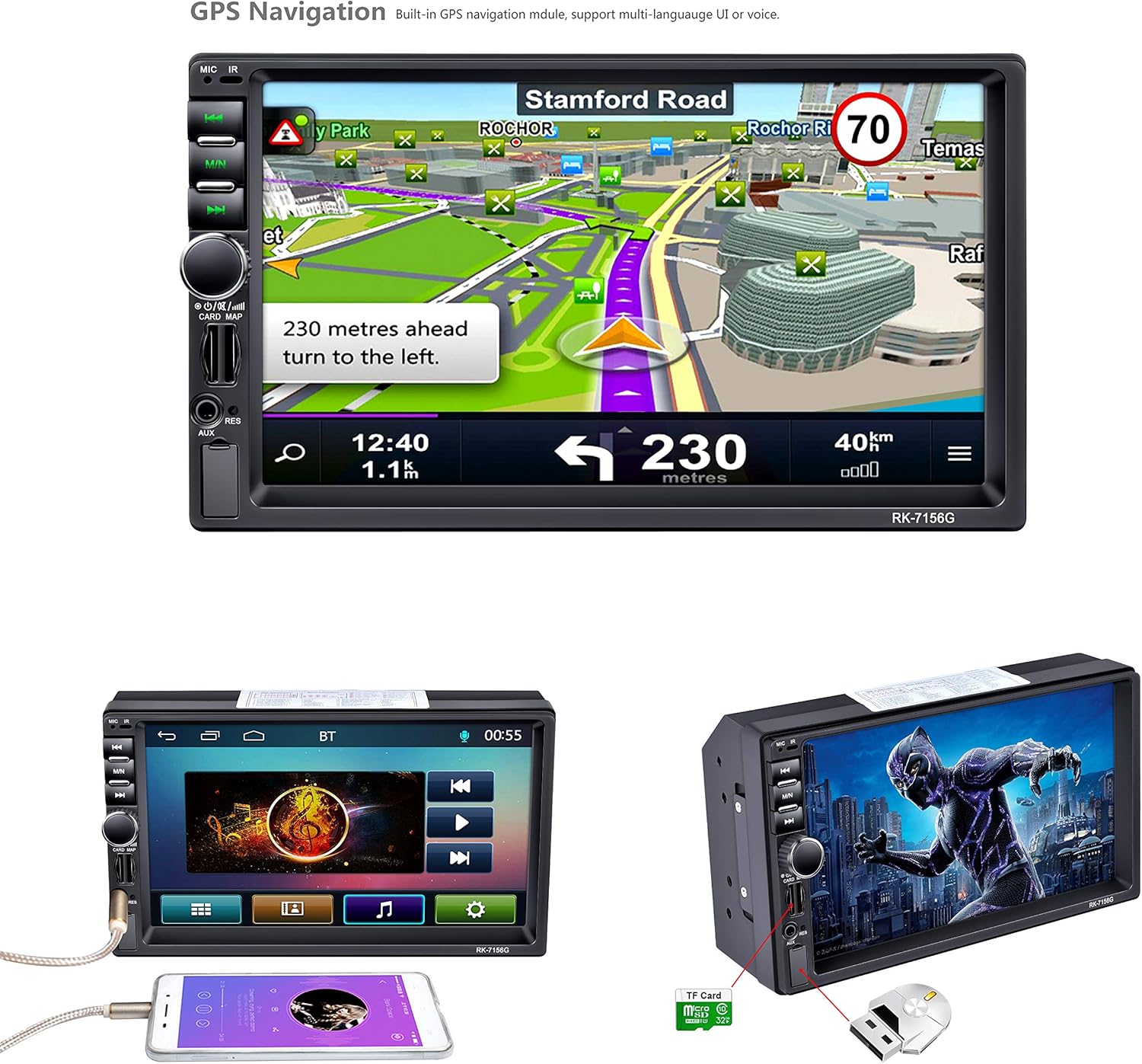
The car stereo's 7-inch screen displays the integrated GPS navigation system. The map shows a route with turn-by-turn directions, including a prompt to '230 meters ahead turn to the left'. This highlights the built-in navigation capabilities of the unit.
Media Playback (USB, SD, MP5)
The stereo supports various media formats via USB, TF/SD card slots. Insert your storage device into the appropriate slot and select the 'UDisk' (USB) or 'Card' (TF/SD) option from the main menu to browse and play media files.
Radio (FM/AM/RDS)
Select the 'Radio' icon from the main menu. Use the touchscreen to scan for stations, save presets, and access RDS information where available.
Control del volant (SWC)
If your vehicle supports steering wheel controls, you can configure them through the stereo's settings menu. Access the SWC setup interface to map your vehicle's steering wheel buttons to the stereo's functions.
Entrada de càmera posterior
When a rear camera is connected and the vehicle is put into reverse gear, the stereo automatically displays the camera feed on the screen, often with parking guidelines.

This image showcases the audio and visual capabilities of the LSLYA car stereo. It features the sound balance adjustment screen, allowing users to fine-tune audio output. The bottom left highlights the 7-inch HD LCD display (800x480 resolution) with a vibrant image. The bottom right demonstrates the rear view camera input, displaying a clear image with parking guidelines for safe reversing.
Enllaç mirall
The unit supports Android phone mirror link for Android OS 4.0-7.0. Connect your compatible Android smartphone via USB to mirror its screen onto the stereo display.
Manteniment
- Neteja: Feu servir un drap suau i sec per netejar la pantalla i l'exterior de la unitat. Eviteu productes de neteja o dissolvents abrasius.
- Actualitzacions de programari: Comproveu el del fabricant weblloc web periòdicament per a les actualitzacions de programari disponibles per garantir un rendiment òptim i noves funcions.
- Substitució de fusibles: If the unit loses power, check the fuse located at the rear of the unit. Replace with a fuse of the same rating if blown.
Resolució de problemes
- Sense energia:
- Check all power connections (B+, ACC, Ground) as per the wiring diagram.
- Verify the fuse is intact and not blown.
- Assegureu-vos que la bateria del vehicle tingui prou càrrega.
- Sense so:
- Comproveu les connexions dels cables de l'altaveu.
- Verify volume levels and mute settings.
- Ensure audio output mode is correctly selected.
- El GPS no funciona/és inexacte:
- Assegureu-vos que l'antena GPS estigui connectada correctament i que tingui una visió clara view del cel.
- Check GPS settings within the unit.
- Problemes de connexió Bluetooth:
- Assegureu-vos que el Bluetooth estigui activat tant a l'estèreo com al telèfon intel·ligent.
- Suprimeix els emparellaments anteriors i intenta tornar-los a emparellar.
- Move closer to the unit if experiencing signal issues.
- Els comandaments del volant no responen:
- Verify SWC wiring connections.
- Re-calibrate the steering wheel controls through the unit's settings menu.
Especificacions
| Marca | LSLYA |
| Número de model | B07FZ49MFT |
| Mida de la pantalla | 7 polzades |
| Resolució de visualització | 800x480 (HD LCD) |
| Tecnologia de connectivitat | Bluetooth, USB |
| Característiques especials | Built-In Bluetooth, Touchscreen, GPS Navigation, MP5/TF/SD/USB Media Player, Steering Wheel Control, FM/AM/RDS Tuner, Rear Camera Input, Android Mirror Link (OS 4.0-7.0) |
| Dispositius compatibles | Smartphone |
| Mode de sortida d'àudio | estèreo |
| Potència de sortida | 50 watts (per canal) |
| Wat totaltage | 200 watts |
| Nombre de canals | 4 |
| Pes de l'article | 2.22 lliures |
| Dimensions del paquet | 8.39 x 6.06 x 4.92 polzades |
| Data de primera disponibilitat | 10 de novembre de 2018 |
Garantia i Suport
For warranty information or technical support, please refer to the documentation included with your purchase or contact LSLYA customer service through their official channels. Keep your purchase receipt as proof of purchase.