1. Introducció
This manual provides detailed instructions for the operation and maintenance of your Hopestar A10 Portable Wireless Bluetooth Speaker. The A10 speaker offers versatile connectivity options including FM Radio, Aux-in, USB Drive, Bluetooth, and TF card support, delivering high-quality sound with good bass in a compact and portable design.
Les característiques clau inclouen:
- Wireless Speaker Supports FM Radio, Aux, USB Drive, Bluetooth, TF card.
- Compact and easy to hold design with high-quality sound and good bass.
- Portable and easy to carry anywhere.
- Supports connection with all types of phones and audio devices.
2. Què hi ha a la caixa
Please check the contents of your package upon unboxing:
- 1 x Hopestar A10 Wireless Bluetooth Speaker
- 1 x cable auxiliar
- 1 x cable de càrrega USB
3. Producte acabatview
Familiaritzeu-vos amb els components i els controls de l'altaveu.
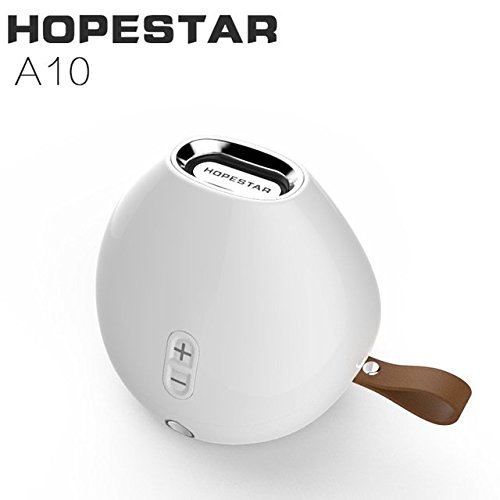
Figura 3.1: Frontal view of the Hopestar A10 Wireless Bluetooth Speaker in white, showing the volume controls and the Hopestar logo.
This image displays the primary view of the Hopestar A10 speaker. It features a sleek, rounded design with a white finish. Visible elements include the volume up (+) and volume down (-) buttons on the side, and the Hopestar brand name subtly placed on the top metallic ring. A brown leather strap is visible on the right side, indicating portability.
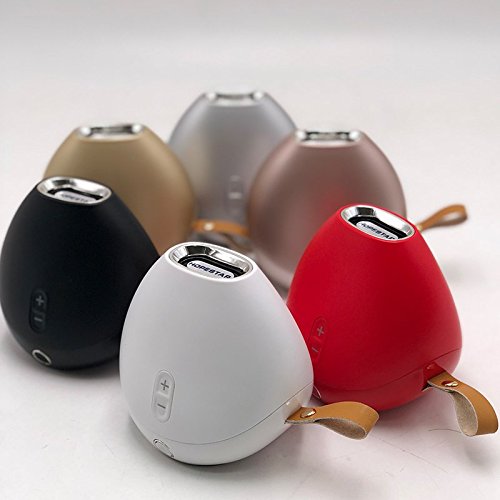
Figure 3.2: Collection of Hopestar A10 Speakers in different colors.
This image showcases the Hopestar A10 speaker available in multiple color options, including white, black, red, gold, and rose gold. The speakers are arranged in a group, highlighting their compact size and consistent design across different finishes. Each speaker retains the same button layout and leather strap for easy carrying.
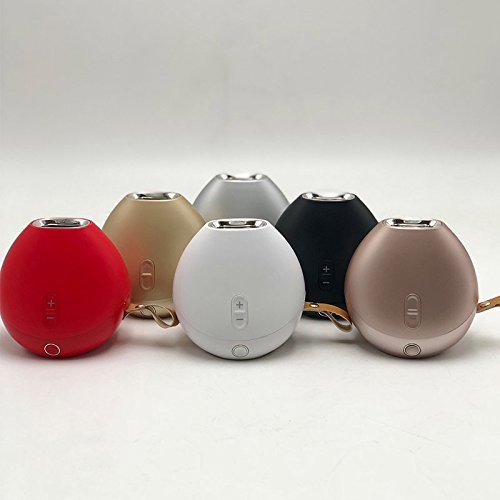
Figura 3.3: Un altre view of multiple Hopestar A10 Speakers.
This image provides an alternative perspective of the Hopestar A10 speakers in various colors. It emphasizes the rounded, pebble-like shape of the device and the integrated strap. The arrangement allows for a better appreciation of the speaker's overall form factor and portability.
Controls i ports:
- Botó d'encesa: Located at the bottom/front. Press and hold to turn on/off.
- Puja el volum (+): Increases volume. Also used for next track in some modes.
- Baixar el volum (-): Decreases volume. Also used for previous track in some modes.
- Botó Reproduir/Pausa: Controls playback. Also used for answering/ending calls.
- Botó de mode (M): Switches between Bluetooth, FM Radio, AUX, and TF/USB modes.
- Port USB: For USB drive playback and charging.
- Ranura per a targetes TF: Per a la reproducció amb targeta TF (MicroSD).
- Port d'entrada AUX: Per connectar dispositius d'àudio externs mitjançant un cable d'àudio de 3.5 mm.
4. Configuració
4.1 Càrrega de l'altaveu
- Connect the small end of the included USB charging cable to the USB port on the speaker.
- Connecteu l'extrem més gran del cable USB a un adaptador de corrent USB (no inclòs) o al port USB d'un ordinador.
- El llum indicador de càrrega s'il·luminarà (el color pot variar) per indicar que l'altaveu s'està carregant.
- Once fully charged, the indicator light will change or turn off. A full charge typically takes 2-3 hours.
Note: For optimal battery life, fully charge the speaker before first use.
4.2 Engegada/apagada
- Per encendre: Press and hold the Power button for approximately 3 seconds until you hear an audible prompt or see an indicator light.
- Per apagar: Press and hold the Power button for approximately 3 seconds until you hear an audible prompt or the indicator light turns off.
5. Instruccions de funcionament
5.1 Vinculació Bluetooth
- Assegureu-vos que l'altaveu estigui encès i en mode Bluetooth. Si no, premeu el botó Mode (M) button until you hear the Bluetooth pairing prompt.
- Al dispositiu mòbil o a l'ordinador, activeu el Bluetooth i cerqueu els dispositius disponibles.
- Selecciona "HOPESTAR A10" de la llista de dispositius.
- Un cop emparellat, l'altaveu indicarà una connexió correcta i podreu començar a reproduir àudio.
- L'altaveu intentarà tornar a connectar-se automàticament amb l'últim dispositiu emparellat quan s'engegui.
5.2 Mode de ràdio FM
- Premeu el botó Mode (M) botó per canviar al mode de ràdio FM.
- To auto-scan and save available stations, press the Reproduir/Pausa button once. The speaker will scan and store stations automatically.
- Utilitza el Puja el volum (+) i Baixar el volum (-) buttons to navigate between saved stations (short press).
- For better reception, ensure the USB charging cable is connected as an antenna.
5.3 Mode d'entrada auxiliar
- Connect one end of the 3.5mm Aux cable to the AUX-in port on the speaker.
- Connect the other end of the Aux cable to the audio output jack of your external device (e.g., smartphone, MP3 player).
- The speaker will automatically switch to AUX mode, or you may need to press the Mode (M) botó per seleccionar-lo.
- Controla la reproducció i el volum des del dispositiu connectat.
5.4 USB Drive / TF Card Playback
- Inseriu una unitat USB al port USB o una targeta TF (MicroSD) a la ranura per a targetes TF.
- L'altaveu detectarà automàticament el dispositiu d'emmagatzematge i començarà a reproduir àudio files. Si no, premeu la tecla Mode (M) botó per canviar al mode correcte.
- Utilitza el Reproduir/Pausa botó per aturar o reprendre la reproducció.
- Premsa curta Puja el volum (+) for the next track, and Baixar el volum (-) for the previous track.
- Premsa llarga Puja el volum (+) or Baixar el volum (-) per ajustar el volum.
5.5 Call Function (Bluetooth Mode)
- Respon a la trucada: Quan arribi una trucada, premeu el botó Reproduir/Pausa button once to answer.
- Finalitzar la trucada: Durant una trucada, premeu el botó Reproduir/Pausa button once to end the call.
- Rebutja la trucada: Manteniu premut el botó Reproduir/Pausa botó durant 2 segons per rebutjar una trucada entrant.
- Torna a marcar l'últim número: In Bluetooth mode, double-press the Reproduir/Pausa botó per tornar a marcar l'últim número marcat.
6. Manteniment
- Neteja: Feu servir un drap suau i sec per netejar la superfície de l'altaveu. No utilitzeu netejadors abrasius, alcohol ni altres dissolvents químics, ja que poden danyar l'acabat.
- Emmagatzematge: Quan no l'utilitzeu durant períodes prolongats, guardeu l'altaveu en un lloc fresc i sec, allunyat de la llum solar directa i de temperatures extremes.
- Cura de la bateria: Per allargar la durada de la bateria, eviteu descarregar completament l'altaveu amb freqüència. Carregueu-lo regularment, fins i tot si no l'esteu fent servir.
- Resistència a l'aigua: While the product is listed as waterproof, avoid submerging it in water or exposing it to heavy rain for prolonged periods. Ensure all ports are sealed if applicable.
7. Solució De Problemes
| Problema | Causa possible | Solució |
|---|---|---|
| L'altaveu no s'encén. | Bateria baixa. | Carregueu l'altaveu durant almenys 30 minuts. |
| No hi ha so de l'altaveu. | Volum massa baix; mode incorrecte; dispositiu no connectat. | Increase speaker and device volume. Ensure correct mode is selected (Bluetooth, AUX, etc.). Reconnect device. |
| L'aparellament de Bluetooth falla. | L'altaveu no està en mode d'emparellament; el Bluetooth del dispositiu està desactivat; massa lluny de l'altaveu. | Ensure speaker is in Bluetooth pairing mode. Turn Bluetooth on your device. Move device closer to speaker (within 10 meters). Forget "HOPESTAR A10" on your device and re-pair. |
| Mala recepció de ràdio FM. | Weak signal; no antenna. | Connect the USB charging cable to act as an external antenna. Move to an area with better signal. |
| La targeta USB/TF no funciona. | Sense suport file format; targeta/unitat no inserida correctament; corrupta files. | Assegureu-vos files are in a supported format (e.g., MP3). Reinsert the card/drive. Try a different card/drive. |
8. Especificacions
| Característica | Detall |
|---|---|
| Marca | HOPESTAR |
| Nom del model | A10 |
| Tecnologia de connectivitat | Bluetooth, Auxiliar, USB, Sense fil |
| Característica especial | Bluetooth, Wireless, FM Radio, TF Card, USB Drive |
| Color | White (Other colors available) |
| Pes de l'article | 450 grams |
| Dimensions del producte (LxWxH) | 10 x 10 x 8 centímetres |
| És impermeable | VERITAT |
| Components inclosos | 1 Speaker, 1 Aux cable, 1 USB Cable |
| Tipus de muntatge | Muntatge de taula |
| Tipus d'altaveu | prestatgeria |
9. Garantia i assistència
9.1 Garantia del producte
The Hopestar A10 Wireless Bluetooth Speaker comes with a 6 mesos de garantia des de la data de compra. Aquesta garantia cobreix els defectes de fabricació i els problemes derivats de l'ús normal. No cobreix els danys causats per un mal ús, accidents, modificacions no autoritzades o desastres naturals.
Si us plau, conserveu el rebut de compra com a comprovant de compra per a reclamacions de garantia.
9.2 Atenció al client
For technical assistance, troubleshooting, or warranty inquiries, please contact Hopestar customer support. Refer to the contact information provided with your product packaging or visit the official Hopestar weblloc web per obtenir els detalls d'assistència més actualitzats.
Typical support channels may include:
- Suport per correu electrònic
- Suport telefònic
- Online FAQ / Knowledge Base


