Introducció
Gràcies per la compraasing the HOPESTAR A10 Portable Wireless Bluetooth Speaker. This manual provides detailed instructions on how to set up, operate, and maintain your speaker to ensure optimal performance and longevity. Please read this manual carefully before using the product and retain it for future reference.
Informació de seguretat
Per garantir un funcionament segur i evitar danys, observeu les precaucions següents:
- No exposeu l'altaveu a temperatures extremes, llum solar directa ni humitat elevada.
- Eviteu deixar caure o sotmetre l'altaveu a forts impactes.
- No desmunteu, repareu ni modifiqueu l'altaveu vosaltres mateixos. Encarregueu tot el manteniment a personal qualificat.
- Keep the speaker away from water and liquids. Although it is listed as waterproof, prolonged submersion or exposure to high-pressure water jets should be avoided.
- Feu servir només el cable de càrrega proporcionat i un adaptador de corrent compatible.
- Netegeu l'altaveu amb un drap suau i sec. No utilitzeu productes de neteja abrasius ni dissolvents.
Contingut del paquet
Marqueu la casella per als elements següents:
- 1 x HOPESTAR A10 Bluetooth Speaker
- 1 x cable auxiliar
- 1 x cable de càrrega USB

Image: The HOPESTAR A10 speaker in gold, showing its compact design and integrated strap.
Producte acabatview
The HOPESTAR A10 is a compact and portable wireless Bluetooth speaker designed for high-quality audio on the go. It features multiple connectivity options and intuitive controls.
Controls i ports:
- Botó d'encesa: Manteniu premut per activar/desactivar.
- Puja el volum (+): Premeu curt per augmentar el volum. Premeu llargament per passar a la següent pista.
- Baixar el volum (-): Premeu curt per baixar el volum. Premeu llargament per anar a la pista anterior.
- Botó Reproduir/Pausa: Reprodueix o pausa l'àudio. Respon/finalitza trucades.
- Botó de mode (M): Switch between Bluetooth, FM Radio, AUX, USB, and TF Card modes.
- Port USB: Per a la reproducció des d'una unitat USB.
- Ranura per a targetes TF: Per a la reproducció amb targeta TF (Micro SD).
- Entrada AUX: Per a la connexió per cable a dispositius d'àudio.
- Port de càrrega: Port micro USB per carregar l'altaveu.
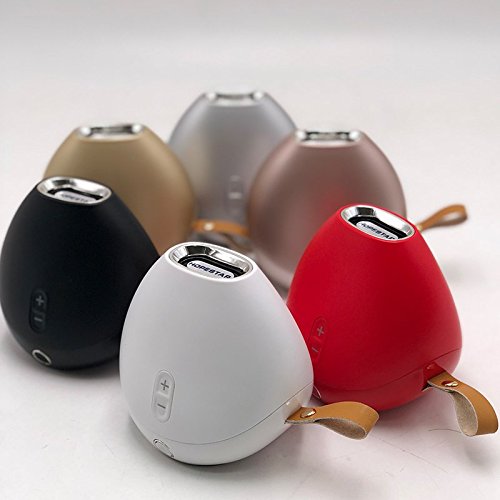
Image: A collection of HOPESTAR A10 speakers showcasing different available colors, highlighting the compact and uniform design across the range.
Configuració
1. Càrrega de l'altaveu:
- Connecteu l'extrem petit del cable de càrrega USB al port de càrrega de l'altaveu.
- Connecteu l'extrem gran del cable USB a un adaptador de corrent USB (no inclòs) o al port USB d'un ordinador.
- El llum indicador de càrrega s'il·luminarà. S'apagarà o canviarà de color un cop estigui completament carregat.
- Normalment, una càrrega completa triga entre 2 i 3 hores.
2. Encendre/apagar:
- To turn on, press and hold the Power button until you hear an audible prompt.
- To turn off, press and hold the Power button again until the speaker powers down.
Instruccions de funcionament
Mode Bluetooth:
- Engegueu l'altaveu. Entrarà automàticament en mode d'emparellament Bluetooth, cosa que s'indicarà amb un llum LED intermitent.
- Activeu el Bluetooth al vostre telèfon intel·ligent, tauleta o altre dispositiu compatible amb Bluetooth.
- Cerca "HOPESTAR A10" in your device's Bluetooth list and select it to pair.
- Once successfully paired, the speaker will emit an audible confirmation, and the LED light will stop flashing.
- Ara pots reproduir àudio des del teu dispositiu a través de l'altaveu.
Mode de ràdio FM:
- Premeu el botó "M" (Mode) per canviar al mode de ràdio FM.
- To auto-scan for stations, press and hold the Play/Pause button. The speaker will scan and save available stations.
- Feu servir els botons Pujar volum (+) i Baixar volum (-) (pressió curta) per navegar entre les emissores desades.
Mode d'entrada AUX:
- Connecteu un extrem del cable AUX de 3.5 mm al port d'entrada AUX de l'altaveu.
- Connect the other end of the AUX cable to the audio output jack of your external device (e.g., MP3 player, computer).
- The speaker will automatically switch to AUX mode, or you may need to press the "M" (Mode) button to select it.
- Controla la reproducció des del dispositiu connectat.
USB Drive / TF Card Playback:
- Insert a USB drive or TF (Micro SD) card with MP3 audio files into the respective port/slot.
- L'altaveu detectarà automàticament el dispositiu d'emmagatzematge i començarà a reproduir àudio files. If not, press the "M" (Mode) button to switch to the correct mode.
- Use the Play/Pause button to control playback.
- Use the Volume Up (+) and Volume Down (-) buttons (long press) to skip tracks.
Manteniment
- Neteja: Feu servir un drap suau, sec i sense borrissol per netejar la superfície de l'altaveu. No utilitzeu netejadors líquids, aerosols ni dissolvents.
- Emmagatzematge: Quan no l'utilitzeu durant períodes prolongats, guardeu l'altaveu en un lloc fresc i sec, allunyat de la llum solar directa i de temperatures extremes.
- Cura de la bateria: Per allargar la durada de la bateria, eviteu descarregar-la completament amb freqüència. Carregueu l'altaveu regularment, fins i tot si no l'esteu fent servir.
Resolució de problemes
| Problema | Causa possible | Solució |
|---|---|---|
| L'altaveu no s'encén. | La bateria està baixa o esgotada. | Carregueu l'altaveu completament. |
| No es pot emparellar amb un dispositiu Bluetooth. | L'altaveu no està en mode d'emparellament; el Bluetooth està desactivat al dispositiu; el dispositiu és massa lluny. | Ensure speaker is in pairing mode (flashing LED). Turn on Bluetooth on your device. Move device closer to speaker (within 10 meters). |
| Sense so. | Volume is too low; Incorrect mode selected; Cable not connected properly (AUX). | Increase volume on both speaker and connected device. Press "M" button to select correct mode. Reconnect AUX cable securely. |
| Mala recepció de ràdio FM. | Senyal feble; Interferències ambientals. | Relocate the speaker to an area with better signal. Extend the AUX cable (if used as antenna). |
Especificacions
| Marca | HOPESTAR |
| Nom del model | A10 |
| Tecnologia de connectivitat | Auxiliary, Bluetooth, USB, Wireless |
| Característica especial | Bluetooth |
| Dispositius compatibles | Smartphone, tauleta |
| Color | Or |
| Pes de l'article | 450 grams |
| Dimensions del producte | 10 x 10 x 8 cm |
| És impermeable | VERITAT |
Garantia i Suport
The HOPESTAR A10 Portable Wireless Bluetooth Speaker comes with a 6 mesos de garantia des de la data de compra. Aquesta garantia cobreix els defectes de fabricació i la mà d'obra en condicions d'ús normal.
The warranty does not cover damage caused by misuse, accident, unauthorized modification, or natural disasters. Please retain your purchase receipt as proof of purchase for warranty claims.
For technical support, warranty claims, or any inquiries, please contact your retailer or the manufacturer's customer service. Refer to the product packaging or retailer's weblloc per obtenir informació de contacte.


