1. Introducció i finalview
The Optoma X343 is a professional XGA DLP projector designed for clear and vibrant presentations in various environments, including meeting rooms, classrooms, and home use. It features 3,600 lumens of brightness and a 22,000:1 contrast ratio, ensuring sharp text and graphics even in well-lit conditions. The projector includes an integrated 10-watt speaker for audio playback and offers a long lamp vida útil de fins a 15,000 hores.
Les característiques clau inclouen:
- Qualitat de la imatge: XGA resolution (1024x768) and 22,000:1 contrast ratio for vibrant and sharp images.
- Alt Brillantor: 3,600 lumens for clear projection in various lighting conditions.
- Opcions de connectivitat: Multiple input options including HDMI, VGA, and composite.
- Llargaamp Vida: Up to 15,000 hours, reducing maintenance needs.
- Fàcil instal·lació: Vertical keystone correction and 1.1x zoom for flexible placement.
- Altaveu integrat: A 10-watt speaker provides room-filling audio.
- Mida portàtil: Weighing less than 7 pounds, it is easy to transport.
- Distància de llançament: Projects a 120-inch image from approximately 18 feet away.
2. Què hi ha a la caixa
Upon unpacking your Optoma X343 projector, please ensure all the following items are present:
- Projector X343
- Cable d'alimentació
- Control remot
- Bateries per a comandament a distància
If any items are missing or damaged, please contact your retailer or Optoma customer support immediately.
3. Components del producte

Figura 3.1: Frontal view of the Optoma X343 Projector, showcasinla lent i les reixetes de ventilació.

Figura 3.2: superior view of the Optoma X343 Projector, highlighting the focus and zoom rings, and the control panel buttons.

Figura 3.3: lateral view of the Optoma X343 Projector with dimensions (9.6 x 12.4 x 3.9 inches) indicated.
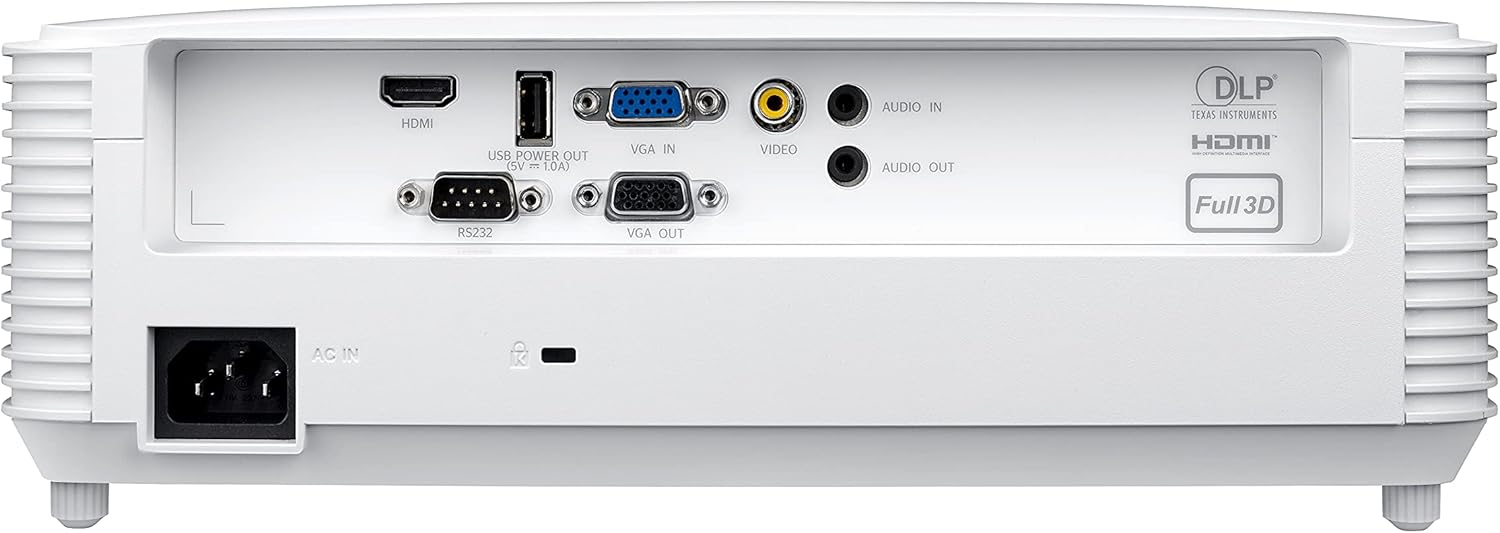
Figure 3.4: Rear panel of the Optoma X343 Projector, showing various input and output ports including HDMI, VGA, USB, and audio connections.
4. Guia de configuració
4.1 Col·locació
Position the projector on a stable, flat surface or mount it securely. Ensure adequate ventilation around the projector to prevent overheating. For a 120-inch image, the projector should be approximately 18 feet from the screen. The 1.1x zoom and vertical keystone correction features allow for minor adjustments to image size and shape.
4.2 Connexió d'alimentació
- Connect the power cord to the 'AC IN' port on the rear of the projector.
- Connecteu l'altre extrem del cable d'alimentació a una presa de corrent amb connexió a terra.
4.3 Connexió a un dispositiu font
The X343 offers multiple connectivity options:
- HDMI: For high-definition digital video and audio. Connect an HDMI cable from your source device (e.g., laptop, Blu-ray player) to the HDMI port on the projector.
- VGA: For analog video. Connect a VGA cable from your computer to the 'VGA IN' port. If audio is required, connect a separate audio cable to the 'AUDIO IN' port.
- Vídeo compost: For standard definition analog video. Connect a composite video cable (yellow RCA) to the 'VIDEO' port.
- USB Power Out (5V=1.0A): This port can be used to power external devices such as HDMI dongles.
5. Instruccions de funcionament
5.1 Engegada/apagada
- Per encendre: Press the power button on the projector's control panel or the remote control. The power indicator light will turn blue.
- Per apagar: Press the power button again. A confirmation message may appear. Press the power button a second time to confirm shutdown. The power indicator light will turn red.
5.2 Ajust de la imatge
- Focus: Rotate the focus ring around the lens until the image is sharp and clear.
- Zoom: Rotate the zoom ring around the lens to adjust the image size.
- Correcció Keystone: Use the 'Keystone' function in the projector menu or dedicated buttons on the remote to correct trapezoidal image distortion.
5.3 Selecció de la font
Press the 'Source' button on the remote control or projector panel to cycle through available input sources (HDMI, VGA, Video). Select the input corresponding to your connected device.
6. Manteniment
6.1 Lamp La vida
The Optoma X343 lamp has a life expectancy of up to 15,000 hours. When the lamp approaches its end of life, a warning message may appear on the screen. Refer to the full user manual for lamp procediments de substitució.
6.2 Neteja
- Lent: Use a soft, lint-free cloth specifically designed for optical lenses. Avoid abrasive cleaners.
- Casing: Netegeu el projector casing with a soft, dry cloth. Do not use harsh chemicals or solvents.
- Vendes d'aire: Ensure air vents are clear of dust and obstructions to maintain proper airflow and prevent overheating.
7. Solució De Problemes
This section addresses common issues you might encounter with your Optoma X343 projector.
7.1 No hi ha imatge a la pantalla
- Ensure the projector is powered on and the power indicator is blue.
- Verify that the video cable (HDMI, VGA) is securely connected to both the projector and the source device.
- Comproveu que s'ha seleccionat la font d'entrada correcta al projector.
- Confirmeu que el dispositiu font està encès i emet un senyal.
7.2 Sense so
- If using HDMI, ensure the source device's audio output is set to HDMI.
- If using VGA or composite, ensure a separate audio cable is connected to the 'AUDIO IN' port.
- Comproveu la configuració de volum tant al projector com al dispositiu font.
7.3 Sobreescalfament del projector
- Ensure all ventilation grilles are clear and unobstructed.
- Feu funcionar el projector en una zona ben ventilada.
- If the issue persists, power off the projector, allow it to cool, and then restart. If overheating continues, contact support.
8. Especificacions
| Especificació | Valor |
|---|---|
| Número de model | X343 |
| Tecnologia de visualització | DLP |
| Resolució nativa | XGA (1024 x 768) |
| Brillantor | 3600 lúmens |
| Relació de contrast | 22,000:1 |
| Lamp La vida | Fins a 15,000 hores |
| Relació de llançament | 1.94 – 2.15:1 |
| Zoom | 1.1x manual |
| Correcció de pedra clau | Vertical |
| Altaveu integrat | 10 watts |
| Connectivitat | HDMI, VGA In, VGA Out, Composite Video, Audio In, Audio Out, RS232, USB Power (5V=1.0A) |
| Pes de l'article | 6.7 lliures |
| Dimensions del producte | 9.6 x 12.4 x 3.9 polzades |
9. Vídeo oficial del producte
Video 9.1: Optoma Home Projection Technology. This video provides an overview of Optoma's projection capabilities, showcasing various applications and features of their projectors, including home cinema, gaming, and sports viewing.
10. Garantia i Suport
For detailed warranty information, technical support, or service inquiries, please refer to the official Optoma website or contact Optoma customer service directly. Keep your purchase receipt and product serial number handy for any support requests.
Podeu trobar recursos addicionals i informació de contacte a Optoma Store on Amazon.


