Producte acabatview
The SteelSeries Arctis 3 headset redefines gaming audio with its innovative design, delivering superior sound, comfort, and style across all major gaming platforms. It features a completely overhauled audio system and a new microphone design for unmatched clarity.
Característiques clau
- Optimal PS5 compatibility: Requires user to change settings on Sony PS5 – disable Sony 3D Audio and then increase default volume to 100%.
- All-Platform Design: Designed for everywhere you game, with superior sound, comfort and style on all gaming platforms, including PC, PlayStation, Xbox One, Nintendo Switch via detachable 3.5 millimeter cables.
- ClearCast Microphone: Widely recognized as the best mic in gaming, the Discord certified ClearCast microphone delivers studio quality voice clarity and background noise cancellation.
- Àudio superior: Sound is your competitive advantage with the S1 speaker drivers, engineered to produce ultra-low distortion audio so you hear every detail.
- Comoditat durant tot el dia: Play all day with athletics inspired performance fabric AirWeave ear cushions that keep your ears cool and dry.
- Spatial Audio Ready: Windows Sonic Spatial Audio fully compatible with native surround sound built into Windows 10 PCs and Xbox One consoles; Headphone sensitivity: 98 dB.
Què hi ha a la caixa
- Auriculars
- Manual d'usuari

The SteelSeries Arctis 3 headset and its included accessories, ready for setup.
Configuració
Connectant els auriculars
The Arctis 3 headset connects via detachable 3.5mm cables, ensuring broad compatibility across various gaming platforms.
Connexió a PC
For PC, use the included splitter extension cable to connect the headset's 3.5mm jack to separate microphone and headphone ports on your computer.
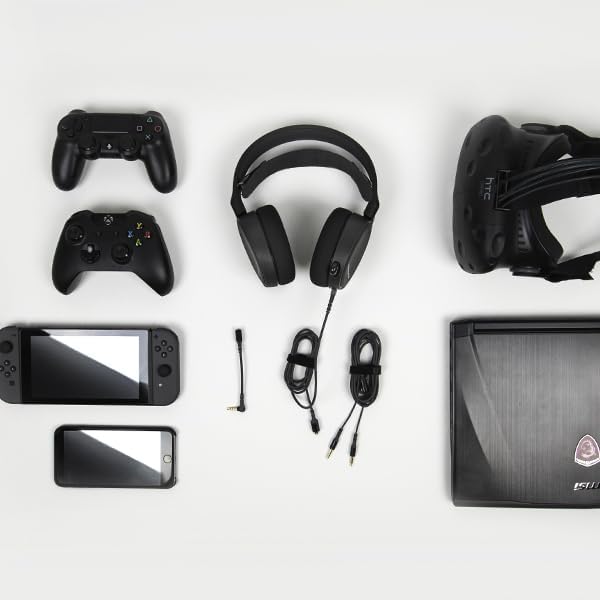
The SteelSeries Arctis 3 headset shown with various compatible devices and connection cables, highlighting its multi-platform design.
Console Connection (PlayStation, Xbox One, Nintendo Switch)
For consoles, connect the headset directly to your controller's 3.5mm audio jack.
Important PS5 Compatibility Note: To ensure optimal PS5 compatibility, disable Sony 3D Audio in your PS5 settings and increase the default volume to 100%.
Official SteelSeries video demonstrating the features and compatibility of the Arctis 3 Black Gaming Headset.
Funcionament dels auriculars
Ús del micròfon
The Discord-certified ClearCast microphone is retractable and delivers studio-quality voice clarity with background noise cancellation.
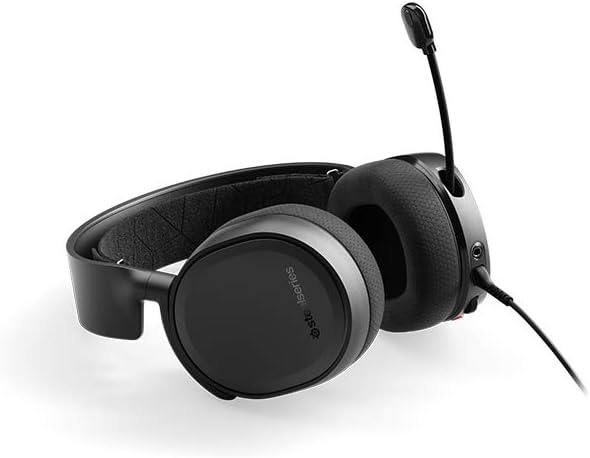
The SteelSeries Arctis 3 headset with its ClearCast microphone extended, ready for voice communication.
To extend the microphone, gently pull it out from the left earcup. To retract, push it back into the earcup until it is flush.
On-Headset Controls
The left earcup features convenient controls for volume adjustment and microphone muting.
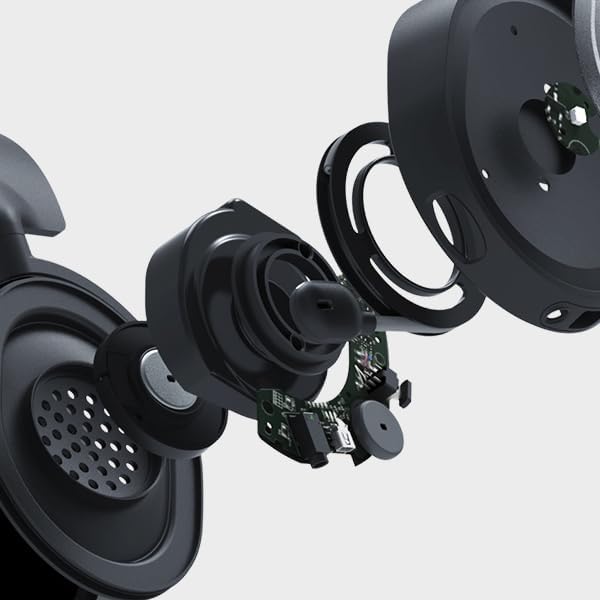
Primer pla view of the volume scroll wheel and microphone mute button located on the left earcup of the Arctis 3 headset.
- Roda de volum: Scroll up or down to adjust the audio volume.
- Botó de silenci del micròfon: Press to mute or unmute your microphone.
Manteniment
To ensure the longevity and optimal performance of your SteelSeries Arctis 3 headset, follow these maintenance guidelines:
- Neteja: Use a soft, dry cloth to wipe down the earcups and headband. Avoid abrasive cleaners or solvents.
- Emmagatzematge: Store the headset in a cool, dry place away from direct sunlight and extreme temperatures. When not in use, retract the microphone to protect it.
- Cura del cable: Manipuleu els cables amb cura. Eviteu doblegar-los bruscament o estirar-los excessivament per evitar danys.
- Earcup Maintenance: The AirWeave ear cushions are designed for comfort and breathability. Periodically check them for wear and tear.
Resolució de problemes
If you encounter issues with your SteelSeries Arctis 3 headset, refer to the following common troubleshooting steps:
- Sense àudio/Volum baix:
- Ensure the 3.5mm cable is securely connected to both the headset and your device.
- Comproveu la roda de volum dels auriculars i la configuració d'àudio del dispositiu.
- Verify that the microphone mute button is not engaged.
- For PS5 users, confirm Sony 3D Audio is disabled and volume is at 100% as per setup instructions.
- El micròfon no funciona:
- Ensure the microphone is fully extended.
- Check that the microphone mute button is not engaged.
- Verify microphone input settings on your PC or console.
- If using the PC splitter cable, ensure both jacks are correctly inserted into the microphone and headphone ports.
- Distorsió del so:
- Lower the volume on both the headset and your device.
- Prova els auriculars amb un altre dispositiu per descartar un problema específic del dispositiu.
Especificacions
| Característica | Detall |
|---|---|
| Conector d'auriculars | Mini-phone |
| Nom del model | Arctis |
| Tecnologia de connectivitat | Amb cable |
| Components inclosos | User Manual, Headset |
| Usos específics per al producte | Jocs |
| Tema | Videojoc |
| Tipus de control | Control de soroll |
| Característica del cable | Desmuntable |
| Pes de l'article | 10.4 unces |
| Tipus de paquet del client | Embalatge estàndard |
| Recompte d'unitats | 1.0 recompte |
| Estil | Arctis 3 |
| Nombre d'articles | 1 |
| UPC | 813682025212 |
| Número d'identificació comercial global | 00813682025212 |
| Fabricant | SteelSeries APS |
| Dimensions del producte | 7.93 x 7.08 x 3.58 polzades |
| ASIN | B07G12Z1HR |
| Número de model de l'article | 61503 |
| Bateries | Necessites 1 piles de polímer de liti. |
| Re Clientviews | 4.2 sobre 5 estrelles (12,688 valoracions) |
| Classificació dels més venuts | #23,643 in Video Games, #856 in PC Game Headsets |
| Està aturat pel fabricant | No |
| Data de primera disponibilitat | 28 d'agost de 2018 |
| Marca | SteelSeries |
| Color | Negre |
| Factor de forma | Sobre l'orella |
| Impedància | 32 ohms |
| Resposta de freqüència | 22000 Hz |
Garantia i Suport
The SteelSeries Arctis 3 headset comes with a manufacturer's warranty. For detailed warranty information and support, please refer to the official SteelSeries website or the user manual.
You can download the full User Manual in PDF format: Manual d'usuari (PDF)
For further assistance, visit the official SteelSeries store page: SteelSeries Store


