1. Instruccions de seguretat
Si us plau, llegiu atentament aquestes instruccions de seguretat abans de fer funcionar la unitat. Conserveu aquest manual per a futures consultes.
- Font d'alimentació: Ensure the unit is connected to an AC power supply that matches the voltage especificat a l'etiqueta de qualificació.
- Ventilació: No bloquegeu cap obertura de ventilació. Deixeu prou espai al voltant de la unitat per a un flux d'aire adequat.
- Aigua i humitat: No exposeu la unitat a la pluja, la humitat, les goteges o les esquitxades. No col·loqueu objectes plens de líquids, com ara gerros, a sobre de la unitat.
- Fonts de calor: Mantingueu la unitat allunyada de fonts de calor com ara radiadors, registres de calor, estufes o altres aparells (inclosos amplificadors) que produeixen calor.
- Neteja: Desendolleu la unitat de la presa de corrent abans de netejar-la. Feu servir un drap suau i sec. No utilitzeu netejadors líquids ni aerosols.
- Manteniment: No intenteu atendre aquest producte vosaltres mateixos. Consulteu tots els serveis a personal de servei qualificat.
- Col·locació: Col·loqueu la unitat sobre una superfície estable i plana per evitar que caigui.
2. Producte acabatview
The Soundmaster NR566BR is a versatile 7-in-1 Hi-Fi system designed to play various audio formats with a nostalgic aesthetic.
2.1 Components principals
- Plataforma giratòria: Supports 33, 45, and 78 RPM records, equipped with an Audio Technica magnetic cartridge.
- DAB+/FM Digital Radio: For receiving digital and analog radio broadcasts.
- Reproductor de CD/MP3: Compatible with CD and MP3-CD discs.
- Port USB: For MP3 playback and digitization (recording).
- Reproductor de casset: For playing audio cassettes.
- Connectivitat Bluetooth: Per a la transmissió d'àudio sense fil des de dispositius compatibles.
- Altaveus estèreo integrats: 2 x 4 Watt RMS output.
- Equalitzador: For sound customization.
- Comandament a distància: Per a un funcionament còmode.
2.2 Controls i funcions del panell frontal

Figura 2.2.1: Davant view of the Soundmaster NR566BR Hi-Fi System with the turntable lid open, showcasing the turntable and the main control panel below.

Figura 2.2.2: Detallada view of the CD player tray located on the front panel of the unit.

Figura 2.2.3: Close-up of the USB port, showing a USB flash drive inserted, located on the front panel.

Figura 2.2.4: Detallada view of the cassette player slot, typically located on the side of the unit.
- Botó d'encesa: Encén/apaga la unitat.
- Selector de funcions: Switches between Turntable, Radio, CD, USB, Cassette, and Bluetooth modes.
- Control de volum: Ajusta el nivell de so general.
- Tuning Knob/Buttons: For radio station selection.
- Controls de reproducció: Play/Pause, Stop, Skip/Search (for CD, USB, Cassette).
- Pantalla de visualització: Mostra el mode actual, la informació de la pista, la freqüència de ràdio, etc.
- Controls de l'equalitzador: Buttons or knobs for adjusting bass, treble, or preset EQ modes.
2.3 Connexions del panell posterior
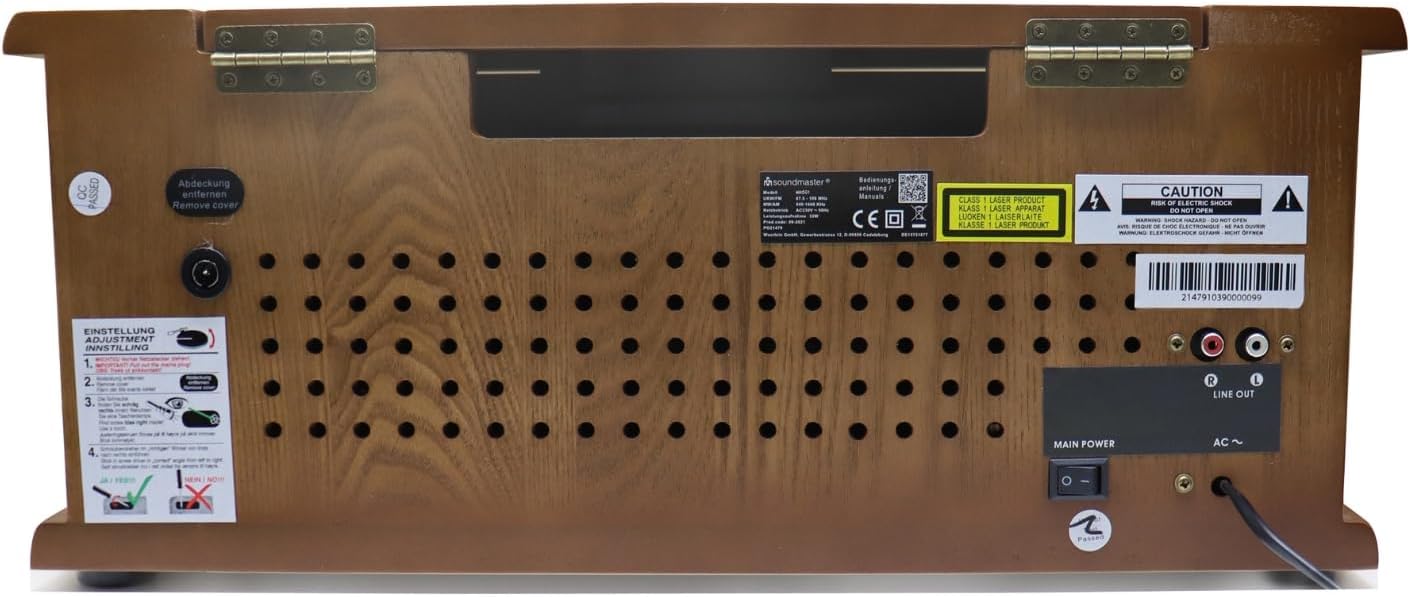
Figura 2.3.1: Rear panel of the Soundmaster NR566BR, displaying the power input, antenna connection, and Line Out ports.

Figura 2.3.2: Primer pla view of the red and white RCA Line Out ports on the rear of the unit, labeled 'R' and 'L'.
- Entrada d'alimentació de CA: Per connectar el cable d'alimentació.
- Terminal d'antena: For connecting the DAB+/FM antenna.
- Sortida de línia (RCA): Red (Right) and White (Left) outputs for connecting to an external amplifier o altaveus alimentats.
3. Configuració
3.1 Desembalatge i col·locació
- Traieu amb cura la unitat del seu embalatge.
- Place the unit on a stable, level surface, ensuring adequate ventilation around all sides.
- Avoid placing the unit near strong magnetic fields, direct sunlight, or sources of excessive heat or moisture.
3.2 Connexió de potència
- Assegureu-vos que l'interruptor d'alimentació de la unitat estigui en la posició OFF.
- Connect the AC power cord to the AC power input on the rear of the unit.
- Connecteu l'altre extrem del cable d'alimentació a una presa de corrent adequada.
3.3 Connexió de l'antena
- Connect the supplied DAB+/FM antenna to the antenna terminal on the rear of the unit.
- Extend the antenna fully and position it for optimal reception. You may need to adjust its position later to improve signal quality.
4. Instruccions de funcionament
Press the Power button to turn on the unit. Use the Function Selector to choose your desired audio source.
4.1 Funcionament del tocadiscs

Figura 4.1.1: Detallada view of the turntable platter and tonearm, highlighting the Audio Technica magnetic cartridge.
- Aixequeu la tapa del plat giratori.
- Posa un disc al plat.
- Select the appropriate speed (33, 45, or 78 RPM) using the speed selector switch. For 45 RPM records, place the included adapter on the spindle.
- Allibereu el bloqueig del braç.
- Aixequeu suaument el braç amb la palanca de cueing i col·loqueu el llapis sobre la pista desitjada del disc.
- Baixeu el braç lentament amb la palanca de cueing. El disc començarà a reproduir-se.
- At the end of the record, the tonearm will automatically return to its rest position (if auto-stop is enabled).
- To stop playback manually, lift the tonearm, return it to its rest, and engage the tonearm lock.
4.2 Radio (DAB+/FM) Operation
- Select the 'Radio' function.
- For DAB+ radio, the unit will automatically scan for available digital stations. Use the tuning controls to navigate through the station list.
- For FM radio, use the tuning knob or buttons to manually tune to a station or perform an auto-scan.
- To save a station as a preset, refer to the specific instructions in the full manual (usually involves pressing and holding a preset button).
4.3 Funcionament del reproductor de CD/MP3
- Select the 'CD' function.
- Press the Eject button to open the CD tray.
- Place a CD or MP3-CD disc with the label side facing up into the tray.
- Press the Eject button again to close the tray. The unit will read the disc and begin playback.
- Use the Play/Pause, Stop, and Skip/Search buttons to control playback.
Reproducció USB 4.4
- Inseriu una unitat flaix USB al port USB.
- Select the 'USB' function. The unit will automatically detect and begin playing MP3 files.
- Use the navigation buttons to browse folders and select specific tracks.
4.5 Funcionament del reproductor de casset
- Insert an audio cassette into the cassette slot.
- Select the 'Cassette' function.
- Use the playback controls (Play, Stop, Fast Forward, Rewind) to operate the cassette player.
4.6 Connectivitat Bluetooth
- Select the 'Bluetooth' function. The unit will enter pairing mode, indicated on the display.
- On your Bluetooth-enabled device (smartphone, tablet), search for available Bluetooth devices.
- Select 'Soundmaster NR566BR' from the list to pair. Once paired, you can stream audio wirelessly to the unit.
4.7 Digitization (Recording to USB)
The NR566BR allows you to record audio from Vinyl, CD, or Radio directly to a USB flash drive in MP3 format.
- Insert a USB flash drive with sufficient free space into the USB port.
- Select the desired source (Turntable, CD, or Radio).
- Begin playback of the source audio.
- Press the 'Record' button (usually labeled 'REC') on the unit or remote control. Recording will begin.
- Press the 'Record' button again or 'Stop' to end the recording. The recorded file es desarà a la unitat USB.
4.8 Ajust de l'equalitzador
Use the Equalizer controls to adjust the sound characteristics to your preference. This may include preset modes (e.g., Rock, Pop, Classic) or manual bass/treble adjustments.

Figura 4.8.1: The remote control for the Soundmaster NR566BR, featuring various function and playback buttons, including EQ controls.
5. Manteniment
5.1 Neteja de la unitat
- Desconnecteu sempre la unitat de la presa de corrent abans de netejar-la.
- Feu servir un drap suau, sec i sense borrissol per netejar les superfícies exteriors.
- No utilitzeu netejadors abrasius, ceres o dissolvents, ja que poden danyar l'acabat.
5.2 Turntable and Stylus Care
- Keep the turntable platter and stylus free from dust. Use a soft brush specifically designed for stylus cleaning.
- Eviteu tocar el llapis amb els dits.
- If the sound quality deteriorates, the stylus may need cleaning or replacement. Consult a qualified technician for stylus replacement.
5.3 Cura del reproductor de CD
- Agafeu els CD per les vores per evitar les empremtes dactilars.
- Netegeu els discos amb un drap suau i sense borrissol, netejant des del centre cap a fora.
- Do not use abrasive cleaners or solvents on discs.
6. Solució De Problemes
If you experience problems with your unit, please check the following points before contacting service personnel.
| Problema | Causa possible | Solució |
|---|---|---|
| Sense poder | Power cord not connected; Power outlet faulty; Unit is off. | Ensure power cord is securely plugged in; Test outlet with another device; Press the Power button to turn on the unit. |
| Sense so | Volume too low; Incorrect function selected; Speakers disconnected (if external). | Increase volume; Select correct function (e.g., CD, Turntable); Check speaker connections. |
| Mala recepció de ràdio | Antena no estesa o posicionada correctament; Senyal feble. | Extend and adjust the antenna; Try relocating the unit for better signal. |
| Turntable not spinning or sound distorted | Speed setting incorrect; Stylus dirty or damaged; Tonearm locked. | Select correct RPM (33/45/78); Clean or replace stylus; Release tonearm lock. |
| El CD no es reprodueix o salta | Disc dirty or scratched; Disc inserted incorrectly; Incompatible disc format. | Clean disc; Insert disc with label side up; Ensure disc is CD or MP3-CD format. |
| S'ha produït un error en l'aparellament de Bluetooth | Unit not in pairing mode; Device too far; Bluetooth on device is off. | Ensure unit is in Bluetooth mode; Move device closer; Enable Bluetooth on your device. |
7. Especificacions
| Característica | Especificació |
|---|---|
| Nom del model | NR566BR |
| Dimensions (L x A x A) | 51 x 35 x 22 cm |
| Pes | 8 quilos |
| Fabricant | Mestre de so |
| Velocitats de la placa giratòria | 33, 45 i 78 RPM |
| Components inclosos | CD Player, Integrated Speakers |
| Característica especial | Adjustable speed, Digitization function |
| Material | Fusta |
| Color | marró |
| Dispositius compatibles | Smartphone, tauleta |
| Sortida de l'altaveu | 2 x 4 watts RMS |
8. Garantia i Suport
This product is covered by a manufacturer's warranty. Please refer to the warranty card included with your purchase for specific terms and conditions.
For technical support, service, or warranty claims, please contact your retailer or the Soundmaster customer service department. Contact information can typically be found on the manufacturer's official weblloc web o a l'embalatge del producte.
When contacting support, please have your product model number (NR566BR) and proof of purchase readily available.


