Introducció
Welcome to the ARCADE1UP At-Home Arcade experience! This manual provides essential information for the assembly, operation, and maintenance of your new ARCADE1UP 6650 Asteroids arcade cabinet. Please read these instructions carefully before assembly and use to ensure safe and optimal performance.
Your ARCADE1UP cabinet brings classic arcade gaming into your home, featuring iconic titles such as Asteroids, Major Havoc, Lunar Lander, and Tempest.
Informació de seguretat
- Es requereix assemblea d'adults: Aquest producte conté peces petites i requereix el muntatge per part d'un adult.
- Seguretat elèctrica: Ensure the power cord is not damaged. Plug into a grounded outlet. Do not expose to water or excessive moisture.
- Col·locació: Place the arcade cabinet on a flat, stable surface. Avoid placing in direct sunlight or near heat sources.
- Ventilació: No bloquegeu les obertures de ventilació. Assegureu-vos que hi hagi un flux d'aire adequat al voltant de la unitat.
- Neteja: Desconnecteu l'alimentació abans de netejar. Feu servir un drap suau i sec. No utilitzeu netejadors líquids ni aerosols.
- Nens: Supervise children during use. This product is not a toy and is intended for users aged 14 and up.
Contingut del paquet
Please refer to the packaging for a complete list of included components. Ensure all parts are present before beginning assembly. If any parts are missing or damaged, contact ARCADE1UP customer support.

Image: The ARCADE1UP Asteroids arcade cabinet packaging, showing the product box with graphics and key features.
Muntatge i muntatge
Assembly typically requires two adults and takes approximately 1-2 hours. Follow the step-by-step instructions provided in the separate assembly guide included with your product. The general process involves:
- Desembalatge: Traieu amb cura tots els components de l'embalatge.
- Muntatge del panell: Connect the side panels, back panel, and base using the provided hardware.
- Instal·lació del monitor: Securely mount the LCD monitor into the cabinet.
- Control Panel Attachment: Attach the control panel to the cabinet, ensuring all cables are properly connected.
- Marquee and Top Panel: Install the illuminated marquee and top panel.
- Connexió d'alimentació: Connect the power adapter to the cabinet and then to a wall outlet.

Imatge: Frontal view of the fully assembled ARCADE1UP Asteroids arcade cabinet, showcasing the screen, control panel, and artwork.
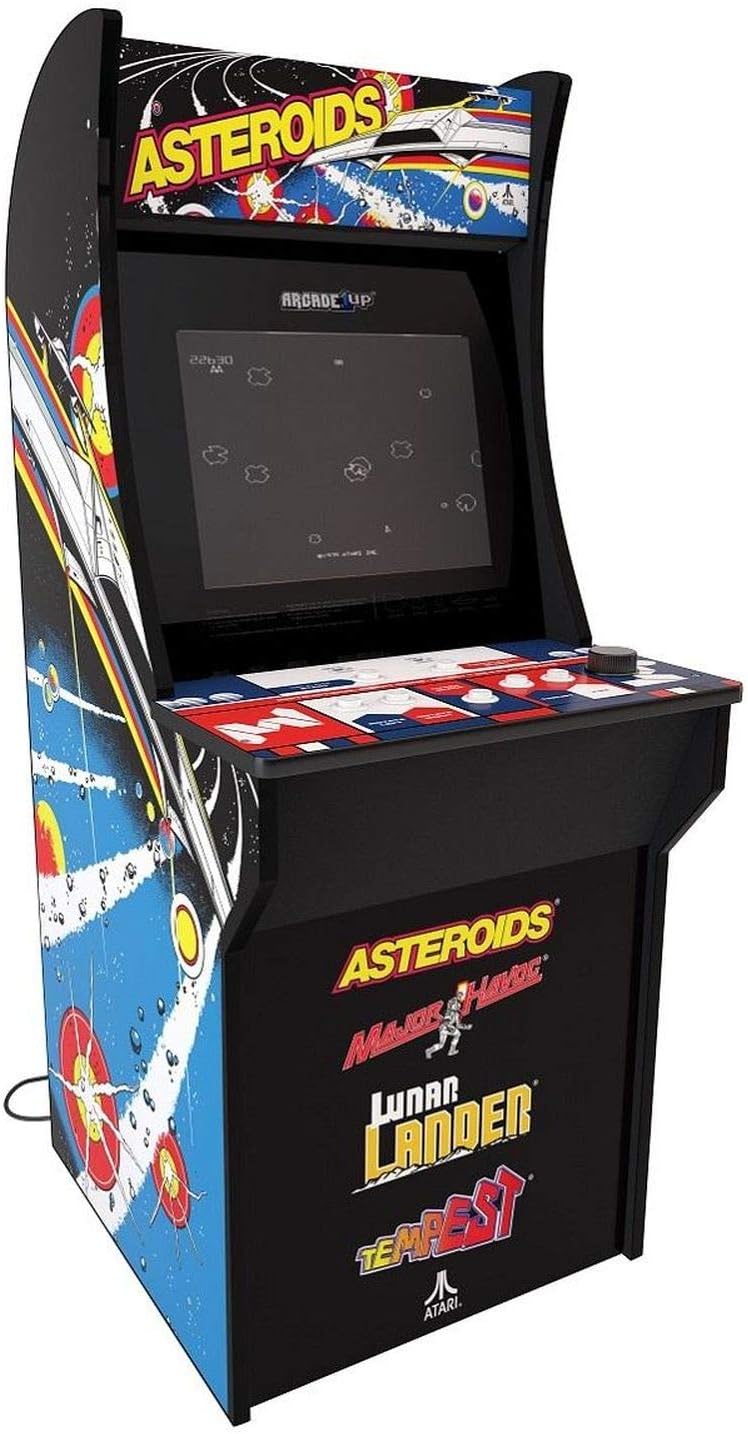
Imatge: Anglesa view of the fully assembled ARCADE1UP Asteroids arcade cabinet, highlighting the side panel artwork and overall design.

Imatge: Lateral view of the ARCADE1UP Asteroids arcade cabinet, showing the detailed side panel artwork and the power cord exiting the back.

Imatge: Primer pla view of the ARCADE1UP Asteroids control panel, displaying the joystick, buttons, and game instructions printed on the surface.
Instruccions de funcionament
- Encès: Plug the power adapter into a wall outlet. The arcade cabinet will automatically power on.
- Selecció del joc: Use the joystick and buttons on the control panel to navigate the game selection menu.
- Comença el joc: Once a game is selected, press the "1 Player Start" or "2 Player Start" button to begin.
- Controls:
- Palanca de control: Movement (e.g., steering your ship in Asteroids).
- Botó de foc: Shoots projectiles.
- Thrust Button: Propels your ship forward.
- Hyperspace Button: Teleports your ship to a random location (use sparingly, as it can be risky).
- Rotate Left/Right Buttons: For games like Tempest, these buttons control rotation.
- Control de volum: Adjust the volume using the dedicated volume buttons or switch, typically located on the control panel or back of the unit.
- Exiting a Game: To return to the main menu, press the "Option" or "Menu" button (refer to your specific control panel layout).
- Apagar: Unplug the power adapter from the wall outlet to power off the unit.
Jocs inclosos
Your ARCADE1UP 6650 cabinet includes the following classic Atari titles:
- Asteroids: The original space shooter where you destroy asteroids and flying saucers.
- Major Havoc: A vector graphics arcade game with multiple gameplay styles.
- Lunar Lander: A classic game of precision, guiding a lunar module to a safe landing.
- Tempest: A fast-paced tube shooter with vibrant vector graphics.
Manteniment
- Neteja de l'armari: Utilitzeu un suau, lleugerament damp drap per netejar les superfícies exteriors. Eviteu productes de neteja o dissolvents abrasius.
- Neteja de la pantalla: Use a microfiber cloth specifically designed for electronics screens. Do not spray cleaners directly onto the screen.
- Control Panel Care: Keep the control panel clean and dry. Avoid spills. For stubborn grime, a small amount of isopropyl alcohol on a cloth can be used, but test in an inconspicuous area first.
- Inspecció del cable d'alimentació: Reviseu periòdicament el cable d'alimentació per detectar qualsevol signe de danys. Si està malmès, deixeu d'utilitzar-lo i poseu-vos en contacte amb el servei d'atenció al client.
Resolució de problemes
| Problema | Possible solució |
|---|---|
| Sense alimentació / La unitat no s'encén |
|
| Sense so |
|
| Screen Display Issues (No Picture, Flickering) |
|
| Els controls no responen |
|
If you encounter issues not listed here or if the suggested solutions do not resolve the problem, please contact ARCADE1UP customer support for further assistance.
Especificacions
- Model: ARCADE1UP 6650 Asteroids At-Home Arcade Game
- Factor de forma: Talla completa
- Dimensions del producte: 119.38 cm (Al) x 58.42 cm (A) x 48.26 cm (F)
- Pes de l'article: 26.76 quilos
- Mida de la pantalla: LCD de 17 polzades
- Font d'alimentació: Elèctric amb cable
- Nombre de jugadors: 1
- Tipus de controlador: Joystick and Buttons
- Included Games: Asteroids, Major Havoc, Lunar Lander, Tempest
- Descripció de la franja d'edat: Kid (Recommended for ages 14+)
Garantia i Suport
For warranty information, technical support, or to order replacement parts, please visit the official ARCADE1UP weblloc web o poseu-vos en contacte amb el seu departament d'atenció al client. Conserveu el comprovant de compra per a reclamacions de garantia.
ARCADE1UP Official Weblloc: www.arcade1up.com