Introducció
This manual provides essential information for the safe and effective use of your Walfront A4 LED Tracing Light Pad. Please read these instructions carefully before operation and retain them for future reference.

Image: The Walfront A4 LED Tracing Light Pad displayed on a desk, ready for use with various art supplies.
Informació de seguretat
- No exposeu el dispositiu a l'aigua ni a una humitat excessiva.
- Eviteu deixar caure o sotmetre el dispositiu a forts impactes.
- Use only the provided USB cable for power.
- No intenteu desmuntar ni reparar el dispositiu vosaltres mateixos. Poseu-vos en contacte amb el servei d'atenció al client si sorgeixen problemes.
- Mantenir fora de l'abast dels nens.
Contingut del paquet
Verifiqueu que tots els elements siguin presents al paquet:
- 1 x Walfront A4 LED Tracing Light Pad
- 1 x cable micro USB
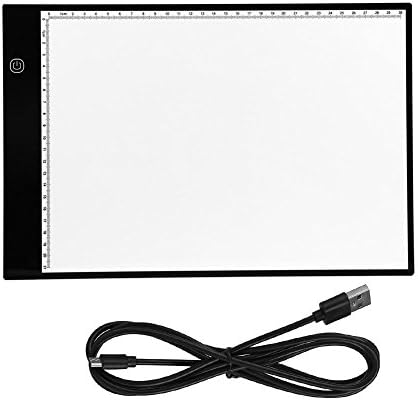
Image: The Walfront A4 LED Tracing Light Pad and its accompanying Micro USB cable.
Producte acabatview
The Walfront A4 LED Tracing Light Pad is a portable and versatile tool designed for artists, animators, and hobbyists. It features a slim design, adjustable brightness, and eye-protected LED lighting.
Característiques principals:
- Disseny ultra prim: With a thickness of only 0.2 inches (5mm) and a weight of 1.5 pounds (685g), it is highly portable.
- A4 Size with Scale: Standard A4 paper size with integrated measurement scales for convenience.
- Alimentat per USB: Easily powered via any USB port (computer, power bank, wall adapter).
- Brillantor ajustable: 3-level adjustable brightness with a simple touch control.
- Eye-Protected LED: Designed to provide stable, uniform light, reducing eye strain during extended use.
- Baix consum d'energia: Operates at 5V with 2.2W power consumption, emitting minimal heat.

Image: Visual representation of the light pad's features, including eyesight protection, ultra-thin profile, low power consumption, and touch control.
Configuració
- Desembalar: Carefully remove the light pad and USB cable from its packaging.
- Connectar l'alimentació: Insert the micro USB end of the cable into the light pad's micro USB port.
- Font d'alimentació: Connect the standard USB end of the cable to a compatible 5V USB power source, such as a computer, power bank, or a USB wall adapter.

Image: Illustration demonstrating the various USB power source options for the light pad, including laptops, computers, power banks, and wall chargers.
Instruccions de funcionament
- Encès/apagat: Once connected to a power source, touch the power button icon on the light pad to turn it on. Touch it again to turn it off.
- Ajusta la brillantor: With the light pad on, touch and hold the power button icon to cycle through the three brightness levels (low, medium, high). Release your finger when the desired brightness is reached.
- Seguiment: Place your original image or design on the light pad. Then, place a blank sheet of paper over the original. The illuminated surface will allow you to see through both layers, enabling easy tracing.
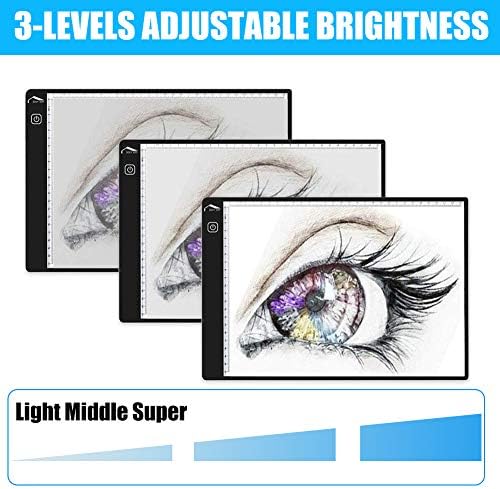
Image: Depiction of the three adjustable brightness levels (Light, Middle, Super) available on the tracing pad.
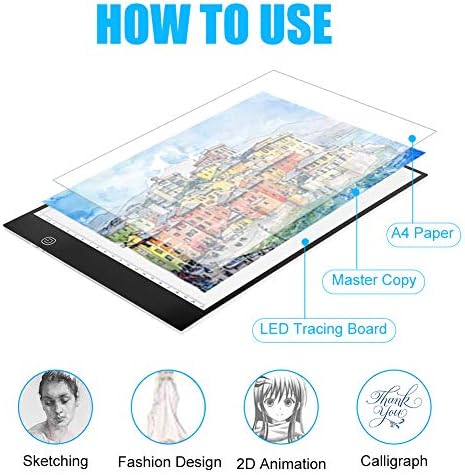
Image: Step-by-step visual guide on how to layer paper for tracing, illustrating its application in various creative fields.
Manteniment
- Neteja: Use a soft, dry cloth to wipe the surface of the light pad. For stubborn marks, slightly dampRenta el drap amb aigua. Evita productes de neteja o dissolvents abrasius.
- Emmagatzematge: Store the light pad in a dry, dust-free environment when not in use. Avoid placing heavy objects on it.
- Cura del cable: Handle the USB cable gently. Do not bend or crimp it excessively.
Resolució de problemes
| Problema | Causa possible | Solució |
|---|---|---|
| Light pad does not turn on. | No power, loose connection, faulty cable/power source. |
|
| L'ajust de brillantor no funciona. | Incorrect operation, touch sensor issue. |
|
| La llum parpelleja o és inestable. | Unstable power supply, faulty cable. |
|
Especificacions
| Nom del model | A4 LED Tracing Light Pad |
| Marca | Walfront |
| Material | Acrílic |
| Color | Blanc |
| Tipus de font de llum | Díode emissor de llum (LED) |
| Font d'alimentació | Cable elèctric (USB 5V) |
| Dimensions del producte (L x A x A) | 13.78" x 9.25" x 0.16" (35 cm x 23.5 cm x 0.4 cm) |
| Gruix de l'article | 0.2 polzades (5 mm) |
| Pes de l'article | 1.5 lliures (685 g) |
| UPC | 700890033088 |
| ASIN | B07G25WT4T |
Garantia i Suport
For warranty information or technical support, please contact Walfront customer service through the retailer where the product was purchased or visit the official Walfront store page on Amazon: Botiga Walfront.
Please have your product model number (A4 LED Tracing Light Pad) and ASIN (B07G25WT4T) ready when contacting support.


