1. Introducció
Gràcies per la compraasing the ieGeek Portable DVD Player. This manual provides essential information for the safe and efficient operation of your device. Please read it thoroughly before use and retain it for future reference.
Informació de seguretat
- No exposeu el dispositiu a la pluja o la humitat.
- No desmunteu el dispositiu. Encarregueu tot el manteniment a personal qualificat.
- Feu servir només els adaptadors de corrent i els accessoris especificats.
- Eviteu les temperatures extremes i la llum solar directa.
- Mantingueu el dispositiu allunyat de camps magnètics forts.
2. Contingut del paquet
Verifiqueu que tots els elements siguin presents al paquet:
- ieGeek Portable DVD Player
- Control remot
- Carregador de cotxe
- Adaptador de corrent alterna
- Cable AV 3 en 1
- Manual d'usuari

Figura 2.1: Accessoris inclosos
3. Producte acabatview
The ieGeek Portable DVD Player features a 10.5-inch HD swivel screen and supports various media formats for versatile entertainment.
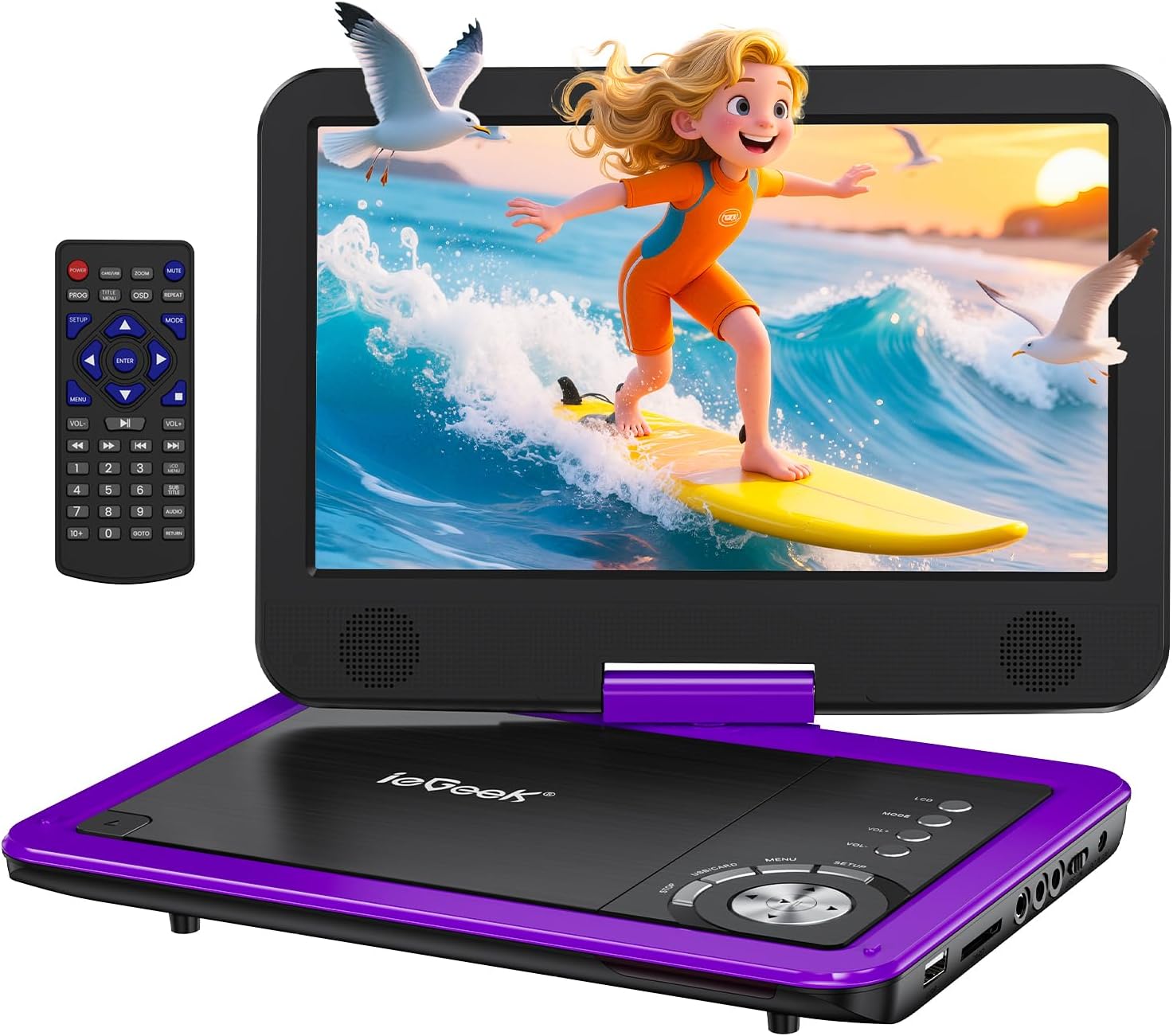
Figure 3.1: ieGeek Portable DVD Player
Controls i Ports

Figure 3.2: Side Ports and Controls
- Port USB: Per connectar unitats flaix USB.
- Ranura per a targeta SD: Per inserir targetes de memòria SD.
- Presa per a auriculars: Per connectar auriculars.
- SORTIDA AV: Connects to a TV or projector for larger screen viewing.
- AV IN: Connects to another portable DVD player for synchronized viewing.
- Interruptor ON / OFF: Encén o apaga el dispositiu.
- DC IN 12V: Power input for AC adapter or car charger.
- GAME Port: For connecting a game controller (if supported).
4. Configuració
4.1 Càrrega inicial
Before first use, fully charge the portable DVD player. The built-in rechargeable battery provides approximately 5 hours of video playback.
- Connect the AC Power Adapter to the DC IN 12V port and a power outlet.
- Alternatively, use the Car Charger to power the device in a vehicle.

Figura 4.1: Opcions de càrrega
4.2 Loading a Disc
- Slide the 'OPEN' latch to open the disc lid.
- Place the DVD or CD onto the spindle, ensuring it clicks into place.
- Close the disc lid firmly. The player will begin loading automatically.
Nota: Blu-ray discs are not supported.
4.3 Inserting USB/SD Card
- Inseriu una unitat flaix USB al port USB.
- Insert an SD card into the SD Card slot.
The player will detect the media and allow you to select files per a la reproducció.

Figure 4.2: USB and SD Card Insertion
5. Instruccions de funcionament
5.1 Reproducció bàsica
- Encès/apagat: Use the ON/OFF switch on the side of the device.
- Reproduir/pausa: Press the Play/Pause button on the device or remote to start or pause playback.
- Atura: Premeu el botó Atura per finalitzar la reproducció.
- Omet: Use the Previous/Next buttons to skip tracks or chapters.
- Control de volum: Adjust the volume using the VOL+ and VOL- buttons on the device or remote.
5.2 Rotació de la pantalla
The 10.5-inch HD screen can rotate 270° and flip 180°, allowing for multiple viewing angles or folding into a tablet-like form.

Figure 5.1: Screen Rotation Capabilities
5.3 Control remot
El comandament a distància inclòs ofereix totes les funcions per a un funcionament còmode des de la distància.
5.4 External Connections (SYNC Screen Playing)
- Connectar-se al televisor: Use the AV to RCA cable (3-in-1 AV Cable) to connect the AV OUT port of the DVD player to the AV IN ports of a television. This allows you to view content on a larger screen.
- Connect to Another Player: Use an AV to AV cable (not included) to connect the AV OUT of one player to the AV IN of another, enabling synchronized viewing across two devices.
5.5 Característiques especials
- Última funció de memòria: The player automatically resumes playback from where it was last stopped, even after powering off.
- Reproducció en bucle: Enable the repeat function to play files on a continuous loop.
- Funció anti-shake: Designed to minimize disc skip issues during movement, ideal for car travel.
6. Media Compatibility
This portable DVD player supports a wide range of media formats and is region-free for DVD playback.

Figure 6.1: Supported Media Types
6.1 Formats de disc compatibles
- CD, DVD, VCD, DVD±R, DVD±RW, CD-R, CD-RW, CVD, SVCD.
- Not compatible with Blu-ray discs.
6.2 Supported Digital Media (USB/SD Card)
Supports USB and SD cards up to 32GB.
- Vídeo: AVI, MPG, MPVG4, VOB, FLV, RMVB (resolution within 720*576).
- Àudio: MP3, WMA, OGG, AAC.
7. Solució De Problemes
If you encounter issues with your ieGeek Portable DVD Player, refer to the following common solutions:
- Sense energia: Ensure the device is fully charged or connected to a power source. Check the ON/OFF switch.
- No Disc Detected: Verify the disc is inserted correctly and is a supported format (not Blu-ray). Clean the disc if necessary.
- No hi ha imatge/so al televisor: Check the AV cable connections between the DVD player and the TV. Ensure the TV input is set to the correct AV channel.
- Mala qualitat d'imatge: Ensure the disc is clean and free of scratches. Adjust screen settings if available.
- El control remot no funciona: Check the remote's batteries. Ensure there are no obstructions between the remote and the player's sensor.
Game Functionality
The ieGeek Portable DVD Player supports game playback via the USB port. Connect a compatible game controller to the USB port to access pre-loaded games or games from a USB drive.
Video 7.1: Demonstrating game play on the ieGeek Portable DVD Player by connecting a game controller via USB and playing a classic game.
8. Especificacions
| Dimensions del producte | 5.5 x 10.33 x 5.5 polzades |
| Pes de l'article | 3.25 lliures |
| Bateries | Necessites 1 piles de polímer de liti (incloses) |
| Marca | és a dir, Geek |
| Tipus de suport | DVD, VCD, CD, MP3, MPEG, AVI, VOB, USB, SD |
| Color | Lila |
| Mida de la pantalla | 10.5 polzades |
| Tipus de visualització | LCD |
9. Garantia i Suport
The ieGeek Portable DVD Player typically comes with a 1-year warranty from the date of purchase. For technical support, warranty claims, or any inquiries, please contact ieGeek customer service.
- Correu electrònic de contacte: vp-service@iegeek.com
- Suport: Lifetime Technical Support is available.
- Devolucions/Canvis: 24 Months Return and Exchange policy.


