Introducció
This manual provides comprehensive instructions for the setup, operation, and maintenance of your BOBLOV Body Mounted Camera. Please read this manual thoroughly before using the device to ensure proper functionality and to maximize its performance and lifespan.
Contingut del paquet
Verifiqueu que tots els elements que s'enumeren a continuació s'inclouen al vostre paquet:

Figura 1: Accessoris inclosos
- BOBLOV Body Mounted Camera (Main Unit)
- Clip d'espatlla
- Clip de cinturó
- Carregador
- Cable de dades (USB)
- Manual d'usuari
Característiques del producte
High Definition Video Recording

Figure 2: 1296P HD Resolution
The camera records video at a maximum resolution of 1296P (1728x1296) at 30 frames per second, ensuring clear and detailed footage. Lower resolutions like 1080P, 720P, and 480P are also available to optimize storage space.
Lent gran angular

Figure 3: 150 Degree Wide Angle Lens
Equipped with a 150-degree wide-angle lens (F1.8 aperture), the camera captures a broad field of view, minimizing blind spots and ensuring comprehensive coverage of your surroundings.
Night Vision Capabilities

Figure 4: Night Vision IR LED Lights
Integrated IR LED lights enable clear recording in low-light or complete darkness. The night vision mode can be manually activated for optimal visibility.
Disseny compacte i lleuger

Figure 5: Compact Size & Lightweight
Weighing only 7 ounces (115g) and with compact dimensions, the camera is designed for comfortable and discreet body-worn use.
Smart Fast Charging

Figure 6: Smart Fast Charging
The device supports smart fast charging, allowing for a full charge in approximately one hour, providing up to 7 hours of continuous recording time.
Connectivitat Plug and Play

Figure 7: Plug and Play with USB Cable
Transferir fàcilment files to your computer (Windows 7/8/10/Mac compatible) using the included USB cable without requiring additional software installation.
Product Structure and Controls
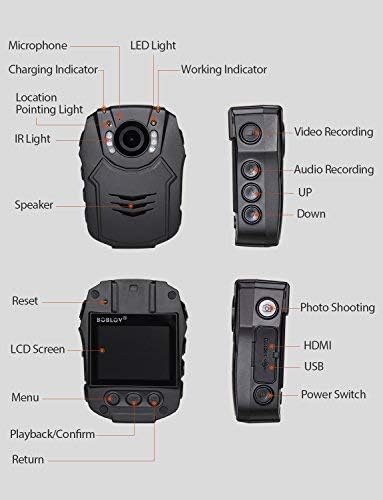
Figura 8: Estructura i controls del producte
Familiarize yourself with the camera's layout and button functions as detailed in the diagram above for efficient operation.
Configuració
- Càrrega: Before first use, fully charge the camera using the provided charger and USB cable. The charging indicator will show charging status.
- Targeta de memòria: The camera uses an SD card (not included) for storage. Insert a compatible SD card into the designated slot. Ensure it is properly formatted via the camera's menu for optimal performance.
- Muntatge: Attach the camera to your clothing or gear using the included shoulder clip or belt clip. Ensure the camera lens has an unobstructed view.
Instruccions de funcionament
- Encès/apagat: Press and hold the Power Switch button until the screen turns on/off.
- Gravació de vídeo: Press the Video Recording button to start recording. Press it again to stop. A red indicator light typically signifies active recording.
- Photo Shooting: Press the Photo Shooting button to capture still images.
- Enregistrament d'àudio: Press the Audio Recording button to start recording audio only. Press again to stop.
- Night Vision Activation: In low light conditions, manually activate the IR LED lights using the dedicated button for night vision recording.
- Reproducció: Use the navigation buttons and LCD screen to browse and play back recorded videos and photos.
- Navegació del menú: Access settings and options via the Menu button. Use the Up/Down buttons to navigate and OK to confirm selections.
Manteniment
- Mantingueu la càmera neta netejant-la amb un drap suau i sec.
- Eviteu exposar la càmera a temperatures extremes o a la llum solar directa durant períodes prolongats.
- Ensure the USB port cover is securely closed to protect against dust and moisture.
- Guardeu la càmera en un lloc fresc i sec quan no la feu servir.
Resolució de problemes
- La càmera no s'encén: Ensure the battery is charged. If fully charged, try resetting the device (refer to Product Structure diagram for reset button location).
- Poca qualitat de vídeo: Check the selected resolution in the settings. Ensure the lens is clean and free from smudges.
- La visió nocturna no funciona: Confirm that the IR LED lights are manually activated in dark environments.
- Files not transferring: Ensure the USB cable is securely connected to both the camera and the computer. Try a different USB port or cable.
Especificacions
| Característica | Especificació |
|---|---|
| Marca | BOBLOV |
| Número de model | PD5064 |
| Resolució de captura de vídeo | 1296p |
| Tipus de lent | Wide Angle (150 Degree) |
| Apertura màxima | 1.8 f |
| Tipus de memòria flash | SD |
| Mida de la pantalla | 2 polzades |
| Característiques especials | Waterproof, Infrared, Night Vision, Low Light |
| Pes de l'article | 7 unces |
| Dimensions del producte | 3.94 x 0.79 x 2.36 polzades |
Garantia i suport
Your BOBLOV Body Mounted Camera comes with a Un any de garantia des de la data de compra. Si us plau, conserveu el comprovant de compra per a reclamacions de garantia.
For technical support, troubleshooting assistance, or warranty inquiries, please visit the official BOBLOV store on Amazon or contact their customer service directly. Official product videos from the seller were not available in the provided data.


