1. Introducció i finalview
This manual provides detailed instructions for the installation, operation, and maintenance of your XTRONS TM100L car stereo. The TM100L is an advanced in-car entertainment system featuring Android 8.1 Oreo, an Octa Core processor, and a 10.1-inch rotatable touch display. It offers a comprehensive suite of features designed to enhance your driving experience.
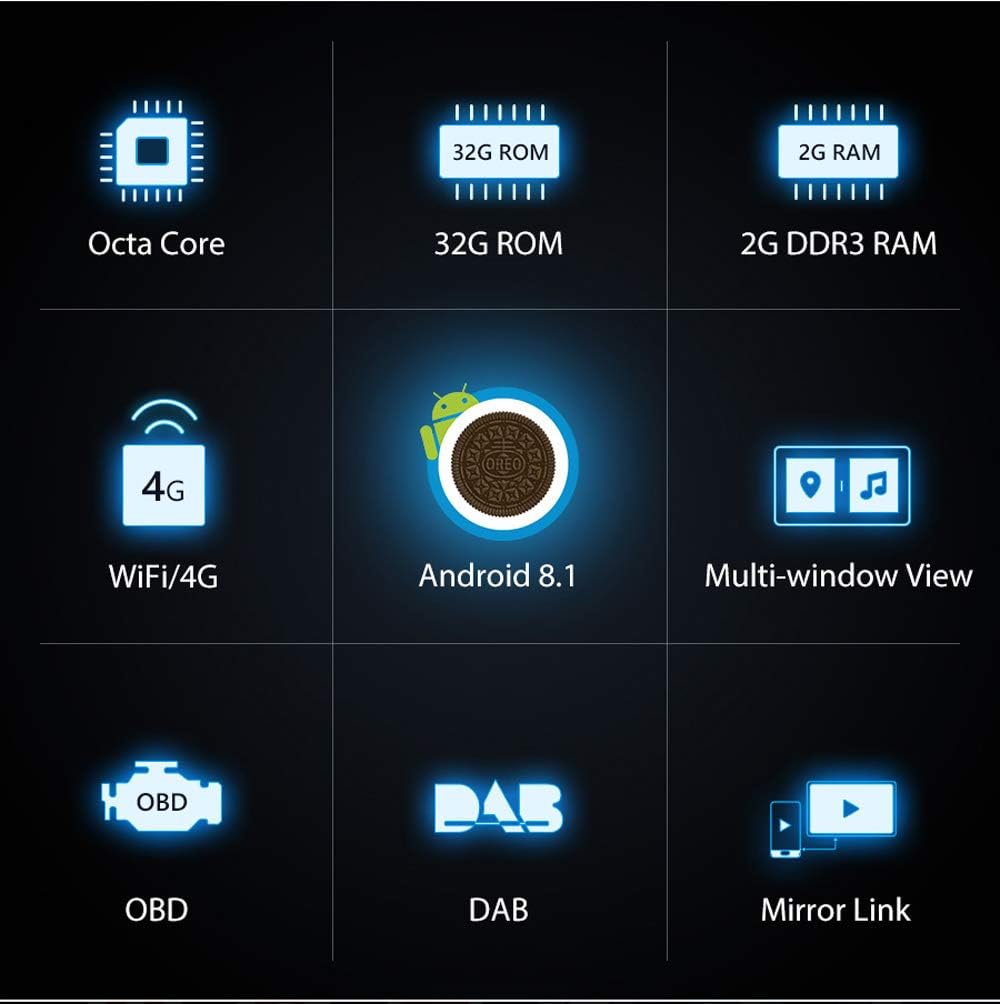
Imatge: Més deview of the XTRONS TM100L's core features.
2. Característiques del producte
- Sistema operatiu: Android 8.1 Oreo for improved compatibility and features.
- Processador i memòria: Powerful Octa Core Processor with 2GB DDR3 RAM and 32GB ROM for quick app launches and smooth performance.
- Visualització: 10.1-inch (1024x600 resolution) sensitive and intuitive touch screen with 2.5D curved glass edging. Supports 4K video playback.
- Rotatable Face Panel: Adjustable panel that can be rotated from 0° to 90° horizontally and 0° to 30° vertically for optimal viewangles d'ajust.
- Connectivitat: Built-in Wi-Fi, supports optional 3G/4G dongle for internet access.
- Bluetooth 5.0: For hands-free calls and audio streaming, including phonebook access and call logs.
- Navegació: Built-in GPS, compatible with various Android navigation software (e.g., iGo, Google Maps).
- Sintonitzador de ràdio: Built-in FM/AM tuner with 18 FM and 12 AM station presets. DAB+ tuner ready (optional receiver required).
- Multifinestra View: Run two applications side-by-side on the screen.
- Replica de pantalla: Connect your smartphone (Android USB, Android WiFi, iPhone WiFi) to display content directly on the head unit.
- Suport OBD2: Diagnose car status with an optional OBD2 device.
- DVR Input: Dedicated input for an optional DVR to record driving events.
- Multi-Color Buttons: Customizable button illumination to match your vehicle's interior.
- Front and Rear Camera Input: Supports external front and reversing cameras for enhanced safety.

Image: The XTRONS TM100L with its rotatable face panel, offering flexible viewangles d'ajust.

Image: The unit's display showcasing its 4K video playback capability.
Vídeo: Un overview of the XTRONS TM100L car stereo, highlighting its key features and functionalities.
3. Què hi ha a la caixa
The XTRONS TM100L package includes the following components:
- 1 x XTRONS TM100L Head Unit
- 1 x Arnès de cablejat ISO
- 1 x Antena GPS
- 1 x Manual d'usuari
- 2 x Fitting Kits
- 6 x cargols
- 1 x cable RCA
- 1 x cable USB

Image: All components included in the XTRONS TM100L product package.
4. Instal·lació
The XTRONS TM100L is designed for universal fit in both single DIN and double DIN dashboard slots. A universal fitting kit is included. For single DIN installations, an optional fitting cage (XTRONS FRA002) may be required.
4.1. Preparació per a la instal·lació
- Assegureu-vos que el vehicle estigui apagat i que la bateria estigui desconnectada abans de començar la instal·lació.
- Identify the appropriate dashboard slot (single DIN or double DIN) in your vehicle.
- Gather all necessary tools, including screwdrivers, wire strippers, and electrical tape.
4.2. Connecting the Face Panel
- Connect the flat cable of the face panel with the head unit. Pinch the clip to unplug the cable when removing the face panel.
- Use both hands to pull the two clips (A, B) to both sides.
- Make the face panel back side get through the head unit's holder from top.
- Installation of the face panel is completed.

Image: The XTRONS TM100L is compatible with both single and double DIN slots.
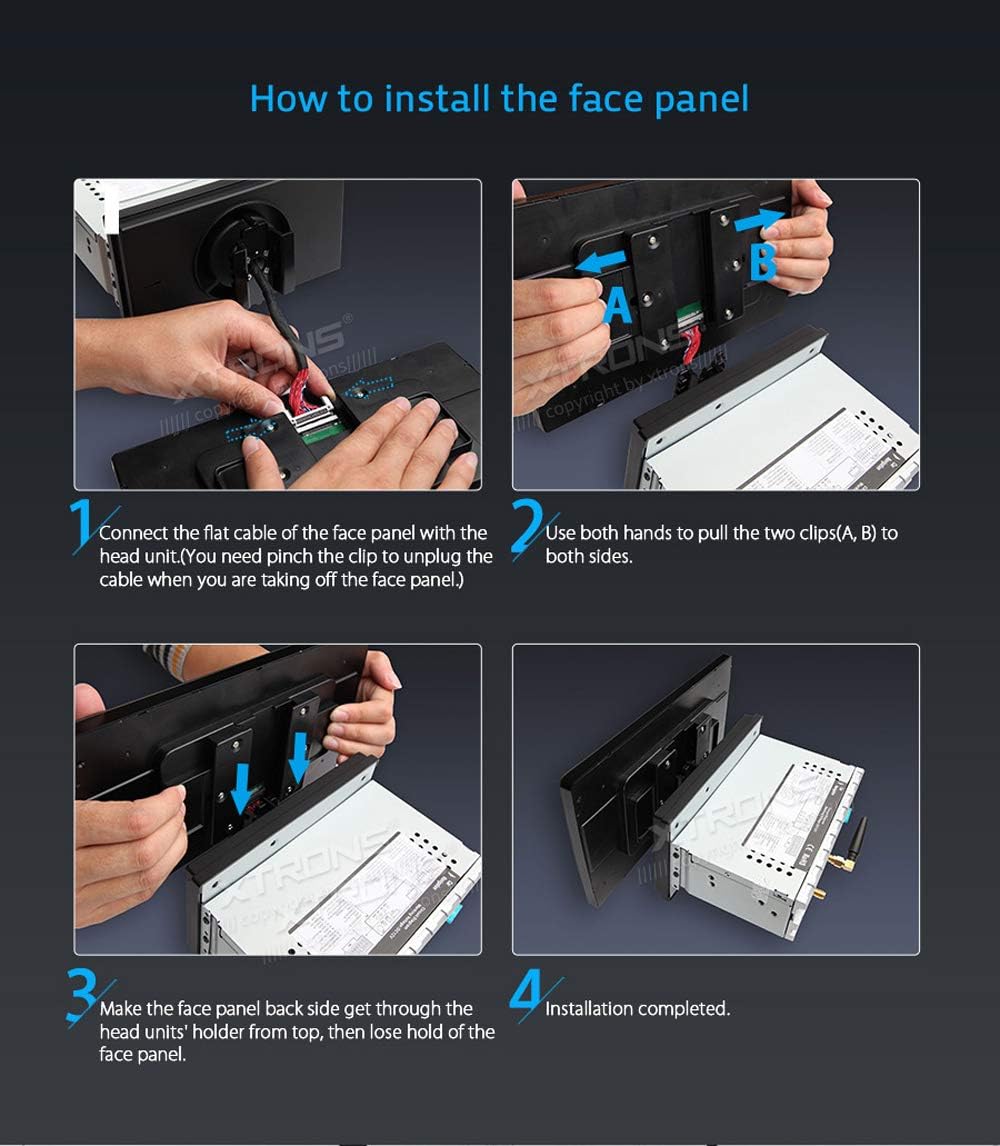
Image: Instructions for installing the rotatable face panel.
4.3. Dimensions

Image: Physical dimensions of the XTRONS TM100L unit.
5. Configuració
5.1. Engegada inicial
- After successful installation, turn on your vehicle's ignition. The unit should power on automatically.
- Follow the on-screen prompts for initial setup, including language selection, time zone, and date.
5.2. Wi-Fi / 4G Connection
- Navigate to 'Settings' > 'Network & Internet' > 'Wi-Fi'.
- Select your desired Wi-Fi network and enter the password to connect.
- If using an optional 3G/4G dongle, ensure it is properly connected and configured according to its specific instructions.
5.3. Emparellament Bluetooth
- Go to 'Settings' > 'Connected devices' > 'Bluetooth'.
- Enable Bluetooth on both the car stereo and your mobile device.
- Cerca available devices on your mobile phone and select 'CarKit' (or similar device name) to pair.
- Enter the PIN (default is '0000') if prompted.
6. Instruccions de funcionament
6.1. Navegació
The unit features built-in GPS and supports various Android navigation applications. Access the 'Navi' icon on the home screen to launch your preferred navigation software. Ensure the GPS antenna is properly installed for optimal signal reception.
6.2. Reproducció multimèdia
- Música: Tap the 'Music' icon to play audio files from internal storage, USB drives, or SD cards.
- Vídeo: Tap the 'Video' icon to play video files. The unit supports 4K video playback for high-quality viewing.
- Targeta USB/SD: Insert your USB stick or SD card into the designated ports to access media files.
6.3. Ràdio
Access the 'Radio' icon to use the built-in FM/AM tuner. You can scan for stations, save presets, and utilize RDS functions where available. For digital radio, connect an optional DAB+ receiver via USB and access it through the 'DAB+' app.
6.4. Mirall de pantalla
The screen mirroring function allows you to display your smartphone's screen directly on the head unit. Connect your Android phone via USB or Wi-Fi, or your iPhone via Wi-Fi, and follow the on-screen instructions in the 'EasyConnection' app. This enables viewing messages, videos, and playing games safely on the larger display.
6.5. Multi-Window View
To use the multi-window view, open two desired applications. Then, use the recent apps button (usually a square icon) and drag one app to one side of the screen and the other app to the opposite side. This allows for simultaneous operation, such as navigating while listening to music.
6.6. Control del volant
The unit is compatible with existing steering wheel controls in most vehicles. Access the 'Steering Wheel' app in the main menu to configure and map your vehicle's steering wheel buttons to control functions like volume, track skipping, and hands-free calling.
6.7. Car Information Display (OBD2)
With an optional OBD2 diagnostic tool connected via Bluetooth, you can monitor various car information such as engine status, oil level, door status, and more. Use compatible apps like 'Torque' to display this data on the head unit.
6.8. DVR Input
Connect an optional XTRONS DVR (Dedicated Journey Recorder) to the unit's USB port. This allows you to record and capture live events while driving, providing an additional layer of security. Access the DVR functionality through the dedicated app on the head unit.
7. Manteniment
7.1. Neteja
- Feu servir un drap suau i sec per netejar la pantalla i l'exterior de la unitat.
- Avoid using abrasive cleaners, solvents, or chemical sprays, as these can damage the surface.
7.2. Actualitzacions de programari
Periodically check the official XTRONS website for available software or firmware updates. Updates can improve performance, add new features, and resolve potential issues. Follow the provided instructions carefully when performing updates.
8. Solució De Problemes
If you encounter issues with your XTRONS TM100L, consider the following basic troubleshooting steps:
- Sense energia: Comproveu totes les connexions d'alimentació i assegureu-vos que el vehicle estigui engegat. Verifiqueu que el fusible estigui intacte.
- Sense so: Check speaker connections, volume levels, and audio source selection.
- Pèrdua de senyal GPS: Assegureu-vos que l'antena GPS estigui connectada correctament i que tingui una visió clara view del cel.
- Problemes de connexió Bluetooth: Assegureu-vos que el Bluetooth estigui habilitat als dos dispositius i proveu de tornar-lo a sincronitzar.
- Pantalla tàctil que no respon: Prova de reiniciar la unitat. Si el problema persisteix, pot ser necessari restablir les dades de fàbrica (nota: això esborrarà totes les dades de l'usuari).
- Mal funcionament de l'aplicació: Prova d'esborrar la memòria cau de l'aplicació o de reinstal·lar-la.
For more detailed troubleshooting or persistent issues, refer to the comprehensive user manual included with your product or visit the XTRONS support weblloc.
9. Especificacions
| Característica | Especificació |
|---|---|
| Número de model de l'article | TM100L |
| Sistema operatiu | Android 8.1 Oreo |
| Processador | Octa Core |
| RAM | 2 GB DDR3 |
| ROM | 32 GB |
| Mida de la pantalla | 10.1 polzades |
| Resolució de visualització | 1024 x 600 |
| Suport en vídeo | Vídeo 4K |
| Tecnologia de connectivitat | Bluetooth, USB, Wi-Fi |
| Versió Bluetooth | 5.0 |
| Mode de sortida d'àudio | estèreo |
| Nombre de canals | 4 |
| Potència de sortidatage | 50 watts |
| Pes de l'article | 3.75 lliures |
| Dimensions del paquet | 13.4 x 9.2 x 8.4 polzades |
| Data de primera disponibilitat | 14 d'agost de 2018 |
10. Garantia i Suport
For warranty information, please refer to the warranty card included in your product packaging or visit the official XTRONS website. For technical support, product registration, or further assistance, please contact XTRONS customer service through their official channels.
Official XTRONS Weblloc: www.xtrons.com