1. Introducció
Thank you for choosing the Nedis Smart Wi-Fi Speaker. This device combines powerful 15W audio output with smart voice control capabilities, allowing you to stream music, control smart home devices, and access information using your voice. This manual provides essential information for setting up, operating, and maintaining your speaker to ensure optimal performance and longevity.

Imatge 1.1: Frontal view of the Nedis Smart Wi-Fi Speaker, showcasing its fabric-covered cylindrical design and illuminated top panel.
2. Producte acabatview
Familiarize yourself with the various components and controls of your Nedis Smart Wi-Fi Speaker.
2.1 Controls del panell superior

Imatge 2.1: Part superior view of the speaker showing control buttons for volume, playback, mode, and microphone.
- Baixar el volum (-): Decreases the speaker volume.
- Puja el volum (+): Increases the speaker volume.
- Reprodueix/Pausa (►▮▮): Plays or pauses audio playback.
- Mode (M): Switches between different input modes (e.g., Wi-Fi, Bluetooth, USB).
- Microphone Mute (🎤): Toggles the microphone on/off for privacy.
- Action Button (●): Activates the voice assistant or performs specific functions depending on the mode.
2.2 Ports del panell posterior
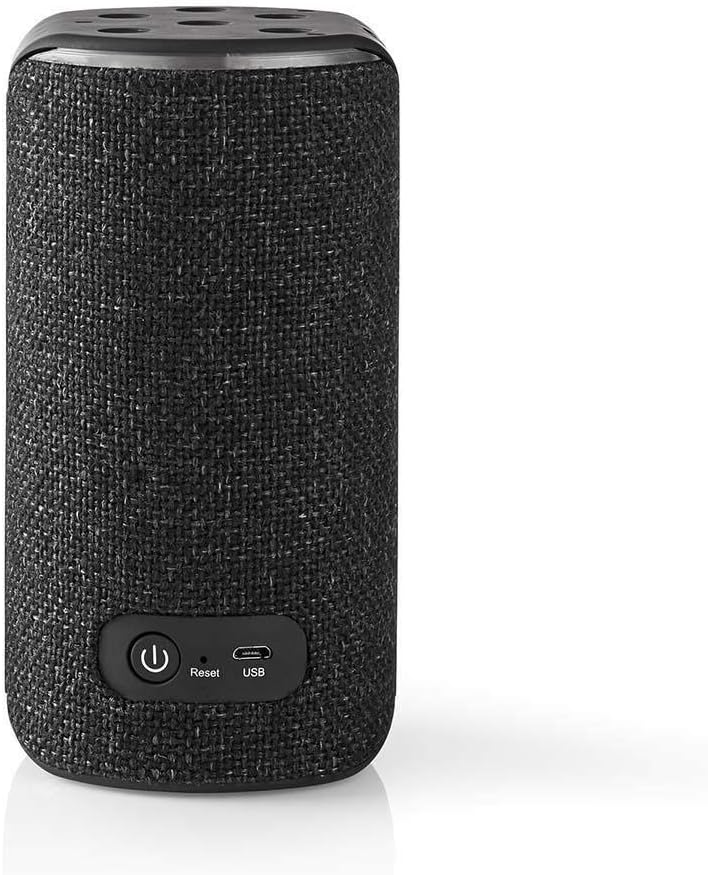
Imatge 2.2: posterior view of the speaker showing the power button, reset button, and USB port.
- Power Button (⏺): Turns the speaker on or off.
- Botó de restabliment: Resets the speaker to factory settings. Use a small pin or paperclip to press.
- Port USB: For charging the device or playing audio from a USB storage device.
3. Configuració
Follow these steps to set up your Nedis Smart Wi-Fi Speaker for the first time.
3.1 Càrrega de l'altaveu
- Connect the provided USB cable to the speaker's USB port and the other end to a suitable USB power adapter (not included).
- The LED indicator will show charging status. Allow the speaker to fully charge before first use.
3.2 Encès inicial
- Press and hold the Power Button (⏺) on the rear panel for a few seconds until the speaker powers on.
- The speaker will enter pairing mode, indicated by a flashing LED.
3.3 Connecting to Wi-Fi and Voice Assistant
To utilize the smart features and voice control, you need to connect the speaker to your Wi-Fi network and link it to a compatible voice assistant service (e.g., Amazon Alexa, as indicated on the product packaging).

Image 3.1: Retail packaging highlighting the speaker's compatibility with Amazon Alexa voice control.
- Download the dedicated Nedis SmartLife app (or the app specified in the speaker's quick start guide) from your smartphone's app store.
- Obriu l'aplicació i seguiu les instruccions a la pantalla per afegir un dispositiu nou.
- Select your Nedis Smart Wi-Fi Speaker from the list of discoverable devices.
- Enter your Wi-Fi network credentials when prompted.
- Once connected to Wi-Fi, the app will guide you through linking your voice assistant account (e.g., Amazon Alexa).
- Follow the voice assistant app's instructions to complete the setup.
4. Funcionament de l'altaveu
Learn how to use your speaker's various functions.
4.1 Control de veu
Once configured with a voice assistant, you can use voice commands to control your speaker and other smart devices.
- To activate the voice assistant, say the wake word (e.g., "Alexa") or press the Action Button (●) on the top panel.
- Speak clearly and directly towards the speaker.
- Example commands: "Play music," "What's the weather?", "Set a timer for 10 minutes."
4.2 Reproducció de música
- Transmissió Wi-Fi: Use voice commands or the companion app to stream music from supported services.
- Mode Bluetooth: Press the Mode (M) button until the speaker enters Bluetooth pairing mode. Cerca the speaker on your device's Bluetooth settings and connect.
- Reproducció USB: Insert a USB storage device into the USB port. The speaker may automatically switch to USB mode, or you may need to select it using the Mode (M) button.
4.3 Ajust de volum
Use the Volume Up (+) and Volume Down (-) buttons on the top panel, or use voice commands (e.g., "Alexa, turn up the volume").
5. Manteniment
Proper care ensures the longevity and performance of your speaker.
- Neteja: Use a soft, dry cloth to wipe the speaker's surface. Do not use liquid cleaners or abrasive materials.
- Emmagatzematge: Guardeu l'altaveu en un lloc fresc i sec, allunyat de la llum solar directa i de temperatures extremes quan no l'utilitzeu durant períodes prolongats.
- Cura de la bateria: To prolong battery life, avoid fully discharging the speaker frequently. Charge it regularly.
6. Solució De Problemes
If you encounter issues with your speaker, refer to the following common solutions.
| Problema | Possible solució |
|---|---|
| L'altaveu no s'encén. | Assegureu-vos que l'altaveu estigui carregat. Connecteu-lo a una font d'alimentació i torneu-ho a provar. |
| No hi ha so de l’altaveu. | Check the volume level on the speaker and your connected device. Ensure the correct input mode is selected (Wi-Fi, Bluetooth, USB). |
| No es pot connectar a la Wi-Fi. | Verify your Wi-Fi password. Ensure the speaker is within range of your router. Try restarting your router and the speaker. Perform a factory reset if necessary. |
| L'assistent de veu no respon. | Ensure the microphone is not muted. Check your internet connection. Verify that the voice assistant account is correctly linked in the companion app. |
| Problemes d'emparellament per Bluetooth. | Ensure the speaker is in Bluetooth pairing mode. Turn off and on Bluetooth on your device. Forget the speaker from your device's Bluetooth list and try pairing again. |
If the problem persists, please contact Nedis customer support.
7. Especificacions
Detailed technical specifications for the Nedis Smart Wi-Fi Speaker.
- Número de model: 5412810292615
- Marca: NEDIS
- Font d'alimentació: Funciona amb bateria
- Tecnologia de connectivitat: Wi-Fi, Bluetooth
- Potència màxima de sortida de l'altaveu: 15 watts
- Característiques especials: Bluetooth, Integrated Microphone, USB Port
- Mètode de control: veu
- Tipus d'altaveu: Bluetooth, Wi-Fi Speaker
- Configuració del canal de so envoltant: 2.0
- Pes de l'article: 403.66 grams
- Tipus de muntatge: Taula
8. Informació de seguretat
Please read and follow these safety guidelines to prevent damage to the device or injury to yourself.
- No exposeu l'altaveu a l'aigua, la humitat ni a temperatures extremes.
- Eviteu deixar caure o sotmetre l'altaveu a forts impactes.
- No intenteu desmuntar ni reparar l'altaveu vosaltres mateixos. Encarregueu tot el manteniment a personal qualificat.
- Feu servir només cables i adaptadors de càrrega aprovats.
- Mantingueu l'altaveu allunyat de fonts de calor i flames obertes.
- Assegureu-vos que hi hagi una ventilació adequada al voltant de l'altaveu durant l'ús.
9. Garantia i Suport
For warranty information, technical support, or service inquiries, please refer to the warranty card included with your product or visit the official Nedis weblloc web. Conserveu el comprovant de compra per a reclamacions de garantia.


