1. Introducció
The MAONO AU-A04 USB Condenser Microphone Kit is designed for high-quality audio capture, ideal for podcasting, streaming, gaming, singing, YouTube content creation, and voice-overs. Featuring a professional sound chipset with a 192kHz/24Bit sampling rate and a smooth, flat frequency response of 30Hz-16kHz, this microphone ensures crystal clear sound reproduction. Its plug-and-play functionality allows for seamless integration with various operating systems without the need for additional drivers or external sound cards.

Image: The MAONO AU-A04 USB Condenser Microphone Kit in use with a laptop, highlighting its professional appearance and ease of setup.
2. Què hi ha a la caixa
Your MAONO AU-A04 kit includes all necessary components for immediate setup and use:
- Micròfon de condensador
- Adjustable Scissor Arm Stand
- Metal Shock Mount
- Filtre Pop
- Foam Mic Windscreen
- Muntatge de taula Clamp
- USB-A/USB-C to USB-B Cable

Image: All components of the MAONO AU-A04 kit, including the microphone, arm stand, and accessories, neatly arranged.
3. Instruccions de configuració
- Attach the Table Mounting Clamp: Secure the table mounting clamp to the edge of your desk or table. Ensure it is tightened firmly for stability.
- Insert the Adjustable Scissor Arm Stand: Slide the base of the adjustable scissor arm stand into the hole on the table mounting clampEstrenyeu el cargol del clamp to hold the arm securely.
- Mount the Metal Shock Mount: Screw the metal shock mount onto the threaded end of the boom arm.
- Inseriu el micròfon: Gently place the MAONO condenser microphone into the shock mount. The shock mount helps to isolate the microphone from vibrations and handling noise.
- Connecteu el filtre anti-pop: Clamp the pop filter onto the boom arm, positioning it a few inches in front of the microphone. The pop filter reduces plosive sounds (like 'p' and 'b') for clearer audio.
- Apply the Foam Mic Windscreen: Slide the foam windscreen over the microphone head. This provides additional protection against plosives and light wind noise.
- Connecteu el cable USB: Plug the USB-B end of the provided cable into the bottom of the microphone. Connect the USB-A or USB-C end to an available USB port on your computer (PC, Laptop, Mac), PS4/PS5, or mobile phone (OTG adapter not included for mobile phones).

Image: The MAONO AU-A04 microphone fully assembled with its boom arm, shock mount, and pop filter, ready for use.

Image: Close-up of the adjustable boom arm stand and its heavy-duty metal clip base, demonstrating its flexibility and secure mounting.
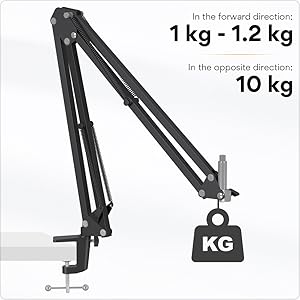
Image: A diagram illustrating the weight capacity of the boom arm, indicating its robust design for holding the microphone.
4. Instruccions de funcionament
Funcionalitat Plug and Play
The MAONO AU-A04 is designed for plug-and-play operation. Once connected via USB, your computer or device should automatically recognize the microphone without requiring any additional driver software or external sound cards. For optimal performance, ensure the microphone is selected as the input device in your system's sound settings.

Image: A visual representation of the microphone's plug-and-play compatibility with PC, Laptop, Windows, MacOS, and PS4/PS5.
Qualitat i característiques del so
The 16mm electret condenser transducer provides a strong bass response and crystal clear audio. The cardioid polar pattern effectively reduces noise interference from the back and sides, focusing on sound directly in front of the microphone for clearer and crisper recordings. The double-shielded USB cable further reduces interference, ensuring a clean audio signal.

Image: An illustration highlighting the professional sound chipset and high sampling rate (192kHz/24Bit) for clear audio.

Image: A diagram detailing the 16mm electret condenser transducer and the cardioid polar pattern, showing its directional sound pickup.
Compatibilitat de programari
This microphone works seamlessly with most audio recording and communication software. No specific drivers are required. For recording, free software like Audacity can be used effectively. For live applications such as gaming or video conferencing, the microphone will integrate directly with your system's audio input settings.
5. Manteniment
- Neteja: Use a soft, dry cloth to clean the microphone body and stand. Avoid using liquid cleaners or abrasive materials.
- Emmagatzematge: When not in use, store the microphone in a clean, dry place away from extreme temperatures and humidity.
- Cura del cable: Eviteu doblegar o doblegar bruscament el cable USB per evitar danys interns.
- Comprovació de components: Periodically check that all screws and clamps on the boom arm and shock mount are tightened to ensure stability and prevent wobbling.
6. Solució De Problemes
- Micròfon no reconegut: Ensure the USB cable is securely connected to both the microphone and your device. Try a different USB port or restart your computer. Verify the microphone is selected as the default input device in your operating system's sound settings.
- So baix o sense so: Check the input volume levels in your computer's sound settings and within your recording software. Ensure the microphone is positioned correctly, facing the sound source.
- Static or White Noise: Ensure the USB cable is fully inserted. Try connecting the microphone to a different USB port or a different computer to rule out port or system interference. The double-shielded cable is designed to minimize this, but external electrical interference can sometimes occur.
- Boom Arm Wobbles: Tighten all adjustment knobs and the table mounting clamp on the boom arm. The heavy-duty metal construction is designed for stability, but periodic tightening may be necessary.
- Connexió al telèfon mòbil: An OTG (On-The-Go) adapter is required for connecting the microphone to most mobile phones. This adapter is not included in the kit and must be purchased separately.
7. Especificacions del producte
| Característica | Descripció |
|---|---|
| Marca | MAONO |
| Nom del model | AU-A04 |
| Tecnologia de connectivitat | USB, USB tipus C |
| Factor de forma del micròfon | Diafragma gran |
| Patró polar | Cardioide |
| SampTarifa ling | 192 kHz/24 bits |
| Interval de freqüència | 30 Hz - 16 kHz |
| Ràtio senyal / soroll | 70 dB |
| Material | Metall |
| Pes de l'article | 12.3 unces (350 grams) |
| Dimensions del producte | 17.13 x 8.07 x 3.54 polzades |
| Dispositius compatibles | Computer, PC, Laptop, Desktop, Mac OS, PS4, PS5, Mobile phones |
8. Garantia i assistència
MAONO stands behind the quality of its products. For any support inquiries, troubleshooting assistance beyond this manual, or warranty claims, please refer to the official MAONO website or contact their customer support directly. The product typically comes with a standard manufacturer's warranty. Please retain your proof of purchase for warranty purposes.
També podeu descarregar una guia d'usuari detallada (PDF): Descarrega la Guia d'usuari
For information on returns, please refer to the retailer's return policy, typically 30 days from purchase.