1. Introducció
The TechniSat DIGITRADIO 2 is a versatile portable radio designed for high-quality audio reception both at home and on the go. It features DAB+ and FM radio reception, Bluetooth audio streaming, an OLED display, and a built-in rechargeable battery for extended use. This manual provides detailed instructions for setting up, operating, and maintaining your device.
Característiques principals:
- DAB+ and FM radio reception
- Bluetooth audio streaming for connecting smartphones or tablets
- Integrated replaceable battery providing up to 10 hours of music playback
- High-quality dimmable OLED display
- Presa per a auriculars (3.5 mm)
- 1 W (RMS) mono speaker with equalizer
- Memory for up to 20 favorite stations for both DAB+ and FM
- Alarm clock with two adjustable alarms, sleep timer, and snooze function
- Large, clear control buttons for intuitive operation
2. Producte acabatview i Components
Familiarize yourself with the components of your TechniSat DIGITRADIO 2.
Contingut del paquet:
- TechniSat DIGITRADIO 2 Radio
- Adaptador d'alimentació
- Cable USB
- Manual d'usuari
- Bateria recarregable (preinstal·lada o separada)
Disseny del dispositiu:

Figura 2.1: Frontal view of the TechniSat DIGITRADIO 2, highlighting the speaker grille, OLED display, and control panel.

Figura 2.2: Detallada view of the control panel and OLED display, showing station information and navigation buttons (MODE, FAV, OK, MENU, directional arrows).
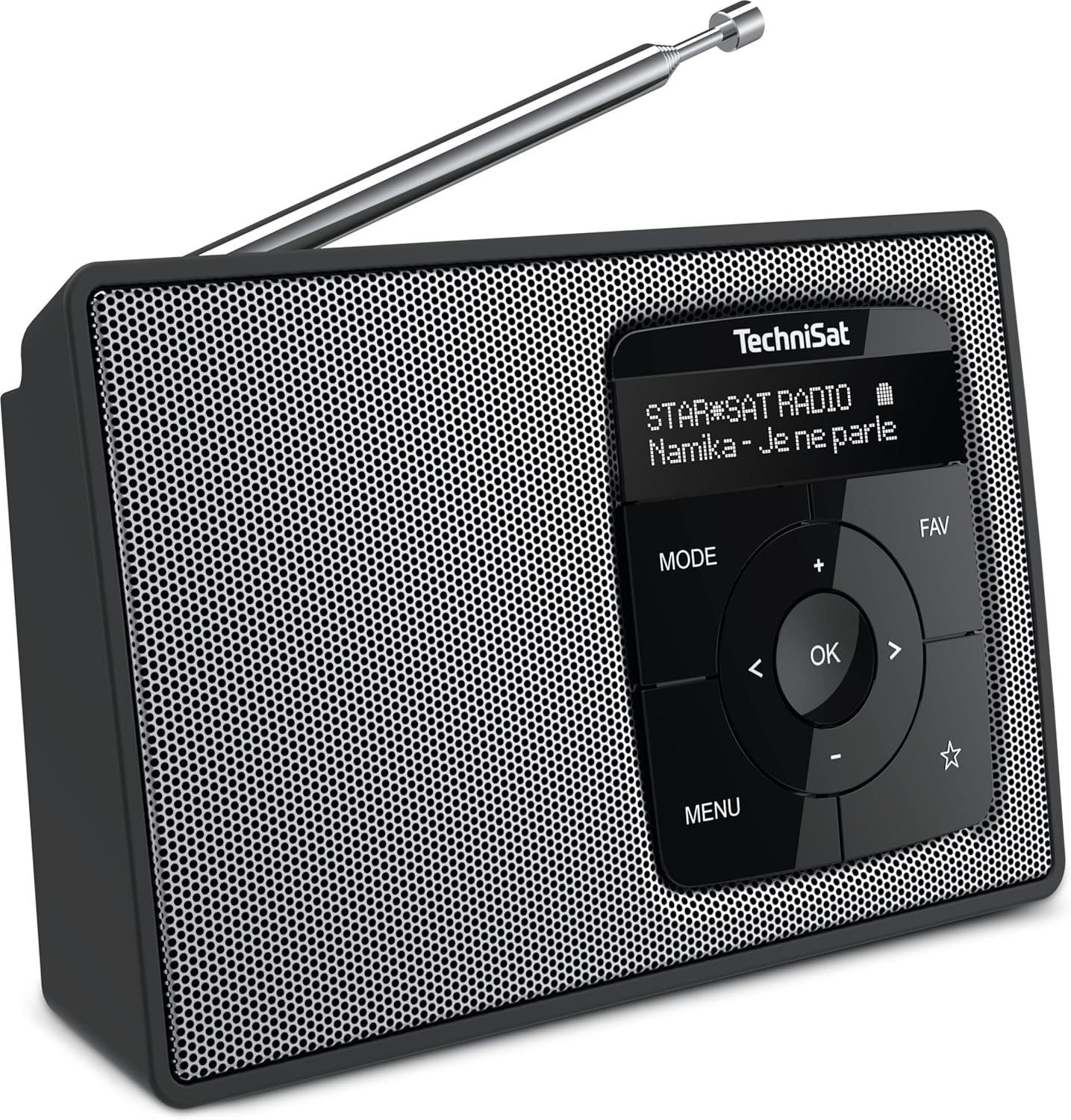
Figure 2.3: Angled perspective of the radio, illustrating its compact design and the extendable antenna for improved reception.
3. Configuració
3.1 Engegar el dispositiu
- Instal·lació de la bateria: Ensure the rechargeable Lithium-ion battery is correctly inserted into the battery compartment. If it's new, it might be pre-installed.
- Connecteu l'adaptador d'alimentació: Plug the supplied power adapter into the DC IN port on the radio and then into a wall outlet. The battery will begin charging.
- Primer engegada: Manteniu premut el botó PODER button (usually integrated with the MODE or OK button, refer to specific button labels on your device) to turn on the radio.
3.2 Initial Scan (DAB+ and FM)
Upon first power-on, the radio will typically initiate an automatic scan for available DAB+ and FM stations. This process may take a few minutes.
- DAB+ Scan: The radio will search for all available digital radio stations and store them.
- Escaneig FM: The radio will scan for analog FM stations.
- Ensure the antenna is fully extended for optimal reception during the scan.
4. Funcionament
4.1 Canvi entre els modes DAB+ i FM
Premeu el botó MODE button to switch between DAB+ radio, FM radio, and Bluetooth audio streaming modes.
4.2 Funcionament de la ràdio DAB+
- Select Station: In DAB+ mode, use the ESQUERRA/DRETA botons de fletxa per navegar per la llista d'estacions disponibles.
- Confirmeu la selecció: Premeu el botó OK button to select and play a station.
- Emmagatzema els valors predefinits: To save a favorite station, press and hold the FAV Feu servir els botons de fletxa per seleccionar un número preestablert (1-20) i premeu OK per confirmar.
- Recuperació de presets: Premeu breument FAV button, then use the arrow buttons to select your desired preset and press OK.
4.3 Funcionament de la ràdio FM
- Emissora de sintonització: En el mode FM, feu servir la ESQUERRA/DRETA arrow buttons to manually tune the frequency. Press and hold the ESQUERRA/DRETA arrow buttons for automatic scanning to the next available station.
- Emmagatzema els valors predefinits: Similar to DAB+ mode, press and hold the FAV button, select a preset number, and press OK.
- Recuperació de presets: Premeu breument FAV button, select your desired preset, and press OK.
Transmissió d'àudio Bluetooth 4.4
- Introduïu el mode Bluetooth: Premeu el botó MODE button until "Bluetooth" or a similar indicator appears on the OLED display. The radio will enter pairing mode.
- Parella el dispositiu: On your smartphone or tablet, enable Bluetooth and search for "DIGITRADIO 2" (or similar name). Select it to pair.
- Reproduir àudio: Once paired, you can play audio from your device, and it will stream through the radio's speaker.
4.5 Alarm Clock, Sleep Timer, and Snooze
- Configuració d'alarma: Accediu a la configuració de l'alarma mitjançant MENÚ button. Follow the on-screen prompts to set up to two alarms, including time, source (DAB+/FM/Buzzer), and volume.
- Temporitzador de son: The sleep timer allows the radio to turn off automatically after a set period. Access this function via the MENÚ.
- Funció de posposar: When an alarm sounds, press any button (except power) to activate the snooze function for a short delay.
4.6 Ús d'auriculars
Connect 3.5mm headphones to the headphone jack for private listening. The internal speaker will automatically mute when headphones are connected.
5. Manteniment
5.1 Neteja
- Wipe the radio with a soft, dry, lint-free cloth.
- No utilitzeu netejadors abrasius, ceres o dissolvents, ja que poden danyar la superfície.
- Eviteu ruixar líquids directament sobre el dispositiu.
5.2 Cura de la bateria
- The integrated Lithium-ion battery is replaceable. If battery life significantly decreases, consider replacing it with an official TechniSat replacement battery.
- Per a una durada òptima de la bateria, eviteu descarregar-la completament amb freqüència.
- Store the device in a cool, dry place if not used for extended periods.
6. Solució De Problemes
6.1 Sense alimentació / El dispositiu no s'encén
- Assegureu-vos que l'adaptador de corrent estigui connectat correctament tant a la ràdio com a una presa de corrent que funcioni.
- Check if the battery is correctly inserted and charged.
- Try pressing and holding the power button for a few seconds.
6.2 Mala recepció de ràdio
- Esteneu completament l’antena telescòpica.
- Reposition the radio to a different location, away from potential interference sources (e.g., other electronic devices, thick walls).
- Perform a full scan for DAB+ and FM stations again.
6.3 Problemes d'emparellament Bluetooth
- Ensure the radio is in Bluetooth pairing mode.
- Make sure Bluetooth is enabled on your external device (smartphone/tablet).
- Move your external device closer to the radio.
- If previously paired, try "forgetting" the device on your smartphone/tablet and re-pairing.
7. Especificacions
| Característica | Detall |
|---|---|
| Marca | TechniSat |
| Número de model | 0000/3910 |
| Color | Neutral (Black/Silver) |
| Tecnologia de connectivitat | Bluetooth, auxiliar |
| Característiques especials | Bluetooth Connectivity, DAB+/FM Tuner, Rechargeable Battery |
| Dispositius compatibles | Auriculars |
| Composició de la bateria | Ió de liti |
| Bateria recarregable | Sí (1 inclosos) |
| Dimensions del producte (L x A x A) | 17.5 x 4.7 x 10.9 cm |
| Tecnologia d'afinació | DAB+, FM |
| Bandes de ràdio compatibles | DAB+, FM |
| Font d'alimentació | Funciona amb bateria |
| Sortida de l'altaveu | 1 W RMS Mono |
| País d'origen | Alemanya |
8. Garantia i Suport
8.1 Informació de la garantia
The TechniSat DIGITRADIO 2 comes with a 1-year availability of spare parts. For specific warranty terms and conditions, please refer to the warranty card included with your product or contact TechniSat customer service.
8.2 Atenció al client
For technical assistance, troubleshooting, or service inquiries, please visit the official TechniSat website or contact their customer support department. Contact details can typically be found on the manufacturer's weblloc o a l'embalatge del producte.


