1. Introducció
This manual provides detailed instructions for the proper setup, operation, and maintenance of your SUNLUX XL5500 CCD USB Barcode Reader. Please read this manual thoroughly before using the device to ensure optimal performance and longevity.
2. Informació de seguretat
Observeu les següents precaucions de seguretat per evitar danys al dispositiu o lesions personals:
- No exposeu el dispositiu a temperatures extremes, humitat o llum solar directa.
- Eviteu deixar caure el dispositiu o sotmetre-lo a forts impactes.
- Do not attempt to disassemble or modify the barcode reader. This will void the warranty.
- Mantingueu la finestra d'escaneig neta per garantir una lectura precisa del codi de barres.
- Feu servir només el cable USB proporcionat per a la connexió.
3. Contingut del paquet
Verifiqueu que tots els elements siguin presents al paquet:
- SUNLUX XL5500 CCD USB Barcode Reader
- Cable de connexió USB
- Manual d'usuari (aquest document)
4. Producte acabatview
The SUNLUX XL5500 is a handheld CCD barcode reader designed for efficient and reliable scanning of various 1D barcodes. Its ergonomic design ensures comfortable use during extended periods.
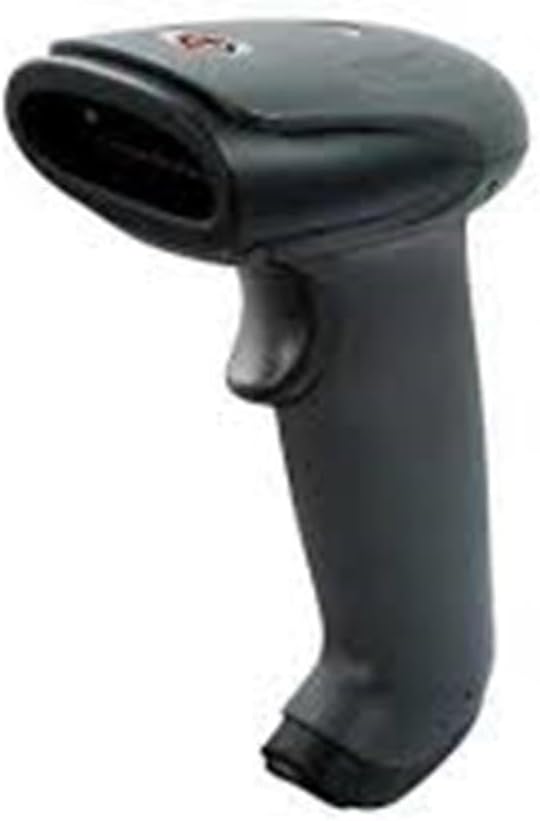
An image showing the SUNLUX XL5500 handheld barcode reader. It features a dark gray ergonomic handle, a trigger button on the top, and a scanning window at the front.
5. Configuració
Follow these steps to set up your barcode reader:
- Connecteu el cable USB: Insert the smaller end of the USB cable into the port at the base of the barcode reader.
- Connexió a l'ordinador: Connecteu l'extrem més gran del cable USB a un port USB disponible de l'ordinador.
- Instal·lació del controlador: The barcode reader is typically plug-and-play. Your operating system should automatically detect and install the necessary drivers. Wait for the installation to complete (usually indicated by a notification).
- Prova de connexió: Open a text editor (e.g., Notepad, Word) or any application that accepts keyboard input. The device is ready for use when it is recognized by the system.
6. Instruccions de funcionament
To operate the SUNLUX XL5500 barcode reader:
- Encès: The device powers on automatically when connected to a USB port.
- Apunta i escaneja: Point the scanning window of the reader at the barcode you wish to scan. Ensure the entire barcode is within the scanning area.
- Press Trigger: Press the trigger button located on the handle. A red scanning line will emit from the window.
- Confirmació: A successful scan is typically indicated by an audible beep and/or a visual LED indicator. The scanned data will appear in the active application on your computer.
Tipus de codis de barres compatibles:
- EAN-8, EAN-13, UPC-A, UPC-E
- Codi 39, Codi 93, Codi 128
- Codabar, Interleaved 2 of 5, Industrial 2 of 5
- Matrix 2 of 5, MSI, China Post
7. Manteniment
Proper maintenance ensures the longevity and performance of your barcode reader:
- Neteja de la finestra d'escaneig: Feu servir un drap suau i sense borrissol, lleugerament humitampened with water or a mild, non-abrasive cleaner, to gently wipe the scanning window. Do not use harsh chemicals or abrasive materials.
- Neteja de l'exterior: Netegeu l'exterior del dispositiu amb un drap suau i sec.
- Emmagatzematge: When not in use, store the barcode reader in a clean, dry environment, away from direct sunlight and extreme temperatures.
8. Solució De Problemes
If you encounter issues with your barcode reader, refer to the following table:
| Problema | Causa possible | Solució |
|---|---|---|
| Reader does not power on. | El cable USB no està connectat correctament o el port USB està defectuós. | Ensure the USB cable is securely connected to both the reader and the computer. Try a different USB port. |
| Barcode not scanning. | Barcode damaged, scanning window dirty, or incorrect aiming. | Clean the scanning window. Ensure the barcode is not damaged. Aim the scanning line directly across the entire barcode. |
| Les dades escanejades apareixen incorrectament. | Keyboard language settings mismatch or corrupted data. | Verify your computer's keyboard language settings. Rescan the barcode. |
| No beep sound after scanning. | Beeper disabled or faulty. | Refer to advanced configuration options (if available) to enable the beeper. If not, the scan may still be successful if data appears. |
9. Especificacions tècniques
| Característica | Especificació |
|---|---|
| Model | XL5500 |
| Categoria | CCD Reader |
| Marca | Sunlux |
| Tecnologia de connectivitat | Cable USB |
| Font d'alimentació | Elèctric per cable |
| Dimensions del producte | 20 x 15 x 10 cm |
| Pes | 500 grams |
| Número de part | 2053871 |
10. Garantia i Suport
Informació de la garantia:
The SUNLUX XL5500 CCD USB Barcode Reader comes with a standard manufacturer's warranty. Please refer to your purchase documentation or contact your retailer for specific warranty terms and conditions.
Atenció al client:
For technical assistance, troubleshooting beyond this manual, or warranty claims, please contact your point of purchase or the official SUNLUX customer support channels. Have your product model and serial number ready when contacting support.


