1. Introducció
The Bluesound Vault 2i is a versatile audio device designed for high-resolution music playback, CD ripping, and network storage. It allows users to rip CDs into various high-quality formats, store a large music library on its internal 2TB hard drive, and stream digital music throughout a home audio system. The Vault 2i also functions as a network-attached storage (NAS) drive, providing centralized access to your music collection.

Figura 1: Frontal view of the Bluesound Vault 2i.
2. Característiques del producte
The Bluesound Vault 2i offers a range of features for comprehensive digital music management and playback:
- Emmagatzematge intern: Store up to 30,000 tracks on a 2TB ultra-quiet internal hard drive, which also functions as a network NAS drive.
- CD Ripping: Rip CDs in bit-perfect, high-resolution formats such as FLAC, WAV, and WMA, or space-saving MP3.
- Connectivitat USB: Includes one Type-A USB port for connecting external storage to add personal music collections.
- Potència de processament: Equipped with innovative 1GHz dual-core ARM Cortex processors for efficient performance.
- Transmissió sense fils: Stream music directly from Apple devices using AirPlay.
- Control de veu: Compatible with Alexa and Siri for hands-free control of music playback.
- Control intuïtiu: Manage music wirelessly using the Bluesound Controller app.
- Àudio multihabitació: Stream music libraries to multiple Bluesound players throughout the home for a synchronized audio experience.
3. Guia de configuració
Follow these steps to set up your Bluesound Vault 2i:
- Desempaquetar el dispositiu: Carefully remove the Vault 2i from its packaging.
- Connexió de xarxa: Connect the Vault 2i to your home network using an Ethernet cable. A stable wired connection is recommended for optimal performance, especially during CD ripping and large file transferències.
- Sortida d'àudio: Connect the Vault 2i to your existing audio system (amplifier, receiver, or powered speakers) using the appropriate audio cables (RCA, Optical, Coaxial).
- Connexió d'alimentació: Plug the power cable into the Vault 2i and then into a wall outlet.
- Descarrega l'aplicació: Download and install the Bluesound Controller app on your smartphone, tablet, or computer. The app is available for iOS, Android, Windows, and macOS.
- Configuració inicial: Open the Bluesound Controller app and follow the on-screen instructions to discover and configure your Vault 2i on the network.

Figure 2: Rear panel showing various input/output connections.
4. Instruccions de funcionament
4.1 CD Ripping
The Vault 2i allows you to rip your CD collection directly to its internal hard drive. Ensure the device is powered on and connected to the network.
- Insereix CD: Gently insert an audio CD into the slot on the front of the Vault 2i. The device will automatically detect the CD.
- Start Ripping: Open the Bluesound Controller app. The app will typically prompt you to begin ripping the inserted CD. You can select your preferred ripping format (e.g., FLAC for high-resolution, MP3 for space-saving).
- Supervisar el progrés: The app will display the ripping progress. Once complete, the CD will be ejected, and the tracks will be added to your music library on the Vault 2i.

Figura 3: Frontal view highlighting the CD slot.
4.2 Music Management and Playback
Use the Bluesound Controller app to browse, organize, and play your music.
- Access Library: The app provides access to your ripped CDs, music files stored on the internal 2TB hard drive, and any connected USB drives.
- Serveis de streaming: Integrate and stream from various online music services supported by Bluesound.
- Multi-room Playback: Group multiple Bluesound players together to play the same music in different rooms, or play different music on each player.
- Control de veu: Utilize Alexa or Siri commands to control playback, select tracks, and manage playlists.
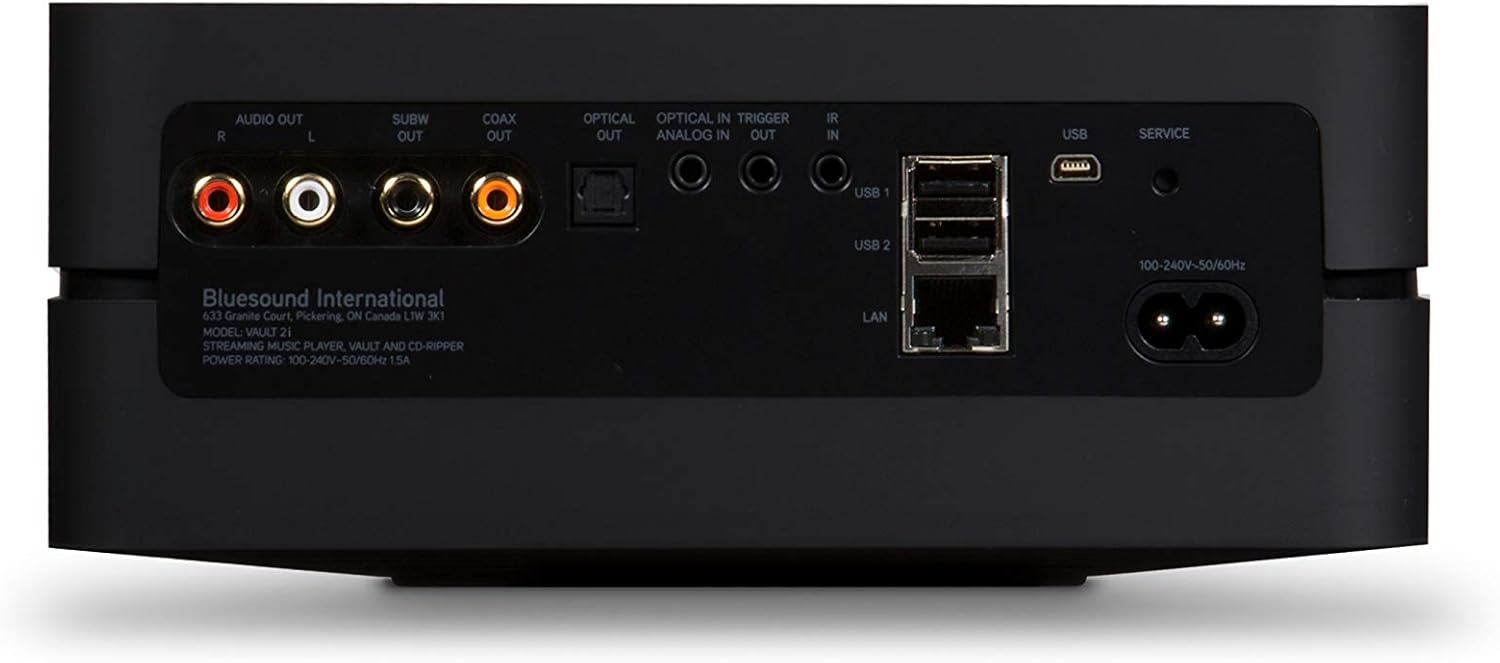
Figure 4: Top panel with touch controls for playback.
5. Manteniment
- Neteja: Use a soft, dry cloth to clean the exterior of the Vault 2i. Avoid abrasive cleaners or solvents.
- Actualitzacions de programari: Regularly check for and install software updates via the Bluesound Controller app to ensure optimal performance and access to new features.
- Ventilació: Ensure the device has adequate ventilation and is not placed in an enclosed space to prevent overheating.
6. Solució De Problemes
If you encounter issues with your Bluesound Vault 2i, refer to the following common solutions:
- Sense energia:
- Check that the power cable is securely connected to both the Vault 2i and a working power outlet.
- Comproveu que la presa de corrent funcioni.
- Sense connexió de xarxa:
- Ensure the Ethernet cable is properly connected to the Vault 2i and your router/switch.
- Restart your router and the Vault 2i.
- Confirm your network is operational.
- CD Ripping Issues:
- Assegureu-vos que el CD estigui net i sense ratllades.
- Try rebooting the Vault 2i through the Bluesound Controller app (Settings > Diagnostics > Reboot).
- If ripping is slow, ensure a stable wired network connection.
- App Cannot Find Vault 2i:
- Ensure your mobile device or computer is on the same network as the Vault 2i.
- Restart the app and the Vault 2i.
- Sense sortida d'àudio:
- Check all audio cable connections between the Vault 2i and your audio system.
- Verifiqueu que l'entrada correcta estigui seleccionada al vostre amplificador o receptor.
- Adjust volume levels on both the Vault 2i (via app) and your audio system.
For further assistance, consult the official Bluesound support resources or contact customer service.
7. Especificacions
| Marca | So blau |
| Nom del model | VAULT 2i BLK |
| Emmagatzematge intern | Disc dur 2TB |
| CD Ripping Formats | FLAC, MP3, WAV, WMA |
| Processador | 1GHz Dual-Core ARM Cortex |
| Connectivitat | Ethernet (LAN), USB (Type-A), Micro USB (Service) |
| Sortides d'àudio | RCA Stereo, Coaxial, Optical, Subwoofer |
| Característiques especials | High-definition audio, CD ripping, network connectivity, multi-room streaming, Alexa & Siri compatibility, AirPlay |
| Dimensions (L x A x A) | 24.61 x 11.8 x 12.59 polzades |
| Pes de l'article | 4 lliures |
| Color | Negre |
Què hi ha a la caixa:
- Bluesound Vault 2i Streaming Player
Note: Additional accessories such as power cables, Ethernet cables, and audio cables are typically included but not explicitly listed in the provided data.
8. Garantia i Suport
Per obtenir informació sobre la garantia, el registre del producte i l'assistència tècnica, consulteu la pàgina oficial de Bluesound. weblloc web o poseu-vos en contacte amb el seu departament d'atenció al client. Conserveu el rebut de compra per a reclamacions de garantia.
Online resources may include FAQs, troubleshooting guides, and software downloads.


