Introducció
Thank you for choosing the iTOMA CKS801 Alarm Clock. This device combines a digital alarm clock with convenient features such as wireless charging, a USB charging port, dual alarms, an adjustable night light, and an indoor temperature and humidity display. This manual will guide you through the setup, operation, and maintenance of your new alarm clock to ensure optimal performance and user experience.
Característiques del producte
- Funció de càrrega sense fil: Compatible with most universal wireless charging enabled mobile phones.
- Port de càrrega USB: Provides an additional port for charging other mobile devices.
- Dual Alarm with Snooze: Set two independent alarms with a 9-minute snooze function (up to 6 times).
- Llum nocturna ajustable: Features two night light modes for ambient lighting.
- 4-Level Display Dimmer: Adjust the brightness of the LED display.
- Indoor Temperature and Humidity Display: Shows ambient temperature (Celsius/Fahrenheit) and relative humidity.
- Format d'hora de 12/24 hores: Seleccioneu el format de visualització de l'hora que preferiu.
Disseny del dispositiu
Familiarize yourself with the buttons and display elements of your iTOMA CKS801 alarm clock.
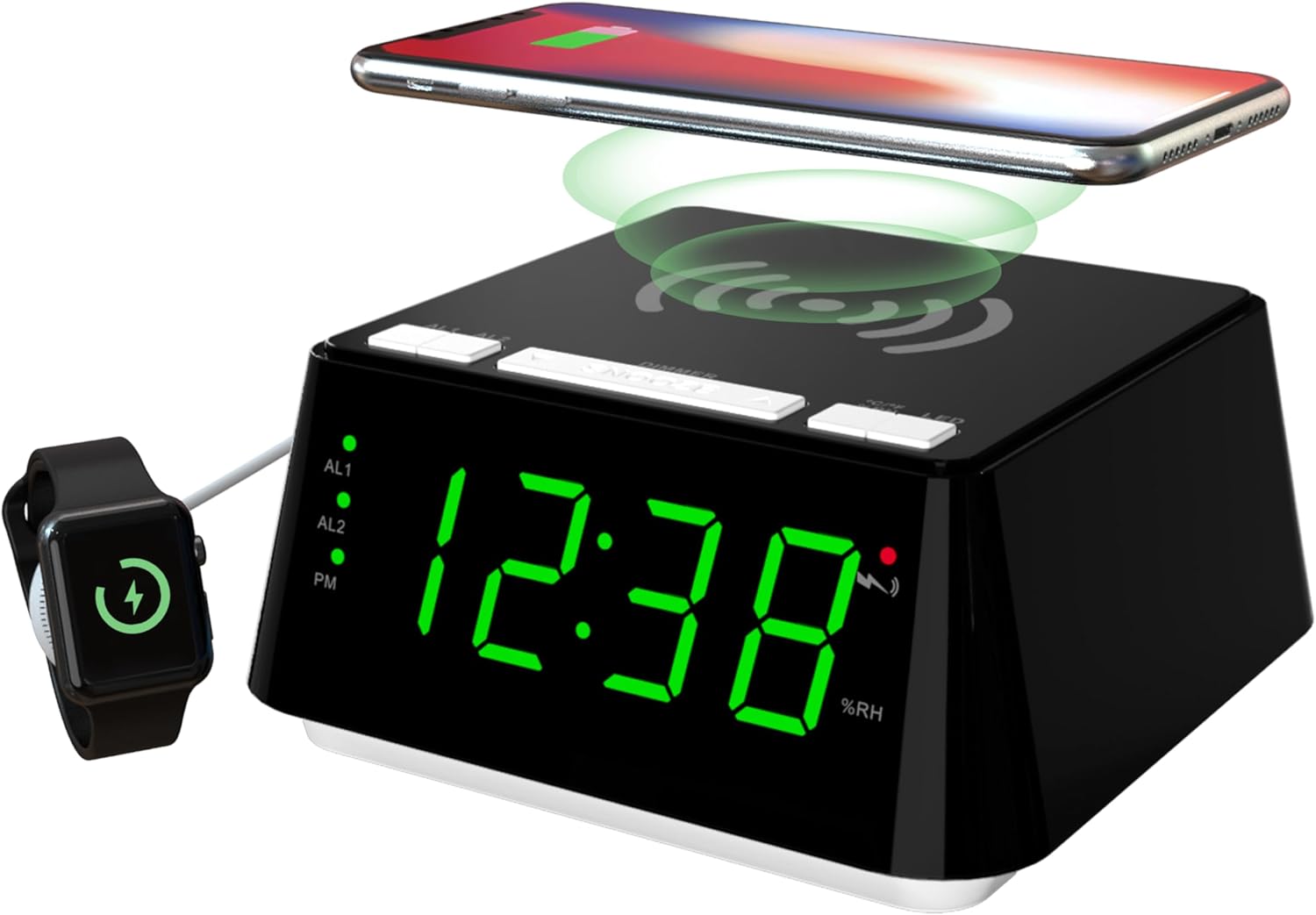
Imatge 1: Davant i superior view of the iTOMA CKS801 alarm clock, showing the digital time display, alarm indicators (AL1, AL2), PM indicator, humidity percentage (%RH), and the wireless charging pad on top. A smartphone is shown wirelessly charging, and a smartwatch is connected to the USB port.
- Tauler superior: Wireless charging pad, SNOOZE/DIMMER button, AL1/AL2 buttons, °C/°F/%RH button, LED (Night Light) button.
- Pantalla frontal: Large LED display showing time, AL1/AL2 indicators, PM indicator, temperature, and humidity.
- Panell posterior: Power input, USB charging port.
Configuració
- Connexió d'alimentació: Connect the provided power adapter to the DC input port on the back of the alarm clock and then plug it into a standard wall outlet. The display will light up.
- Configuració de l'hora inicial: Upon first power-up, the clock may display a default time. Refer to the "Time Setting" section under Operating Instructions to set the correct time.
Instruccions de funcionament
1. Configuració del temps
- Manteniu premut el botó HORA CONFIGURADA button (if available, otherwise use a combination of buttons, e.g., SNOOZE/DIMMER for setting mode and AL1/AL2 for adjustment).
- Utilitza el AL1 or AL2 buttons (or dedicated UP/DOWN buttons if present) to adjust the hour.
- Premeu el botó HORA CONFIGURADA button again to move to minute adjustment. Use AL1 or AL2 per ajustar els minuts.
- Premeu el botó HORA CONFIGURADA Premeu el botó una altra vegada per confirmar i sortir del mode de configuració de l'hora.
- Per canviar entre el format de 12 hores i el de 24 hores, premeu la tecla °C/°F/%RH button while the time is displayed. The PM indicator will appear for 12-hour format afternoon times.
2. Alarm Setting (AL1 & AL2)

Imatge 2: Close-up of the iTOMA CKS801 display and top buttons, illustrating the dual alarm indicators (AL1, AL2) and the three alarm modes: ALL-7-DAY, WEEKDAY, and WEEKEND.
- Setting Alarm 1 (AL1):
- Manteniu premut el botó AL1 botó. La pantalla de les hores parpellejarà.
- Utilitza el SNOOZE / DIMMER button (or dedicated UP/DOWN) to adjust the alarm hour.
- Premeu AL1 again to move to minute adjustment. Use SNOOZE / DIMMER per ajustar els minuts.
- Premeu AL1 again to select the alarm mode (ALL-7-DAY, WEEKDAY, WEEKEND). Use SNOOZE / DIMMER per anar ciclant pels modes.
- Premeu AL1 once more to confirm and activate Alarm 1. The AL1 indicator will light up.
- Setting Alarm 2 (AL2): Follow the same steps as for AL1, using the AL2 botó.
- Activació/desactivació d'alarmes: Premeu breument AL1 or AL2 button to toggle the respective alarm on or off. The AL1/AL2 indicator will show its status.
- Funció de posposar: Quan soni una alarma, premeu la tecla gran SNOOZE / DIMMER button on top to activate snooze. The alarm will pause for 9 minutes and sound again. This can be repeated up to 6 times.
- Aturar una alarma: To stop an alarm completely, press any other button (e.g., AL1, AL2, LED) except the SNOOZE/DIMMER button. The alarm will reset for the next day.
3. Càrrega sense fil

Imatge 3: A smartphone placed on the top surface of the iTOMA CKS801 alarm clock, indicating active wireless charging with a charging icon on the phone screen.
- Place your Qi-compatible smartphone directly on the wireless charging pad located on the top surface of the alarm clock.
- Ensure the phone is centered on the charging pad for optimal charging.
- A charging indicator (usually on your phone screen) will confirm that charging has begun.
- Remove any metal objects or thick cases from your phone that may interfere with wireless charging.
4. Port de càrrega USB
- Locate the USB charging port on the rear of the alarm clock.
- Connecteu el cable de càrrega USB del dispositiu a aquest port.
- This port provides a convenient way to charge non-wireless charging devices or additional accessories like smartwatches.
5. Night Light Operation

Imatge 4: The iTOMA CKS801 alarm clock displaying the time, with its integrated night light illuminated, casting a soft glow around the base.
- Premeu el botó LED button on the top panel to turn the night light on.
- Premeu el botó LED button again to cycle through the available night light modes (e.g., different brightness levels or colors, if applicable, as the description mentions "two modes").
- Premeu el botó LED button repeatedly until the night light turns off.
6. Visualització de temperatura i humitat

Imatge 5: Two iTOMA CKS801 alarm clocks side-by-side, one displaying "23C" (Celsius) and the other "73F" (Fahrenheit), demonstrating the temperature display feature.

Imatge 6: The iTOMA CKS801 alarm clock displaying "55%RH", indicating the indoor humidity percentage.
- The alarm clock automatically displays the indoor temperature and humidity.
- To switch between Celsius (°C) and Fahrenheit (°F) for temperature, briefly press the °C/°F/%RH botó.
- The humidity is displayed as a percentage (%RH).
7. Control de regulador d'intensitat de la pantalla

Imatge 7: Quatre views of the iTOMA CKS801 alarm clock, demonstrating the four levels of display brightness: High (L-3), Medium (L-2), Low (L-1), and Off.
- Premeu breument SNOOZE / DIMMER button to cycle through the 4 levels of display brightness: High (L-3), Medium (L-2), Low (L-1), and Off.
- Select the brightness level that is most comfortable for your environment.
Manteniment
- Neteja: Netegeu el dispositiu amb un drap suau i sec. No utilitzeu productes de neteja abrasius ni dissolvents.
- Col·locació: Col·loca el despertador sobre una superfície estable i plana, allunyada de la llum solar directa, de fonts de calor i de la humitat.
- Potència: Feu servir sempre l'adaptador de corrent original que s'inclou amb el dispositiu.
Resolució de problemes
| Problema | Possible causa/solució |
|---|---|
| La pantalla del rellotge està apagada o parpelleja. |
|
| La càrrega sense fil no funciona. |
|
| L'alarma no sona. |
|
| Incorrect temperature/humidity reading. |
|
Especificacions
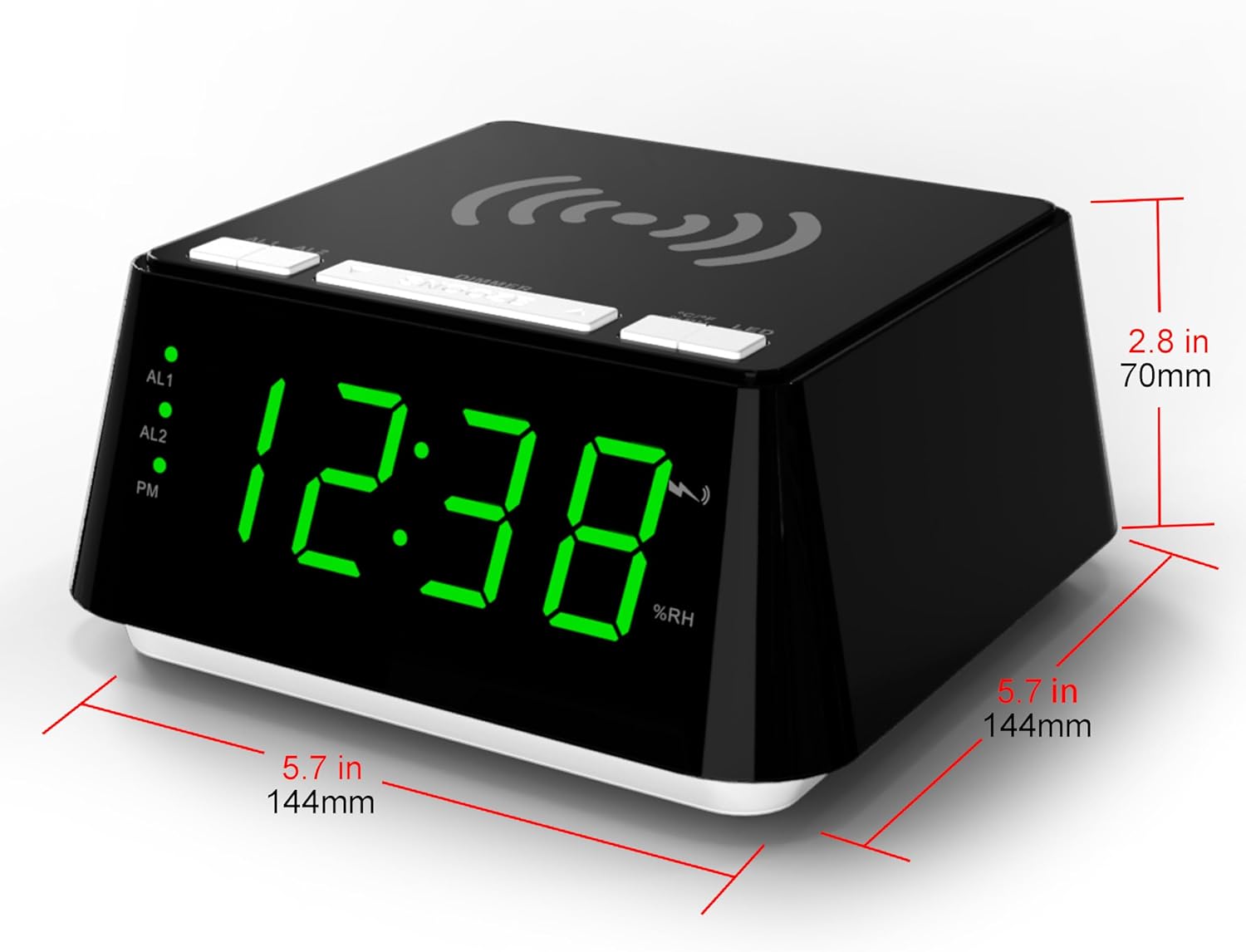
Imatge 8: Diagram showing the dimensions of the iTOMA CKS801 alarm clock: 5.7 inches (144mm) in width, 5.7 inches (144mm) in depth, and 2.8 inches (70mm) in height.
| Característica | Detall |
|---|---|
| Model | CKS 801 |
| Dimensions (L x A x A) | 14.4 x 13 x 7.11 cm (5.7 x 5.1 x 2.8 polzades) |
| Pes | 381.02 g (0.84 lliures) |
| Tipus de visualització | LED digital |
| Color | Green (LED display color, product casing is black) |
| Font d'alimentació | AC Power Adapter (Batteries not required for operation) |
| Característiques especials | Alarm, Wireless Charging, USB Charging, Night Light, Temperature Display, Humidity Display |
Garantia i Suport
For warranty information or technical support, please refer to the documentation included with your purchase or visit the official iTOMA website. If you encounter any issues not covered in this manual, please contact iTOMA customer service for assistance.


