1. Introducció
The Denver MRD-51 is a versatile multi-function music system designed to play various audio formats. It integrates a record player, DAB+ and FM/AM radio tuner, CD player, and cassette deck into a single unit. Additionally, it features a USB port for digitizing audio from CDs, records, or cassettes, and an AUX input for connecting external devices. The system includes two integrated stereo speakers for a complete audio experience.
2. Instruccions de seguretat
- Llegiu atentament totes les instruccions abans d'utilitzar el dispositiu.
- Conserveu aquest manual com a referència futura.
- No exposeu la unitat a la pluja ni a la humitat per evitar incendis o descàrregues elèctriques.
- Assegureu-vos que la ventilació sigui adequada; no obstruïu cap obertura de ventilació.
- Col·loqueu la unitat sobre una superfície plana i estable.
- Desconnecteu l'endoll de la presa de corrent si no feu servir la unitat durant un període llarg de temps.
- No intenteu fer el manteniment de la unitat vosaltres mateixos. Envieu totes les tasques de manteniment a personal de servei qualificat.
3. Contingut del paquet
Verifiqueu que hi hagi tots els elements en desempaquetar:
- Denver MRD-51 Multi-Function Music System
- Cable d'alimentació
- Control remot
- Manual d'usuari
4. Producte acabatview

Figura 4.1: Denver MRD-51 Multi-Function Music System with turntable open. This image displays the Denver MRD-51 music system from a front-top perspective, with the turntable lid open and a vinyl record placed on the platter. The control panel, including the LCD display, knobs, and buttons, is visible below the turntable.

Figura 4.2: Denver MRD-51 Multi-Function Music System, front view. A front view of the Denver MRD-51 music system with the turntable lid closed. This image highlights the integrated stereo speakers on the sides and the central control panel, emphasizing its classic design.
4.1 Controls del panell frontal
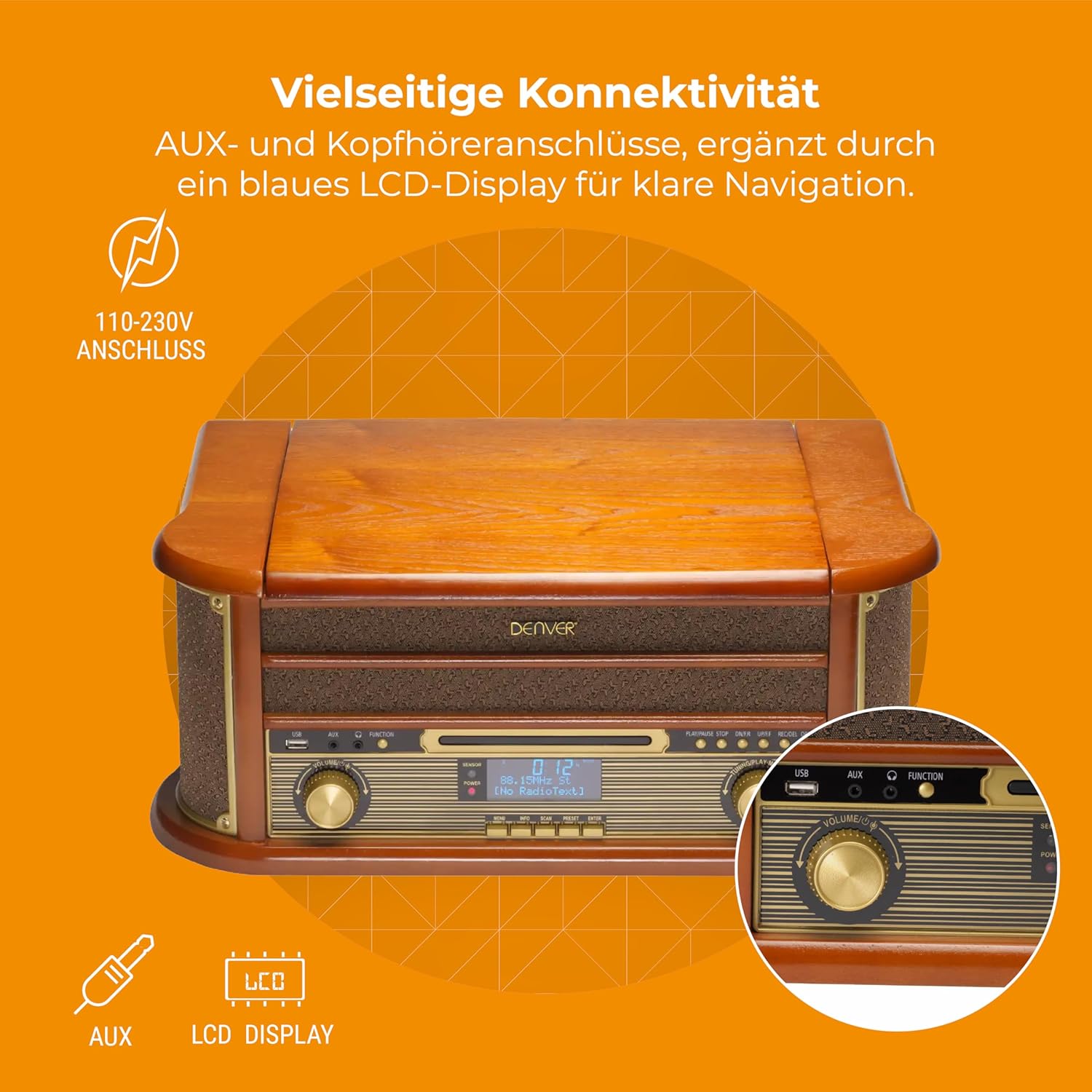
Figura 4.3: Denver MRD-51 front panel with USB, AUX, and LCD display. A close-up of the Denver MRD-51's front control panel, showcasing the USB port, AUX input, and the blue LCD display for clear navigation. This view details the various connectivity options available.
- Botó d'encendre: Encén o apaga la unitat.
- Botó FUNCIÓ: Selects between Turntable, CD, Cassette, DAB+, FM, AM, AUX, and USB modes.
- Port USB: For connecting USB storage devices for playback or recording.
- Entrada AUX: Jack de 3.5 mm per connectar fonts d'àudio externes.
- Pantalla LCD: Shows current mode, track information, radio frequency, and other system status.
- Botó REPRODUCIR/PAUSA: Starts or pauses playback for CD, Cassette, or USB.
- Botó STOP: Atura la reproducció.
- SKIP Buttons (◀◀ / ▶▶): Skips tracks or fast forwards/rewinds.
- Botó RECORD: Initiates recording to USB.
- Botó de VOLUM: Ajusta el volum de sortida general.
- Botó d'AFINAMENT: Adjusts radio frequency in FM/AM mode or navigates menus in DAB+ mode.
4.2 Turntable and Cassette Deck

Figura 4.4: Denver MRD-51 showing open turntable and cassette deck. This image illustrates the versatility of the Denver MRD-51, featuring the open turntable with a record and an arrow pointing to the cassette deck slot on the side, indicating its multi-format playback capabilities.
- Plat giratori: For playing vinyl records.
- Tone Arm with Stylus: Reads the grooves of vinyl records.
- Selector de velocitat: Allows selection of 33, 45, or 78 RPM.
- Cassette Deck Slot: Per inserir cassets d'àudio.
4.3 Reproductor de CD

Figura 4.5: Denver MRD-51 with CD tray open and remote control. This image shows the Denver MRD-51 with its CD tray open, ready for disc insertion. A remote control is also pictured, indicating convenient operation of the system's functions.
- Safata de CD: Per inserir discos compactes.
- Botó OBRIR/TANCAR: Obre i tanca la safata del CD.
5. Configuració
5.1 Desembalatge i col·locació
- Traieu amb cura la unitat del seu embalatge.
- Col·loqueu la unitat sobre una superfície plana i estable, allunyada de la llum solar directa, de fonts de calor i de pols o humitat excessives.
- Assegureu-vos que hi hagi prou espai al voltant de la unitat per a la ventilació.
5.2 Connexió d'alimentació
- Connect the power cable to the AC IN socket on the rear of the unit.
- Plug the other end of the power cable into a standard wall outlet (110-230V).
5.3 Connexió de l'antena
For optimal radio reception, extend the telescopic antenna fully for FM/DAB+ or adjust its position for AM.
6. Instruccions de funcionament
6.1 Funcionament general
- Premeu el botó PODER botó per encendre la unitat.
- Premeu el botó FUNCIÓ button repeatedly to cycle through available modes: Turntable, CD, Cassette, DAB+, FM, AM, AUX, USB.
- Ajusteu el VOLUM el botó al nivell d'escolta desitjat.
6.2 Funcionament del tocadiscs
- Select the 'Turntable' function.
- Obriu la tapa del plat giratori.
- Col·loca un disc de vinil al plat.
- Set the speed selector to match the record's speed (33, 45, or 78 RPM). For 45 RPM records, use the included adapter if necessary.
- Aixequeu suaument el braç i col·loqueu el punter sobre la pista desitjada del disc.
- Baixeu lentament el braç del lector sobre el disc. Començarà la reproducció.
- At the end of the record, the tone arm may automatically return to its rest, or you may need to manually lift and return it.
6.3 Funcionament del reproductor de CD
- Select the 'CD' function.
- Premeu el botó OBRIR/TANCAR botó per obrir la safata de CD.
- Place a CD (CD/CD-R/CD-RW compatible) with the label side facing up into the tray.
- Premeu el botó OBRIR/TANCAR Premeu el botó de nou per tancar la safata. La unitat llegirà el disc.
- Premeu REPRODUCCIÓ/PAUSA per iniciar la reproducció.
- Utilitza el SALTAR botons (◀◀ / ▶▶) per navegar entre pistes.
- Premeu STOP per finalitzar la reproducció.
6.4 Funcionament del reproductor de casset
- Select the 'Cassette' function.
- Insert an audio cassette into the cassette deck slot until it clicks into place.
- Premeu el botó JUGAR button (often integrated with the cassette mechanism) to start playback.
- Utilitza el STOP button to end playback. Fast forward and rewind functions are typically available via dedicated buttons on the cassette deck.
6.5 Funcionament de la ràdio (DAB+/FM/AM)
- Select the desired radio function (DAB+, FM, or AM).
- For DAB+ Radio: The unit will typically perform an automatic scan for available stations upon first use. Use the TUNING pom o SALTAR buttons to navigate through the list of stations.
- For FM/AM Radio: Utilitza el TUNING knob to manually tune to a station. The frequency will be displayed on the LCD.
6.6 Gravació USB
The MRD-51 allows you to digitize audio from your records, CDs, or cassettes directly to a USB storage device.
- Inseriu una unitat flaix USB al Port USB.
- Select the source function you wish to record from (Turntable, CD, or Cassette).
- Start playback of the audio source (e.g., play a record, CD, or cassette).
- Premeu el botó REGISTRAR button. The recording indicator on the display will illuminate, and recording will begin.
- Premeu el botó REGISTRAR de nou o el botó STOP botó per finalitzar l'enregistrament. L'enregistrat file es desarà a la unitat USB.
6.7 Entrada AUX
- Connecteu un dispositiu d'àudio extern (per exemple, un telèfon intel·ligent o un reproductor MP3) al Entrada AUX utilitzant un cable d'àudio de 3.5 mm.
- Select the 'AUX' function.
- Start playback on your external device. The audio will be played through the MRD-51's speakers.
7. Manteniment
7.1 Neteja de la unitat
- Desconnecteu sempre la unitat de la presa de corrent abans de netejar-la.
- Feu servir un drap suau i sec per netejar les superfícies exteriors.
- No utilitzeu netejadors abrasius, ceres ni dissolvents.
7.2 Cura del punter del tocadiscs
- Gently clean the stylus regularly with a soft brush, brushing from back to front.
- Eviteu tocar el llapis amb els dits.
- Replace the stylus when sound quality deteriorates or if it is visibly damaged.
7.3 CD/Cassette Player Care
- Handle CDs and cassettes by their edges to avoid fingerprints and scratches.
- Keep the CD tray and cassette deck free of dust and debris.
8. Solució De Problemes
| Problema | Causa possible | Solució |
|---|---|---|
| Sense poder | Power cable not connected; Wall outlet not active | Ensure power cable is securely connected; Try a different outlet |
| Sense so | Volume too low; Incorrect function selected; External device not playing | Increase volume; Select correct function; Ensure external device is playing and connected properly |
| Turntable not spinning or poor sound | Speed setting incorrect; Stylus dirty or damaged; Record dirty | Adjust speed selector; Clean or replace stylus; Clean record |
| El CD no es reprodueix | CD inserted incorrectly; CD scratched or dirty; CD format not supported | Reinsert CD correctly; Clean or replace CD; Ensure CD is CD/CD-R/CD-RW format |
| Mala recepció de ràdio | Antenna not extended/positioned correctly; Weak signal | Extend and adjust antenna; Try repositioning the unit |
| La gravació per USB no funciona | USB drive full or incompatible; Source not playing | Use a different USB drive or clear space; Ensure audio source is playing during recording |
9. Especificacions
| Característica | Especificació |
|---|---|
| Dimensions del producte | 20.08 x 13.39 x 8.46 polzades |
| Pes de l'article | 15.18 lliures (6.9 quilograms) |
| Número de model | MRD-51 (Internal: 111201210000) |
| Marca | Denver |
| Velocitat de rotació màxima | 78 RPM (admet 33, 45, 78 RPM) |
| Components inclosos | MRD-51 unit |
| Característiques especials | Adjustable Speed, Digital Recorder, Integrated Speakers |
| Material | Aluminum (internal components), Wood (housing) |
| Color | Fusta |
| Dispositius compatibles | Personal Computer (for USB transfer) |
| Sintonitzador de ràdio | DAB+, FM, AM |
| Reproductor de CD | Supports CD/CD-R/CD-RW |
| Sortida d'àudio | 2 altaveus estèreo de 2.5 W |
10. Garantia i Suport
For warranty information and technical support, please refer to the documentation provided with your purchase or contact Denver customer service through their official weblloc web. Conserveu el comprovant de compra per a qualsevol reclamació de garantia.


