1. Introducció
This manual provides detailed instructions for the operation and maintenance of the Walfront JDS6600 DDS Signal Generator Counter. The JDS6600 is a dual-channel arbitrary waveform function generator and frequency meter, capable of producing various waveforms with high precision and stability. It is designed for use in factories, schools, research institutes, and laboratories.
2. Informació de seguretat
- Assegureu-vos que la font d'alimentació voltage coincideix amb els requisits del dispositiu.
- No utilitzeu el dispositiu en mullat o damp condicions.
- Eviteu exposar el dispositiu a la llum solar directa o a temperatures elevades.
- No intenteu desmuntar ni reparar el dispositiu vosaltres mateixos. Demaneu el servei tècnic a personal qualificat.
- Feu servir només els accessoris i cables especificats.
3. Contingut del paquet
Verifiqueu que tots els elements que s'enumeren a continuació s'inclouen al vostre paquet:
- 1 x JDS6600 DDS Signal Generator Counter Unit
- 2 x BNC to Alligator Clip Cables
- 1 x BNC to BNC Cable
- 1 x cable USB
- 1 x adaptador de corrent
- 1 x Manual d’operacions
- 1 x CD (Software/Drivers)
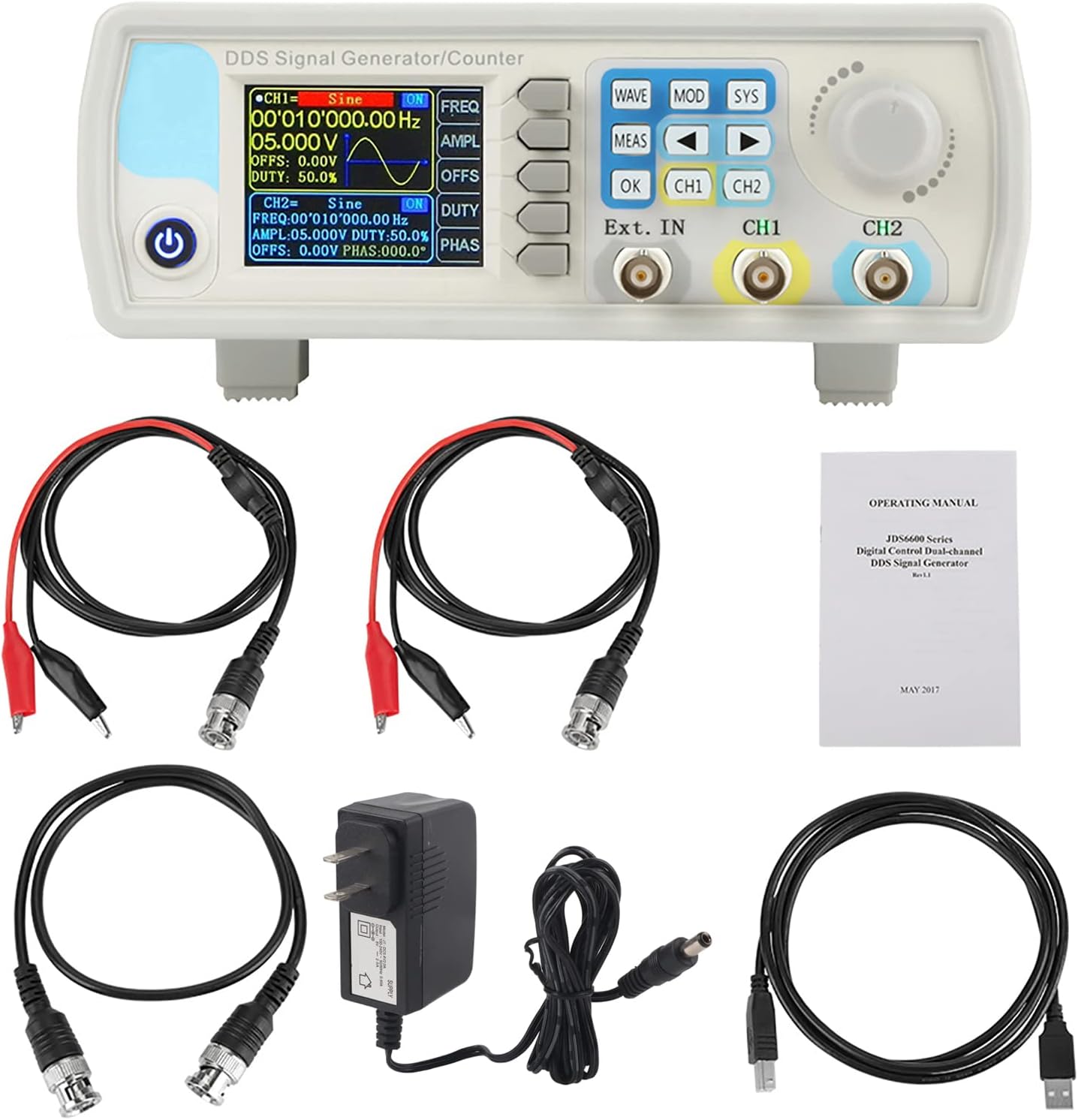
4. Producte acabatview
4.1 Disposició del panell frontal
The front panel features a 2.4-inch TFT color LCD display, control buttons, a rotary encoder, and BNC output terminals for channels 1 and 2, as well as an external input.

4.2 Connexions del panell posterior
The rear panel includes the TTL extension interface, USB communication port, and the DC 5V power supply input.

4.3 Interfície de visualització
The 2.4-inch TFT color LCD displays parameters for both Channel 1 (CH1) and Channel 2 (CH2), including waveform type, frequency, amplitude, offset, and duty cycle. It also shows the current channel output status, a waveform display, and a soft-key menu bar for navigation.

4.4 Característiques clau
- Exquisite Waveform: 14-bit vertical resolution, 266MSa/s sampling rate. Sine frequency up to 60MHz, square up to 15MHz.
- Sortida de doble canal: Fully independent dual-channel operation with adjustable phase difference (0.1 degrees precision).
- Diverse Waveforms: Supports Sine, Square, Pulse (adjustable duty cycle, pulse width, period), Triangular, Partial Sine, CMOS, DC level, Half Wave, Full Wave, Positive Staircase, Anti-Ladder, Noise, Exponential Rise/Drop, Multi-Sonic, and 60 arbitrary waveforms.
- Control de programari per a PC: Allows control of all machine functions and creation of arbitrary waveforms via standard PC software.
- Protecció de sortida: Output short circuit protection for up to 60 seconds under load.
- Alta precisió: Utilizes large-scale integrated circuits and SMT technology for high reliability and precise bias adjustment (-9.99V to +9.99V).

5. Configuració
5.1 Connexió d'alimentació
Connect the provided DC 5V power adapter to the power input port on the rear panel of the JDS6600 unit. Plug the adapter into a suitable power outlet.
5.2 USB Connection (for PC Control)
To control the JDS6600 via PC software, connect the unit to your computer using the supplied USB cable. The USB port is located on the rear panel.
5.3 Connexions de sortida
Connect BNC cables to the CH1 and CH2 output terminals on the front panel. These cables can then be connected to an oscilloscope, frequency counter, or other test equipment.
5.4 Instal·lació del programari
The JDS6600 comes with PC software that allows for comprehensive control and arbitrary waveform generation. Install the software from the provided CD or download the latest version from the manufacturer's website. Follow the on-screen instructions for driver and software installation.
6. Instruccions de funcionament
6.1 Funcionament bàsic
After connecting the power, press the power button to turn on the device. The display will show the default settings for CH1 and CH2. Use the CH1 and CH2 buttons to toggle the output of each channel on or off. The rotary encoder is used to navigate menus and adjust parameter values.
6.2 Waveform Selection and Parameter Adjustment
Premeu el botó ONADA button to cycle through available waveform types. Once a waveform is selected, use the dedicated function buttons (FREQ, AMPL, OFFS, DEURE, PHAS) to adjust its parameters. Turn the rotary encoder to change the values, and press OK per confirmar.
6.3 Configuració del sistema
Premeu el botó SYS button to access system settings. Here you can save and load configurations, adjust sound and brightness, change the display language, and manage other system-wide preferences.
6.4 Modes de modulació
Premeu el botó MOD button to enter modulation mode. You can select various modulation types such as Sweep Frequency, Pulse Generator, and Burst. Use the arrow keys and rotary encoder to configure the modulation parameters.
6.5 Mode de mesura
El MEAS button allows you to use the device as a frequency counter for external signals. Connect the external signal to the 'Ext. IN' BNC port and configure the measurement settings via the menu.
6.6 Control del programari de l'ordinador
Once the PC software is installed and the device is connected via USB, you can control all functions from your computer. The software interface mirrors the device's controls, allowing for precise adjustments and the creation of custom arbitrary waveforms. This enables advanced signal generation and analysis.

7. Manteniment
- Mantingueu el dispositiu net i lliure de pols. Feu servir un drap suau i sec per netejar-lo.
- Avoid using abrasive cleaners or solvents that could damage the casing o pantalla.
- Guardeu el dispositiu en un ambient fresc i sec quan no l'utilitzeu.
- Reviseu regularment els cables i els connectors per detectar qualsevol signe de desgast o dany.
8. Solució De Problemes
- Sense energia: Check the power adapter connection and ensure the power outlet is functional.
- No Signal Output: Verify that the correct channel (CH1 or CH2) is enabled and that parameters like amplitude and frequency are set appropriately. Check cable connections.
- Problemes de connexió del programari de l'ordinador: Ensure USB drivers are correctly installed (refer to Section 5.4). Check the COM port selection in the software.
- Incorrect Waveform Display: Confirm that the selected waveform type and parameters match your intended output.
9. Especificacions
9.1 Especificacions generals
| Característica | Descripció |
|---|---|
| Mostra | 2.4 inch TFT color LCD |
| Store and Load | Quantity: 100 (00 to 99), Position: 00 to 99 (00 memory location is loaded by default as power on) |
| Onada arbitrària | Quantity: 1 to 60 total (15 groups by default as power on) |
| Mode d’interfície | Interfície USB a sèrie |
| Interfície d'extensió | Amb interfície sèrie en mode de nivell TTL per al desenvolupament secundari de l'usuari |
| Velocitat de comunicació | Standard 115200bps |
| Protocol | Using the command line, the protocol is public |
| Font d'alimentació | DC5V±0.5V |
| Tecnologia de fabricació | Tecnologia de muntatge en superfície, circuits integrats a gran escala, alta fiabilitat, llarga vida útil |
| To de sol·licitud | Els usuaris poden activar o desactivar configurant el programa |
| Característiques operatives | Totes les operacions clau, perilla d'ajust continu |
| Condicions ambientals | Temperature: 0~40°C, Humidity: <80% |
9.2 Waveform Characteristics
| Característica | Descripció |
|---|---|
| Tipus de forma d'ona | Sine, Square, Pulse (adjustable duty cycle, precise adjustment of pulse width and period), Triangular, Partial Sine, CMOS, DC level, Half Wave, Full Wave, Positive Staircase, Anti-Ladder, Noise, Exponential Rise/Drop, Multi-Sonic, Symplectic Pulse, Lorenz Pulse, and 60 arbitrary waveforms. |
| Longitud d'ona | 2048 punts |
| SampTarifa ling | 266MSa / s |
| Waveform Vertical Resolution | 14 bits |
9.3 Frequency Ranges (JDS6600-15M Model)
| Tipus de forma d'ona | Interval de freqüència |
|---|---|
| Ona sinusoïdal | 0~15MHz |
| Onada quadrada | 0~15MHz |
| Onada Triangle | 0~15MHz |
| Onada de pols | 0~6MHz |
| TTL Digital Wave | 0~6MHz |
| Arbitrary Frequency | 0~6MHz |
9.4 Other Parameters
| Paràmetre | Valor |
|---|---|
| Pulse Width Adjustment Range | 100 ns ~ 4000 s |
| Square Wave Rise Time | ≤25ns |
| Minimum Frequency Resolution | 0.01uHz (0.00000001Hz) |
| Precisió de freqüència | ± 20 ppm |
| Estabilitat de freqüència | ±1 ppm/3 hores |
| Dimensions del producte | 194 x 178 x 69 mm (7.48 x 7.09 x 2.76 polzades) |
| Pes de l'article | 0.98 kg (2.16 lliures) |


10. Garantia i Suport
Per obtenir informació sobre la garantia, assistència tècnica o consultes sobre el servei, poseu-vos en contacte amb el vostre distribuïdor o directament amb el fabricant. Conserveu el rebut de compra com a comprovant de compra.


