Introducció
Thank you for choosing Groov-e Bluetooth DJ Style Wireless On-Ear Headphones. These headphones are designed for young users, offering wireless freedom, comfortable wear, and an audio-sharing feature. This manual provides essential information for setting up, operating, maintaining, and troubleshooting your new headphones to ensure a safe and enjoyable listening experience.
Contingut del paquet
Marqueu la casella per als elements següents:
- 1 x Groov-e Bluetooth Kids Headphones with Audio Sharing Port
- 1 cable d'àudio jack de 3.5 mm
- 1 x cable de càrrega micro USB
- 1 x Manual d'usuari (aquest document)
Producte acabatview
Familiarize yourself with the various parts and controls of your Groov-e headphones.
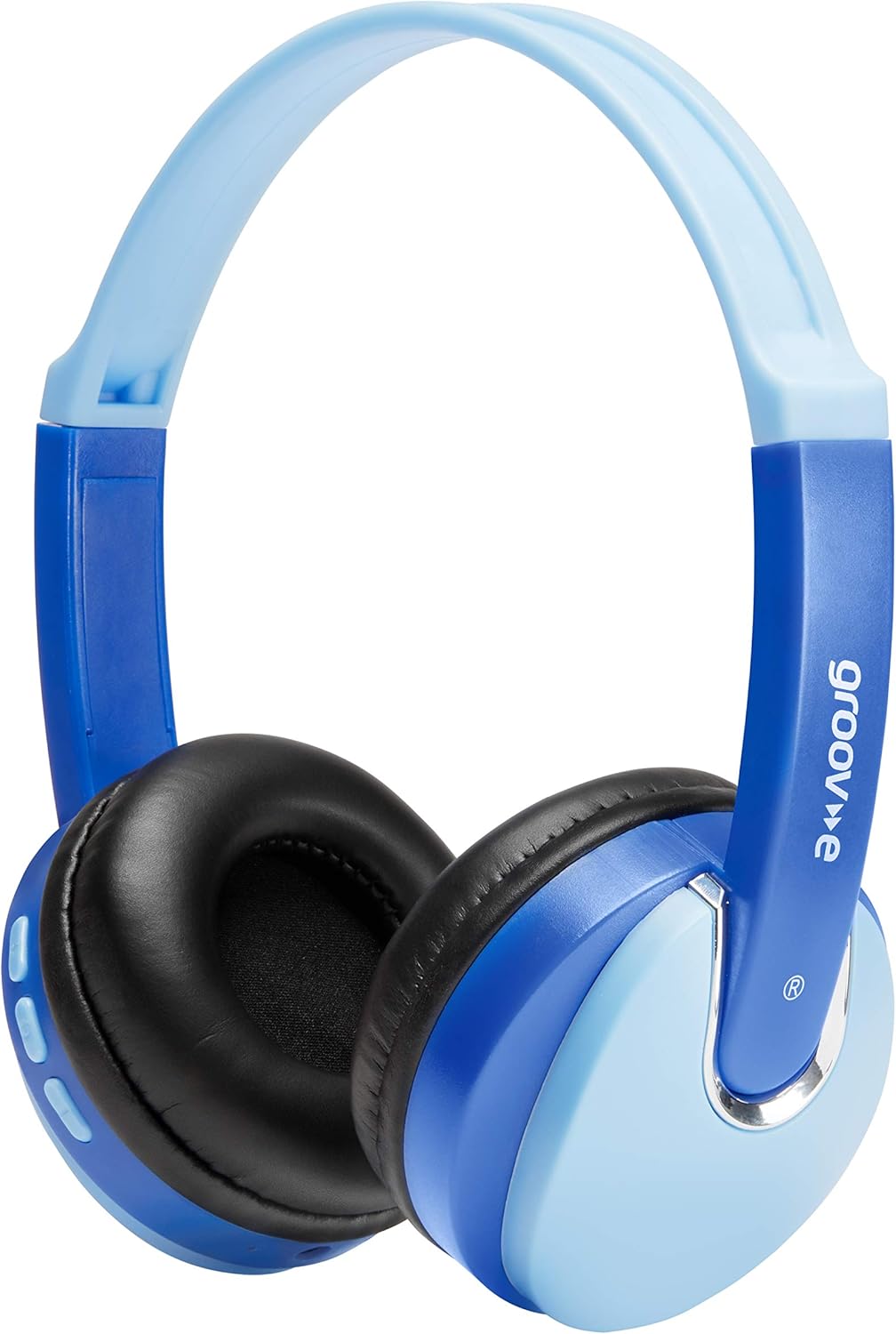
Davant view of the Groov-e Bluetooth DJ Style Wireless On-Ear Headphones in blue.

lateral view of the right earcup, displaying the volume and track control buttons.
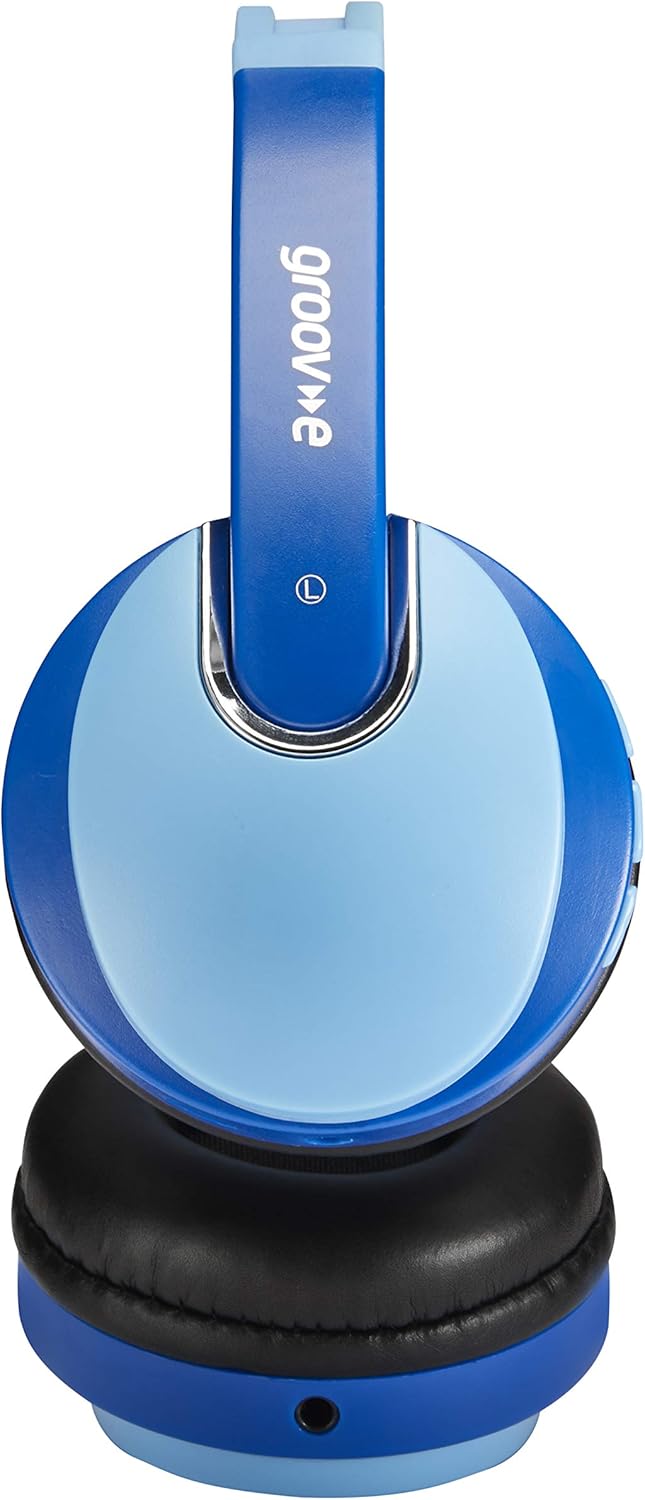
lateral view of the left earcup, showing the 3.5mm audio input and the audio sharing port.
- Diadema ajustable: Per a un ajustament còmode i segur.
- Coixinets suaus per a les orelles: Dissenyat per a una comoditat d'ús prolongada.
- Botons de control: Located on the earcup for power, volume, and track control.
- Micròfon: Integrat per a trucades de mans lliures.
- Conector d'àudio de 3.5 mm: Per a la connexió per cable a dispositius.
- Port de càrrega micro USB: Per recarregar la bateria interna.
- Audio Sharing Port: Allows another pair of headphones to connect and share audio.
Configuració
Carregant els auriculars
Before first use, fully charge the headphones. Connect the Micro USB charging cable to the charging port on the headphones and the other end to a USB power source (e.g., computer USB port, USB wall adapter). The LED indicator will show charging status (typically red while charging, turning off or blue when fully charged). A full charge provides up to 7.5 hours of wireless playback.
Emparellament Bluetooth
- Assegureu-vos que els auriculars estiguin apagats.
- Premeu i manteniu premut el botó d'engegada fins que l'indicador LED parpellegi en blau i vermell alternativament, cosa que indica el mode d'emparellament.
- Al dispositiu (telèfon intel·ligent, tauleta, ordinador portàtil), activeu el Bluetooth i cerqueu dispositius nous.
- Select "Groov-e Kidz DJ" (or similar name) from the list of available devices.
- Once connected, the LED indicator will typically flash blue slowly or remain solid blue.
Connexió per cable
If Bluetooth is not available or the battery is depleted, you can use the included 3.5mm audio cable. Simply plug one end into the 3.5mm audio jack on the headphones and the other end into the audio output of your device.
Instruccions de funcionament
Encès/Apagat
- Encès: Premeu i manteniu premut el botó d'engegada durant aproximadament 3 segons fins que l'indicador LED s'encengui.
- Apagar: Premeu i manteniu premut el botó d'engegada durant aproximadament 3 segons fins que l'indicador LED s'apagui.
Reproducció de música
- Reproduir/pausa: Premeu breument el botó Reproduir/Pausa.
- Pujar el volum: Premeu breument el botó "+".
- Baixar el volum: Premeu breument el botó "-".
- Pista següent: Premeu llargament el botó "+".
- Pista anterior: Premeu llargament el botó "-".
Trucades mans lliures
- Respondre/Finalitzar la trucada: Premeu breument el botó Reproduir/Pausa.
- Rebutja la trucada: Premeu llargament el botó Reproduir/Pausa.
- Torna a marcar l'últim número: Premeu dues vegades el botó Reproduir/Pausa.
Audio Sharing (Daisy Chain)
The headphones feature a 'daisy chain' audio-sharing port. To share audio with another pair of headphones:
- Connect your Groov-e headphones to your audio source (via Bluetooth or 3.5mm cable).
- Plug a 3.5mm audio cable into the Audio Sharing Port on your Groov-e headphones.
- Connect the other end of the 3.5mm audio cable to the audio input of a second pair of headphones.
- Both pairs of headphones will now play the same audio.
Manteniment
Neteja
Netegeu els auriculars amb un drap suau i sec. No utilitzeu productes de neteja abrasius ni dissolvents. Eviteu que entri humitat a les obertures.
Emmagatzematge
Guardeu els auriculars en un lloc fresc i sec, allunyat de la llum solar directa i de temperatures extremes. Eviteu col·locar-hi objectes pesats a sobre.
Cura de la bateria
To prolong battery life, avoid fully discharging the battery frequently. If storing for a long period, charge the headphones at least once every three months.
Resolució de problemes
| Problema | Causa possible | Solució |
|---|---|---|
| Els auriculars no s'engeguen. | La bateria està baixa o esgotada. | Carregueu els auriculars completament. |
| No es pot emparellar per Bluetooth. | Auriculars no en mode d'emparellament; Bluetooth del dispositiu desactivat; massa lluny del dispositiu. | Assegureu-vos que els auriculars estiguin en mode d'emparellament (vermell/blau intermitent). Activeu el Bluetooth del dispositiu. Acosteu els auriculars al dispositiu (a menys de 10 metres). |
| Sense so. | Volum massa baix; font d'àudio incorrecta; auriculars no connectats. | Increase volume on headphones and device. Ensure headphones are properly connected (Bluetooth or wired). Check if the correct audio output is selected on your device. |
| Distorsió del so. | Too far from device; interference. | Move closer to the Bluetooth device. Avoid strong electromagnetic interference. |
Especificacions
| Característica | Detall |
|---|---|
| Nom del model | GV590 KIDS DJ |
| Número de model | GVBT590BE |
| Tecnologia de connectivitat | Bluetooth, Wired (3.5mm Jack), USB (Charging) |
| Comunicació sense fils | Bluetooth |
| Temps de reproducció | Up to 7.5 hours (wireless) |
| Mida del controlador | 40 mm |
| Interval d'edat (descripció) | Kid (Suitable for children aged 3+) |
| Material | Plàstic |
| Dispositius compatibles | All Bluetooth devices, devices with 3.5mm jacks (MP3, smartphone, tablet, PC, laptop, portable DVD) |
| Pes de l'article | 298 grams (0.3 quilograms) |
| Dimensions del producte | 7.7 x 18.2 x 24 cm |
| Tipus de bateria | 1 bateria de ions de liti (inclosa) |
| Color | Bluetooth blau |
| Factor de forma | A l'orella |
Informació de la garantia
Groov-e products are manufactured to high standards. For specific warranty details, please refer to the warranty card included with your purchase or visit the official Groov-e weblloc web. Conserveu el comprovant de compra per a qualsevol reclamació de garantia.
Atenció al client
If you encounter any issues not covered in this manual or require further assistance, please contact Groov-e customer support. Contact details can typically be found on the product packaging, the official Groov-e weblloc web o a través del vostre distribuïdor.


