1. Introducció
Gràcies per la compraasing the SENCOR SSS 3200 Kids Bluetooth Speaker with Karaoke Microphone. This portable speaker is designed to provide entertainment with its Bluetooth connectivity, karaoke function, and vibrant LED lighting. Please read this manual carefully before using the product to ensure proper operation and to maximize its lifespan. Keep this manual for future reference.
2. Instruccions de seguretat
- No exposeu el dispositiu a temperatures extremes, llum solar directa ni humitat elevada.
- Use only the supplied charger to recharge the product.
- Eviteu deixar caure o sotmetre l'altaveu a forts impactes.
- No desmunteu ni intenteu reparar el dispositiu vosaltres mateixos. Envieu totes les tasques de manteniment a personal qualificat.
- Keep the speaker away from water or other liquids to prevent electric shock.
- Assegureu-vos que hi hagi una ventilació adequada al voltant de l'altaveu durant l'ús.
3. Contingut del paquet
Carefully unpack your SENCOR SSS 3200 Kids speaker and check that all items are present and in good condition. The package should include:
- SENCOR SSS 3200 Kids Bluetooth Speaker
- Micròfon per cable
- 3.5mm Audio Cable (AUX cable)
- Cable de càrrega USB
- Adaptador d'alimentació
- Corretja d'espatlla
- Manual d'usuari (aquest document)

Image 3.1: Included accessories for the SENCOR SSS 3200 Kids speaker, including the wired microphone, various cables, power adapter, and shoulder strap.
4. Producte acabatview
4.1 Tauler frontal

Imatge 4.1: Frontal view of the SENCOR SSS 3200 Kids Bluetooth Speaker, showcasing the main speaker grille with LED backlighting and the SENCOR logo.
The front of the speaker features the main speaker grille, which is equipped with multi-color flashing LED backlighting for an enhanced visual experience. The SENCOR brand logo is prominently displayed.
4.2 Rear Panel and Controls

Image 4.2: Rear panel of the SENCOR SSS 3200 Kids Bluetooth Speaker, showing various input ports, control buttons, and adjustment knobs.
The rear panel houses all the essential controls and connectivity ports:
- MIC-IN: 6.3mm jack for connecting the wired microphone.
- GUITAR-IN: 6.3mm jack for connecting a guitar (if applicable).
- LINE IN EAR MIC: 3.5mm AUX input.
- Port USB: Per a la reproducció des d'una unitat flaix USB.
- Ranura per a targetes TF: Per a la reproducció amb targeta microSD.
- CC 9V: Entrada d'alimentació per a la càrrega.
- Interruptor d'alimentació: Per encendre/apagar l'altaveu.
- Visualització: Digital display for mode and track information.
- Botons de control: Play/Pause, Skip tracks, Mode/Shift, Record/Delete.
- Manilles: VOLUME+, -TREBLE+, -ECHO+, -MIC VOL+ for audio adjustments.
- Indicador de bateria: Mostra l'estat de la bateria.
5. Configuració
5.1 Càrrega de la bateria
Before first use, fully charge the speaker's built-in rechargeable battery. Connect the supplied power adapter to the DC 9V input on the rear panel and plug it into a power outlet. The battery indicator will show charging status. A full charge typically takes 3-5 hours. Ensure the product is fully charged before initial operation to ensure proper functionality.
5.2 Connexió del micròfon
Insert the plug of the wired microphone into the MIC-IN jack on the rear panel of the speaker. Ensure the microphone's ON/OFF switch is in the 'ON' position when in use.
6. Instruccions de funcionament
6.1 Encès/Apagat
To turn the speaker ON, slide the Power switch on the rear panel to the 'ON' position. To turn it OFF, slide the switch to the 'OFF' position.
6.2 Vinculació Bluetooth
- Turn on the speaker. It will automatically enter Bluetooth pairing mode, indicated by a flashing Bluetooth icon on the display.
- Activeu el Bluetooth al vostre telèfon intel·ligent, tauleta o altre dispositiu compatible.
- Cerca available Bluetooth devices and select "SSS 3200 Kids" from the list.
- Un cop emparellat, l'altaveu emetrà un so de confirmació i la icona de Bluetooth de la pantalla deixarà de parpellejar.
- Ara pots reproduir àudio des del teu dispositiu a través de l'altaveu.
Reproducció de targetes USB/TF de 6.3
Insert a USB flash drive or a TF (microSD) card into the respective port/slot on the rear panel. The speaker will automatically detect the storage device and begin playing audio files. Use the control buttons (Play/Pause, Skip tracks) to manage playback.
6.4 Entrada AUX
Connect an external audio device (e.g., MP3 player, laptop) to the LINE IN EAR MIC (3.5mm AUX) port using the supplied 3.5mm audio cable. Press the 'MODE/SHIFT' button to switch to AUX input mode. Audio will then play from your connected device.
6.5 Karaoke Function and Recording
With the microphone connected to the MIC-IN port, you can sing along to music playing from any source (Bluetooth, USB, TF, AUX). Adjust the microphone volume using the 'MIC VOL+' knob and add echo effects with the '-ECHO+' knob. The speaker also supports recording your karaoke performance. Refer to the 'REC/DEL' button for recording and deleting functions.
6.6 modes de llum LED
The speaker features multi-color flashing LED backlighting. These lights automatically activate when the speaker is on, enhancing the party atmosphere. There may be a dedicated button or a combination of buttons to cycle through different light modes or turn them off, if available (refer to specific product documentation for details).
6.7 Ajustaments d'àudio
Use the 'VOLUME+' knob to adjust the overall speaker volume. The '-TREBLE+' knob allows you to fine-tune the treble levels for clearer sound. The '-ECHO+' and '-MIC VOL+' knobs are specifically for microphone effects and volume, respectively.
7. Manteniment
7.1 Neteja
Netegeu l'exterior de l'altaveu amb un drap suau i sec. No utilitzeu productes de neteja abrasius, ceres ni dissolvents. Assegureu-vos que no entrin líquids a les obertures de l'altaveu.
7.2 Emmagatzematge
When not in use for extended periods, store the speaker in a cool, dry place, away from direct sunlight and extreme temperatures. It is recommended to fully charge the battery every few months to maintain its health.
8. Solució De Problemes
- Sense energia: Ensure the speaker is charged. Connect the power adapter and allow it to charge for a few hours. Check the power switch is in the 'ON' position.
- Sense so: Check the volume levels on both the speaker and the connected device. Ensure the correct input mode (Bluetooth, USB, AUX) is selected.
- Bluetooth no connectat: Make sure the speaker is in pairing mode. Disable and re-enable Bluetooth on your device. Move your device closer to the speaker.
- El micròfon no funciona: Ensure the microphone is securely plugged into the MIC-IN jack and its ON/OFF switch is in the 'ON' position. Adjust the 'MIC VOL+' knob.
- So distorsionat: Reduce the volume on both the speaker and the connected device. Ensure audio files no estan malmeses.
9. Especificacions
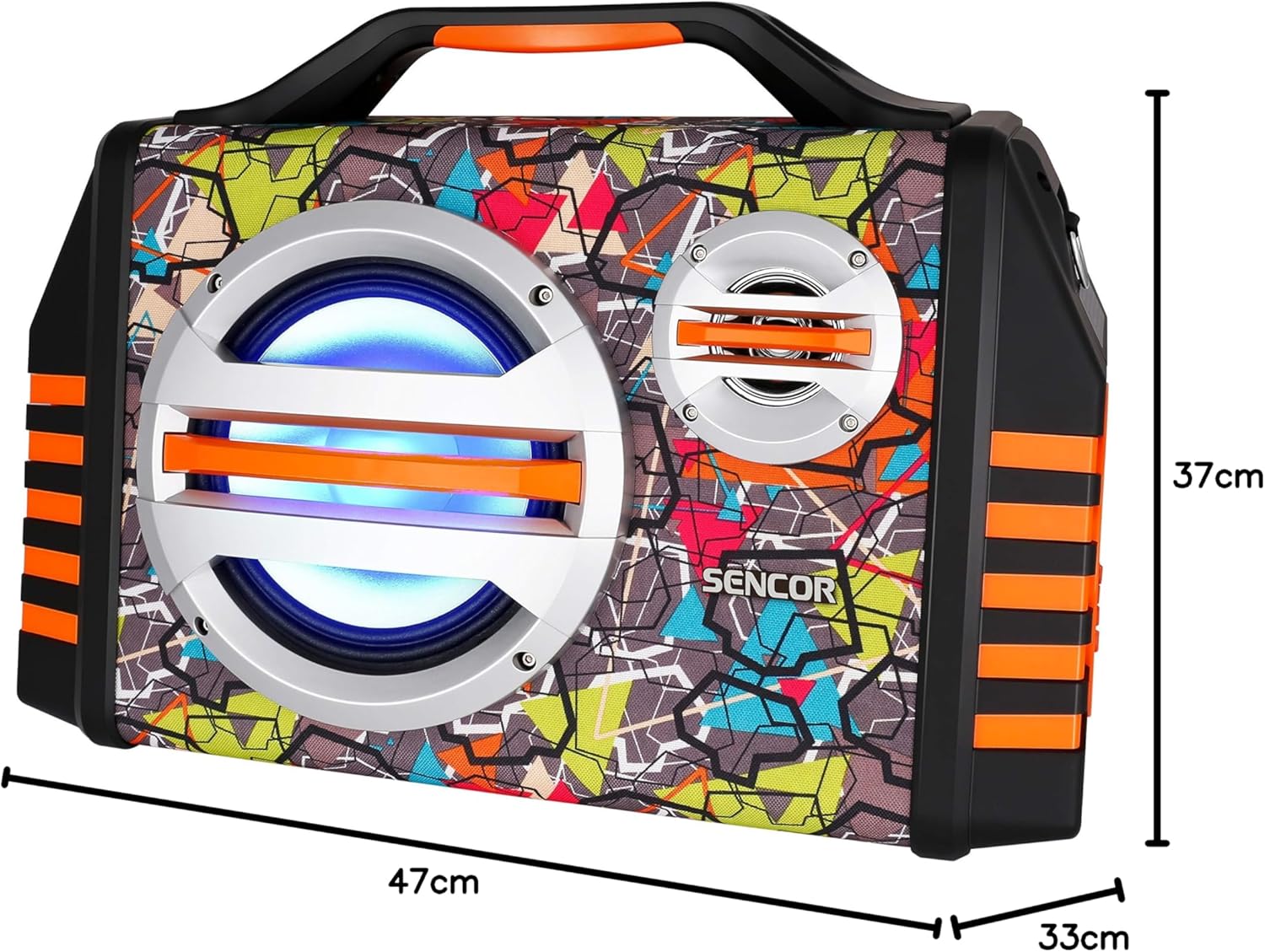
Image 9.1: Dimensions of the SENCOR SSS 3200 Kids Bluetooth Speaker, showing approximate measurements of 47cm (width), 37cm (height), and 33cm (depth).
| Característica | Especificació |
|---|---|
| Marca | Sence |
| Número de model | SSS3200KIDS |
| Color | Multicolor |
| Tecnologia de connectivitat | Bluetooth |
| Ports de connectivitat | Jack de 3.5 mm, USB |
| Característiques especials | Integrated Microphone, Multi-color LED Backlight |
| Ports USB totals | 1 |
| Impedància | 4 ohms |
| Dispositius compatibles | Ordinador portàtil, telèfon intel·ligent, tauleta |
| Usos recomanats | Children's Entertainment, Music Activities |
| Font d'alimentació | Funciona amb bateria |
| Nombre de ponents | 1 |
10. Garantia i Suport
SENCOR products are designed and manufactured to the highest quality standards. For warranty information, please refer to the warranty card included with your purchase or contact your local SENCOR distributor. For technical support or service inquiries, please visit the official SENCOR weblloc o poseu-vos en contacte amb el seu departament d'atenció al client.


