1. Introducció
This manual provides essential information for setting up, operating, and maintaining your Apple iPad Pro 12.9-inch (ML3T2LL/A). The iPad Pro is a versatile tablet designed for various tasks, featuring a large Retina display, a powerful A9X chip, and Wi-Fi + Cellular connectivity. Please read this guide thoroughly to ensure proper use and to maximize your device's capabilities.

Figura 1: Frontal view of the Apple iPad Pro 12.9-inch, showcasing its display with standard iOS app icons.
2. Configuració
2.1. Engegada i càrrega inicials
- Carregar l'iPad: Before first use, connect your iPad Pro to the provided power adapter and charging cable. Allow it to charge for at least 30 minutes or until the Apple logo appears.
- Encès: Premeu i manteniu premut el botó d'engegada (situat a la vora superior dreta) fins que aparegui el logotip d'Apple.
- Seguiu les instruccions a la pantalla: L'iPad us guiarà durant el procés de configuració inicial, incloent-hi la selecció d'idioma, la regió i les opcions d'accessibilitat.
2.2. Wi-Fi and Cellular Setup
- Connecta't a Wi-Fi: During setup, select your preferred Wi-Fi network and enter the password if required.
- Dades mòbils: For models with cellular capability, you may need to insert a nano-SIM card (if not pre-installed) or activate an eSIM plan with your carrier. Follow your carrier's instructions for cellular data activation.
2.3. Apple ID and Data Transfer
- Inicia la sessió amb l'ID d'Apple: Enter your existing Apple ID and password. If you do not have one, you can create a new Apple ID during this step. An Apple ID is essential for downloading apps, using iCloud, and other Apple services.
- Restore Data (Optional): If you are upgrading from another iOS device, you can restore data from an iCloud or iTunes backup during setup.
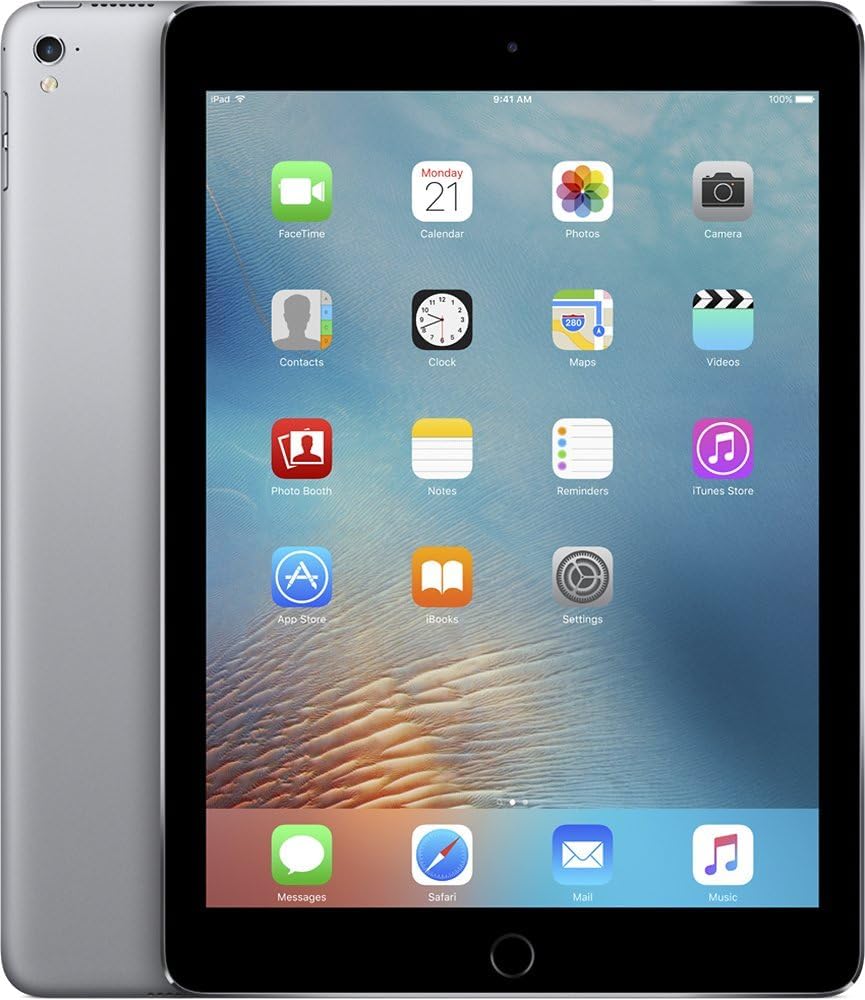
Figura 2: frontal i lateral view of the Apple iPad Pro, illustrating its thin profile and the rear casing.
3. Operating the iPad Pro
3.1. Navegació bàsica
- Botó d'inici: Press once to return to the Home screen. Double-press to open the App Switcher. Press and hold to activate Siri.
- Gestos tàctils: Use taps, swipes, pinches, and spreads to interact with the screen.
- Centre de control: Swipe up from the bottom edge of the screen to access quick settings like Wi-Fi, Bluetooth, brightness, and volume.
- Centre de notificacions: Llisca cap avall des de la vora superior de la pantalla per view notificacions.
3.2. Ús d'aplicacions
- App Store: Tap the App Store icon to browse and download applications.
- Organitzar aplicacions: Touch and hold an app icon until it jiggles, then drag it to rearrange or create folders.
- Multitasca: Use Split View or Slide Over to work with multiple apps simultaneously. Refer to the iPadOS user guide for detailed instructions on multitasking features.
3.3. Funcions de la càmera
- Càmera posterior: The 8-megapixel rear-facing camera is suitable for capturing photos and videos.
- Càmera frontal: The 1.2-megapixel FaceTime camera is designed for video calls and selfies.
- Aplicació de càmera: Open the Camera app to switch between photo, video, panorama, and other modes.
3.4. Security with Touch ID
The Home button integrates Touch ID, allowing you to unlock your iPad and make purchases using your fingerprint. To set up Touch ID:
- Vés a Configuració > Touch ID i contrasenya.
- Seguiu les instruccions que apareixen a la pantalla per registrar les vostres empremtes dactilars.
4. Manteniment i cura
4.1. Cleaning Your iPad Pro
- Feu servir un drap suau i sense borrissol per netejar la pantalla i l'exterior.
- Eviteu materials abrasius, aerosols, dissolvents o netejadors amb base d'amoníac.
- No ruixeu productes de neteja directament sobre el dispositiu.
4.2. Cura de la bateria
- For optimal battery life, avoid exposing the iPad to extreme temperatures.
- Regularly update iPadOS to benefit from battery optimization features.
- If storing the device for an extended period, charge it to about 50% to prevent deep discharge.
4.3. Actualitzacions de programari
Keep your iPad Pro updated to the latest version of iPadOS for security enhancements, new features, and performance improvements.
- Vés a Configuració > General > Actualització de programari.
- If an update is available, tap Descarrega i instal·la.
5. Solució De Problemes
5.1. Problemes comuns i solucions
- El dispositiu no respon: If the iPad is frozen or unresponsive, perform a force restart. Press and hold both the Home button and the Top (Sleep/Wake) button simultaneously until the Apple logo appears.
- Problemes de connectivitat Wi-Fi:
- Ensure Wi-Fi is enabled in Control Center or Settings.
- Reinicieu el vostre encaminador Wi-Fi.
- Vés a Configuració > General > Restablir > Restablir configuració de xarxa (this will clear all Wi-Fi passwords).
- Les aplicacions es bloquegen:
- Close and reopen the app from the App Switcher.
- Comprova si hi ha actualitzacions de l'aplicació a l'App Store.
- Suprimeix i torna a instal·lar l'aplicació.
5.2. Restabliment de fàbrica (últim recurs)
If persistent issues occur, you may consider a factory reset. This will erase all data and settings on your iPad. Ensure you have a backup before proceeding.
- Vés a Configuració > General > Transferir o restablir l'iPad > Esborrar tot el contingut i la configuració.
- Seguiu les indicacions de la pantalla per confirmar el restabliment.
6. Especificacions

Figura 3: Múltiple views of the Apple iPad Pro, detailing its physical design and components.
| Característica | Detall |
|---|---|
| Número de model | ML3T2LL/A |
| Mostra | 12.9-inch Retina LED, 2732x2048 resolution |
| Processador | Apple A9X (Dual-Core, 2.2GHz) |
| RAM | 4 GB DDR4 |
| Emmagatzematge | Memòria flaix de 256 GB |
| Sistema operatiu | iPadOS |
| Càmera posterior | 8 MP |
| Càmera frontal | 1.2 MP FaceTime HD |
| Connectivitat sense fil | Wi-Fi (802.11a/b/g/n/ac), Bluetooth, Cellular (Wi-Fi + Cellular model) |
| Durada de la bateria | Up to 10 hours (Lithium Polymer) |
| Dimensions (LxWxH) | 8.68 x 12 x 0.27 polzades |
| Pes | 1.59 lliures |
| Color | Gris espacial |
7. Garantia i Suport
This Apple iPad Pro is a renewed product. For information regarding returns, refunds, or replacements, please refer to the Amazon Renewed program's policies. Typically, Amazon Renewed products come with a 90-day refund or replacement policy.
For technical support related to iPadOS or Apple services, please visit the official Apple Support weblloc: support.apple.com.
For issues specific to your purchase or the renewed condition, contact the seller directly through your Amazon order history.


