1. Introducció
Thank you for choosing the 70mai Midrive-TP03 Air Compressor Lite. This portable air compressor is designed for convenient and efficient inflation of various items, including car tires, motorcycle tires, bicycle tires, and sports balls. Featuring a digital screen for real-time pressure display and automatic shut-off, it ensures precise and safe inflation. Please read this manual thoroughly before use to ensure proper operation and maintenance.

Imatge 1.1: Frontal view of the 70mai Midrive-TP03 Air Compressor Lite.
2. Informació de seguretat
To prevent injury or damage, observe the following safety precautions:
- No deixeu el compressor sense vigilància durant el funcionament.
- Mantenir fora de l'abast dels nens.
- Assegureu-vos que la font d'alimentació coincideixi amb el volum del compressortage requisits (12V).
- Avoid operating the compressor in wet conditions or near flammable liquids/gases.
- Do not touch the air hose or nozzle immediately after prolonged use, as they may become hot.
- Always check the recommended pressure for the item being inflated to avoid over-inflation.
- If the compressor makes unusual noises or becomes excessively hot, turn it off immediately and disconnect from power.
3. Contingut del paquet
Verifiqueu que tots els elements siguin presents al paquet:
- 70mai Midrive-TP03 Air Compressor Lite
- Mànega d'inflació
- Various nozzle adapters (e.g., for balls, bicycles)
- Manual d'usuari (aquest document)
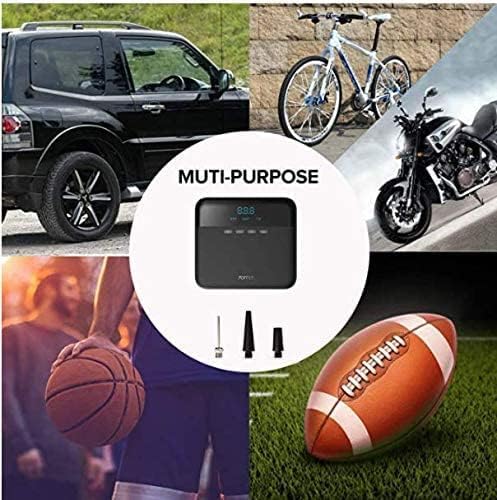
Image 3.1: The air compressor shown with its multi-purpose adapters for various inflation needs, including car tires, bicycles, motorcycles, basketballs, and footballs.
4. Producte acabatview
Familiarize yourself with the components of your 70mai Midrive-TP03 Air Compressor Lite.
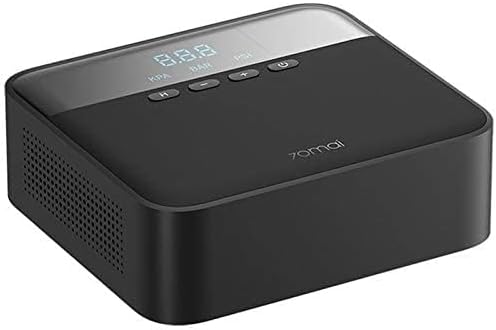
Imatge 4.1: Part superior view of the compressor, highlighting the digital display (KPA, BAR, PSI) and control buttons (Mode, Minus, Plus, Power).
- Pantalla digital: Shows real-time pressure and target pressure.
- Unit Button (H): Toggles between KPA, BAR, and PSI pressure units.
- Botó Menys (-): Decreases the target inflation pressure.
- Botó més (+): Increases the target inflation pressure.
- Botó d'encesa: Turns the compressor on/off and starts/stops inflation.
- Port d'inflació: Where the inflation hose connects.
- Cable de corrent: Connects to a 12V power source (e.g., car cigarette lighter).
5. Configuració
Follow these steps to prepare your air compressor for use:
- Connectar l'alimentació: Plug the compressor's power cable into a 12V DC power outlet (e.g., car cigarette lighter socket). Ensure your vehicle's engine is running to provide stable power.
- Connecteu la mànega d'inflació: Screw the inflation hose securely onto the inflation port of the compressor.
- Seleccioneu l'adaptador (si cal): For items other than standard car tires, select the appropriate nozzle adapter and attach it to the end of the inflation hose.

Image 5.1: The compressor connected to a tire valve for inflation, demonstrating its compact size and ease of use. Also shows how it can be stored in a car compartment.
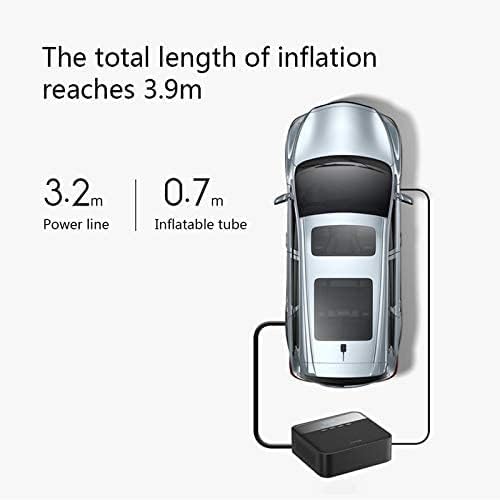
Image 5.2: Diagram illustrating the total reach of the compressor, with a 3.2m power line and 0.7m inflatable tube, totaling 3.9m for convenient access to all tires.
6. Instruccions de funcionament
Inflating an item with your 70mai Air Compressor Lite:
- Connecta a l'element: Screw the inflation hose nozzle onto the valve stem of the item you wish to inflate. For car tires, ensure it's tightly secured to prevent air leakage.
- Encès: Press the Power button to turn on the compressor. The digital display will show the current pressure of the connected item.
- Seleccioneu la unitat: Press the "H" (Unit) button to cycle through KPA, BAR, and PSI until your desired pressure unit is displayed.
- Establir la pressió objectiu: Use the "+" and "-" buttons to set the desired target inflation pressure. Refer to the item's manufacturer recommendations for correct pressure.
- Inici de la inflació: Press the Power button again to start the inflation process. The compressor will automatically stop once the preset target pressure is reached.
- Desconnectar: Once inflation is complete, unscrew the nozzle from the valve stem and disconnect the power cable from the 12V outlet.
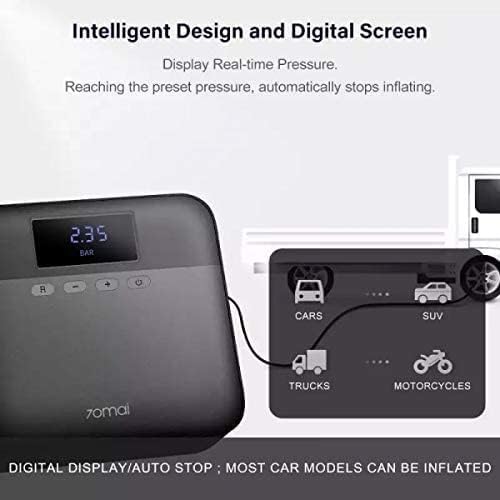
Image 6.1: The digital screen showing real-time pressure (e.g., 2.35 BAR). The compressor features an intelligent design that automatically stops inflation upon reaching the preset pressure.

Image 6.2: This image highlights the compressor's broad compatibility with trucks, cars, SUVs, and motorcycles, along with features like durable material, powerful inflation, smart chip, digital display, all-in-one design, and long runtime.
7. Manteniment
Proper maintenance ensures the longevity and optimal performance of your air compressor:
- Neteja: Netegeu l'exterior del compressor amb un drap suau iamp drap. No utilitzeu productes químics agressius ni netejadors abrasius. Assegureu-vos que no entri aigua als components interns.
- Emmagatzematge: Store the compressor in a dry, cool place, away from direct sunlight and extreme temperatures. Ensure the hose and power cable are neatly coiled to prevent damage.
- Inspecció: Periodically inspect the power cable, inflation hose, and nozzle adapters for any signs of wear, cracks, or damage. Replace damaged parts if necessary.
8. Solució De Problemes
If you encounter issues with your air compressor, refer to the following common problems and solutions:
| Problema | Causa possible | Solució |
|---|---|---|
| El compressor no s'engega. | No power from 12V outlet; Blown fuse in vehicle or compressor. | Check 12V outlet for power; Inspect and replace vehicle's cigarette lighter fuse or compressor's internal fuse (if accessible and user-serviceable). Ensure vehicle engine is running. |
| El compressor funciona però no s'infla. | Hose not securely attached; Leak in hose or nozzle; Valve stem issue. | Ensure hose is tightly screwed onto compressor and valve stem; Check hose and nozzle for damage; Inspect valve stem for blockages or damage. |
| Compressor inflates too slowly. | Low power supply; Compressor overheating. | Ensure vehicle engine is running for optimal power; Allow compressor to cool down if it has been running for an extended period. |
| Lectura de pressió inexacta. | Loose connection; Sensor malfunction. | Ensure the hose is tightly connected to the valve stem. If the issue persists, contact customer support. |
If the problem persists after attempting these solutions, please contact 70mai customer support.
9. Especificacions
Technical details for the 70mai Midrive-TP03 Air Compressor Lite:
- Número de model: Midrive-TP03
- Voltage: 12 V
- Actual: 10A
- Interval de pressió d'inflació: 0.1~11 BAR / 1~160 PSI
- Dimensions del producte: 16.4 x 14.8 x 5.4 cm
- Pes de l'article: 860 g
- Power Line Length: 3.2 m
- Inflatable Tube Length: 0.7 m
- Total Inflation Length: 3.9 m
- Temps d'execució: Up to 30 minutes (continuous)
- Material: Mixt
- Color: Negre

Image 9.1: Key features of the compressor, including its 0.78kg weight (approx. 860g), portable design, and 30-minute long runtime.
10. Garantia i Suport
The 70mai Midrive-TP03 Air Compressor Lite comes with a standard manufacturer's warranty. For detailed warranty terms and conditions, please refer to the warranty card included with your product or visit the official 70mai weblloc.
For technical support, troubleshooting assistance beyond this manual, or inquiries regarding parts and service, please contact 70mai customer support through their official channels. Keep your purchase receipt and product model number handy when contacting support.


