1. Introducció
This manual provides essential instructions for the safe and effective use of your Zoom H1n Handy Recorder. Please read this manual thoroughly before using the device to ensure proper operation and to prevent damage.
2. Producte acabatview
2.1 Contingut del paquet
- Zoom H1n Handy Recorder (Blue Edition)
- 2 piles AA
Note: A microSD card and USB cable are not included and must be purchased separately.
2.2 Identificació de components
Familiarize yourself with the various parts of your H1n recorder.

Figura 1: Frontal View of Zoom H1n Handy Recorder. This image displays the front of the blue Zoom H1n recorder, highlighting the built-in stereo microphones at the top, the LCD screen, the large red record button, and playback controls.

Figura 2: Angle View of Zoom H1n Handy Recorder. This image shows the Zoom H1n from an angled perspective, revealing the side controls such as the volume buttons, power switch, and various input/output ports.
- Micròfons estèreo integrats: X/Y configuration for wide stereo imaging.
- Input Level Dial: Adjusts recording input sensitivity.
- Pantalla LCD: Shows recording status, file information, and menu options.
- Botó REC: Inicia i atura l'enregistrament.
- Botó OPCIÓ: Accesses menu settings.
- Controls de reproducció: Play/Pause, Stop, Fast Forward, Rewind.
- LINE IN Jack: 3.5mm stereo input for external microphones or line-level devices.
- LINE OUT/HEADPHONE Jack: 3.5mm stereo output for monitoring or connecting to other devices.
- VOLUME Buttons: Ajusta el volum de reproducció.
- Port USB: Micro-USB port for data transfer and use as a USB microphone.
- Ranura per a targeta MicroSD: For recording media.
- Compartiment de la bateria: Holds two AA batteries.
3. Configuració
3.1 Instal·lació de bateries
- Obriu la tapa del compartiment de la bateria a la part posterior de la unitat.
- Introduïu dues piles AA, assegurant-vos de la polaritat correcta (+/-).
- Tanqueu bé la tapa del compartiment de la bateria.
3.2 Inserció d'una targeta MicroSD
The H1n requires a microSD or microSDHC card (up to 32 GB) for recording. Ensure the card is formatted correctly (FAT32).
- Locate the microSD card slot on the side of the unit.
- Insert the microSD card with the contacts facing down until it clicks into place.
- To remove, push the card in gently until it clicks, then release to eject.
3.3 Engegada/apagada
- Per encendre: Slide the POWER switch (located on the side) downwards and hold until the display lights up.
- Per apagar: Slide the POWER switch downwards and hold until the display turns off.
4. Instruccions de funcionament
4.1 Enregistrament bàsic
- Power on the H1n.
- Adjust the input level using the dial at the top. Monitor the level meter on the LCD to avoid clipping (distortion).
- Press the large red REC button once to enter record standby mode.
- Premeu el botó REC button again to start recording. The REC indicator will light up.
- Per aturar la gravació, premeu el botó REC botó. El file es desarà automàticament.
4.2 Reproducció
- Use the Fast Forward (>>) or Rewind (<<) buttons to select a file.
- Premeu Reproduir/Pausa (>/II) per iniciar la reproducció.
- Adjust the playback volume using the VOLUME buttons on the side.
- Premeu Atura (■) per aturar la reproducció.
4.3 Configuració del menú
Premeu el botó OPCIÓ button to access the menu and adjust various settings. Use the playback control buttons to navigate and select options.
- ÀUDIO: Select recording format (WAV/MP3), sampla velocitat i la profunditat de bits.
- LO CUT: Activates a low-cut filter to reduce unwanted low-frequency noise.
- LIMITADOR: Prevents input overload and distortion by compressing loud signals.
- AUTOLEVEL: Automatically adjusts the recording level.
- TONE GENERATOR: Produces a test tone for calibrating audio levels with cameras or other devices.
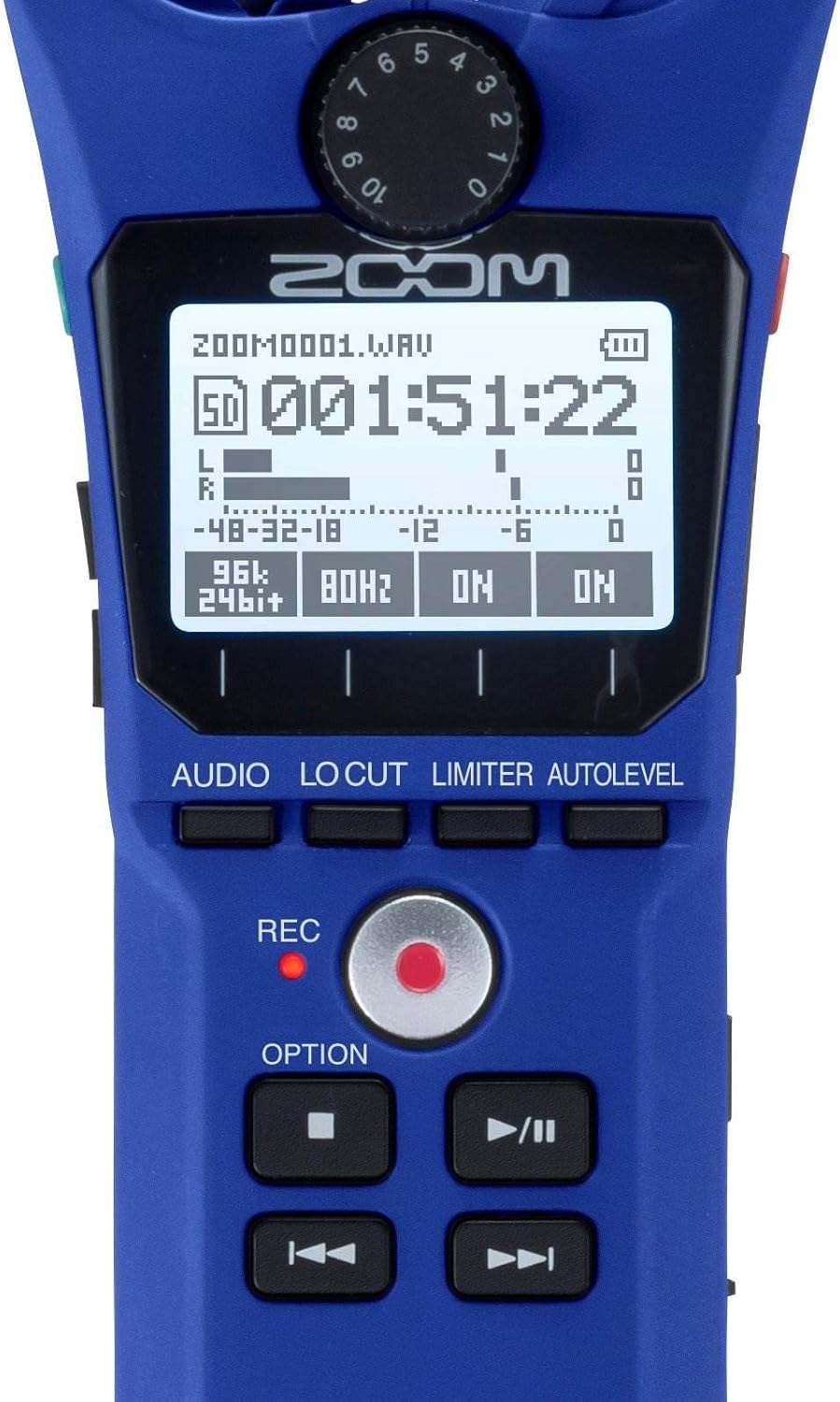
Figure 3: Close-up of H1n Display and Controls. Aquesta imatge ofereix un detall view of the H1n's LCD screen, showing recording parameters, and the main control buttons including REC, OPTION, and playback controls.
4.4 USB Functionality
Connect the H1n to a computer using a micro-USB cable (sold separately).
- USB Microphone: The H1n can function as a USB microphone for your computer.
- Lector de targetes SD: Accés files on the microSD card directly from your computer.
5. Manteniment
- Neteja: Use a soft, dry cloth to clean the unit. Do not use liquid cleaners or solvents.
- Emmagatzematge: Store the H1n in a cool, dry place away from direct sunlight and extreme temperatures. Remove batteries if storing for extended periods.
- Manipulació: The H1n is a precision instrument. Avoid dropping it or subjecting it to strong impacts.
6. Solució De Problemes
- El dispositiu no s'encén: Comproveu la instal·lació de la bateria i assegureu-vos que les bateries estiguin carregades.
- Recording issues (no sound, distorted sound): Verify input level settings. Ensure microphones are not obstructed. Check if an external microphone is properly connected to the LINE IN jack.
- SD card errors: Ensure the microSD card is properly inserted and formatted. Try a different microSD card if issues persist.
- Rattling sound from volume rocker: This is a known characteristic of the design. To minimize noise during recording, avoid shaking the device or secure the rocker with a finger if recording while moving.
- Computer does not recognize H1n via USB: Ensure the USB cable is securely connected. Try a different USB port or cable. Select the correct USB mode on the H1n (Audio Interface or SD Card Reader).
7. Especificacions
| Característica | Especificació |
|---|---|
| Mitjans de gravació | microSD/microSDHC card (up to 32 GB) |
| Formats de gravació | WAV (16/24-bit, 44.1/48/96 kHz), MP3 (48-320 kbps) |
| Micròfon | 90° X/Y stereo condenser microphones |
| Entrades | 3.5mm stereo mini jack (LINE IN) |
| Sortides | 3.5mm stereo mini jack (LINE OUT/HEADPHONE) |
| Port USB | Micro-USB (USB 2.0 High Speed) |
| Poder | 2 x AAA batteries (Alkaline or NiMH) or AC adapter (AD-17, sold separately) |
| Durada de la bateria | Approximately 10 hours (Alkaline batteries, WAV 44.1 kHz/16-bit) |
| Dimensions | 1.5 cm de profunditat x 5.5 cm d'amplada x 1 cm d'alçada (aproximadament) |
| Pes | 0.5 Pounds (approximate, without batteries) |
8. Garantia i Suport
Per obtenir informació sobre la garantia i assistència tècnica, consulteu la pàgina oficial de Zoom. website or contact your local Zoom distributor. Keep your purchase receipt as proof of purchase for warranty claims.


