1. Producte acabatview
The Elecom M-FBL01DBXSBK is a 5-button wireless mouse designed for comfortable and quiet operation. It features a Blue LED sensor for versatile surface compatibility and a compact USB receiver.

Image 1.1: Elecom M-FBL01DBXSBK Wireless Mouse with its compact USB receiver.
2. Contingut del paquet
- Elecom M-FBL01DBXSBK Wireless Mouse
- Receptor sense fil USB
- AA Alkaline Battery (for operation confirmation)
- Manual d'usuari (aquest document)
3. Instruccions de configuració
3.1. Instal·lació de la bateria
- Localitzeu la tapa del compartiment de la bateria a la part inferior del ratolí.
- Feu lliscar o aixequeu la tapa per obrir el compartiment.
- Insert one AA alkaline battery, ensuring the positive (+) and negative (-) terminals align correctly with the markings inside the compartment.
- Tanqueu bé la tapa del compartiment de la bateria.

Image 3.1: The underside of the mouse, indicating the battery compartment and power switch.
3.2. Connexió del receptor USB
- Remove the compact USB receiver from its storage slot on the underside of the mouse.
- Connecteu el receptor USB a un port USB-A disponible de l'ordinador.
- L'ordinador hauria de detectar i instal·lar automàticament els controladors necessaris. Això pot trigar uns instants.
3.3. Encendre el ratolí
After installing the battery and connecting the receiver, locate the power switch on the underside of the mouse and slide it to the 'ON' position. The mouse is now ready for use.
3.4. OS Compatibility
The Elecom M-FBL01DBXSBK Wireless Mouse is compatible with:
- Windows 11, Windows 10, Windows RT8.1, Windows 8.1, Windows 7, Windows Vista
- macOS High Sierra 10.13 i posterior
Ensure your operating system is updated to the latest version and any service packs are installed for optimal performance.
4. Funcionament del ratolí
4.1. Funcions bàsiques
The mouse features five buttons and a scroll wheel:
- Botó esquerre: Funció de clic principal.
- Botó dret: Funció de clic secundari (menú contextual).
- Roda de desplaçament: Documents en rotllana i web pages vertically. Can also be pressed for a middle-click function.
- Botó Endavant: Navega cap endavant web navegadors o file exploradors.
- Botó enrere: Navega cap enrere web navegadors o file exploradors.

Image 4.1: The five buttons of the Elecom M-FBL01DBXSBK mouse, including the scroll wheel.
4.2. Quiet Click Feature
All five buttons incorporate a silent switch mechanism, significantly reducing clicking noise. This allows for quiet operation in various environments.

Image 4.2: The silent switch design minimizes operational noise.
4.3. Blue LED Sensor
The mouse is equipped with a Blue LED optical sensor, which provides accurate tracking on a variety of surfaces, including those with slight unevenness or dust. This enhances usability in diverse settings.

Image 4.3: The Blue LED sensor allows for comfortable use on various surfaces.
4.4. Connectivitat sense fil
The mouse utilizes a 2.4 GHz wireless band for stable communication. The effective radio distance is approximately 3 meters (9.8 feet) on magnetic surfaces (e.g., steel desks) and up to 10 meters (32.8 feet) on non-magnetic surfaces (e.g., wooden desks).
4.5. Indicador de bateria
An integrated battery indicator light notifies you when the battery level is low, signaling that a replacement is needed.
4.6. Elecom Mouse Assistant Software
Button functions can be customized using the free downloadable Elecom Mouse Assistant software. This allows users to reassign functions to the mouse buttons for improved workflow efficiency.
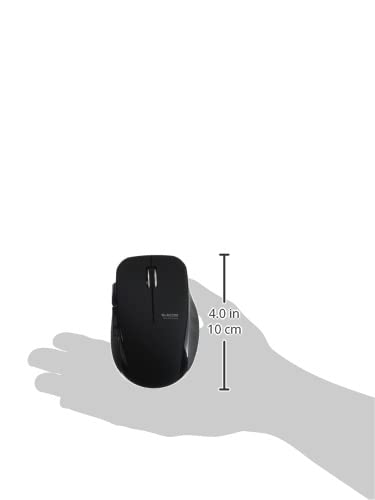
Image 4.4: The Elecom Mouse Assistant software enables button customization.
5. Manteniment
5.1. Substitució de la bateria
When the battery indicator signals low power, replace the AA battery with a new AA alkaline, manganese, or NiMH battery. Follow the battery installation steps outlined in Section 3.1.
5.2. Neteja
To clean the mouse, gently wipe its surface with a soft, dry cloth. Avoid using harsh chemicals or abrasive materials, as these can damage the finish. Ensure no liquid enters the mouse.
5.3. Receiver Storage
The USB receiver can be stored inside the mouse body when not in use or during transport. This helps prevent loss of the receiver.
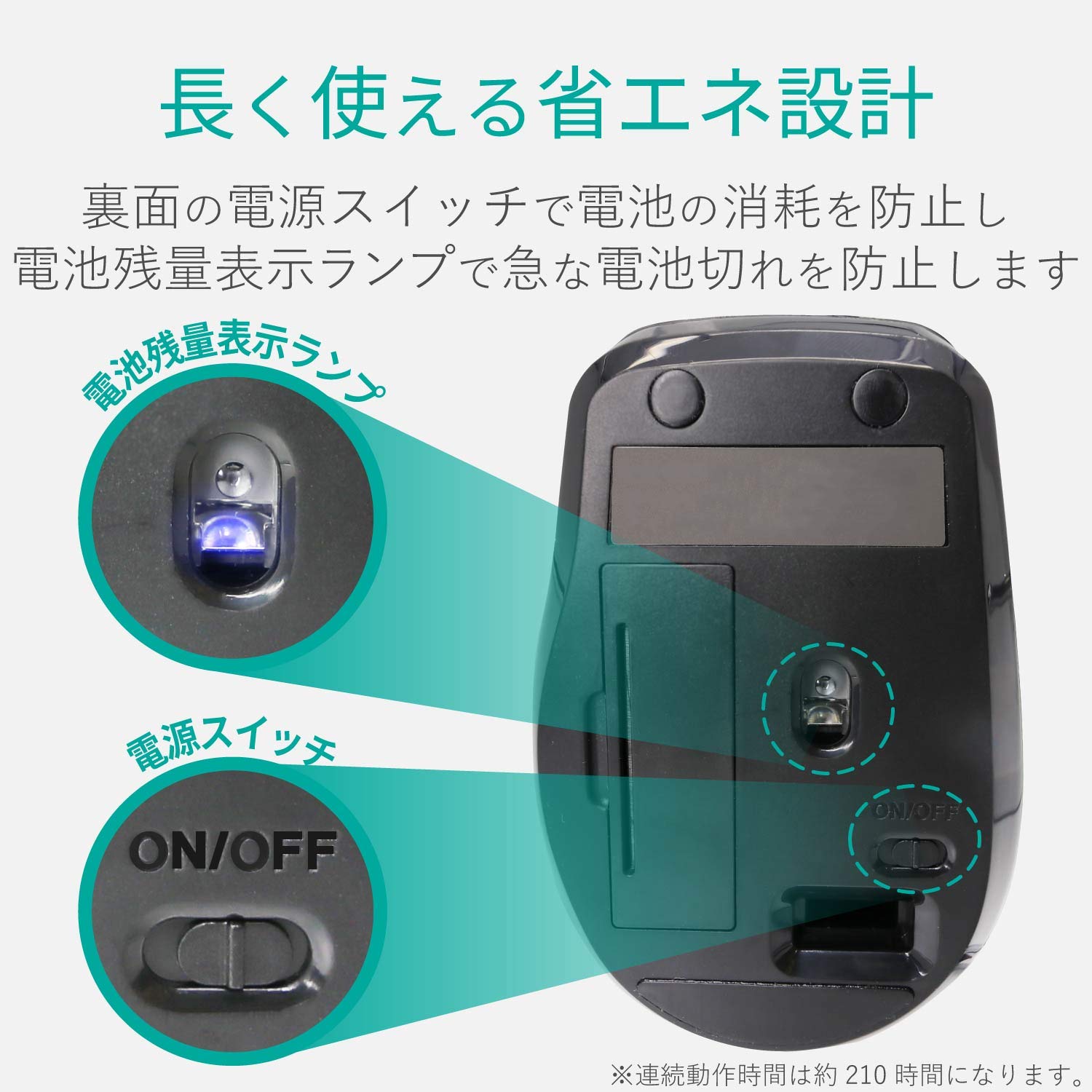
Image 5.1: The compact receiver can be stored within the mouse for convenience.
6. Solució De Problemes
- El ratolí no respon:
- Check if the mouse is powered on (power switch on the underside).
- Assegureu-vos que la bateria estigui correctament instal·lada i que no estigui esgotada. Substituïu-la si cal.
- Verifiqueu que el receptor USB estigui ben connectat a un port USB que funcioni de l'ordinador. Proveu-ho amb un altre port USB.
- Reinicieu l'ordinador.
- Moviment erràtic del cursor:
- Netegeu la zona del sensor òptic a la part inferior del ratolí.
- Assegureu-vos que feu servir el ratolí sobre una superfície adequada. Eviteu superfícies molt reflectants o transparents.
- Check for interference from other wireless devices. Move the mouse closer to the receiver.
- Botons que no funcionen correctament:
- If using Elecom Mouse Assistant, ensure button assignments are correct.
- Reinstall the Elecom Mouse Assistant software if issues persist.
7. Especificacions
| Interfície | USB |
| Forma del connector | USB-A Mascle |
| Sistema operatiu compatible | Windows 11, 10, RT8.1, 8.1, 7, Vista; macOS High Sierra 10.13+ |
| Resolució | 1600 comptes |
| Mètode de comunicació | Mètode GFSK |
| Freqüència de ràdio | Banda de 2.4 GHz |
| Radio Distance | Magnetic objects: 3m (9.8 ft); Non-magnetic objects: 10m (32.8 ft) |
| Mètode de lectura | Sistema de sensor òptic (LED blau) |
| Nombre de botons | 5 (including wheel button) |
| Nombre de rodes | 1 |
| Emmagatzematge del receptor | Sí |
| Temps de funcionament continu | Aprox. 210 hores |
| Temps d'espera | Aprox. 1666 dies |
| Temps d'ús estimat de la bateria | Aprox. 478 dies |
| Font d'alimentació (unitat principal) | 1 AA alkaline, manganese, or NiMH battery |
| Voltage (Body) | 1.5 V |
| Color | Negre |
| Weight (Mouse) | Aprox. 62 g (sense bateria) |
| Dimensions externes (receptor) | 14.5 x 18.0 x 6.3 mm |
| Pes (receptor) | Aprox. 2 g |
8. Garantia i Suport
8.1. Període de garantia
Aquest producte té una garantia de 6 mesos a partir de la data de compra.
8.2. Product Inquiries
For product inquiries or technical support, please contact the Elecom General Information Center:
- TEL: 0570-084-465
- FAX: 0570-050-012
- Reception Time: 10:00 - 19:00 (24/7)


